
Travel connectivity guide
Saudi Arabia eSIM: mobile internet for travel
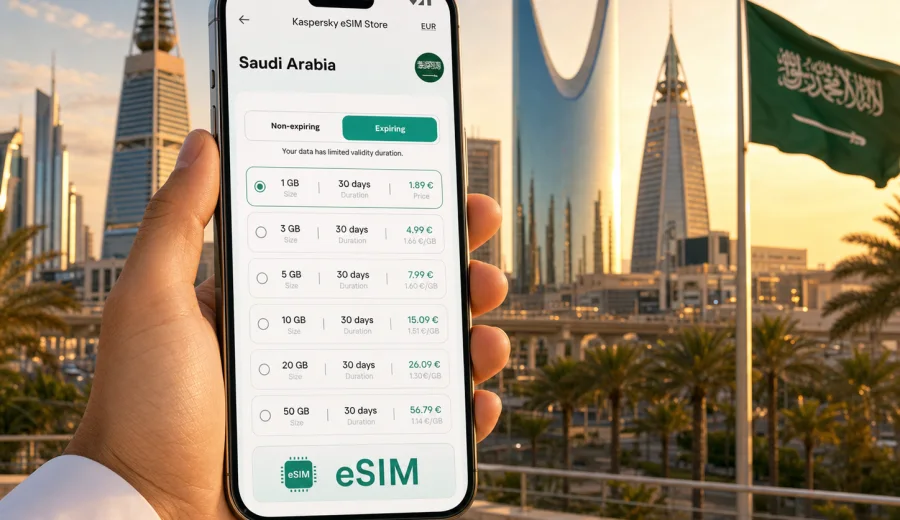
Saudi Arabia eSIM: mobile connection and internet for travel
Saudi Arabia is a country where mobile internet quickly becomes part of the trip itself. You may need a map in Riyadh, a ride-hailing app in Jeddah, hotel messages in Medina, flight updates in Dammam, or translation help while moving between airports, stations, malls, old districts, and desert routes. A practical eSIM setup helps you prepare this connection before you depend on it.
An eSIM is a digital SIM profile installed on a compatible phone or tablet. For travel, it is usually used for mobile data: maps, messengers, email, banking apps, booking platforms, cloud documents, and navigation. It does not automatically replace a local phone number, and voice calls or SMS are not included unless the selected tariff says so.
Kaspersky eSIM Store is an app and website where you can choose, order, install, and activate an eSIM with a suitable data tariff for international travel. The useful part is not only the digital SIM itself, but the ability to review the destination, data amount, validity period, and conditions before the trip.
Why mobile internet matters in Saudi Arabia
Saudi Arabia is large, urban, and travel patterns can change quickly. A short business visit may include airport transfers, meetings, restaurant bookings, and document access. A family trip may involve several cities. A religious journey may require coordination across a group. A leisure itinerary can combine Riyadh, Jeddah, AlUla, the Red Sea coast, and domestic flights.
Mobile data is useful for everyday travel tasks:
- checking transport, hotel, and airline notifications;
- using maps between airports, hotels, business districts, and attractions;
- keeping messengers available for family, colleagues, guides, and drivers;
- translating short signs, addresses, and service messages;
- confirming restaurant, museum, event, or tour bookings;
- using banking apps and payment confirmations when required;
- sharing live location with trusted contacts during busy travel days.
Public Wi-Fi can help in airports, hotels, and cafes, but it is not a complete travel plan. You may need internet before you find Wi-Fi, after you leave a building, inside a vehicle, or while solving a booking issue. Roaming can be convenient, but costs and conditions vary by home operator. A travel eSIM gives you another option for mobile data, with the tariff terms visible before you activate it.
What an eSIM does for a Saudi Arabia trip
For most travelers, the best way to think about eSIM is simple: it is a mobile data profile for your trip. It lets you keep your physical SIM in the phone for your usual number while using the eSIM for internet, if your device supports this setup.
That can be helpful when you want to:
- keep your home number reachable for banking or account verification;
- avoid looking for a physical SIM card immediately after arrival;
- compare data amounts before the trip instead of choosing in a hurry;
- separate travel data from your regular mobile plan;
- install the profile in advance and activate it when needed.
The exact experience depends on the selected tariff, the device, local network conditions, and your phone settings. Before purchase, always read the plan details carefully: destination, data amount, validity period, activation rules, and whether top-up is available.
Where travelers usually need data
Saudi Arabia is not a single-city destination. Even if your trip starts in Riyadh or Jeddah, the mobile internet scenarios can vary by region.
| Travel scenario | Why mobile data helps | What to check before departure |
|---|---|---|
| Riyadh business trip | Maps, transport apps, calendar changes, files, meeting chat | Enough data for navigation, video calls, and cloud documents |
| Jeddah and Red Sea visit | Hotel coordination, restaurant bookings, photos, routes | Data allowance for maps and media sharing |
| Makkah or Medina journey | Group coordination, messages, maps around busy areas | Phone battery plan, offline backups, messenger access |
| AlUla or desert itinerary | Navigation, booking confirmations, guide contact | Coverage expectations, offline maps, power bank |
| Multi-city route | Domestic flights, transfers, hotel changes, shared documents | Longer validity period and enough data for transit days |
No mobile internet option can remove every travel uncertainty. In remote areas, indoors, during peak crowding, or on long roads, performance can vary. A good plan is to combine eSIM data with offline maps, saved hotel addresses, downloaded tickets, and a charged power bank.
How much data to choose
Data needs depend on how you use your phone. A traveler who mainly uses maps and messengers can choose a smaller allowance than someone who uploads videos, joins work calls, or uses mobile data as a laptop hotspot.
Use this practical estimate:
| Usage style | Typical behavior | Suggested approach |
|---|---|---|
| Light | Messaging, maps, email, transport apps | Choose a modest data package and keep media uploads for Wi-Fi |
| Moderate | Daily maps, social apps, photo sharing, booking apps | Choose a mid-size package with a validity period covering the whole stay |
| Heavy | Video calls, large uploads, hotspot use, remote work | Choose a larger data package and monitor usage daily |
| Group organizer | Coordinates family, colleagues, or pilgrims | Choose extra data because messages, maps, and calls can increase quickly |
Video is usually the biggest data drain. Cloud backups, automatic app updates, high-resolution photo sync, and hotspot use can also consume data quickly. Before your flight, disable automatic downloads on mobile data and set your cloud photo app to use Wi-Fi when possible.
Before you buy: device compatibility and settings
Not every smartphone or tablet supports eSIM, and some devices may be locked to a mobile operator. Before choosing a tariff, confirm that your exact device model supports eSIM and can use it for mobile data abroad. You can also check your device compatibility before you continue.
Check these points:
- your phone supports eSIM installation;
- your device is not locked to one mobile operator;
- you have a stable internet connection for installation;
- your operating system is updated enough to manage eSIM profiles;
- you know which SIM will be used for calls, SMS, and mobile data;
- data roaming for the travel eSIM can be enabled if the selected tariff requires it.
If you use two SIMs, label them clearly in your phone settings. For example, keep your home SIM for calls and verification messages, and set the travel eSIM as the mobile data line after arrival. This reduces the chance of using the wrong line for data.
When to install and activate the eSIM
The best timing depends on the tariff rules. In many cases, travelers prefer to install the eSIM before leaving home, while they still have reliable Wi-Fi and time to read the instructions. Activation may happen later, often when the eSIM connects to a supported network or when the user turns on the line, depending on the plan conditions.
Read the activation details before you start. Do not assume every eSIM behaves the same way. If the validity period starts immediately after installation for a specific tariff, installing too early may waste days. If validity starts after connection in the destination, pre-installation can be convenient.
For installation guidance, use the relevant step-by-step page for your device: Android eSIM installation instructions or iOS eSIM installation instructions.
A practical setup for arrival in Saudi Arabia
After landing, the first online tasks are often simple but time-sensitive: message your hotel, find your driver, check the terminal exit, open a map, or confirm a domestic connection. Preparing eSIM settings in advance makes this easier.
Suggested sequence:
1. Before the trip, check that your device supports eSIM and is unlocked.
2. Choose Saudi Arabia as the destination and compare data amount and validity.
3. Install the eSIM while connected to stable Wi-Fi.
4. Save the installation instructions and any important travel details offline.
5. On arrival, set the eSIM as the mobile data line.
6. Enable data roaming for the eSIM if the tariff instructions require it.
7. Open a browser or map app to confirm that mobile data works.
8. Keep your home SIM settings unchanged unless you intentionally want to change calls or SMS behavior.
If data does not start immediately, check the selected mobile data line, roaming toggle, APN instructions if provided, and whether airplane mode has been fully turned off. Restarting the device can also help the phone register again.
Choosing a Saudi Arabia eSIM tariff
Once you know your travel dates and expected usage, compare the available data packages by destination, validity period, and data volume. For a short stay, a smaller package may be enough if you mainly use maps and messengers. For a longer trip or a busy work schedule, a larger package can reduce the need to monitor every megabyte.
If you want to prepare mobile data before departure, you can choose an eSIM tariff for Saudi Arabia and review the available options for your trip. Check the plan details carefully so the selected data amount and validity period match your route.
When comparing tariffs, focus on practical questions:
- How many days will you be in Saudi Arabia?
- Will you travel between cities or stay in one area?
- Will you use maps every day?
- Do you expect video calls or remote work?
- Will you share internet with a laptop or another device?
- Do you need data from the first minutes after arrival?
- Are you comfortable topping up later, or do you prefer one larger package?
The answer is rarely "the biggest package for everyone." A better choice is the tariff that fits your actual route and phone habits.
Saudi Arabia travel scenarios and data planning
Business travel
Business travelers usually need reliability and predictability. Calendar changes, building addresses, meeting chats, presentation files, and corporate email can all require mobile data. If your meetings are spread across Riyadh or Jeddah, maps and ride-hailing apps can be active for long periods.
Preparation tips:
- download key documents before the flight;
- keep meeting addresses in your calendar and offline notes;
- choose enough data for navigation and messaging throughout the trip;
- avoid large file sync on mobile data unless necessary;
- keep a backup power bank for long meeting days.
Religious travel
For trips connected with Makkah or Medina, mobile internet is often about coordination. Travelers may need group messages, location sharing, hotel directions, transport updates, and contact with organizers. Busy periods can make planning more important.
Preparation tips:
- save hotel names, addresses, and group contact details offline;
- agree on a messenger and backup meeting point with your group;
- keep location sharing limited to trusted contacts;
- choose a data package that covers the full stay, including transfer days;
- reduce background data so essential apps stay available longer.
Leisure and culture trips
Saudi Arabia offers very different travel environments: modern city districts, Red Sea resorts, heritage areas, desert landscapes, and museums. Mobile data helps with tickets, maps, restaurant bookings, photo sharing, and route changes.
Preparation tips:
- download offline maps for areas outside large cities;
- keep booking confirmations available without internet;
- use Wi-Fi for large photo uploads when possible;
- choose extra data if you plan to post video frequently;
- check whether your accommodation and transport apps require verification messages.
Long routes and domestic flights
If your itinerary includes several cities, the value of a longer-validity eSIM tariff increases. You may use data repeatedly on arrival days, during transfers, and while solving schedule changes.
Preparation tips:
- choose a validity period that covers arrival and departure days;
- keep airline apps updated before you leave;
- save domestic flight and hotel details offline;
- monitor remaining data after each city;
- avoid assuming airport Wi-Fi will be enough for every transfer.
eSIM, roaming, and public Wi-Fi compared
Travelers often combine several connection methods. The right mix depends on cost, convenience, security expectations, and how often you need data away from buildings.
| Option | Good for | Limits to consider |
|---|---|---|
| Travel eSIM | Mobile data from a compatible device, planned before travel | Requires eSIM support and correct settings |
| Home operator roaming | Keeping your usual plan active abroad | Conditions and costs depend on your home operator |
| Public Wi-Fi | Large downloads in hotels, airports, cafes | Availability, speed, and sign-in process vary |
| Physical local SIM | Longer stays or users who need a local number | Requires time to obtain and install a SIM card |
An eSIM is often useful because it can be prepared before the trip and managed digitally. It is not a universal replacement for every connection method. If you need a local voice number, check the terms of the specific product you choose, because many travel eSIM tariffs are data-only.
Data-saving checklist for Saudi Arabia
Use these settings before your first travel day:
- turn off automatic app updates on mobile data;
- pause cloud photo and video backup until Wi-Fi is available;
- download offline maps for Riyadh, Jeddah, Makkah, Medina, AlUla, or your route;
- save hotel, airport, and meeting addresses in offline notes;
- set streaming apps to low data mode;
- disable background data for apps you do not need during the trip;
- monitor data usage daily if your package is limited;
- keep important QR codes, tickets, and confirmations available offline.
These small steps help preserve data for the moments that matter: directions, messages, booking changes, and payment confirmations.
Common mistakes to avoid
Some eSIM issues happen because travelers rush the setup. Avoid these common mistakes:
- buying a tariff before confirming that the device supports eSIM;
- installing the profile on the wrong phone;
- deleting the eSIM profile after activation without checking whether it can be reinstalled;
- leaving mobile data assigned to the home SIM after arrival;
- forgetting to enable data roaming when the eSIM instructions require it;
- assuming voice calls and SMS are included in a data tariff;
- using video streaming or hotspot mode without tracking data use;
- waiting until a stressful airport moment to read the setup instructions.
If you are traveling with family or colleagues, check each device separately. One compatible phone does not mean every phone in the group supports eSIM.
Quick reference: best practices for Saudi Arabia eSIM use
For a smooth trip, prepare mobile internet like you prepare documents and transport. The most reliable approach is to decide early, install calmly, and keep offline backups.
Key points to remember:
- eSIM is useful for mobile data in Saudi Arabia, especially maps, messengers, bookings, and transport apps.
- Kaspersky eSIM Store helps you choose, order, install, and activate an eSIM with a suitable data tariff for travel.
- The selected tariff determines data amount, validity, destination, and other conditions.
- Your device must support eSIM and be free to use it.
- Many travel eSIM tariffs are data-only, so check calls and SMS conditions if you need them.
- Public Wi-Fi is helpful, but it should not be your only connection plan.
- Offline maps, saved documents, and data-saving settings make your eSIM data last longer.
FAQ
Can I install an eSIM before flying to Saudi Arabia?
Often, yes, but always read the activation rules of the selected tariff. Some travelers install the eSIM at home using Wi-Fi and activate it later according to the plan conditions. Do not install too early if the validity period starts immediately.
Will an eSIM give me a Saudi phone number?
Many travel eSIM tariffs are designed for mobile data and do not include a local phone number, voice calls, or SMS unless this is clearly stated in the tariff details. You can usually use internet-based messengers over mobile data.
Can I keep my home SIM active?
On many dual-SIM phones, yes. You can keep your home SIM for calls or verification messages and use the eSIM for mobile data. Check your phone settings carefully so mobile data is assigned to the travel eSIM after arrival.
Is eSIM useful for short trips?
Yes, especially if you need maps, transport apps, and messages immediately after landing. For a short trip, choose a tariff with a data amount and validity period that match the stay instead of buying more data than you expect to use.
What should I do if mobile data does not work after arrival?
Check that the eSIM is turned on, selected for mobile data, and allowed to use data roaming if required. Confirm the APN instructions if provided, turn airplane mode off and on, and restart the phone if needed. Also make sure your tariff is active and has remaining data.
Choose mobile internet for your Saudi Arabia trip
Before you travel, decide how much data you need, confirm that your phone supports eSIM, and review the tariff details in advance. This gives you a clearer connection plan for airport arrival, city navigation, hotel coordination, and everyday travel tasks.
You can prepare an eSIM tariff for Saudi Arabia through Kaspersky eSIM Store, then install and activate it according to the instructions for your device and selected plan.