
Travel connectivity guide
Savaneta eSIM for Aruba Travel Internet
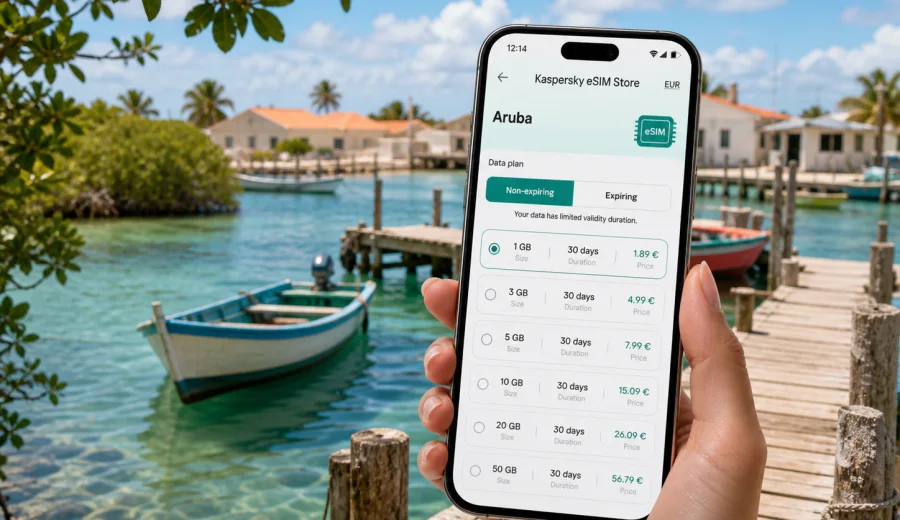
Savaneta eSIM: mobile connection and internet for your Aruba trip
Savaneta is a different kind of Aruba base. Instead of the high-rise hotel strip and busy resort rhythm, you get a quieter fishing town on the southwestern coast, small piers, shallow turquoise water, mangroves, local restaurants, and easy drives toward Mangel Halto, San Nicolas, Baby Beach, Oranjestad, and the airport. That calmer pace is exactly why mobile internet matters here: you may spend less time walking between large tourist landmarks and more time moving by car, checking maps, confirming reservations, finding snorkeling spots, and coordinating short trips around the island.
An eSIM helps you prepare mobile data before you land or soon after arrival, without looking for a physical SIM card shop at the airport or in a busier resort area. For Savaneta, this is useful because the town is spread along the coast and many plans depend on flexible movement: a morning swim at Mangel Halto, lunch near the fishing piers, an afternoon in San Nicolas, and dinner back by the water. A stable data setup keeps the day simple.
This guide focuses on practical mobile connection and internet use in Savaneta: arrival, local transport, navigation, hotels and villas, business stays, stopovers, day trips, data planning, eSIM setup, and the checks worth doing before you choose a tariff.
Why Savaneta is an eSIM-first kind of destination
Savaneta is one of Aruba's oldest settlements and is often described as the island's former capital. Today it feels more local and less packaged than the main resort zones. That is part of its appeal, but it also changes how you use your phone.
In Palm Beach or Eagle Beach, many travelers can rely on hotel Wi-Fi, restaurant Wi-Fi, and short walks. In Savaneta, you are more likely to depend on mobile data between stops. You may need it while driving, parking, checking beach access points, comparing restaurant opening times, or sending your location to a driver or travel companion.
Common phone tasks in Savaneta include:
- navigating from Queen Beatrix International Airport to a guesthouse or villa;
- using maps for the road between Savaneta, Pos Chiquito, Mangel Halto, and San Nicolas;
- checking whether a seafood spot, beach bar, or tour meeting point is open;
- messaging a host about arrival time;
- ordering a taxi or coordinating a rental-car pickup;
- checking weather, wind, and sea conditions before snorkeling;
- sharing a live location when groups split between the beach and town;
- using internet calls or messaging apps when the eSIM tariff is data-only.
The key point is simple: Savaneta rewards flexible movement. Mobile internet makes that flexibility easier to manage.
Arrival in Aruba: getting online before the drive to Savaneta
Most international visitors arrive through Queen Beatrix International Airport near Oranjestad. From there, Savaneta is usually reached by rental car, taxi, private transfer, or a prearranged pickup. Even though the island is compact, the first hour after landing can involve several data-heavy tasks: confirming the address, loading the route, messaging your host, finding the correct pickup point, or checking whether you should stop for groceries before continuing south.
If you install an eSIM before departure, you can reduce the number of decisions you need to make at the airport. Once the plane lands and your device is allowed to connect, you can switch on the eSIM line according to the setup instructions and use mobile data for the first route. If you prefer to activate after arrival, download any QR code or setup details while you still have reliable home Wi-Fi.
For the airport-to-Savaneta route, mobile data is useful for:
| Moment | Why internet helps |
|---|---|
| After landing | Messaging your accommodation or driver |
| At the rental desk | Checking booking details and route notes |
| On the first drive | Using live navigation and traffic updates |
| Before check-in | Finding groceries, fuel, or an ATM |
| Late arrival | Confirming self-check-in instructions |
Offline maps are still worth downloading, especially if you arrive at night or after a long flight. But offline maps do not always help with live changes, updated opening hours, messages from a host, or quick searches. An eSIM fills that gap.
Mobile internet around Savaneta's coast
Savaneta is not a city of big avenues and dense shopping streets. It is a coastal area where the practical points are spread out: fishing piers, small restaurants, villas, residential roads, mangrove edges, snorkeling entries, and nearby beaches. That makes mobile connection less about scrolling and more about small, repeated travel tasks.
You may use data to locate Mangel Halto, check where to enter the water safely, or find the route from Savaneta to Baby Beach without accidentally taking a longer detour. If you are meeting friends after snorkeling, a live location can be more useful than a written address. If you are staying in a villa, the host may share gate codes, parking notes, or check-out instructions through a messaging app.
The best approach is to treat your phone as a travel tool rather than a backup device. Keep the essentials ready:
- a map app with Aruba downloaded offline;
- your accommodation address saved in full;
- screenshots of check-in details;
- your eSIM setup details saved before departure;
- a messaging app that everyone in your group can use;
- a power bank for long beach or boat days.
This preparation is especially helpful in Savaneta because you may not always be next to a hotel lobby, tour desk, or large shopping area when you need information.
Choosing the right amount of data for Savaneta
Data needs in Savaneta depend less on the town itself and more on your travel style. A traveler who stays at one villa, uses Wi-Fi most evenings, and checks maps a few times a day can manage with a smaller package. A traveler who rents a car, explores the south coast, uploads photos, takes video calls, and uses maps constantly should choose more data.
Use this practical estimate:
| Trip style in Savaneta | Typical mobile data use | What to consider |
|---|---|---|
| Short stopover or one-night stay | Low | Maps, messaging, check-in details |
| 3-4 quiet beach days | Moderate | Navigation, restaurant searches, photos, weather |
| Week with rental car | Moderate to high | Maps, day trips, streaming music, group chats |
| Remote work or business stay | High | Video calls, hotspot use, file access |
| Family or group organizer | Higher than average | Shared bookings, messages, routes, child or luggage logistics |
Streaming video, cloud backups, video calls, and hotspot sharing are the fastest ways to use data. If your accommodation has reliable Wi-Fi, save heavy uploads for the evening. If you plan to spend full days around beaches and restaurants, choose enough mobile data for maps, messages, payment checks, and changes of plan.
A useful rule for Savaneta: choose a tariff by the number of days you will be moving around the island, not only by the number of nights in town. A three-night stay with a rental car and two full day trips can use more data than a five-night stay spent mostly at one hotel.
Where eSIM is most useful in and around Savaneta
Savaneta is a good base for travelers who want local atmosphere and easy access to the southern side of Aruba. Mobile internet helps most when your plans are practical, location-based, and time-sensitive.
High-value eSIM moments include:
1. Finding your accommodation after dark. Many stays in and around Savaneta are villas, apartments, or smaller hotels rather than huge resorts. Exact map pins matter.
2. Planning snorkeling at Mangel Halto. You may want weather, wind, tide, reef, or access information before leaving.
3. Coordinating seafood lunches and dinners. Opening times, queues, and group messages can change the plan.
4. Driving to San Nicolas. Street art, cafes, local shops, and onward routes to Baby Beach are easier with live maps.
5. Handling split-group travel. One person may stay by the water while another picks up groceries or rental gear.
6. Managing business calls. If you are working during the trip, a data connection can support quick checks when hotel Wi-Fi is weak or unavailable.
When you are ready to compare options for the island, you can choose an eSIM tariff for your Aruba trip through Kaspersky eSIM Store and match the package to your expected time in Savaneta, day trips, and data habits.
Device compatibility before you buy
Before choosing a tariff, confirm that your phone or tablet supports eSIM and is not locked in a way that prevents adding another mobile plan. This is a small check, but it prevents a common travel problem: buying a tariff and discovering at the airport that the device cannot use it.
Use the compatibility window before purchase: check your device.
Also check these points:
- your device model supports eSIM in your region;
- your device has a stable internet connection during installation;
- your main SIM and eSIM settings are clear before you travel;
- mobile data is assigned to the eSIM line when you want to use the travel package;
- data roaming for the eSIM is enabled if the selected tariff instructions require it;
- you understand whether the tariff includes data only or any additional services.
Many travel eSIM tariffs are designed for mobile data. They may not include a local phone number, voice calls, or SMS unless the specific tariff conditions say so. For calls and messages, plan to use internet-based apps.
How to install and activate an eSIM for Savaneta
The setup flow depends on your device and the tariff you choose, but the travel routine is usually straightforward: choose the destination, select a data amount and validity period, pay for the tariff, install the eSIM profile, and activate it at the right moment.
For detailed setup, use the relevant guide:
A practical setup sequence for Savaneta:
1. Choose Aruba as the destination before the trip.
2. Select a data package based on your stay length, driving plans, and expected hotspot use.
3. Install the eSIM while you have reliable Wi-Fi.
4. Keep your primary SIM active only for the services you still need, such as bank verification messages, if applicable.
5. On arrival, set mobile data to the eSIM line.
6. Check that data roaming is configured as required by the tariff instructions.
7. Test maps and messaging before leaving the airport or accommodation.
Do not wait until you are standing by a beach road with low battery and luggage in the car. The setup is easier when you are calm, connected to Wi-Fi, and not trying to solve transport at the same time.
Savaneta transport scenarios and data use
Savaneta is easiest with a rental car, especially if you want to move between beaches, restaurants, and the rest of Aruba. Taxis and arranged transfers can work well for airport runs or evenings out, but spontaneous coastal exploring is simpler when you control the route.
Here is how mobile internet supports each transport style:
| Transport style | Why eSIM helps |
|---|---|
| Rental car | Live navigation, fuel stops, parking notes, route changes |
| Taxi or private transfer | Driver messaging, pickup pins, fare confirmation |
| Tour pickup | Meeting-point checks and schedule updates |
| Walking nearby | Restaurant searches, map pins, weather checks |
| Group travel | Location sharing and quick changes of plan |
For rental cars, mobile data can be more useful than the vehicle's built-in navigation because your phone also holds your messages, accommodation notes, restaurant reservations, and saved places. Keep a charger in the car and download offline maps as a backup.
Hotel, villa, and work internet planning
Accommodation in Savaneta can feel more residential than resort-like. That is attractive if you want a slower Aruba stay, but it also means you should not assume every property has the same Wi-Fi quality, workspace, or front-desk support.
If you are staying in a villa or apartment, ask in advance about:
- Wi-Fi speed and reliability;
- self-check-in instructions;
- parking location;
- whether the address is easy to find on map apps;
- backup contact methods if you arrive late;
- workspace options if you need calls.
An eSIM is not a replacement for a proper work connection if you need hours of video meetings, but it can be a practical backup for short calls, authentication messages, route checks, and urgent file access. If you plan to use your phone as a hotspot, choose a data package with enough allowance and check whether hotspot use is supported by the selected tariff. Business travelers who stay in quiet Savaneta and drive to Oranjestad, the airport corridor, or San Nicolas should treat mobile data as a bridge between accommodation Wi-Fi, meeting rooms, and transport.
Practical data-saving tips in Savaneta
You do not need to be offline to be careful with data. Small settings make a travel package last longer.
Use this checklist before a full day out:
- Download the Aruba map area over Wi-Fi.
- Save your accommodation, airport, Mangel Halto, Savaneta, San Nicolas, and Baby Beach.
- Turn off automatic cloud photo and video backup on mobile data.
- Download playlists, boarding passes, and travel documents in advance.
- Use lower video quality if you need to stream.
- Restrict background app refresh for apps you do not need during the trip.
- Check data usage after the first day and adjust.
The biggest data drains are usually not maps or messages. They are automatic backups, short videos, social apps, and hotspot use. If you manage those, a moderate package can go further.
FAQ: eSIM and mobile internet in Savaneta
Is Savaneta a good place to rely on mobile data?
Yes, mobile data is useful in Savaneta because many travel tasks happen while moving between coastal stops, villas, restaurants, and nearby beaches. Still, connection quality can depend on your device, selected tariff, local network conditions, and exact location.
Do I need eSIM if my hotel or villa has Wi-Fi?
Wi-Fi helps at the property, but it does not cover the drive from the airport, beach days, restaurant searches, taxi messaging, or day trips. An eSIM is most useful outside the accommodation.
Can I use eSIM for calls in Savaneta?
Many travel eSIM tariffs focus on mobile data and may not include a regular phone number, voice calls, or SMS. Use messaging and calling apps over the internet unless your selected tariff conditions say otherwise.
Final preparation before your Savaneta trip
Before you leave for Aruba, make your phone ready for the way Savaneta actually works: quiet roads, coastal stops, villa check-ins, restaurant plans, snorkeling decisions, and short drives across the island. Check device compatibility, choose a data allowance that matches your route, install the eSIM on Wi-Fi, save offline maps, and keep your accommodation details available without relying on a browser tab.
Kaspersky eSIM Store is an app and website where you can quickly choose, arrange, and activate an eSIM with a suitable tariff for mobile internet in an international trip. For a Savaneta stay, that means you can prepare your Aruba data plan before the first airport drive and keep maps, messages, and travel details close at hand.
If Savaneta is your base for fishing piers, Mangel Halto, San Nicolas, Baby Beach, or a quieter Aruba itinerary, prepare an eSIM tariff for your Aruba trip before you go and travel with a clearer mobile internet plan from the start.