
Travel connectivity guide
Savusavu eSIM for mobile internet in Fiji
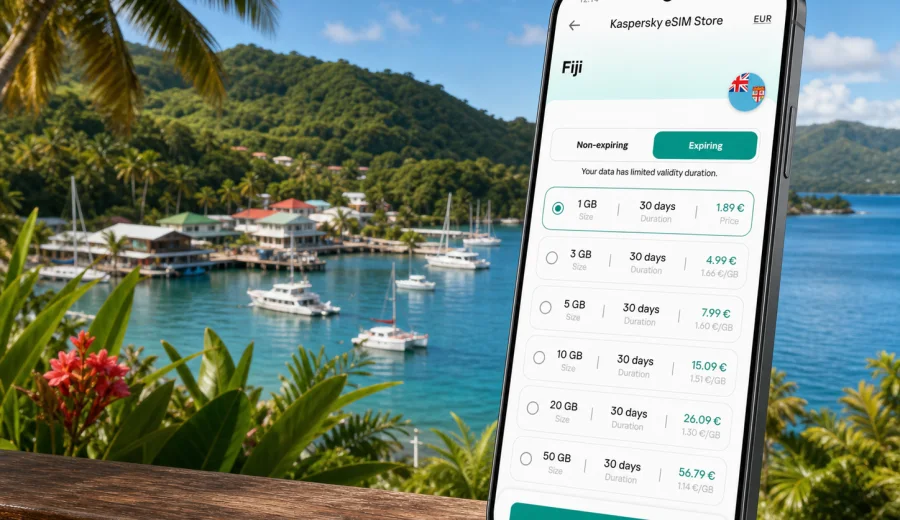
Savusavu eSIM: mobile connection and internet for a Fiji trip
Savusavu is a small arrival point with a big travel radius. You may come for a marina stop, a diving holiday, a resort stay on Vanua Levu, a work visit, or a quiet base for exploring waterfalls, villages, hot springs, coastal roads, and bays. In all of those scenarios, mobile internet matters before the trip starts to feel complicated: you need maps from the airport or pier, a message to your hotel, a ride confirmation, weather checks, payment notifications, and a way to stay in touch when you move outside the town center.
An eSIM can make that first day easier because you do not need to find a physical SIM card shop before using data. With a compatible phone, you can prepare a digital SIM profile before departure, then use mobile data for navigation, bookings, messaging, and trip admin after arrival. For Savusavu, that is especially practical because the town is compact, many stays are spread along the coast, and plans often include routes beyond town rather than one fixed urban itinerary.
This guide focuses on Savusavu, not Fiji in general. It explains how to think about mobile connection around the airport, marina, hotels, local roads, day trips, business visits, and multi-island travel, and how to choose an eSIM data plan that fits the way you will actually use the internet.
Why mobile internet matters in Savusavu
Savusavu is not a large city where you can assume that every step of the trip happens within a dense transport grid. Travelers often move between the airport, town, the Copra Shed Marina area, nearby resorts, rental homes, dive operators, restaurants, markets, and coastal viewpoints. A short route can still require coordination, and many practical details are handled through messages rather than signs or fixed timetables.
Mobile data is useful in Savusavu for:
- confirming a pickup after landing at Savusavu Airport;
- sending your arrival time to a hotel, villa host, marina office, or dive center;
- using maps for coastal roads and small turnoffs;
- checking whether a restaurant, tour office, or shop is open before you walk across town;
- receiving banking, booking, and airline notifications;
- arranging taxis or local transfers by phone or messenger;
- coordinating boat, diving, sailing, or resort schedules;
- keeping contact with colleagues during a business or project visit;
- sharing your route when you are away from your hotel Wi-Fi.
The value of eSIM in Savusavu is not only about speed. It is about having a working data option when the next decision depends on your phone: where the driver is waiting, which road leads to the resort entrance, whether your domestic flight has changed, or how to contact a host when you arrive after dark.
Arrival scenarios: airport, pier, and first transfer
Many visitors reach Savusavu by domestic flight or by ferry and road connections from other parts of Fiji. Exact schedules and transfer options can change, so check your booking before departure. The connection task, however, is similar in every route: you want mobile internet available before you start looking for your next transport.
| Arrival point | What you may need data for | Practical eSIM use |
|---|---|---|
| Savusavu Airport | Hotel pickup messages, map checks, flight updates | Turn on the eSIM data line after landing and contact your transfer before leaving the terminal area |
| Marina area | Vessel, resort, taxi, or customs-related coordination | Keep messaging apps available while moving between the waterfront, accommodation, and services |
| Ferry or road arrival | Navigation, pickup location, calls through apps | Share your location and confirm the route before you leave the arrival area |
| Transfer from Labasa or other towns | Road navigation and stop coordination | Use data for maps, messaging, weather, and route changes during the drive |
If you rely only on Wi-Fi, your first usable connection may be at the hotel or a cafe. That can be fine for a simple escorted transfer, but it is less convenient if your arrival time changes, your luggage is delayed, or the driver needs an exact meeting point. An eSIM gives you another option: you can keep your main SIM for calls or SMS if needed and use the eSIM profile for travel data.
Savusavu travel patterns that affect your data needs
Savusavu trips tend to be practical rather than checklist-heavy. You may spend the morning near the waterfront, the afternoon at a beach or waterfall, and the evening coordinating the next day with a resort or tour operator. That makes data use uneven: some days require only messaging and maps, while others include video calls, file uploads, or navigation during longer drives.
Before you choose a plan, think about your main Savusavu pattern:
- Short town stay: one to three days around the marina, market, restaurants, and nearby accommodation.
- Resort base: a week or more with regular movement between the resort, town, beaches, tours, and airport.
- Diving or sailing trip: heavy coordination by messages, weather checks, photos, and route changes.
- Business or NGO visit: email, cloud documents, maps, ride coordination, and possible tethering.
- Vanua Levu route: Savusavu plus Labasa, coastal villages, waterfalls, and longer road transfers.
- Fiji combination trip: Savusavu after Nadi, Suva, Taveuni, or another island stop.
For a light town stay, a smaller data allowance may be enough if you use hotel Wi-Fi for backups and streaming. For a resort base or working trip, choose more data than you expect to use on maps alone. Uploading photos, joining calls, syncing files, and using your phone as a hotspot can consume data quickly.
Where eSIM is most useful around town
Savusavu is walkable in parts, but many stays are not directly in the center. The waterfront and marina area can be straightforward during the day, while resorts and rental properties may sit along roads where turnoffs are easier to miss. Mobile internet helps bridge the gap between a relaxed island pace and the practical need to find places, confirm times, and adjust plans.
Useful moments include:
1. Getting from the airport to accommodation. You can message your host, check the route, or send a location pin.
2. Moving between town and coastal stays. Navigation helps when a hotel entrance, jetty, or villa road is not obvious.
3. Managing activities. Dive operators, boat trips, spa appointments, and restaurant bookings often depend on messages.
4. Handling changing weather. Tropical rain can affect tours, road comfort, and pickup timing.
5. Keeping work available. Even a leisure trip may include a quick call, approval, or document download.
6. Making onward plans. Domestic flights, ferries, drivers, and island connections are easier to monitor when your phone has data.
The best approach is to install the eSIM before you need it. Do the setup while you have stable Wi-Fi, then activate mobile data at the right moment according to the instructions for your selected plan.
How much data to consider for Savusavu
There is no single correct data amount for every visitor. A traveler who checks maps twice a day and uses Wi-Fi in the evening needs much less than someone who works from a laptop, uploads dive footage, or uses video calls. Choose based on your habits and the length of stay, not only on the city name.
| Trip style | Typical use | Data planning note |
|---|---|---|
| Weekend or stopover | Maps, messaging, ride or hotel coordination | A smaller package can work if you avoid video and large uploads |
| One-week resort stay | Maps, messaging, browsing, bookings, light social media | A medium package gives more room for daily use outside Wi-Fi |
| Diving, sailing, or tours | Messages, weather, photos, route updates | Consider extra data if you upload media during the day |
| Business visit | Email, documents, calls, hotspot use | Choose a larger allowance and check hotspot terms in the plan |
| Multi-city Fiji route | Savusavu plus Nadi, Suva, Labasa, or Taveuni | Match the plan to Fiji coverage and the full travel duration |
Practical tip: offline maps and downloaded booking PDFs can reduce data use, but they do not replace live data. You still need a connection for updated routes, ride coordination, messaging, two-factor prompts, banking checks, and last-minute schedule changes.
What to check before choosing an eSIM plan
Before buying or activating any eSIM for Savusavu, check the basics carefully. This avoids the most common travel-data problems.
- Your phone or tablet must support eSIM. You can check your device before you choose a plan.
- The device should be unlocked by your mobile operator. A locked device may not accept another mobile profile.
- The plan should cover Fiji, not only another stop on your route.
- The validity period should match your travel dates, including arrival and departure days.
- The data allowance should match your expected use, especially if you plan to tether a laptop.
- Check when validity starts: some plans begin when installed, others when connected to a local network.
- Keep your primary SIM settings under control so you do not accidentally use roaming data on the wrong line.
For Savusavu, the country match is important. City pages use the Fiji destination plan, because the eSIM is selected for the country where the city belongs. If your route includes another country before or after Fiji, compare whether a separate country plan or a regional option fits better.
A practical setup flow before departure
The calmest way to handle eSIM for Savusavu is to do the administrative work before you travel. You do not need to wait until you are tired, carrying bags, and trying to find your transfer.
1. Check that your device supports eSIM and is not carrier-locked.
2. Estimate how long you will stay in Savusavu and whether you will also visit other parts of Fiji.
3. Choose a data allowance that covers maps, messaging, bookings, and realistic daily use.
4. Install the eSIM profile while you are still on reliable Wi-Fi.
5. Label the eSIM line clearly, for example "Fiji data", so you can recognize it later.
6. Keep your regular SIM active only for the services you still need, such as banking SMS if your home operator supports it abroad.
7. On arrival, select the eSIM as the mobile data line and follow the plan instructions for data roaming settings.
When you are ready to compare destination options, you can choose an eSIM plan for your trip to Savusavu and Fiji through Kaspersky eSIM Store. Review the data amount, validity period, destination, and conditions before completing the setup.
Installing eSIM on iOS and Android
Installation is usually easiest when you still have a stable Wi-Fi connection. After you choose a plan, follow the instructions shown in your account, app, or confirmation email. The exact screens differ by device model and operating system version, so use the guide that matches your phone.
For setup details, use the Android installation guide or the iOS installation guide. Keep the QR code or manual activation details available until the eSIM profile is installed successfully.
Useful setup habits:
- Do not delete an installed eSIM profile unless you are sure you no longer need it.
- Keep your phone charged before arrival, especially if your transfer depends on messages.
- Save hotel, driver, and tour contacts before flying.
- Download offline maps for Savusavu and your wider Vanua Levu route.
- After landing, check that mobile data is assigned to the eSIM line.
- If the instructions for your plan mention data roaming for the eSIM profile, enable it for that profile only.
An eSIM data plan is mainly for mobile internet. It may not include a regular phone number, voice calls, or SMS unless those services are clearly listed in the selected plan terms. For everyday contact in Savusavu, many travelers use internet-based calls and messages through their usual apps.
Local movement: what your phone will do all day
In a place like Savusavu, the phone is less about constant browsing and more about removing small frictions. You may use it for a quick map refresh, a message to a driver, a weather update, a photo upload, or a payment confirmation. These moments are short, but they happen repeatedly.
Common daily data tasks:
- navigation between accommodation, town, marina, restaurants, and activity meeting points;
- checking opening hours and contact details before walking or driving;
- messaging a driver, guide, host, colleague, or family member;
- using translation, currency conversion, and banking apps;
- reviewing domestic flight or ferry information;
- checking weather before a boat trip or road excursion;
- sharing location during independent walks or transfers;
- using a laptop hotspot in limited cases, if the selected plan allows it.
To conserve data, avoid automatic cloud photo uploads on mobile data, download entertainment on Wi-Fi, and set app updates to Wi-Fi only. These small settings matter more on a smaller island trip because you may not want to interrupt your day to top up.
Hotel Wi-Fi and public Wi-Fi in Savusavu
Hotel or resort Wi-Fi can be useful, but it should not be your only connection plan. Speeds and coverage can vary by property, room location, weather, and number of users. In cafes or public areas, Wi-Fi may be convenient for casual browsing, but you still need to consider privacy, reliability, and whether you can connect before you know where you are going.
An eSIM can reduce dependence on shared Wi-Fi during the moments when you need your phone most:
- before you check in;
- while waiting for a transfer;
- when walking outside the hotel area;
- during day trips;
- when a booking or payment notification arrives;
- when you need to contact support for a flight, hotel, card, or tour issue.
This does not mean mobile data will be perfect in every location. Terrain, distance from town, building structure, weather, and local network conditions can affect connection quality. The practical goal is to have a prepared mobile data option, not to assume the same performance everywhere.
FAQ: eSIM and mobile internet in Savusavu
Is Savusavu a city where eSIM is useful?
Yes, especially if you need mobile internet for arrival transfers, hotel messages, maps, marina coordination, resort movement, day trips, or onward travel around Vanua Levu. The benefit is convenience: you can prepare data access without buying a physical SIM card after arrival.
Do I need a Fiji plan for Savusavu?
Yes. Savusavu is in Fiji, so choose a plan that includes Fiji as the destination. If your route includes other countries, check whether a regional plan or separate country plans make more sense.
Can I install eSIM before flying to Savusavu?
In many cases, yes. Install the profile while you have stable Wi-Fi and follow the activation rules for the selected plan. Some plans start validity at installation, while others start when they connect to a supported local network, so read the conditions carefully.
Will eSIM give me a local phone number?
Usually, travel eSIM data plans are for mobile internet and may not include a regular phone number, voice calls, or SMS. If those services matter, check the plan terms before choosing. For many Savusavu travel tasks, internet-based messaging and calls are enough.
Can I use eSIM for a laptop hotspot?
It depends on the selected plan and your device settings. If you expect to use a laptop for work, check whether tethering is allowed and choose a data allowance that can handle file syncs, calls, and browser use.
Should I keep my home SIM active?
You can keep it active for calls, SMS, or banking verification if you need those services, but check roaming costs with your home operator. Set mobile data to the eSIM line to avoid accidental roaming data charges on your primary SIM.
What if hotel Wi-Fi is good?
Use it when it is available and trustworthy, especially for large downloads. eSIM data is still useful outside the property, during transfers, and when hotel Wi-Fi is slow, unavailable, or not convenient.
Final preparation before your Savusavu trip
Before departure, save your hotel address, transfer contact, booking references, and offline maps. Check device compatibility, choose a data allowance that matches your stay, and install the eSIM profile while you still have reliable Wi-Fi. When you arrive in Savusavu, switch mobile data to the eSIM line, confirm your transfer, and keep your main travel details accessible.
Kaspersky eSIM Store is an app and website where you can choose, set up, and activate an eSIM with a suitable data plan for mobile internet in an overseas trip. For Savusavu, focus on Fiji coverage, the full length of your stay, and the amount of data you will need for maps, messages, bookings, work, and onward movement.
To prepare before you fly, select an eSIM plan for Savusavu and Fiji, review the plan conditions, and keep the installation instructions available until your phone is ready for the trip.