Travel connectivity guide
Schaan eSIM: Mobile Internet in Liechtenstein
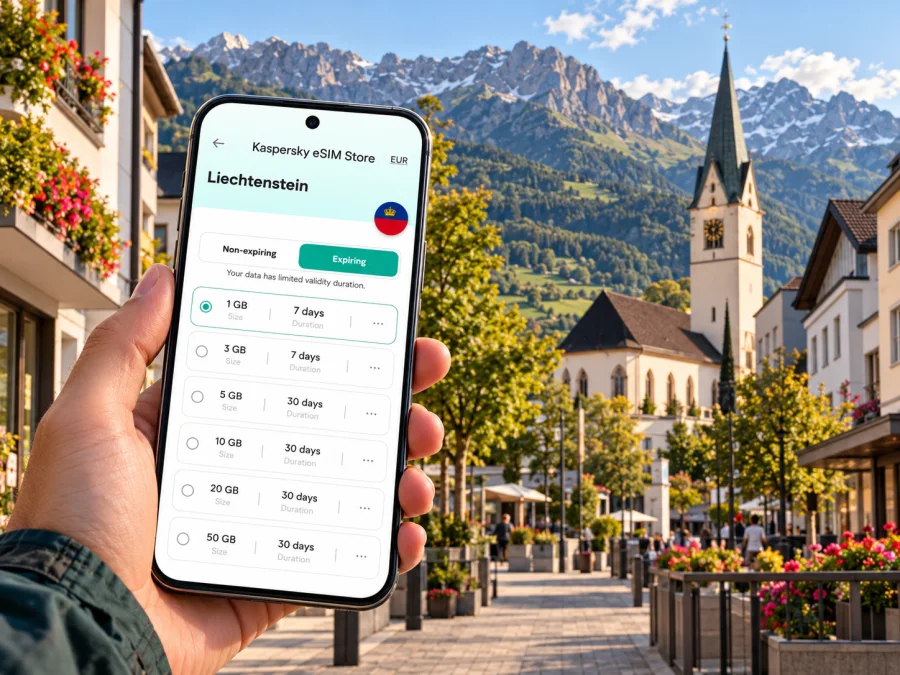
Schaan eSIM: Mobile Connection and Internet for Your Visit
Schaan is a useful base for exploring Liechtenstein: it sits in the Rhine Valley, close to Vaduz and the Swiss border, with buses and rail connections linking it to nearby towns. A dependable mobile data plan can make the practical parts of a visit easier, from checking a connection at Schaan station to finding a hotel entrance or sharing a route with someone travelling with you. The right setup depends on your device, the exact eSIM plan and the network it uses in Liechtenstein.
This guide treats Schaan as a municipality and a town in Liechtenstein, rather than as a large metropolitan area. It explains where mobile data is useful, what to check before you travel, and how to avoid assuming that a Liechtenstein plan automatically covers neighbouring Switzerland or Austria.
What to expect from mobile internet in Schaan
Schaan is compact enough that many central errands can be done on foot, but a phone still helps connect the pieces of a trip. You may arrive at the railway station, walk to accommodation, take a bus toward Vaduz, or continue across the Rhine into Switzerland. Routes and opening times are easier to manage when you can check them as plans change.
Use mobile data for tasks such as:
- looking up the latest bus or rail departure and checking a transfer;
- navigating from Schaan station to your accommodation, a meeting or a trailhead;
- checking messages from a host, hotel or colleague;
- translating a menu or reading an online reservation;
- confirming weather and trail conditions before a walk above town;
- sharing your location or arranging a meeting point;
- using maps while travelling through the Rhine Valley.
A data-only travel eSIM is not automatically a replacement for your usual phone line. Unless the specific plan says otherwise, expect it to provide mobile data rather than a local telephone number, standard voice calls or SMS. Keep your primary SIM available for calls and verification messages if you need them, and use messaging or calling apps over data when that suits your plans.
The border matters
Liechtenstein is a small country between Switzerland and Austria, and Schaan is close to the Swiss border. A phone can sometimes register on a network across a border, depending on location, handset settings and the network arrangement behind the plan. That does not prove that your eSIM includes service in that neighbouring country. Check the plan’s country list and roaming terms before travelling onward, and confirm the selected data line when crossing a border.
| Your route | What to check before relying on mobile data |
|---|---|
| Staying in Schaan | Confirm that Liechtenstein is included in the plan and check the plan’s stated validity and data allowance. |
| Schaan to Vaduz or another Liechtenstein town | Confirm Liechtenstein coverage, then keep the current public transport timetable available. |
| Crossing to Buchs or another Swiss destination | Check Switzerland separately in the plan details; a Liechtenstein listing alone is not a promise of Swiss service. |
| Continuing toward Austria | Check Austria separately and review the plan’s regional terms before departure. |
| Driving or walking near a border | Keep an offline map as a backup and verify which SIM is selected for mobile data. |
Coverage depends on the underlying local network, terrain, buildings and the selected plan. Valleys, indoor spaces and mountain routes can behave differently from an open street in the town centre. No plan should be treated as a guarantee of uninterrupted signal at every point.
Arriving in Schaan and getting oriented
Schaan does not have a commercial airport. Visitors generally reach Liechtenstein through transport hubs in neighbouring countries and continue by rail or bus; the best route depends on the flight, time of day and onward destination. Check your complete journey before leaving the airport, including any transfer between a railway station and a bus stop. A map and live timetable are particularly helpful if your arrival is late or you have luggage.
Schaan’s railway station is an important local orientation point. LIEmobil buses connect Schaan with other parts of Liechtenstein and with destinations across the border, while rail services use the wider regional network. Timetables can change by date, disruption and season, so use the current journey planner on travel day instead of relying on a saved screenshot from an earlier trip. The station name shown in a booking or map may include “Schaan-Vaduz”; check the stop and onward connection carefully rather than assuming it is in Vaduz town centre.
The centre is straightforward to explore on foot, but an offline map is useful if you are heading from the station to a particular address. Save your accommodation pin before travel, note the nearest bus stop, and download the relevant map area in case data is delayed or you temporarily lose signal. If you are meeting someone, send both the place name and a clear map pin; local names and similarly named stops can be confusing on a first visit.
Getting around: station, bus and nearby destinations
LIEmobil operates Liechtenstein’s public bus network, and Schaan’s station area is a practical point for changing between local travel and regional connections. Buses are useful when you want to reach Vaduz, move between municipalities or connect with stations in Buchs, Sargans or Feldkirch. The details vary by route and time. Check live departures, service notices and ticket rules on the day, especially when a rail connection is involved.
Mobile data has a supporting role here: it helps you find the right stop, see an updated departure, and recalculate after a delay. It does not replace a ticket, guarantee a connection or make a route operate outside its published schedule. Buy the correct ticket and allow time for transfers. If a journey crosses into Switzerland or Austria, check the transport ticket’s validity separately from the eSIM’s mobile coverage; these are different arrangements.
Choose a data amount for the way you travel
There is no universal data allowance for a visit. A traveller who mostly checks departures and messages may use much less than someone who relies on video calls, uploads photos or streams entertainment. Think about the tasks you will actually do, the duration of the plan and whether hotel or workplace Wi-Fi will be available. Review the plan’s terms rather than choosing by a headline number alone.
| Travel pattern | Typical data use to plan for | A practical approach |
|---|---|---|
| One-day stop | Maps, messages and a few timetable checks | Download a map, avoid large uploads on mobile data and check when validity begins. |
| Weekend in Schaan | Navigation, reservations, translation and photos | Estimate daily use and allow for a regional day trip if neighbouring countries are included. |
| Work visit | Email, cloud documents and occasional calls | Check whether your employer permits the device and apps on travel data; use Wi-Fi for large files when appropriate. |
| Walking and sightseeing | Maps, weather checks and location sharing | Save the route offline and carry a charged battery; mountain paths can reduce signal reliability. |
| Multi-country itinerary | Data use across more than one country | Confirm every destination in the coverage list or choose a plan that explicitly includes the full route. |
These are planning examples, not usage guarantees. Navigation apps can cache some information, while map refreshes, photo backups, app updates and video can consume more data than expected. Turn off automatic backups and large app downloads over mobile data if you want to preserve a limited allowance. You can usually monitor usage in your phone settings; the exact menu differs by device.
Before buying: check device and plan details
An eSIM works only if the phone or tablet supports eSIM and is not restricted by a carrier lock that prevents another profile from being used. Support can vary by exact model, regional variant and the country where the device was sold. Do not infer eSIM support from a product family name alone. Check whether your device supports eSIM, then confirm the result against the manufacturer’s information and your carrier’s unlock status.
Before choosing, review eSIM options for a trip to Liechtenstein and read each plan’s country coverage, data amount, validity period, activation conditions and any restrictions. This is the country-level destination page; it does not promise Schaan-specific coverage or a tariff for a particular address.
Read the plan details before checkout. Confirm the following:
- Liechtenstein is explicitly included as a destination;
- the plan’s data allowance and validity period suit the length of your visit;
- the activation rule is clear, including whether validity begins at installation, activation or first network use;
- the plan supports your intended device and operating system;
- any data-sharing, tethering or hotspot limits are stated;
- neighbouring countries on your route are separately listed if you will cross a border;
- you understand the provider’s top-up, refund and support conditions.
Do not assume that a plan includes traditional calls or text messages unless the terms say so. If you need your usual number for banking codes, leave the primary line enabled for those messages and set the travel eSIM as the mobile-data line. Check roaming charges on your home line before using it abroad, and disable data roaming on that line if you do not want it to use mobile data.
A simple setup sequence
- Prepare the phone. Install system updates while connected to trusted Wi-Fi, charge the battery and make sure you can access the account used to purchase the plan.
- Check compatibility and carrier lock. Verify the exact device variant and confirm that another eSIM can be added.
- Select the destination and plan. Read the country list, allowance, validity and activation instructions. Save the confirmation details somewhere accessible.
- Install at the right time. Follow the plan-specific instructions. Some plans are best installed before departure; activation timing can differ, so follow the terms rather than guessing.
- Set the data line. When you are ready to use the travel plan, select it for mobile data. Keep your normal line configured for calls or messages only if you need it and understand its roaming costs.
- Check service after arrival. Give the device time to register, confirm the selected line and data-roaming setting required by the plan, then test a simple webpage or map.
- Keep a fallback. Save offline directions, the accommodation address and any essential ticket details. If service does not start, use Wi-Fi to review the plan instructions or contact support.
For device-specific steps, see the Android eSIM installation guide or the iPhone and iPad eSIM installation guide. Menus differ between manufacturers and software versions, so follow the instructions shown for your device and the activation notes for your selected plan.
Practical scenarios in Schaan
You arrive by train and need to reach your hotel
Before travelling, save the hotel’s exact address and map pin. At Schaan station, check whether your accommodation is walkable with your luggage or whether a bus or taxi is more suitable. If a bus is involved, verify its current stop and departure rather than relying on a route remembered from a previous visit. If the eSIM has not connected yet, connect to trusted Wi-Fi where available and keep the address accessible offline.
You have a meeting near the centre
Ask your host for the building name, street address and entrance instructions. Some offices may be outside the compact central area. Download any documents needed for the meeting before leaving reliable Wi-Fi, and use mobile data for updates and messaging. For a video call, test the connection in advance and have a fallback such as venue Wi-Fi or an audio call through your primary line.
You plan to walk toward Dux
Check the weather, daylight and route before setting off. Download the map area and carry a charged phone; battery use rises when the screen, GPS and mobile data stay active. If the weather changes, turn back rather than depending on online navigation to solve a route problem. A data plan is useful for checking conditions and sharing your location, but it cannot remove the ordinary risks of walking in changing alpine weather.
You are taking a cross-border day trip
Confirm transport connections and ticket validity, then inspect the eSIM’s destination list for the country you are entering. Set the right data line before crossing, and watch for a network-name change. If that country is not included, turn off data roaming on the travel profile and use an appropriate plan or Wi-Fi instead. A phone showing signal bars does not prove that data is included or that roaming charges will not apply.
If the eSIM does not connect
Start with settings, not repeated profile deletion. Confirm that the eSIM is installed and enabled, that it is selected for mobile data, and that the plan’s country and activation conditions match your location. If the plan requires data roaming on the eSIM line, enable that setting for the eSIM only. Restart the phone once, wait for network registration and check the plan’s troubleshooting guidance. Avoid deleting the profile unless support or the plan instructions tell you to; some eSIM profiles cannot be installed again after removal.
If service remains unavailable, connect to Wi-Fi and review the purchase confirmation, installation state and support instructions. Note your location, device model, selected data line and any error message. These details make troubleshooting more efficient. For immediate navigation, use a saved offline map, ask your accommodation or transport staff for directions, and keep your ticket and address details available without a connection.
A compact Schaan connectivity checklist
Before departure
- Check exact device support and carrier unlock status.
- Confirm Liechtenstein coverage and separately verify any Swiss or Austrian stop.
- Compare data volume, validity and activation rules with your itinerary.
- Install or prepare the profile according to its instructions.
- Save offline maps, lodging details, travel documents and key tickets.
On arrival
- Select the travel eSIM for mobile data when appropriate.
- Check the current LIEmobil or rail departure for your route.
- Keep your primary number available only as needed and review its roaming settings.
- Monitor data use and download large files over Wi-Fi.
During the visit
- Recheck coverage before crossing a national border.
- Download routes before walking beyond the centre.
- Keep the phone charged and retain offline alternatives for important information.
Frequently asked questions
Is Schaan a city in Liechtenstein?
Schaan is a municipality and town in Liechtenstein’s Rhine Valley. For a trip, it is useful to treat it as a distinct destination with its own station, centre and local points of interest, while remembering that public transport and mobile plans often operate across wider regional or national boundaries.
Does a Liechtenstein eSIM automatically work in Switzerland?
No. Check the exact plan’s country coverage and roaming terms. Schaan is near the Swiss border, but proximity does not mean a Liechtenstein-only plan includes Switzerland. Verify every country on your route before relying on the plan.
Will an eSIM give me a Liechtenstein phone number?
Not necessarily. Many travel eSIM plans are designed for mobile data and do not include a standard phone number, voice calls or SMS. Read the selected plan’s terms. Internet-based messaging and calls may work over data, subject to the app and connection.
Can I install the eSIM before travelling?
Often you can prepare it before departure, but the correct timing depends on the plan. Read whether validity starts at installation, activation or first network use. Follow the plan instructions and avoid removing the profile after installation unless you are told to do so.
Is mobile coverage guaranteed on the way to Dux or near the border?
No mobile plan can promise a signal at every point. Terrain, buildings, the local network and the plan’s roaming arrangements all affect service. Download a map and essential details before leaving the centre, especially for an uphill walk or cross-border trip.
Prepare your connection for Schaan
A little preparation makes a short visit or a longer stay easier: check the exact phone variant, confirm the countries included in the plan, and save essential routes for offline use. Then compare current options and conditions for a trip to Liechtenstein. In Kaspersky eSIM Store, you can use the app or website to choose, arrange and activate an eSIM plan for mobile data abroad. Review the selected plan’s coverage, validity and activation details before you travel, and keep your regular number available for calls or messages if you need it.


