Travel connectivity guide
Schellenberg eSIM: Mobile Internet in Liechtenstein
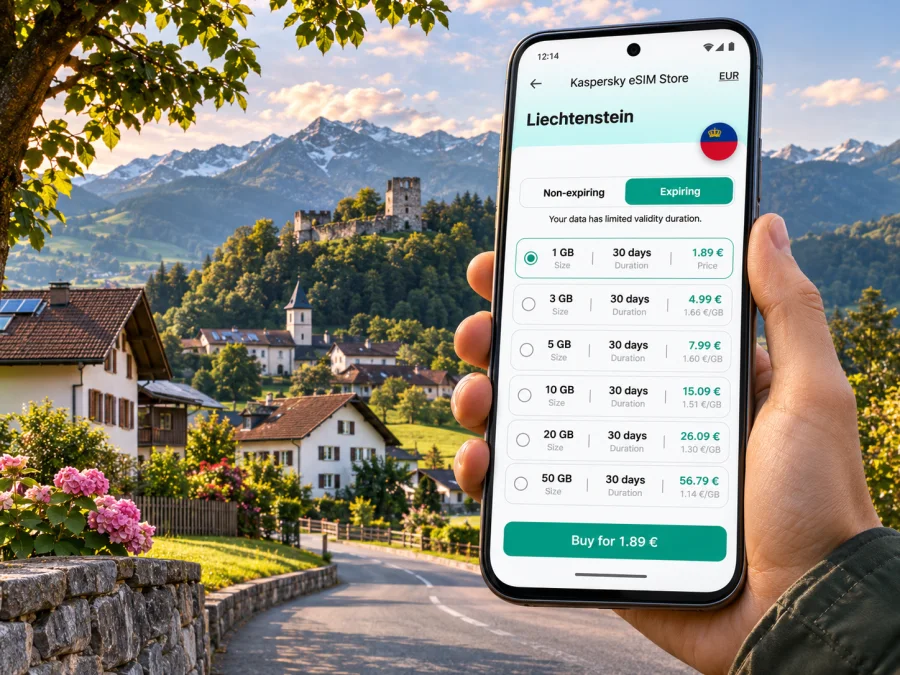
Schellenberg eSIM: Mobile Connection and Internet for Your Visit
Schellenberg is a small municipality in Liechtenstein’s northern Unterland, set on a ridge above the Rhine Valley. A visit here is likely to involve village streets, walking paths, castle ruins and bus connections to other towns rather than a dense city grid. Mobile internet can help with the practical transitions: checking a route before a walk, finding a stop, coordinating a pickup, translating a sign or confirming the next bus.
An eSIM can be a convenient way to prepare mobile data for a trip, provided your device supports it and the selected plan covers Liechtenstein. It is a digital SIM profile installed on a compatible phone, so you do not need to insert a separate plastic SIM for that data plan. Coverage, speed and availability depend on the local network and the terms of the chosen plan; no single connection can be assumed everywhere, especially on slopes, indoors or beyond the village centre.
First, place Schellenberg on the map
Schellenberg is one of Liechtenstein’s municipalities, not a large urban centre. It belongs to the northern part of the country commonly called the Unterland. The village lies among low Alpine foothills, and the wider landscape opens towards the Rhine Valley. This setting matters when planning your phone use: navigation is useful, but a walking route may leave built-up areas, and a map should not replace trail signs or local advice.
The municipality is divided into Vorderer, Mittlerer and Hinterer Schellenberg. You may encounter these names in route descriptions, local addresses or public transport information. The area’s best-known historical landmarks are the Upper and Lower Castle ruins. The Upper Castle ruins are in the Hinterschloss area and are reached by a short walk; the official tourism description presents the site as a place to explore, rest or picnic. The ruins are open-air heritage sites, so check local notices and respect any access instructions when you visit.
Schellenberg works well as a quiet half-day stop or as part of a longer Liechtenstein itinerary. You can spend time in the village and at the ruins, then continue to places such as Ruggell, Bendern, Eschen or Vaduz depending on your route. The exact best order depends on bus times, your accommodation and how much walking you want to do. Save the next stop and its address in advance so your day does not depend on being continuously online.
Arriving and getting around
LIEmobil buses serve Schellenberg. Plan the final leg from your actual starting point; the right route depends on where you arrive and when you travel.
LIEmobil’s current timetable information identifies bus service to Schellenberg, including line 35 and connections involving Bendern, Gamprin, Ruggell, Mauren and Hinterschellenberg. Network and timetable changes can affect route numbers, transfer points and departure times. Search your exact origin and destination in the live timetable shortly before travel instead of relying on a saved screenshot or an older printed schedule. For a route that crosses into Switzerland or Austria, check that the journey planner includes the border segment and any separate ticket rules.
A simple arrival sequence
- Before departure, save the address of your lodging and the nearest named bus stop. Ask your host which stop is most convenient if the property is on a slope or outside the village centre.
- Check the full journey from your arrival station or transfer point to Schellenberg. Note the transfer location and the final stop; do not assume that a bus will take you directly to a particular accommodation.
- Download an offline map of Liechtenstein or the surrounding region. Mark the lodging, your planned visit to the castle ruins and the stop you expect to use on the return.
- When you reach the bus, confirm the destination on the display or with the driver if you are unsure. Keep your route details available offline in case mobile reception changes.
- Before setting out on foot, check the return connection and the amount of daylight available. A missed bus can make a short visit longer, particularly if you need to walk back uphill.
The village is compact compared with a major city, but distances on a map can be misleading when roads climb or a route follows a footpath. Give yourself time between the stop, the accommodation and the ruins. If you have luggage, mobility needs or a late arrival, ask your host about the walk from the stop and whether a pickup can be arranged.
Where mobile internet helps in Schellenberg
A reliable data plan is most useful when it supports a specific part of the visit. In Schellenberg, those tasks are often practical and intermittent rather than constant streaming: route checks, public transport updates, messages and finding local information.
| Moment | What mobile data can help with | What to prepare as a backup |
|---|---|---|
| Before boarding | Rechecking a connection and stop name | Save the route and departure time offline |
| At the village stop | Confirming your direction or messaging your host | Keep the accommodation address written down |
| Walking to the ruins | Checking your position and route options | Follow marked paths and download the map beforehand |
| Returning in the evening | Checking the latest departure or a disruption | Note an alternative stop or contact your host |
| A day trip beyond Schellenberg | Finding a transfer and sharing your arrival time | Check whether your plan covers every country on the route |
A phone can also be useful for translation, reservation messages, weather checks and photos backed up when you have a suitable connection. Those activities do not all need the same amount of data. Navigation and messaging usually consume less than video calls, cloud photo uploads or high-resolution streaming. If your plan has a fixed data allowance, postpone large uploads until you are on trusted Wi-Fi and review background data settings before leaving.
Schellenberg’s rural setting makes it sensible to think in terms of “connection where available,” not an uninterrupted signal promise. Reception can vary with the exact location, building construction, terrain, network choice and the plan’s terms. A phone may show a different network as you move through Liechtenstein or approach a border. That does not, by itself, confirm that your data plan includes the network or country you need; check the plan’s stated destination and roaming terms.
Choosing an eSIM plan for Liechtenstein
Start with the route, length of stay and your normal phone habits. A short visit focused on maps and messages has different data needs from a week of remote work or frequent video calls. Compare the available plans by destination, data allowance, validity period and price shown at the time of purchase. Plan details can change, so use the current product information rather than a figure copied from an old article or screenshot.
For a trip that stays in Liechtenstein, select a plan whose terms specifically include Liechtenstein. If your itinerary also includes Switzerland or Austria, check whether the same plan covers those countries; a geographic border crossing does not automatically mean that a single-country plan will work across it. Confirm where the validity period begins, whether activation is required after arrival, and what happens when the included data is used. These details are set out in the selected plan’s terms.
Kaspersky eSIM Store is an app and website that helps you choose, arrange and activate an eSIM with a suitable plan for mobile data during an international trip. It is not a mobile network operator. You can review the current destination options for Liechtenstein in the Liechtenstein eSIM plan selection and compare the displayed allowance and validity against your actual itinerary.
Estimate your data use
Estimate from your likely activities, not a generic allowance. A day of occasional map checks and messages is different from video meetings, hotspot use or cloud backups. Settings and automatic uploads can change consumption, so treat these categories as a planning aid:
- Light use: maps, messages, email and occasional transport searches. Download maps and tickets first.
- Moderate use: frequent navigation, browsing, translation and photo sharing.
- High use: video calls, hotspot sessions, large file transfers or streaming.
| Travel pattern | Check before choosing | Helpful setting |
|---|---|---|
| One afternoon | Whether a small allowance fits your use | Disable app updates on mobile data |
| Weekend with nearby towns | Route countries and photo use | Restrict backup to Wi-Fi |
| Work trip | Calls, hotspot and file needs | Monitor data use daily |
Do not select only by allowance or displayed unit cost. Confirm destination, validity, activation timing and what happens when data runs out. The current plan terms take precedence over any old price or screenshot.
Device compatibility and preparation
Before purchase, verify that your exact phone model and regional variant support eSIM and are not carrier-locked. Support can differ between versions with the same product name. Check the manufacturer’s information for your variant or ask your mobile operator; do not infer support from a similar model. Check whether your device supports eSIM before choosing a plan.
Make sure you can access the account used for purchase and connect to Wi-Fi during installation. Keep your usual SIM active if you need its number for calls or verification messages. A travel data eSIM should not be assumed to include a local number, voice calls or SMS unless the selected plan explicitly says so.
Before leaving, update your phone, learn where eSIM settings are, save installation details and label the travel line clearly. Review which line is assigned to mobile data and disable data switching if you want to avoid accidental use of your primary SIM’s roaming allowance. Do not delete a profile unless you have checked the plan’s reinstallation rules.
Installation and activation: a careful sequence
Phone menus vary by model and software version. Follow the plan’s instructions and the guide for your operating system: Android eSIM installation guide or iPhone eSIM installation guide.
- Review the destination, allowance, validity and activation rules.
- Complete the order on a stable connection and keep the confirmation accessible.
- Add the eSIM in your phone’s cellular settings using the supplied setup method.
- Label the new line; keep your primary SIM enabled if you need its number.
- Select the travel eSIM for mobile data when ready. Enable data roaming for that line only if its instructions require it.
- Test a simple webpage. If it fails, check the data line, roaming setting and activation status before changing other settings.
Installation and activation may happen at different times. A plan may start at installation, first connection or another event described in its terms. Check the timing before installing well ahead of travel. Profile transfer and reinstallation rules vary, so do not delete an eSIM without checking them.
Using your phone for the castle walk and village day
The Upper and Lower Castle ruins are open-air heritage sites. The Upper Castle ruins in Hinterschloss are described by Liechtenstein’s tourism information as reachable after a short walk. Your pace, footwear and conditions affect what “short” means, so allow time for the walk and the return bus.
Before leaving the village centre:
- Save an offline map and the route description.
- Screenshot your return connection and any booking details.
- Check weather and daylight for your planned return.
- Carry a charged phone and, for a longer day, a power bank.
- Follow marked paths and local notices; turn back if a route is closed or unclear.
Treat reception as a convenience, not a safety system. Downloading a map helps with orientation but does not replace signs, a route description or suitable footwear. If you walk alone, tell someone your plan and keep essential information available offline. Save large photo uploads for trusted Wi-Fi if your allowance is limited.
Border and network considerations
Liechtenstein sits between Switzerland and Austria, and a wider itinerary may cross a national border without an obvious change in scenery. Check that every country where you expect to use data is included in the selected plan; a Liechtenstein plan should not be assumed to cover Switzerland or Austria.
If the phone changes networks, registration may take a moment. If data stops, check the selected data line, plan activation and any required roaming setting. Then briefly toggle airplane mode or restart the phone if appropriate. Keep automatic network selection unless the plan instructions or support team advise otherwise.
Your primary SIM can remain active alongside an eSIM, but it may incur roaming charges when used. Review your home operator’s rules, select the travel eSIM for data and monitor which line is consuming data.
If mobile data does not connect
Try this short sequence:
- Confirm the eSIM is installed and enabled.
- Select it as the mobile data line.
- Check whether the plan is active for your date and location.
- Apply the required roaming setting, if any.
- Toggle airplane mode briefly, then wait for network registration.
- Recheck the plan’s instructions before choosing a network manually.
If the problem continues, connect to trusted Wi-Fi and use the support route provided with the order. Have the device model and regional variant, software version, plan destination and on-screen message ready. Do not share installation details or a QR code publicly. Offline maps, a saved lodging address and route screenshots are useful backups while you troubleshoot.
Useful scenarios
| Visit | Plan and phone preparation |
|---|---|
| Same-day walk | Check both buses, save stop names and use data mainly for maps and messages. |
| Weekend based in Schellenberg | Match validity to your dates; confirm the walk between lodging and stop and check nearby destinations. |
| Business stay | Include video calls, hotspot and file use in your estimate; data service may not include a phone number. |
| Cross-border day trip | Check every country on the route before using mobile data there. |
Frequently asked questions
Is Schellenberg a city?
Schellenberg is a municipality in Liechtenstein’s northern Unterland. It is a small village setting where walking and bus connections matter more than urban transit.
Is eSIM useful for a visit?
It can help with maps, transport checks and messages without replacing a physical SIM. Confirm support for your exact device variant, carrier-unlocked status and Liechtenstein coverage in the plan terms.
Does a Liechtenstein plan also cover Austria and Switzerland?
Not necessarily. Check the plan’s country list for every destination on your route.
Will a travel eSIM provide a phone number?
Do not assume it includes voice calls or SMS. Check the specific plan; internet messaging apps may work over data.
Can I use maps if reception is weak?
Download the map and route beforehand. Offline maps aid orientation but may not show current disruptions or every path detail; follow local signs.
When should I install the eSIM?
Follow the stated activation rules. Validity may start at installation, first network connection or another event specified in the plan.
A compact checklist before you go
- [ ] The phone’s exact model and regional variant support eSIM and are not carrier-locked.
- [ ] The plan terms explicitly include Liechtenstein and match the route’s countries.
- [ ] Data allowance and validity suit your stay and likely use.
- [ ] Installation timing and activation steps are clear.
- [ ] Your accommodation address, bus stop and return route are saved offline.
- [ ] Your primary SIM’s roaming and data settings are understood.
- [ ] The phone is charged, and important route details are available without internet.
A little preparation makes a rural visit easier: know your stop, keep a copy of the route and do not depend on continuous reception while walking. Choose your plan according to the destination and terms you have verified, then install and activate it using the instructions for your device.
Prepare your eSIM for Schellenberg
When you are ready, review the current options for Liechtenstein, compare the validity and data allowance with your itinerary, and choose a plan that matches how you expect to use your phone. You can browse eSIM plans for Liechtenstein through Kaspersky eSIM Store, then install the selected eSIM on a compatible device before your trip or at the time specified in its instructions.


