
Travel connectivity guide
Seattle eSIM for Mobile Internet
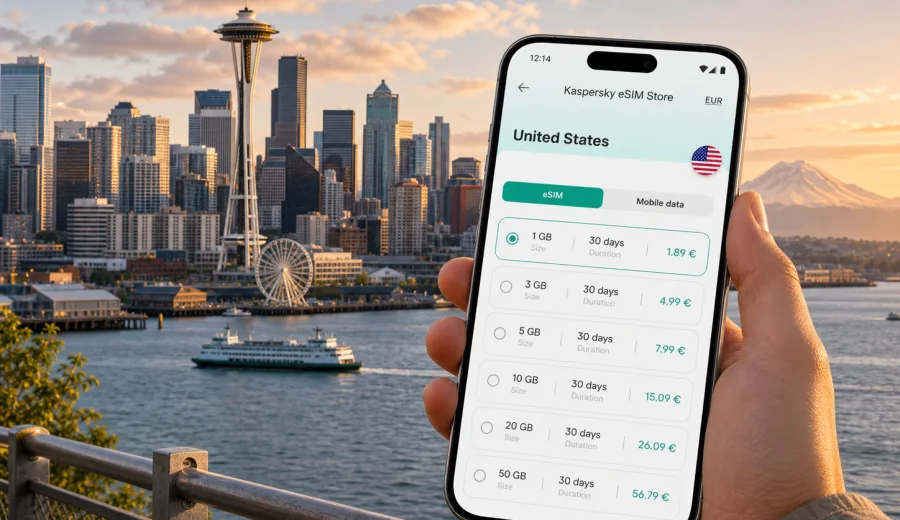
Seattle eSIM: mobile connection and internet for your trip
Seattle is a city where mobile internet quickly becomes part of the travel plan. You may need maps as soon as you leave Seattle-Tacoma International Airport, a rideshare code at the curb, a light rail schedule before heading downtown, or a messaging app when your hotel room is not ready yet. An eSIM can make those first steps easier because it lets you prepare mobile data for the United States without looking for a physical SIM card after arrival.
This guide focuses on Seattle travel scenarios: airport arrival, public transport, downtown walks, waterfront plans, business meetings, hotel stays, ferry trips, and short routes to nearby places in Washington State. It also explains how to choose an eSIM tariff, what to check before purchase, and how Kaspersky eSIM Store can help you choose, arrange, and activate an eSIM with a suitable mobile data plan for an international trip.
Why mobile internet matters in Seattle
Seattle is easy to explore, but it is not a city where every traveler follows one simple route. Some visitors stay around Downtown, Belltown, South Lake Union, and Capitol Hill. Others move between the waterfront, Pike Place Market, the Space Needle, university areas, cruise terminals, business districts, and ferry piers. Many trips also include Bellevue, Redmond, Tacoma, Bainbridge Island, or Mount Rainier day plans.
Reliable mobile data helps with practical decisions throughout the day:
- checking real-time public transport information;
- opening QR codes for hotel, event, ferry, or attraction bookings;
- using maps between hilly neighborhoods and waterfront streets;
- calling a rideshare after a late arrival;
- messaging colleagues or family across time zones;
- checking weather changes before a ferry ride or outdoor walk;
- using mobile boarding passes for onward flights or cruises.
Seattle also has many places where you may be tempted to rely on public Wi-Fi: airport lounges, hotels, cafes, conference venues, coworking spaces, and shopping centers. Public Wi-Fi can be useful, but it is not always available exactly when you need it. With an eSIM data plan ready on your compatible phone, you can reduce your dependence on open networks and keep essential travel apps available while moving around the city.
Arrival at Seattle-Tacoma International Airport
Seattle-Tacoma International Airport is the usual entry point for international visitors and domestic connections. The first hour after landing often includes immigration, baggage, transport decisions, and hotel coordination. This is also the moment when mobile data is most useful: you may need to confirm an address, check a train route, message your host, or find the correct pickup area.
If you have already installed your eSIM before travel, you can switch to the eSIM profile after landing and use mobile data once the device registers on a local network. Activation time and behavior depend on the selected tariff, the device, and local network conditions, so it is better to prepare the setup calmly before you stand at the airport curb.
Common arrival uses include:
| Arrival task | Why mobile data helps |
|---|---|
| Finding the Link light rail station | Airport signs help, but maps and schedules make the route clearer |
| Booking a rideshare | Pickup areas and wait times can change during busy hours |
| Contacting a hotel | Late check-in, shuttle pickup, and address details are easier to confirm online |
| Checking onward plans | Cruise transfers, business meetings, or domestic flights may need quick updates |
| Sharing your arrival | Messaging apps can replace ordinary calls if your eSIM tariff is data-only |
For travelers who are tired after a long flight, the biggest benefit is not drama or speed; it is control. You can see your route, check timing, and avoid making every decision from memory or airport signs alone.
Getting around the city with an eSIM
Seattle combines walkable areas, steep streets, public transport, ferries, rideshares, and regional routes. Mobile internet helps because the best transport choice can change depending on weather, time of day, luggage, and where you are staying.
For many visitors, Link light rail is useful between the airport, Stadium, Pioneer Square, University Street, Westlake, Capitol Hill, University of Washington, and Northgate. Buses fill in routes between neighborhoods. The Seattle Center Monorail can be useful around downtown and the Space Needle. Ferries connect the city to scenic routes such as Bainbridge Island. Rideshares and taxis are still useful late at night, with luggage, or when you need a direct route.
An eSIM does not replace planning, but it supports the small checks that make movement easier:
- live maps when walking from Pike Place Market to the waterfront;
- transit arrival times near Westlake, Capitol Hill, or University District;
- ferry schedules before leaving for the pier;
- rideshare pickup coordination outside hotels and venues;
- weather checks before long walks or viewpoint stops;
- restaurant booking confirmations while you are away from hotel Wi-Fi.
Seattle's hills can also make navigation less obvious than it looks on a flat map. A route that seems short may involve stairs, slopes, or a less convenient crossing. Mobile maps help you compare walking, transit, and rideshare options before you commit.
Where eSIM is useful by neighborhood
Seattle city trips often move across several areas in one day. A practical mobile data plan can help you avoid searching for Wi-Fi between stops.
| Area | Typical travel scenario | Mobile internet use |
|---|---|---|
| Downtown and Belltown | Hotels, offices, restaurants, shopping | Maps, bookings, rideshares, meeting updates |
| Pike Place Market and waterfront | Walking, food stops, ferries, photos | Navigation, payment apps, ferry times, cloud backup |
| Seattle Center | Space Needle, museums, events | Tickets, maps, messaging, transport after events |
| Capitol Hill | Cafes, nightlife, music venues | Rideshares, venue information, group coordination |
| South Lake Union | Business trips, tech offices, hotels | Calendar changes, video calls over suitable data, route checks |
| University District | Campus visits, conferences, medical trips | Maps, schedules, messages, transit |
| Ballard and Fremont | Local restaurants, markets, evening plans | Navigation, table reservations, rideshare timing |
The right amount of data depends on how you travel. A short stopover with maps and messaging uses less than a week of heavy navigation, laptop tethering, social media uploads, and video calls. Before buying any tariff, check the data allowance, validity period, destination coverage, and whether the plan conditions match your route.
Choosing an eSIM tariff for Seattle
Seattle is in the United States, so a city article should point you to a United States eSIM option rather than a separate city-only plan. The country is what matters for the destination tariff; the city helps you understand how you will use mobile data.
Start with three questions:
1. How long will you stay in Seattle?
2. Will you travel beyond Seattle to Bellevue, Redmond, Tacoma, national parks, or another U.S. city?
3. How much data will you use for maps, messaging, browsing, work, and media?
For a weekend in Seattle, a smaller data allowance may be enough if you mainly use maps, messaging, email, and occasional browsing. For a longer trip, a business stay, or a route that includes several U.S. cities, choose a tariff with a validity period and data volume that matches the full trip, not only the first day.
Kaspersky eSIM Store helps you review available tariff details before you arrange the eSIM: destination, data volume, validity period, and price. It is still important to read the conditions of the selected tariff because eSIM data plans can differ in when validity begins, whether top-up is available, and what happens after the data allowance is used.
For Seattle, the practical choice is usually a United States tariff. After you have checked your route and estimated your data needs, you can choose an eSIM tariff for your Seattle trip and prepare mobile internet before you fly.
How much data might you need?
There is no single correct answer because travelers use mobile data differently. A person who uses hotel Wi-Fi in the evening and mobile data only for maps will need less than someone who uploads video, works from cafes, or uses the phone as a hotspot.
Use this as a planning guide rather than a guarantee:
| Travel style | Typical mobile data behavior | What to consider |
|---|---|---|
| Stopover or one-night stay | Maps, messaging, rideshare apps, boarding passes | A smaller allowance may be enough |
| City break | Maps, restaurant searches, tickets, photo sharing | Choose data for several active days |
| Business trip | Email, calendar, file access, messaging, occasional calls over apps | Check validity and allow extra data for changes |
| Remote-work stay | Video calls, cloud tools, tethering | Consider a larger allowance and confirm hotspot needs |
| Regional route | Seattle plus Bellevue, Tacoma, ferries, parks, or another state | Choose coverage and validity for the full route |
Avoid planning only for perfect conditions. If your flight is delayed, your hotel Wi-Fi is weak, or you need to rebook transport, extra mobile data can be useful. At the same time, there is no need to overstate the product: an eSIM tariff is a practical travel data option, not a promise that every location, device, or local network condition will behave the same way.
Check device compatibility before buying
Before choosing any eSIM tariff, confirm that your phone or tablet supports eSIM and is not locked by a mobile carrier. This step is especially important if your device was bought through an operator, is older, or has different regional variants.
Use the compatibility check before purchase: check your device. You should also make sure you can access the device settings needed to add an eSIM profile and choose which SIM profile handles mobile data.
Quick checklist:
- your device supports eSIM;
- your device is not carrier-locked in a way that blocks another eSIM profile;
- you have a stable internet connection for installation;
- you understand when the tariff validity period starts;
- you know whether data roaming must be enabled for the eSIM profile;
- you have kept your primary SIM active if you still need your usual number for calls or SMS.
If your eSIM tariff is data-only, keep your regular SIM or another method available for ordinary calls and SMS if you need them. Many travelers use the eSIM for mobile internet and keep their main SIM for banking messages or incoming calls, depending on roaming settings and costs.
How to install and activate an eSIM
The exact steps depend on your device and operating system, but the general flow is straightforward: choose the destination tariff, arrange the eSIM, install the eSIM profile, and select it for mobile data when you are ready to use it. Kaspersky eSIM Store shows the eSIM in your profile or app after purchase, and you can follow the setup flow for your device.
For detailed setup steps, use the official installation guides for Android and iOS. Read the instructions before departure if you want to avoid doing everything on airport Wi-Fi.
A practical setup sequence for Seattle:
1. Check that your device supports eSIM and is unlocked.
2. Choose a United States tariff with suitable data volume and validity.
3. Install the eSIM profile while you have a stable connection.
4. Keep your primary SIM settings unchanged if you still need your usual number.
5. After landing in Seattle, select the eSIM profile for mobile data.
6. Enable data roaming for the eSIM profile if the plan instructions require it.
7. Test maps, messaging, and browser access before leaving the airport.
Do not delete an eSIM profile casually after installation. Some profiles cannot be transferred or reinstalled on another device after activation, depending on the tariff and profile conditions.
FAQ: eSIM for Seattle travel
Is there a separate Seattle eSIM?
Usually, travelers choose a United States eSIM tariff for a Seattle trip. The city helps define your use case, but the destination plan is normally based on the country or region.
Can I use eSIM for calls and SMS in Seattle?
Many travel eSIM tariffs focus on mobile data and do not include an ordinary phone number, voice calls, or SMS unless the selected tariff states otherwise. You can use internet-based calling and messaging apps when mobile data is active.
Should I install the eSIM before flying?
Installing before departure is often convenient because you can use a stable home or office connection and avoid airport pressure. Check the tariff conditions so you understand when validity starts and when data usage begins.
Will eSIM replace hotel Wi-Fi?
Not necessarily. Hotel Wi-Fi can still be useful for large downloads or laptop work. eSIM is most useful as mobile data while you move around Seattle and as a backup when Wi-Fi is unavailable or inconvenient.
What if I visit Canada after Seattle?
Check the tariff coverage before crossing the border. A United States tariff should not be treated as Canada coverage unless the plan conditions clearly include it. For cross-border routes, review a regional or additional country option if available.
Prepare mobile internet for Seattle before you travel
Seattle is a city where mobile data helps from the first airport decision to the last ferry schedule, meeting update, or hotel transfer. With an eSIM on a compatible device, you can prepare mobile internet for your trip without searching for a physical SIM card after arrival.
Kaspersky eSIM Store helps you choose, arrange, and activate an eSIM with a suitable tariff for mobile data in an international trip. Before you buy, check device compatibility, read the tariff conditions, and choose data volume and validity for your real route through Seattle and the United States.
When your itinerary is ready, you can prepare an eSIM tariff for your Seattle and United States trip and keep maps, transport apps, bookings, and messages available while you travel.