Travel connectivity guide
Senado Square eSIM Guide for Macao Travel
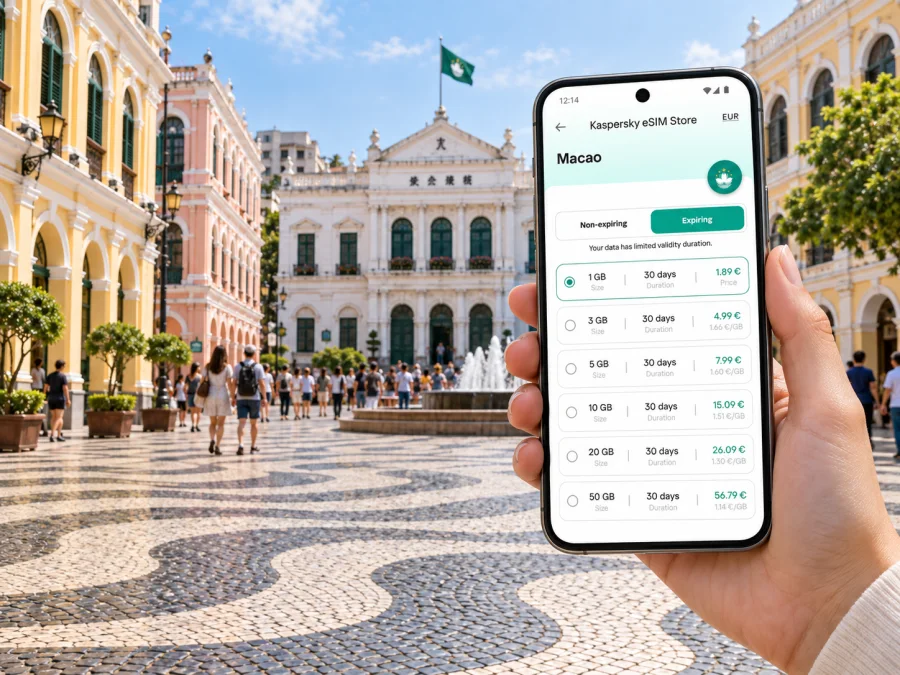
Senado Square eSIM: Mobile Connection and Internet for Your Visit
Senado Square is a practical starting point for exploring Macao’s historic centre. Its wave-pattern pavement, pastel façades and nearby landmarks invite a slow walk, but finding a hotel, choosing the next lane or arranging a meeting still takes useful mobile data. A connection helps you check maps, confirm addresses, message companions and adjust when plans change.
An eSIM can prepare mobile data for an international trip without replacing your physical SIM. This guide covers arrival, nearby walks, onward transport, data planning and practical preparations.
Why mobile data matters around Senado Square
The historic centre is best explored as a series of short walks. You may check a map at a lane entrance, stop at a landmark, then continue by a different street. Mobile internet is useful for those transitions: orienting yourself, looking up a place, translating a sign or sending an update when plans change.
The Macao Government Tourism Office describes Senado Square as a long-standing urban centre and lists nearby sights including the IAM Building, General Post Office Building, Holy House of Mercy, Sam Kai Vui Kun (Kuan Tai Temple) and Lou Kau Mansion. The concentration of landmarks makes the square a useful meeting point, not just a photo stop.
The pavement’s wave pattern and the pastel-coloured buildings help with orientation, but side streets can look similar once you step away from the open square. Save your hotel pin and address, and keep essential booking details in an offline note. These simple backups help if your battery is low or data is temporarily unavailable.
A connection is especially useful when you need to:
- confirm the route from your arrival point to a hotel near the historic centre;
- check a pedestrian route between the square and another landmark;
- share a meeting point when your group separates;
- compare current transport options before leaving the old town;
- message your accommodation or travel party after a change of plan.
Use the map as a guide, then look up from the screen and follow visible signs and landmarks.
Walk the historic centre in manageable sections
Use Senado Square as a start and return point, then plan the old town in short legs. One flexible sequence is to explore the square, visit one or two nearby civic or religious buildings, continue towards the lanes leading to the Ruins of St. Paul’s, and return by another street. The right order depends on opening times, crowd levels and your pace.
Do not assume that a straight line on a map is the easiest pedestrian route. Historic streets can turn, narrow or rise. Check the walking directions before setting out, then confirm them with street signs and landmarks. If you are carrying luggage, travelling with someone with limited mobility, or visiting in hot weather, allow extra time and choose a route with fewer steep sections.
| Starting point or need | A useful way to plan |
|---|---|
| Senado Square | Save it as a pin and use it as a return point. |
| Nearby landmark | Search its full name and check pedestrian directions. |
| Hotel in the old town | Save the exact address and entrance, not just the property name. |
| A meal or break | Pin the venue before leaving the square. |
| Destination farther away | Compare current bus, taxi and other options before departing. |
A practical navigation routine
- Save the square, your hotel and the day’s main destination in your map app.
- Check the route while you have a stable connection and enough battery.
- Confirm turns with street signs; do not rely on the location dot alone.
- Agree on a clear meeting point if the group splits up.
- Stop somewhere safe before reading messages or changing the destination.
A flexible plan with one main destination and one optional stop is easier to adapt than a packed schedule. Save essential information in advance, then use a live connection for updates.
Getting to the square and moving onward
Senado Square is in Macao’s peninsula historic centre. Visitors arrive from several points, including the airport, ferry terminals and land-border crossings. The best route depends on arrival point, time, luggage and accommodation. Check current information for your journey because routes and operating hours can change.
Public buses connect the Macao Peninsula with Taipa and Coloane. Check a current route planner for a suitable boarding point; a walk from the stop may be part of the journey. With bags or a late arrival, compare the full route, including walks at both ends.
Walking is often simplest for close historic-centre sights. A taxi can be practical with luggage or a tight schedule. For a longer trip, check whether a bus or a rail connection from another part of Macao fits your route; do not assume a transport mode serves every landmark directly.
Before leaving the square, confirm the destination name, direction and stop or pickup point. Zoom out to review the whole journey, especially when travelling between the old town and modern resort areas.
- Walking: suits nearby streets; consider heat, rain, slopes and footwear.
- Bus: confirm the current route, stop and payment arrangement before boarding.
- Taxi: save or write down the destination to show the driver.
- Mixed journey: allow time for the final walk from a stop or drop-off point.
For a short stopover, a direct transfer and a relaxed walk around Senado Square may be more realistic than crossing Macao several times.
Choosing a data plan for a Senado Square visit
Estimate data use from your habits: maps and messages require a different allowance from video uploads, work calls or streaming. Choose a validity period that covers the stay and leave room for changes.
Kaspersky eSIM Store is an app and website where travellers can choose, arrange and activate an eSIM with a suitable plan for mobile data on an international trip. Review the selected plan’s destination, coverage, allowance, validity and activation conditions. For an itinerary centred on Senado Square, make sure the destination selection matches the whole trip, including any side journeys.
If you are visiting Macao, you can review eSIM options for Macao and compare the available data amounts and validity periods with your stay. A brief visit may call for a different allowance than several days with frequent video calls or uploads. The details shown when you select a plan are the ones to check, as options and conditions can vary.
| Travel pattern | Include in your estimate |
|---|---|
| Short old-town walk | Maps, messages and occasional lookups. |
| Full sightseeing day | Repeated navigation, translation and group coordination. |
| Business visit | Email, documents, messaging and planned calls. |
| Stopover | Macao usage and any onward destination, if separately covered. |
| Frequent media uploads | Video and photo uploads can use more data than basic navigation. |
Actual usage varies with app settings, media quality and background syncing. Disable automatic video playback or large uploads to conserve data, and check usage in your phone settings.
Before you install an eSIM
Confirm that your device supports eSIM and is not restricted from adding another plan. Check whether your device supports eSIM before choosing. Availability can vary by model, region and configuration.
Review the plan’s destination, allowance, validity and activation instructions. Installing a profile and beginning its validity may be separate steps, so check the selected plan’s terms before deciding when to activate it.
An eSIM intended for mobile data may not include a regular phone number, voice calls or SMS unless the plan says so. You can select which line handles mobile data in your phone settings. If you keep your home line available for calls or verification messages, review your home provider’s roaming terms to avoid unexpected charges.
Set up before leaving, then check on arrival
Prepare over a reliable Wi-Fi connection and follow the instructions for your device: eSIM setup instructions for Android or eSIM setup instructions for iOS. Menu labels vary by device and software version, so use the steps for your model and plan.
- Confirm eSIM support and device restrictions.
- Choose a Macao plan that fits your dates and expected use.
- Read its installation and activation conditions.
- Add the profile and label it clearly, such as “Macao data.”
- Check which line is selected for mobile data and confirm activation as directed.
- On arrival, try loading a map or sending a message.
If it does not connect, check the selected data line, relevant settings and activation conditions before taking further action. Follow the plan instructions or contact customer support. Avoid deleting the profile unless the support guidance directs you to do so.
Where to stay for easy access to Senado Square
A hotel near the historic centre can simplify early walks and returns, but accommodation across Macao offers different trade-offs. Choose according to your full itinerary, luggage, transport access and accessibility needs. Check the property’s exact entrance and walking route: a short straight-line distance may involve slopes, stairs or a less convenient approach with bags.
Save the property’s full name and address, and check how it recommends travelling from your arrival point. If you stay farther away for easier onward connections, plan the first and last legs in advance and keep the hotel pin available offline. Proximity to the square is useful, but your schedule and mobility matter too.
For a business trip or a short stopover
For a meeting near the historic centre, save the venue, hotel and pickup point before the day begins. Leave time to find the correct entrance and walk through busy streets. Keep essential documents available offline where appropriate, and use mobile data for changes such as a revised meeting location or delayed transfer.
On a stopover, decide in advance whether Senado Square fits the available time. Include the return trip and the procedures required for your onward journey. A focused visit to the square and one nearby landmark may be more comfortable than trying to cover distant districts. Keep departure details separate from your sightseeing map so they are easy to find.
For an important online meeting, confirm your setup and identify a backup Wi-Fi location. Connection quality depends on the plan, device, app and surroundings.
A compact day plan from Senado Square
Start: arrive with the hotel and map pins saved. Walk through the square, then choose a nearby historic site or lane. Check opening details before setting out rather than assuming every venue has the same schedule.
Midday: take a break and decide whether to continue to another nearby landmark or return to the square. Review messages and the next route while paused. If the area is busy, move to a quieter street before checking the map.
Later: stay in the old town or travel to another part of Macao. Confirm current transport options before leaving. If you have luggage or a fixed departure, make the return route the priority.
This outline should stay flexible. Weather, opening hours, crowds and your own pace may change the order. Keep one optional stop instead of filling every hour.
A short checklist before the trip
- [ ] Save Senado Square, your hotel and your arrival point in your map app.
- [ ] Check current transport details for your specific arrival time and terminal.
- [ ] Confirm eSIM support and any device restrictions before selecting a plan.
- [ ] Compare the plan’s destination, validity, data allowance and activation terms.
- [ ] Install the profile with the appropriate Android or iOS instructions.
- [ ] Keep booking details and the onward journey available offline as a backup.
Frequently asked questions
Is Senado Square a useful base for the historic centre?
Yes. It is a prominent public square surrounded by historic buildings and close to several Macao heritage sights. Use it as a reference point for walking and meeting companions, and check individual access details on the day.
Do I need mobile internet to visit?
No. A connection is useful for navigation, practical details and coordinating plans, but you can save essential information in advance as a backup.
Can an eSIM support maps and messaging?
A mobile-data eSIM can support internet-based maps and messaging when the plan is active and connected. Check the plan terms; data service does not necessarily include a standard number, calls or SMS.
Will one plan cover the whole itinerary?
Check the destinations and coverage listed for the plan. Do not assume a Macao plan automatically covers another destination on an onward trip.
When should I activate it?
Follow the selected plan’s activation conditions. Read them before installation, as validity may begin according to plan-specific rules.
What if it does not connect?
Check the selected data line, eSIM settings and activation conditions. Follow the plan instructions or contact support; do not remove the profile unless instructed.
Prepare your connection for Senado Square
A little preparation makes the historic centre easier to navigate: save the square and hotel, review your arrival route, and choose a data allowance that fits the way you travel. Kaspersky eSIM Store’s app and website let you choose, arrange and activate an eSIM plan for mobile data on an international trip. Review the destination, validity and activation details, then choose an eSIM plan for your visit to Macao before you set out.


