
Travel connectivity guide
Senegal eSIM: mobile internet for travel
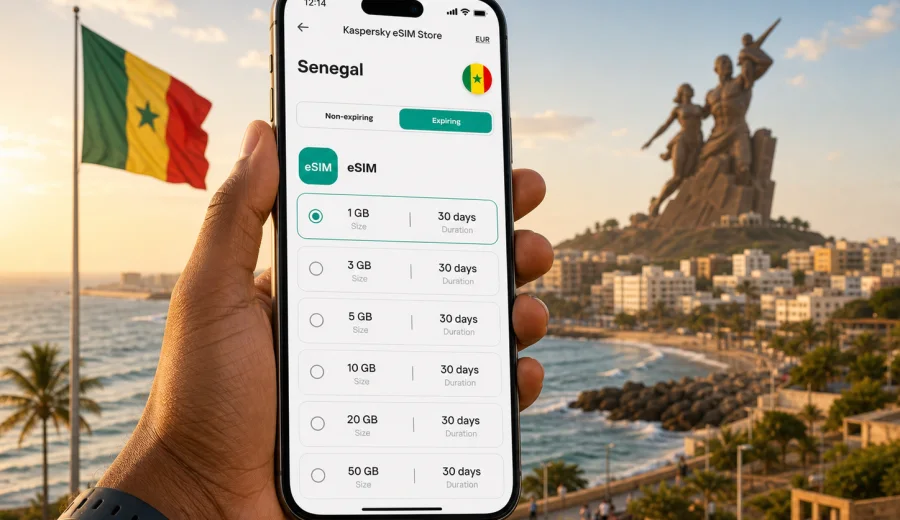
eSIM in Senegal: mobile connection and internet for your trip
Senegal is a country where mobile internet quickly becomes part of the travel plan. You may need maps when leaving Blaise Diagne International Airport, a messenger for a hotel transfer in Dakar, a ride-hailing app in the city, or email access during a business visit. If your phone supports eSIM, you can prepare a digital SIM profile before the trip and use a suitable data plan for mobile internet without looking for a physical SIM card after arrival.
This guide explains how to think about eSIM for Senegal: when it is useful, what to check before buying a plan, how to estimate data needs, how installation works, and what limitations are worth knowing in advance.
Why eSIM can be useful in Senegal
An eSIM is a digital SIM profile built into a compatible smartphone, tablet, or laptop. Instead of inserting a plastic SIM card, you add an eSIM profile to the device, select it for mobile data, and use the internet through the chosen plan when the profile is active and local network conditions allow connection.
For a trip to Senegal, eSIM can be convenient because it helps you prepare mobile data before your route starts. This matters if you land late, have a tight transfer, or do not want to spend your first hour searching for a local SIM counter. It is also helpful if you want to keep your main SIM active for banking messages or calls while using a separate data profile for travel.
Common situations where eSIM helps:
- arriving at Blaise Diagne International Airport and needing maps, taxi details, or hotel directions;
- moving between Dakar, Saint-Louis, Saly, Thies, Touba, or the Casamance region;
- using translation, booking, restaurant, and payment apps during the day;
- sharing a location with family or colleagues;
- working remotely for short sessions from a hotel, cafe, or office;
- reducing dependence on public Wi-Fi in airports, hotels, and restaurants.
eSIM is not a magic replacement for every connectivity option. It is a practical way to arrange mobile internet for travel when your device is compatible and the selected plan fits your route, duration, and expected data use.
What to know before choosing a Senegal eSIM plan
The best plan is not always the largest one. It is the plan that matches how long you will stay, how much mobile data you expect to use, and how much you will rely on the phone away from Wi-Fi.
Use these questions before you choose:
| Question | Why it matters |
|---|---|
| How many days will you stay in Senegal? | The plan validity should cover your full trip, including arrival and departure days. |
| Will you stay mainly in Dakar or travel across regions? | Wider routes usually mean more frequent map, transport, and messaging use. |
| Do you need video calls or remote work? | Video meetings, cloud files, and tethering can use data quickly. |
| Will your hotel or workplace have reliable Wi-Fi? | Good Wi-Fi can reduce how much mobile data you need. |
| Do you need your regular phone number active? | Dual SIM settings let many travelers keep their primary SIM for calls or messages and use eSIM for data. |
In general, a light traveler may use mobile data for maps, messengers, bookings, and occasional browsing. A heavier user may need more data for video calls, social media uploads, hotspot use, and work apps. If you are unsure, choose a plan with enough headroom for the days when Wi-Fi is weak or unavailable.
Data planning for typical Senegal travel scenarios
Data use depends on your apps, settings, and habits, but the following examples can help you estimate a sensible starting point.
| Trip style | Typical mobile internet needs | Planning tip |
|---|---|---|
| Weekend in Dakar | Maps, chat, restaurant searches, transport apps | A smaller data plan may be enough if the hotel Wi-Fi is reliable. |
| One-week leisure trip | Daily maps, photos, social media, bookings, messaging | Choose enough data for travel days and evenings away from Wi-Fi. |
| Business visit | Email, calendar, calls, document sharing, hotspot use | Allow more data if you join video meetings or use your laptop through tethering. |
| Multi-city route | Navigation, intercity transport, accommodation changes | Pick a plan that covers the full validity period and leaves extra data for map use. |
| Remote work stay | Video calls, cloud tools, file uploads, team chats | Check plan conditions carefully and avoid relying on mobile data as your only connection for large workloads. |
To reduce unnecessary data use, download offline maps before departure, set cloud photo backup to Wi-Fi only, disable automatic app updates, and keep video streaming on lower quality when using mobile data. These small changes can make a moderate data package last longer.
Device compatibility comes first
Before you buy any travel eSIM, confirm that your device supports eSIM and is not locked to a single mobile operator. A compatible phone is essential: if the device cannot add an eSIM profile, the plan cannot be installed on that phone.
Check your device before purchase, especially if you use an older smartphone, a model bought through a carrier contract, or a device variant made for a specific market. Some phones with the same commercial name may have different eSIM support depending on region and model number.
Also check these points:
- the device software is up to date;
- you know where mobile data and SIM settings are located;
- you have a stable internet connection for installation;
- you can receive email or open the account where the eSIM details will appear;
- you understand whether the eSIM can be reinstalled if removed from the device.
If you use dual SIM, decide in advance which SIM should handle mobile data, calls, and messages. Many travelers keep their home SIM active for calls or banking codes and set the travel eSIM as the data line.
How to install and activate eSIM for Senegal
The exact steps depend on your phone model, but the flow is usually simple. You choose a destination and plan, complete the order, install the eSIM profile on a compatible device, and select that profile for mobile data. Installation can be done before departure while you still have stable Wi-Fi, but you should read the plan conditions to understand when validity or data use starts.
For device-specific steps, use the official setup guides: Android installation guide and iOS installation guide.
A practical setup checklist:
1. Confirm that your phone supports eSIM and is unlocked.
2. Choose Senegal as your destination and review plan validity, data volume, and conditions.
3. Install the eSIM profile using the on-screen instructions or QR code.
4. Keep your primary SIM active if you still need calls or SMS on your regular number.
5. Set the eSIM as the mobile data line when you are ready to use it.
6. Enable data roaming for the eSIM profile if the instructions or your device require it.
7. Test basic internet access after arrival and restart the phone if the connection does not appear at first.
Do not delete the eSIM profile unless you are sure you no longer need it. Some eSIM profiles may not be transferable to another phone after activation, and reinstall conditions depend on the selected plan.
Where Kaspersky eSIM Store fits in
Kaspersky eSIM Store is an app and website where you can quickly choose, arrange, and activate an eSIM with a suitable data plan for mobile internet during an international trip. The useful part for Senegal travel is that you can review the destination, data volume, validity period, and price before you rely on the plan on the road.
When you are ready to compare options, you can choose an eSIM data plan for Senegal and prepare mobile internet before departure or before your next stage of the trip. Check the plan details carefully and match them to your device, length of stay, and expected data use.
Kaspersky eSIM Store should be understood as a convenient way to select and manage an eSIM plan for travel. It is not a mobile operator, does not replace a local telecom network, and does not turn eSIM into a VPN or anonymity tool. The goal is simpler: help you prepare mobile internet for a foreign trip with clear steps and visible plan conditions.
Senegal travel routes where mobile data matters
Senegal trips often combine city movement, coast, culture, and regional travel. In Dakar, mobile data helps with maps, traffic, hotel messages, and transport. Around Saly, Somone, Mbour, Saint-Louis, Touba, or Casamance, it is useful for longer navigation sessions, accommodation updates, and staying in touch during intercity movement.
For business travelers, data is often about reliability during a schedule: calendar changes, meeting locations, document access, and messages with local partners. For families, it can make it easier to coordinate separate plans without depending on one hotel Wi-Fi network.
eSIM, roaming, public Wi-Fi, and local SIM: how they compare
There is no single option that is best for every traveler. The right choice depends on your phone, budget, route, and how much time you want to spend arranging connectivity.
| Option | Strengths | What to check |
|---|---|---|
| Travel eSIM | Can be prepared before or during the trip, no plastic SIM card, useful for data-first travel | Device compatibility, plan validity, data volume, activation conditions |
| Standard roaming | Uses your existing SIM and number, simple for short occasional use | Daily fees, data limits, speed rules, roaming settings from your home operator |
| Local physical SIM | May suit longer stays or people who need local voice services | Store availability, registration rules, language, device SIM slot, time needed after arrival |
| Public Wi-Fi | Useful in hotels, cafes, offices, and airports | Availability, stability, privacy, speed, whether you need internet while moving |
For many short and medium trips, eSIM works well as the main mobile data option. You can still use hotel Wi-Fi for large downloads or long video calls, and keep roaming disabled or limited if you want to avoid unexpected charges from your home SIM. Before traveling, review your phone settings so mobile data uses the eSIM profile and not the wrong SIM.
Practical checklist before departure
Use this checklist a day or two before your flight:
- Confirm your phone supports eSIM and is not carrier-locked.
- Review the selected plan for Senegal: data volume, validity, price, and activation rules.
- Install the eSIM profile while you have stable Wi-Fi, if the plan allows early installation.
- Save installation details somewhere accessible offline.
- Turn off automatic app updates over mobile data.
- Download offline maps for Dakar and any regions on your route.
- Set photo and video backup to Wi-Fi only.
- Decide whether your main SIM should stay active for calls and SMS.
- Check that you know how to switch the mobile data line on your device.
- Keep the support contact or help section available in case setup questions appear.
This preparation does not take long, but it reduces pressure on arrival. You can leave the airport with maps and messaging ready instead of depending on the first Wi-Fi network you find.
FAQ about eSIM and mobile internet in Senegal
Can I install eSIM before I travel to Senegal?
In many cases, you can install the eSIM profile before departure while connected to stable Wi-Fi. Read the plan terms before doing this, because activation and validity rules can differ. Some plans start counting validity after installation, while others start after connection in the destination.
Does eSIM give me a Senegal phone number?
Travel eSIM plans are usually designed for mobile internet. They typically do not include a local phone number, standard voice calls, or SMS unless the selected plan says otherwise. You can use messengers and internet calling apps over mobile data.
Can I keep my normal SIM active?
Many modern phones allow dual SIM use, so you can keep your main SIM active and use eSIM for mobile data. Check your device settings carefully to avoid using roaming data on the wrong SIM.
Is eSIM always cheaper than roaming?
Not always. Costs depend on your home operator, roaming package, trip length, and the eSIM plan you choose. eSIM can be a practical alternative because you see the data volume, validity, and price before selecting the plan.
What if I travel beyond Senegal?
If your route includes more countries, check whether a country-specific plan is enough or whether a regional plan better matches your itinerary. Do not assume that a Senegal plan covers neighboring countries unless the plan details say so.
Do I need Wi-Fi to install eSIM?
You need an internet connection to download and install the eSIM profile. Stable Wi-Fi is usually the easiest option. After installation and activation, the eSIM can be used for mobile data according to the selected plan conditions.
Choose your eSIM data plan for Senegal
A little preparation makes mobile internet in Senegal easier to manage. Check that your device supports eSIM, choose a data volume and validity period that match your route, install the profile with stable internet, and set the eSIM as your mobile data line when you are ready to use it.
With Kaspersky eSIM Store, you can review available options and prepare an eSIM data plan for your trip to Senegal before you leave or before the next part of your journey. Use it as a practical travel step: choose the destination, read the plan details, install the eSIM on a compatible device, and keep mobile internet ready for maps, messages, bookings, and everyday travel tasks.