
Travel connectivity guide
Sengkurong eSIM for Travel Internet
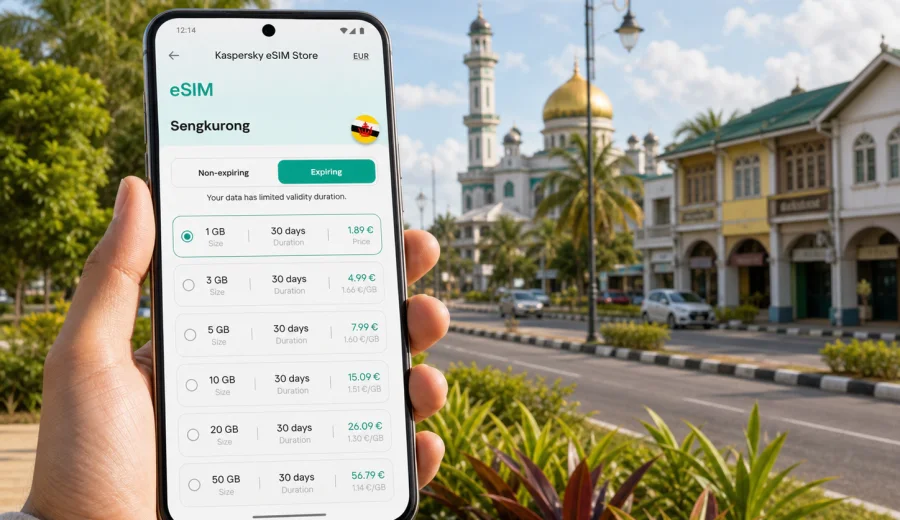
Sengkurong eSIM: mobile connection and internet for Brunei travel
Sengkurong is a practical base for a trip to Brunei Darussalam: close enough to Bandar Seri Begawan for meetings, shopping and airport transfers, yet quieter and more residential than the central districts. You may move between Sengkurong, Jerudong, Gadong, Kiulap, hotels, family homes, offices and coastal routes. In that kind of trip, mobile internet keeps maps, rides, messaging, bookings and work tools usable.
An eSIM can make this easier because you do not need to look for a physical SIM card after landing or swap tiny cards between flights, hotel check-in and the first ride. With a compatible phone, you can install a digital SIM profile and use a data plan for Brunei Darussalam while keeping your regular SIM in place for your usual number, if your device settings support that combination.
This guide focuses on Sengkurong rather than Brunei in general. It is written for travellers who need data for local movement, navigation, business stays, family visits, hotel-based work, stopovers and trips from Sengkurong to nearby parts of Brunei-Muara District.
Why mobile internet matters in Sengkurong
Sengkurong is not a dense old-city destination where every essential stop is one street away. It is a spread-out area of homes, local businesses, roads, schools, shops and connections toward other Brunei-Muara districts. Visitors often depend on a car, hotel transfer, ride arrangement or family pickup. That makes mobile data useful from the moment you arrive.
Typical travel moments where an eSIM helps:
- checking your pickup point after arriving at Brunei International Airport;
- sending your live location to a host, colleague or driver;
- using maps between Sengkurong, Jerudong, Gadong and central Bandar Seri Begawan;
- confirming hotel details, meeting locations and restaurant bookings;
- translating signs, addresses or short messages when needed;
- joining video calls from a hotel or serviced apartment;
- using messaging apps instead of relying on voice calls or SMS;
- checking traffic before moving across town for an appointment;
- keeping boarding passes and travel documents accessible online.
Public Wi-Fi can be useful in hotels and cafes, but it is not a full travel plan. You still need data between those places: on the road, during a pickup, or when you are trying to find the right entrance to a venue.
Arrival scenarios: from airport to Sengkurong
Most international visitors reach Sengkurong after landing in Brunei-Muara District and continuing by car or arranged transfer. The first hour is often when mobile internet is most valuable: you may be tired, carrying bags, and trying to coordinate with someone who is not standing directly in front of you.
Before leaving the airport, you may need to:
1. Message your host or driver.
2. Confirm the address in Sengkurong.
3. Open a map and check the route.
4. Share your location if the pickup point changes.
5. Review hotel check-in instructions.
6. Check whether you need cash, a card or a stored address for the next stop.
If you rely only on airport Wi-Fi, the connection may end as soon as you leave the terminal area. Installing an eSIM before the trip, or preparing it so it can be activated after arrival, keeps that first transfer simpler.
Local movement around Sengkurong
Sengkurong works best when you think in routes rather than single landmarks. You might sleep near Sengkurong, attend a meeting elsewhere, visit a mall, stop in Jerudong, and return through a different road in the evening. Data planning matters because many small tasks happen while you are moving.
| Situation in Sengkurong | Why data helps | Practical tip |
|---|---|---|
| Airport transfer | You may need pickup updates, maps and messaging | Activate data before leaving the terminal area |
| Hotel stay | Hotel Wi-Fi may not cover errands or rides | Keep mobile data ready for movement outside the property |
| Business visit | Meeting locations can change during the day | Save addresses and keep calendar alerts online |
| Family visit | You may travel between homes, shops and restaurants | Use location sharing to reduce repeated directions |
| Short stopover | Time is limited and delays matter | Preload maps, but keep data for live updates |
| Trip to Jerudong or Gadong | Routes may involve several stops | Check traffic and parking details before leaving |
The key point is not that you will use heavy data every minute. It is that small online actions at the right moment can prevent wasted time.
How much data do you need for a Sengkurong trip?
Your data use depends on how you travel. A quiet family visit with hotel Wi-Fi will use less data than a work trip with calls, hotspot use and constant maps. Estimate by activity, not by city name alone.
Light use may include maps, messaging, email and occasional browsing. Moderate use adds social media, photo sharing, transport apps, online payments and regular hotel-to-meeting navigation. Heavy use includes video calls, cloud documents, laptop tethering and streaming.
Use this rough planning table:
| Trip style | Likely data pattern | What to consider |
|---|---|---|
| 1-2 day stopover | Maps, messaging, booking checks | A smaller short-validity plan may be enough |
| 3-5 day visit | Daily navigation, photos, searches, messages | Choose a plan with room for unplanned movement |
| Business trip | Email, calendars, calls, cloud files | Check whether hotspot use is allowed by the selected plan |
| Family trip | Several phones, shared photos, maps | Each traveller may need their own eSIM-compatible device |
| Remote work stay | Video calls, documents, tethering | Pick more data and keep hotel Wi-Fi as a backup |
Avoid choosing only by the lowest price. A plan that is too small can become inconvenient if your hotel Wi-Fi is weak, your meetings move, or you need navigation more often than expected. At the same time, do not overbuy if most of your time will be spent in one home or office with reliable Wi-Fi.
eSIM for business trips to Sengkurong
Business travel around Sengkurong often includes movement between residential areas, offices, hotels and central Bandar Seri Begawan. A visitor may have only one or two days, so mobile data should be ready before the first meeting. Use it for email after landing, calendar updates, maps, cloud documents and messaging with local contacts.
Before the trip, review whether your work apps need multi-factor authentication. If a verification code depends on your regular SIM, keep that SIM available and avoid removing it from the device. Many phones allow a physical SIM and an eSIM profile to coexist, but the exact setup depends on the model and carrier lock status.
Using an eSIM without turning the trip into a tech task
An eSIM is useful because it should not become the main event of the trip. Handle preparation in order:
1. Check whether your phone supports eSIM.
2. Confirm that the device is not locked to one carrier.
3. Choose Brunei Darussalam as the destination.
4. Select a plan by data volume and validity period.
5. Install the eSIM profile while you have a stable internet connection.
6. Activate mobile data for the eSIM at the right time.
7. Keep your regular SIM settings under control so you do not create unwanted roaming costs.
Kaspersky eSIM Store is an app and website where you can choose, arrange and activate an eSIM with a suitable data plan for international travel. For a Sengkurong trip, the relevant destination is Brunei Darussalam, because the city article uses the country plan page rather than a separate city plan. Near the middle of your travel preparation, you can choose an eSIM plan for your trip to Sengkurong in Brunei Darussalam and compare the available data volume and validity options before you leave.
What to check before buying an eSIM plan
The most important checks are simple, but skipping them can cause friction after arrival.
Device compatibility
Not every smartphone supports eSIM. Some models support it only in certain regional versions, and some devices may be locked by a mobile carrier. Before buying a plan, use the compatibility check: Check your device.
You should also confirm:
- the phone is unlocked for mobile network use;
- your operating system is up to date enough for eSIM settings;
- you know where the mobile data and SIM settings are on your device;
- you can access email or your account during installation;
- you have a stable Wi-Fi connection for the installation step.
Plan conditions
Read the plan terms before choosing. Look at data volume, validity period, destination coverage, when validity starts, whether top-up is available, and whether tethering is allowed. eSIM plans for travel usually focus on mobile data. They do not necessarily include a local phone number, voice calls or SMS unless that is clearly stated in the conditions of the selected plan.
Travel route
If your whole trip is Sengkurong and nearby Brunei-Muara locations, a Brunei Darussalam plan may be the natural fit. If you will continue to another country in the region, check whether a regional option is more suitable before buying.
Installing the eSIM before or after arrival
Many travellers prefer to install the eSIM before departure while they have stable home Wi-Fi. That reduces pressure at the airport. You can then activate the eSIM according to the plan instructions when you are ready to use mobile data in Brunei Darussalam.
The exact steps vary by device, so follow the official setup path for your operating system. If you use Android, open the Android eSIM installation guide. If you use iPhone, follow the iOS eSIM installation guide. Keep the QR code or installation details accessible until setup is complete.
A practical setup sequence:
1. Connect to reliable Wi-Fi.
2. Install the eSIM profile using the instructions for your device.
3. Give the profile a clear name, such as "Brunei travel".
4. Keep your usual SIM as the default line for calls if you need it.
5. Set the eSIM as the mobile data line when you arrive or when the plan should start.
6. Turn on data roaming for the eSIM if the plan instructions require it.
7. Check that mobile data is working before leaving the airport or hotel.
Do not delete the eSIM profile after installation unless you are sure you no longer need it.
Sengkurong travel checklist for mobile internet
Use this checklist before you fly or before leaving your hotel for the day:
- Your phone supports eSIM and is unlocked.
- The eSIM profile is installed or ready to install.
- You know which SIM is used for mobile data.
- Roaming settings for the eSIM match the plan instructions.
- Offline maps are downloaded as a backup.
- Hotel address, host address and meeting address are saved.
- Messaging apps are logged in.
- Important documents are available offline as well as online.
- Battery saver and a power bank are ready for longer movement days.
- You have enough data for maps, messages and unexpected route changes.
This is especially useful in Sengkurong because your plans may involve several short drives rather than one long tourist route.
Practical data-saving tips in Sengkurong
An eSIM plan is easier to manage when you control background data. Download offline map areas before leaving Wi-Fi, pause automatic cloud photo backup on mobile data, disable automatic video playback, update apps only on Wi-Fi and monitor remaining data in your account or phone settings. For business trips, be careful with laptop tethering: one laptop video call can use far more data than a day of maps and messaging.
Route-based planning in Sengkurong
Sengkurong is often part of a wider Brunei-Muara route. A typical day may include central Bandar Seri Begawan for appointments, Jerudong for a family outing, and Gadong or Kiulap for errands, food and shopping. For a stopover, install the eSIM in advance, save the route, and reserve data for maps, messaging and booking checks.
FAQ: eSIM for Sengkurong
Is there a separate eSIM just for Sengkurong?
Usually you choose a plan for Brunei Darussalam rather than a city-only plan. Sengkurong is the travel focus, but the mobile data plan should match the country or region where you will use it.
Can I keep my usual phone number?
In many dual-SIM phones, you can keep your regular SIM active and use the eSIM for mobile data. Check which line handles calls, messages and mobile data before travelling.
Does an eSIM include calls and SMS?
Travel eSIM plans often focus on mobile data. Voice calls and SMS are not included unless the selected plan states otherwise. You can usually use internet-based messaging apps through mobile data.
What if my hotel Wi-Fi is good?
Hotel Wi-Fi is helpful, but it does not cover airport pickup, road movement, restaurant searches or meeting changes outside the building. Mobile data fills those gaps.
Final preparation before your Sengkurong trip
The best mobile internet setup for Sengkurong is the one you prepare before you urgently need it. Check device compatibility, choose a plan for Brunei Darussalam, install the eSIM on reliable Wi-Fi, and confirm your mobile data settings before the first transfer or meeting.
Kaspersky eSIM Store helps you choose, arrange and activate an eSIM with a suitable data plan for international travel. For a city trip focused on Sengkurong, you can prepare an eSIM plan for Brunei Darussalam in advance, keep your arrival smoother, and spend less time depending on public Wi-Fi or searching for a physical SIM after landing.