
Travel connectivity guide
eSIM Serbia: Mobile Connection and Internet
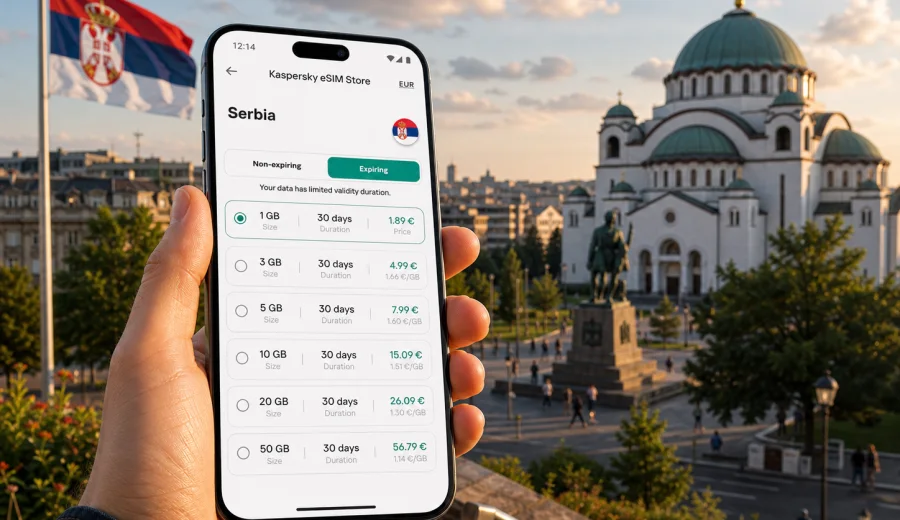
eSIM in Serbia: mobile connection and internet for your trip
Serbia is a country where mobile internet quickly becomes part of the travel plan. You may need maps after landing in Belgrade, a ride-hailing app at night, train times for Novi Sad, messages with a hotel in Niš, or translation while moving between neighborhoods. An eSIM can help you prepare mobile connection and internet before you start looking for a local SIM card or relying on public Wi-Fi.
An eSIM is a digital SIM profile installed on a compatible smartphone or tablet. For a trip to Serbia, it can be used for mobile data without inserting a physical SIM card. In Kaspersky eSIM Store, you can choose the destination, review the traffic allowance and validity period, then install and activate the eSIM on a compatible device. The exact conditions depend on the selected tariff, so it is worth checking the details before payment.
This guide explains how to use eSIM for Serbia, how to choose a data allowance, what to check before buying, and how to avoid common setup mistakes. The focus is practical: stable access to maps, messaging, bookings, transport apps, and work tools while you travel.
Why eSIM can be useful in Serbia
Serbia combines city travel, regional routes, and cross-border itineraries. A visitor may spend a weekend in Belgrade, continue to Novi Sad, visit monasteries and mountain areas, or use Serbia as part of a wider Balkan trip. In each case, the basic need is the same: mobile internet that is ready when you need it.
With an eSIM, you can prepare your data connection before departure or shortly after arrival. You do not need to remove your main SIM card, search for a shop at the airport, or wait until you understand local tariff names. You choose a suitable eSIM tariff for the country or route, install the profile, and use mobile data on the device that supports eSIM.
Key advantages for a Serbia trip:
- You can keep your primary SIM in the phone for calls, banking messages, or account verification.
- You can use mobile internet without buying a physical SIM card.
- You can see the selected tariff conditions in advance, including data allowance and validity period.
- You can reduce dependence on hotel, cafe, airport, or station Wi-Fi.
- You can install the eSIM before the trip, if the tariff conditions allow it, and activate data when needed.
eSIM is especially useful during the first hours after arrival. At Nikola Tesla Airport in Belgrade, you may need maps, transport information, messenger access, or a booking confirmation before you reach the hotel. In Novi Sad or Niš, you may use mobile data for navigation, translation, restaurant reservations, or route planning. For business travel, it can help keep email, calendar, video calls, and cloud documents available outside the hotel.
Typical internet needs during a Serbia trip
The right data allowance depends on how you travel. A short city break usually needs less traffic than a two-week route with daily navigation and remote work. Before choosing an eSIM tariff, think about the apps you use most often and whether your accommodation provides reliable Wi-Fi.
| Travel scenario in Serbia | Common mobile data tasks | What to consider |
|---|---|---|
| Weekend in Belgrade | Maps, taxi apps, messengers, restaurant searches, tickets | A smaller package may be enough if you use hotel Wi-Fi for video |
| Business trip | Email, calendar, messaging, document access, video calls | Choose more traffic if you work outside the office or hotel |
| Route through Belgrade, Novi Sad, and Niš | Navigation, train or bus information, bookings, translation | Check the validity period, not only the traffic volume |
| Family trip | Multiple devices, photo sharing, maps, entertainment | eSIM applies to one compatible device unless sharing is supported by the device and tariff |
| Balkan itinerary | Serbia plus neighboring countries | Consider whether a country, regional, or broader travel tariff fits the route |
Do not choose only by the number of days. A five-day trip with heavy video calls can use more data than a ten-day trip focused on maps and messaging. Streaming, cloud backups, social video uploads, and automatic app updates can consume traffic quickly. If your eSIM tariff supports top-up, you can start with a moderate package and add more data if your usage grows.
What to check before choosing an eSIM tariff
Before you pay for an eSIM tariff for Serbia, check three things: destination, device, and usage pattern. The destination should match where you plan to use mobile internet. The device must support eSIM and must not be locked by a mobile operator. Your usage pattern determines the traffic volume and validity period.
Use this short checklist:
- Check that Serbia is included in the selected tariff.
- Confirm the amount of data and the validity period.
- Read when the validity period starts: after purchase, installation, or first connection, depending on tariff terms.
- Make sure your smartphone or tablet supports eSIM.
- Check that your device is not locked to a single operator.
- Decide whether you need hotspot or tethering, and confirm whether the selected tariff and device allow it.
- Keep a stable internet connection available for installation, because the eSIM profile must be downloaded to the device.
Device compatibility is a practical step, not a formality. Some phone models support eSIM only in certain regional versions, and some carrier-locked devices may not allow adding another mobile profile. Before you choose a tariff, check your device and confirm that eSIM is available in the mobile network settings.
How much data may be enough
There is no universal package size for every traveler, but you can estimate your needs by app category. Messaging and maps usually use moderate traffic. Video calls, streaming, cloud photo backup, and large file transfers use much more. If you rely on mobile data for work, choose a larger package or a tariff that can be topped up.
Practical estimates:
- Light use: maps, messengers, email, web searches, tickets, and bookings.
- Medium use: all light tasks plus regular photo sharing, social media, and some work apps.
- Heavy use: frequent video calls, streaming, large uploads, hotspot use, and cloud synchronization.
For a short trip to Belgrade, a light or medium package may be enough if you use Wi-Fi at the hotel for large downloads. For a longer Serbia route, a larger package gives more flexibility, especially if you travel by bus, train, or car and need navigation during the day. For remote work, treat mobile data as an important part of the trip plan and leave a margin for unexpected calls or file transfers.
When you are ready to compare available options, you can choose an eSIM tariff for your trip to Serbia and review the traffic volume, validity period, and tariff conditions before payment.
eSIM, roaming, local SIM, and public Wi-Fi
For mobile internet in Serbia, travelers usually compare four options: standard roaming from their home operator, a local physical SIM card, public Wi-Fi, or eSIM. Each option can be reasonable, but they solve different problems.
| Option | When it may work well | What to watch |
|---|---|---|
| Home roaming | You need continuity with your home number and accept your operator's roaming terms | Price and included data can vary significantly |
| Local physical SIM | You stay longer and are comfortable buying a SIM after arrival | You may need to visit a shop, change SIM cards, and understand local conditions |
| Public Wi-Fi | You only need occasional internet at a hotel or cafe | Availability, speed, and security can vary; it may not help during transit |
| eSIM | You want mobile data without a physical SIM and prefer to prepare before or soon after arrival | You need a compatible unlocked device and a tariff that fits Serbia |
An eSIM is not a universal replacement for every travel connection option. It is a practical way to prepare mobile internet for a compatible device and selected destination. It may help reduce roaming costs, but the final comparison depends on your home operator, the selected eSIM tariff, and your data usage.
How to install and activate eSIM for Serbia
The exact installation steps depend on your device and operating system, but the general logic is similar. You choose the destination and tariff, complete payment, open the eSIM profile in your account or app, and add it to the device. A QR code may also be available, depending on the installation flow.
Basic installation flow:
1. Check that your device supports eSIM and is not carrier-locked.
2. Choose Serbia or the route that includes Serbia.
3. Select a tariff by data volume, validity period, and conditions.
4. Complete payment.
5. Install the eSIM profile using the instructions shown on the site, in the app, or in the email.
6. Select the eSIM profile for mobile data when you are ready to use it.
7. If required by the device or tariff, enable data roaming for the eSIM profile.
8. Wait a few minutes for connection to the local network.
If you install eSIM before departure, keep your primary line active as needed and avoid using the new mobile data profile until you are ready, unless the tariff terms say otherwise. Some tariffs begin validity at first network connection, while others may follow different rules. Always read the conditions before installation and activation.
For device-specific steps, use the Android eSIM installation guide or the iOS eSIM installation guide. Follow the instructions for your device and keep a separate internet connection available until the eSIM profile has been added successfully.
Settings that help control traffic
After installing an eSIM, small settings can make the data allowance last longer. These settings are especially useful if you choose a compact package for a short Serbia trip.
Recommended settings:
- Turn off automatic app updates on mobile data.
- Disable cloud photo and video backup on mobile data.
- Download offline maps for Belgrade, Novi Sad, Niš, or your route before departure.
- Use lower quality for streaming, if you stream at all.
- Set the eSIM as the mobile data line only when you want to use it.
- Monitor data usage in your phone settings and in the relevant profile or app.
- Keep your primary SIM available for calls and SMS if you need your regular number.
If mobile data does not work immediately, do not delete the eSIM profile as the first step. Check that the eSIM is selected for mobile data, data roaming is enabled if required, airplane mode is off, and the device has had a few minutes to connect.
Important limits to understand
An eSIM tariff for travel usually focuses on mobile internet. It does not automatically include a local phone number, traditional voice calls, or SMS unless the selected tariff conditions explicitly say so. You can use messengers, email, and internet-based calling apps over mobile data, but ordinary phone services are a separate matter.
Remember:
- eSIM needs a compatible unlocked device.
- Installation requires internet access, such as Wi-Fi or another data connection.
- The eSIM profile may not be transferable to another device after activation, depending on the tariff and profile conditions.
- Refunds and changes depend on the purchase terms and whether the tariff has been used.
- Coverage and speed depend on local networks, location, device settings, and selected tariff conditions.
These limits are easier to manage when you check them before purchase. Choose the tariff calmly, install the profile with enough time, and test the setup before you depend on it for navigation or work.
Frequently asked questions
Can I use eSIM in Serbia for calls and SMS?
Usually, travel eSIM tariffs are intended for mobile internet and do not include a separate phone number, regular calls, or SMS unless this is stated in the tariff conditions. For calls and messages, you can use internet-based apps over mobile data.
Should I install the eSIM before arriving in Serbia?
You can often install the eSIM before the trip, but read the tariff conditions first. Some tariffs start counting validity only after connection to a supported network, while others may have different activation rules. Installation also requires an internet connection, so doing it before departure can be convenient.
Do I need to enable data roaming?
On some devices and tariffs, data roaming must be enabled for the eSIM profile to work. This does not mean using your home operator's roaming if the eSIM profile is selected for mobile data, but you should still check the phone settings carefully.
What if my eSIM does not connect?
Check that the eSIM profile is installed, selected for mobile data, and allowed to use data roaming if required. Restart the device, wait a few minutes, and confirm that you are in an area with local network coverage. If the problem continues, contact support with your device model and tariff details.
Choose eSIM for mobile internet in Serbia
For a Serbia trip, eSIM can be a practical way to prepare mobile connection and internet without a physical SIM card. It is useful for arrival, navigation, messaging, bookings, work tools, and regional routes, provided that your device supports eSIM and the selected tariff matches your plans.
Before you travel, check compatibility, compare data volume and validity period, read the activation conditions, and install the profile while you still have reliable internet. When the details are clear, you can prepare an eSIM tariff for Serbia in Kaspersky eSIM Store and keep your mobile internet plan ready for the journey.