Travel connectivity guide
Serekunda eSIM: Mobile Internet for Your Trip
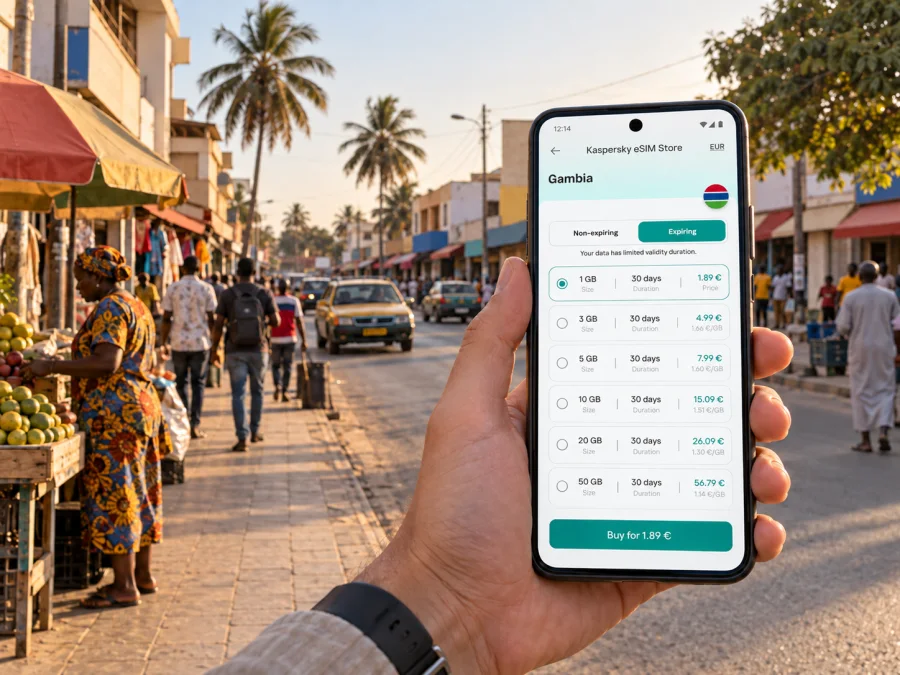
eSIM for Serekunda: mobile connection and internet for your trip
Serekunda is a major city in western Gambia, while the country’s capital is Banjul. The two places sit within the busy western coastal urban area, but they are not the same city. For a visitor staying in Serekunda, mobile data is useful for finding an address, confirming a pickup point, contacting a host and checking onward transport. An eSIM can help you arrange data for the trip without removing the SIM card you already use at home.
This guide focuses on practical connection planning for Serekunda: arrival via Banjul International Airport, getting around the city and nearby coastal districts, choosing a data allowance, and setting up your device. Coverage and performance depend on the local network, your exact location, the device and the selected plan, so treat mobile data as a helpful tool rather than a substitute for local directions or a backup plan.
Why mobile data is useful in Serekunda
Serekunda is a working commercial city, not just a beach resort area. Its streets connect markets, residential districts, shops, transport junctions and nearby destinations such as Bakau, Kotu and the Senegambia area. A route may be described by a junction, landmark or neighbourhood name rather than by a familiar street number. Having maps and messages available makes it easier to confirm where you are going before you set off.
Mobile internet can be useful for:
- checking the route from your accommodation to a meeting, shop or market;
- messaging a driver or host if a pickup point is unclear;
- translating a short phrase or checking opening details while out;
- confirming a booking and keeping reservation information accessible;
- using a map when moving between Serekunda and nearby coastal areas;
- contacting family or colleagues through internet-based messaging and calling apps.
It is still sensible to save your accommodation address and key phone numbers offline. A phone battery can run down, a map may not load, and traffic or a changed pickup point can make a route take longer than expected. Keep the name of your destination in writing and confirm it with your driver or host before leaving.
Arriving through Banjul International Airport
Banjul International Airport, also known as Yundum International Airport, is in Yundum and serves the capital and the wider country. It is not in Serekunda. The airport authority describes it as about 25 kilometres southeast of Banjul; the actual road journey to your accommodation in Serekunda will depend on the destination and traffic. Taxis, car rental and hotel shuttles are among the transport options listed by the airport authority.
Before departure, save your hotel or guesthouse name, address, booking details and the name of the person meeting you. If you have arranged a transfer, agree on a precise meeting point and exchange a contact number while you still have reliable internet access. When you land, follow airport signs and use the pickup arrangement you confirmed; do not assume that a map estimate is the same as a guaranteed journey time.
If you install an eSIM before travel, you can prepare the profile while you have a stable internet connection and follow the plan’s activation instructions. Whether the plan starts counting validity at installation, at a scheduled time or after it connects to a supported local network depends on its terms. Check this before setup. Keep your primary SIM available for calls or messages that require your home number, and set the eSIM as the mobile-data line only when you intend to use it.
For a short stopover, the useful question is not simply “How many days am I in the country?” Consider when you will need data: on arrival, during a transfer, while waiting for a connection, or only after checking in. A short visit with frequent map use and messaging may need a different allowance from a longer stay where you mostly use hotel Wi-Fi. Choose from the actual plan details shown for your dates and destination.
Getting around the city and the coast
Serekunda is part of a dense, connected urban area. Routes between it and places such as Bakau, Kotu, Kololi and Banjul can feel like one continuous trip, but they cross distinct places and may involve busy roads and junctions. Plan around the specific destination rather than relying on a single city label in a map app. For a pickup, send a pin and a written landmark if the exact entrance is difficult to identify.
| Trip situation | How mobile data can help | A practical backup |
|---|---|---|
| Airport to accommodation | Share a live location or confirm a transfer message | Save the address and driver contact before landing |
| Finding a meeting place | Check a pin, route or updated message | Agree on a recognisable landmark by name |
| Serekunda to a coastal district | Compare the route and check the destination | Confirm the destination with the driver before departure |
| Walking around a market area | Keep a map and messaging available | Save the return point and note nearby landmarks |
| Work or a video call | Check availability and send updates | Confirm Wi-Fi and power at the venue in advance |
For walking, download an offline map area when the app allows it. Keep your phone secured and avoid holding it out continuously in a crowded place. You can check a route before leaving, then use short glances at landmarks and directions. This reduces screen use and helps preserve battery for messages or a call later in the day.
Choosing an eSIM plan for a Gambian itinerary
Kaspersky eSIM Store is an app and website where you can choose, purchase and activate an eSIM with a suitable plan for mobile internet during an overseas trip. The destination for this city trip is The Gambia: Serekunda is a city within the country, not a separate country or a separate eSIM destination. If your route includes another country, confirm that the selected plan covers each leg before you buy.
The Gambia’s regulator lists four mobile network operators in the domestic market: GAMCEL, AFRICELL, COMIUM and QCELL. Their presence in the country does not mean that every travel eSIM supports all four networks. The provider and terms can vary by specific travel offer, so check the details shown for the plan you intend to use rather than assuming nationwide or universal operator access.
Africell separately describes a local eSIM process through its own outlets, including an in-person QR-code setup process. QCell also publishes its own local eSIM guidance. Those operator-specific products are distinct from choosing a travel data plan through Kaspersky eSIM Store. A domestic eSIM’s onboarding, number, service terms and retail process may differ from a travel data eSIM. Do not infer that a local operator’s domestic eSIM can be activated through a travel eSIM app, or vice versa.
To choose a suitable plan, consider these points:
- Destination. Confirm that the plan includes The Gambia. A city name in your itinerary does not replace checking the country or region covered by the plan.
- Length of stay. Match the validity period to your travel dates and check when the validity begins.
- Data use. Think about maps, messaging, browsing, uploads, calls through apps and hotspot use. Your habits matter more than a generic estimate.
- Route. If you will cross a border or continue elsewhere, verify the coverage list for every country on your route.
- Conditions. Review speed, data allowance, validity, activation steps and any tethering or fair-use terms shown before purchase.
- Device. Make sure the handset supports eSIM and is not restricted to a different carrier.
When you are ready, review the available eSIM options for a trip to The Gambia. Compare the listed allowance and validity with the way you expect to use your phone in Serekunda, and read the terms on the selected offer before confirming.
Estimate how much data you may need
There is no single data allowance that suits every traveller. A person who mostly sends messages and checks maps may use less than someone who uploads photos, joins video calls or shares a connection with a laptop. Use your recent mobile-data history as a starting point, then account for any travel-specific activity.
| Your usual activity | What to check before choosing |
|---|---|
| Messaging and occasional map checks | Your normal daily use and the plan’s total allowance |
| Frequent navigation and web searches | How often you will move between neighbourhoods and day-trip locations |
| Photo and video uploads | Whether automatic backups can be paused or limited to Wi-Fi |
| Remote work | The amount of video calling, file transfer and hotspot use involved |
| Several days with mostly Wi-Fi access | Whether your mobile data is mainly for arrival, transit and time away from accommodation |
A useful preparation step is to check your phone’s data-usage screen before departure. Reset the statistics if that helps you compare a typical day, and review which apps run in the background. You can also set a data warning or limit on many devices. These controls do not alter the plan, but they can make consumption easier to monitor.
Check your device and its regional variant
eSIM support is not determined by a phone’s brand name alone. The exact model number, country or region where the device was sold, software version and carrier lock can affect whether eSIM setup is available. Some regional variants of a familiar model omit eSIM support, and a device bought through a carrier may be restricted to that carrier. Check the exact model with the manufacturer and confirm that it is unlocked before purchase. Check whether your device supports eSIM.
Also check that you can access the device settings needed to add an eSIM. A work-managed handset may restrict mobile-plan changes. If your phone has dual SIM, decide which line should handle calls and texts and which should handle mobile data. Keep the home SIM’s roaming settings under control so that it does not use data unintentionally. Your eSIM plan’s own instructions determine whether data roaming must be enabled for that eSIM profile.
Do not delete an installed eSIM just to troubleshoot unless the plan instructions or support team tell you to do so. Some profiles cannot be reinstalled with the same QR code after removal. Keep the purchase confirmation and setup information accessible, and install only when you are ready to follow the plan’s activation steps.
Install before leaving or after arrival
Installing before your flight can reduce the number of tasks to handle after landing, provided the plan’s terms allow you to set up the profile in advance. You will need a compatible, unlocked device and an internet connection for the installation flow. If you prefer to wait until arrival, make sure you have another way to get online long enough to complete setup, such as airport Wi-Fi, and keep your accommodation details saved offline.
A typical setup sequence is:
- Connect to a stable Wi-Fi network.
- Open the purchase confirmation or your Kaspersky eSIM Store profile and follow the installation method provided for your plan.
- Add the eSIM in your phone’s mobile-network settings, either through the guided flow or by scanning the supplied QR code.
- Label the new line clearly, for example “Travel data”, so it is easy to identify.
- Select the eSIM for mobile data when you are ready to use the plan.
- Check the plan instructions for activation timing and whether data roaming should be enabled for that eSIM.
- Test a simple webpage or message after connection, then check that the phone is using the intended data line.
The menu labels differ by phone and operating-system version. Use the appropriate Android eSIM installation instructions or iOS eSIM installation instructions and follow the instructions shown for your purchased plan. Activation can take a few minutes and depends on the device and supported local network. If it does not connect, confirm the selected data line, plan status and settings before reinstalling anything.
Keep your connection useful and predictable
A little setup can prevent common problems once you are moving around Serekunda:
- Save your accommodation address, airport transfer details and key bookings offline.
- Download an offline map for the area if your navigation app supports it.
- Switch off automatic app updates and large cloud backups over mobile data.
- Carry a power bank if you expect to navigate and message throughout the day.
- Check which line is selected for mobile data after adding the eSIM.
- Keep your usual number available for calls or verification messages if needed.
- Review the plan’s remaining data and validity in the app or account when available.
Common travel scenarios
One-night stop in Serekunda
Your priority may be a transfer, check-in message and a route to dinner or an early appointment. Save the destination and transfer contact before you fly. A modest plan may be enough if you mostly use messaging and maps, but choose based on the allowance and validity actually offered rather than assuming a fixed daily amount.
Several days split between city and coast
Plan for repeated navigation, coordination and changes to pickup points. Check whether the plan covers the entire trip period and whether its validity begins at installation or first use. Downloading an offline map and limiting photo backups can leave more data for directions and messages.
Business visit with online meetings
Check the venue’s Wi-Fi and power arrangements in advance. Use mobile data as a practical backup for messages and route changes, but do not assume that every location will support uninterrupted video calls. If tethering is important, verify that the selected plan permits it and budget for the higher data use of a laptop.
Day trip beyond Serekunda
Before setting out, confirm the destination, pickup point and return plan with your host or driver. If the trip crosses an international border, check that your eSIM plan includes the additional country. A Gambia-only plan should not be treated as a regional plan without checking its coverage list.
FAQ
Is Serekunda the capital of The Gambia?
No. Banjul is the capital. Serekunda is a separate city and the country’s largest urban centre. The two belong to the same broad western urban travel area, but a booking or navigation pin should use the exact place you intend to visit.
Is Banjul International Airport in Serekunda?
No. The airport is in Yundum and serves Banjul and the wider country. Plan a road transfer to Serekunda and confirm the pickup details with your accommodation or driver.
Will an eSIM work everywhere in Serekunda?
No universal coverage promise is possible. Service depends on the plan’s local provider, network availability, the device and your location. Check the provider and terms shown for the plan, and keep important details available offline.
Does a travel eSIM give me a Gambian phone number?
The travel eSIM described in Kaspersky eSIM Store is for mobile data unless the selected plan explicitly states otherwise. It should not be assumed to include a local phone number, standard voice calls or SMS. Internet calling and messaging apps can work over data, subject to their own requirements.
Can I use my home SIM and an eSIM together?
Many dual-SIM phones can keep both lines available, but the exact functions depend on the device and regional model. Set the eSIM as the data line if that is your intention, and review roaming settings for your home SIM to avoid unintended data use.
Should I install the eSIM before travelling?
Often that is convenient because you can follow the setup steps on a stable connection. Check the plan’s activation rules first; installation and the start of validity may be separate events. If you wait until you arrive, arrange access to Wi-Fi and save your directions and booking details beforehand.
Can I use the same eSIM if I change phones?
Do not assume that an eSIM profile can be moved or installed again. Transfer and reinstallation rules depend on the profile and plan. Check the plan instructions or ask support before changing devices or deleting the profile.
Prepare your Serekunda connection plan
Before departure, confirm your accommodation address and airport transfer, check that your exact phone variant supports eSIM, and review the destination, provider, allowance, validity and activation rules shown for your chosen plan. Install the profile using a reliable connection, keep important details offline, and switch mobile data to the travel eSIM when you are ready to use it.
Kaspersky eSIM Store is an app and website for selecting, purchasing and activating an eSIM with a suitable mobile-data plan for an overseas trip. Choose an eSIM plan for your visit to The Gambia and review its current terms before travelling to Serekunda.


