
Travel connectivity guide
Seria eSIM for mobile internet in Brunei
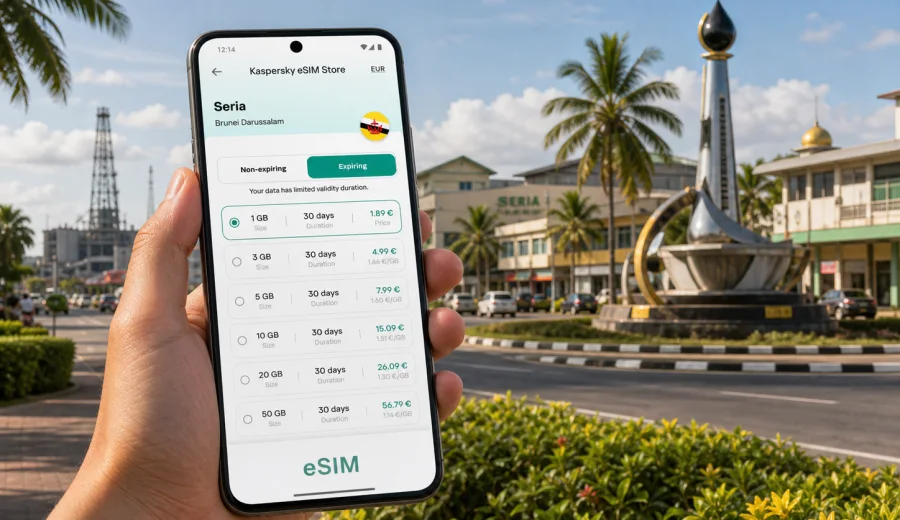
Seria eSIM: mobile connection and internet for your trip to Brunei Darussalam
Seria is a practical travel stop in western Brunei Darussalam: an oil-town base in Belait District, close to Kuala Belait, Panaga, the coastal road and industrial sites that bring many visitors for work. It is smaller and quieter than Bandar Seri Begawan, but that makes mobile internet more important, not less. You may need maps for a long airport transfer, messaging for hotel check-in, a translator for errands, a ride update from a local contact, or a stable data connection while moving between Seria, Panaga, Lumut and Kuala Belait.
An eSIM can make that first day easier because you do not need to search for a physical SIM card after arrival. With a compatible device, you can prepare a digital SIM profile before the trip, choose a suitable prepaid data package, and use mobile data for navigation, messages, bookings and work tools once the eSIM is active and connected to a local network.
This guide focuses on Seria itself: arrival routes, local movement, business trips, hotels, short stays, and side trips from the town. Brunei Darussalam is the country context because a city eSIM article should use the right country tariff, but the practical decisions happen in and around Seria.
Quick answer: why eSIM is useful in Seria
For most visitors, eSIM is useful in Seria because the town is spread across practical travel points rather than one dense tourist centre. You may arrive from Brunei International Airport, cross the border region from Miri, stay near Panaga, visit an office or industrial facility, then continue to Kuala Belait or Bandar Seri Begawan. Mobile data helps keep those small steps connected.
The main advantage is preparation. Before you travel, you can check whether your phone supports eSIM, review the available data amount and validity period, and install the eSIM profile. When you arrive, you can use mobile data without relying on airport Wi-Fi, hotel Wi-Fi or a store visit during your first hours in Brunei Darussalam.
Typical Seria use cases include:
- map navigation on the road from Bandar Seri Begawan to Belait District;
- messaging with a driver, hotel, colleague or site contact;
- checking reservations, documents and email during a business trip;
- using translation, banking and travel apps while running errands;
- sharing location with family or colleagues during a stopover;
- planning short trips to Kuala Belait, Panaga, Lumut or the coast;
- keeping a backup option when public Wi-Fi is inconvenient.
eSIM is mainly about mobile internet. It usually does not include a standard local phone number, voice calls or SMS unless the specific tariff conditions say so. For calls and messages, many travellers use internet-based apps over mobile data.
Arrival in Seria: where mobile data helps first
Many travellers reach Seria by road after landing at Brunei International Airport near Bandar Seri Begawan. The transfer can take around one and a half to two hours depending on the route, stops and traffic. Others arrive from the Malaysian side through the Miri area, or move between Brunei towns during a regional work trip. In each case, the most useful connection is the one that works before you need to solve a problem.
During the first hours, mobile internet can help you:
| Travel moment | Why data matters in Seria |
|---|---|
| Airport arrival | Confirm pickup details, message the hotel, check route timing and keep documents available. |
| Long road transfer | Follow the route, estimate arrival time, share location and check weather or traffic updates. |
| Hotel check-in | Retrieve booking references, send arrival messages and use maps to locate nearby services. |
| Business visit | Contact reception, open calendar details, confirm meeting addresses and use work apps. |
| Evening errands | Find restaurants, ATMs, convenience stores or the quickest route back to your hotel. |
Seria is not a city where you want to spend your first evening hunting for connectivity. If your schedule includes a site visit, a driver pickup or a late arrival, preparing mobile internet in advance is often the smoother option.
Local movement in Seria and nearby Belait District
Seria is closely tied to the wider Belait area. A normal itinerary may include Seria town centre, Panaga, Kuala Belait, Lumut, industrial zones, beaches and road links toward Labi or Bandar Seri Begawan. Distances are manageable, but they are easier when maps, messaging and location sharing work continuously.
Mobile internet is especially useful when your route is not just hotel to attraction. Business travellers may need to move between an office, a plant gate, a guesthouse and a restaurant. Visitors on a short stop may want to see the Billionth Barrel Monument, continue to Kuala Belait, or coordinate with local hosts. Even if you have offline maps, live data helps with changed meeting points, updated pickup times and quick searches.
For local movement, prepare these details before you go:
- save your hotel name and address in English;
- keep key addresses pinned in your map app;
- download offline maps as a backup;
- store your driver or host contact in a messaging app;
- check whether your phone allows data roaming for the eSIM profile;
- keep your physical SIM active for bank messages if you still need it.
An eSIM does not replace good trip preparation, but it reduces the number of moments when you have to depend on someone else's hotspot or public Wi-Fi.
How much data do you need for Seria?
The right data amount depends on your trip style. A short work visit with email, maps and messaging uses less data than a week of video calls, hotspot sharing and social media uploads. Seria is a calm destination, but business travellers can use data quickly if they rely on cloud files or conference calls.
Use this table as a planning guide, then choose based on your real habits:
| Trip type in Seria | Typical data use | Practical choice |
|---|---|---|
| One or two nights, light use | Maps, messaging, email, booking apps | Small data package may be enough. |
| Three to five days | Maps, messaging, browsing, light work | Medium package gives more flexibility. |
| Business week | Email, documents, navigation, calls over data | Choose more data and track usage. |
| Multi-city Brunei route | Seria, Kuala Belait, Bandar Seri Begawan, day trips | Match the validity period to the whole route. |
| Heavy media use | Video calls, streaming, hotspot for a laptop | Pick a larger package or reduce high-data activity. |
Before choosing, look at two things together: data volume and validity period. A large package with too short a validity period may not fit a long stay, while a small package can run out quickly if you use hotspot or video. Kaspersky eSIM Store lets you review these conditions before you select a tariff, so you can match the package to the way you will move around Seria. For a Seria-focused trip, you can review available options and prepare an eSIM tariff for Brunei Darussalam before you travel, especially if you expect a late arrival, a long road transfer or a tight work schedule.
Choosing an eSIM tariff for Seria
For a city trip to Seria, choose a tariff for Brunei Darussalam, not a separate city tariff. eSIM coverage and tariff availability are organised by country or region, while your actual use happens inside the city and surrounding district. Check the destination, data amount, validity period, price and any activation notes before buying.
Good questions to ask before you choose:
1. How many days will you stay in Seria and Belait District?
2. Will you also visit Bandar Seri Begawan, Kuala Belait, Miri or other regional stops?
3. Will you use data only on your phone, or also hotspot to a laptop?
4. Do you need video calls, cloud documents or navigation all day?
5. Do you want to install the eSIM before departure or after arrival?
If your route is mainly Brunei Darussalam, a country tariff is usually the most direct option. If the trip continues across multiple countries, compare whether a regional option is more suitable for your itinerary. Avoid choosing only by price: the cheapest-looking package may not fit the validity period or data volume you need.
Installation before departure or after arrival
You can install an eSIM before the trip or after you arrive, depending on the tariff conditions and your own preference. Many travellers prefer to install the profile while still on a stable home or office connection, then activate mobile data for the eSIM when the trip begins. Always read the conditions of the selected tariff because the start of validity and activation logic can vary.
The usual preparation flow is simple:
1. Check that your phone supports eSIM and is not locked to one mobile operator.
2. Choose Brunei Darussalam as the destination and compare suitable data packages.
3. Complete the order and open the eSIM details in your profile or app.
4. Install the eSIM by following the on-screen steps or using the QR code if provided.
5. When ready to use it, select the eSIM for mobile data and enable data roaming for that eSIM if the instructions require it.
If you need platform-specific setup help, use the Android installation guide or the iOS installation guide. Keep a stable internet connection during installation, and do not delete an installed eSIM profile unless the tariff instructions or support team advise you to do so.
Device compatibility checklist
Before paying for any eSIM tariff, check your device. Not every smartphone supports eSIM, and some devices are locked by the original carrier. A compatible phone must support eSIM technology, allow a new eSIM profile to be installed, and be able to use mobile data with the selected profile during the trip.
Check your device before you choose a tariff, especially if your phone was bought through a carrier contract or in a market where eSIM support can vary by model.
Use this checklist:
- your smartphone or tablet supports eSIM;
- the device is not locked to a single operator;
- the operating system is up to date enough for eSIM setup;
- you know where to select the active mobile data line;
- you can keep your primary SIM available if you need SMS for banking;
- you have a backup Wi-Fi connection for installation;
- you understand that an eSIM profile may not be transferable after activation.
If any item is uncertain, resolve it before the trip. It is easier to check compatibility at home than while standing in a hotel lobby or waiting for a driver in Belait District.
What to download before you leave
eSIM helps reduce dependence on public Wi-Fi, but a few downloads still make travel smoother:
- offline map area for Seria, Kuala Belait and the route from Bandar Seri Begawan;
- hotel booking confirmation and address;
- business meeting details, gate instructions or office contacts;
- airline and transfer confirmations;
- travel insurance documents;
- a translation pack if you use a translation app;
- the app you will use to manage your eSIM and profile details.
Also take a screenshot of your hotel address and first transfer details. If your phone battery is low or you briefly lose data, a screenshot is faster than searching through email.
Seria eSIM FAQ
Is eSIM useful for a small city like Seria?
Yes, especially if you arrive by road, have business appointments, or move between Seria, Panaga and Kuala Belait. Smaller cities can make mobile data more useful because you may rely on maps, messaging and local coordination rather than frequent walk-in services.
Should I choose a Seria eSIM or a Brunei Darussalam eSIM?
Choose the tariff for Brunei Darussalam. Seria is the city where you use the connection, but the destination tariff is country-based. Check the selected tariff conditions before purchase.
Can I install the eSIM before I fly?
Often yes, but always follow the conditions of the selected tariff. Many travellers prefer installing before departure while they have stable Wi-Fi, then using the eSIM for mobile data when they arrive.
Does eSIM include calls and SMS in Seria?
Travel eSIM tariffs are commonly focused on mobile data. Standard voice calls, SMS and a local number are not included unless the tariff conditions clearly say they are. You can use internet-based calling and messaging apps over data.
Final pre-trip checklist for Seria
Before you leave for Seria, confirm the essentials:
- your phone supports eSIM and is unlocked;
- your selected tariff covers Brunei Darussalam;
- the data amount fits your maps, messages and work needs;
- the validity period covers the full trip;
- installation instructions are saved or accessible;
- your primary SIM settings are clear;
- offline maps and key documents are downloaded;
- you know how to switch mobile data to the eSIM profile.
Seria is a practical destination where connectivity supports the real details of travel: getting from the airport to Belait District, reaching a meeting on time, checking into a hotel, navigating to Kuala Belait or Panaga, and keeping family or colleagues updated. Preparing eSIM in advance gives you a cleaner start to the trip and reduces dependence on public Wi-Fi or last-minute store visits.
When your itinerary is set, use Kaspersky eSIM Store to compare available data packages, check the tariff conditions and choose an eSIM option for your trip to Brunei Darussalam. Select the package that fits your Seria schedule, install it on a compatible device, and keep mobile internet ready for the parts of the journey where timing matters.