
Travel connectivity guide
Serowe eSIM: mobile internet for your trip
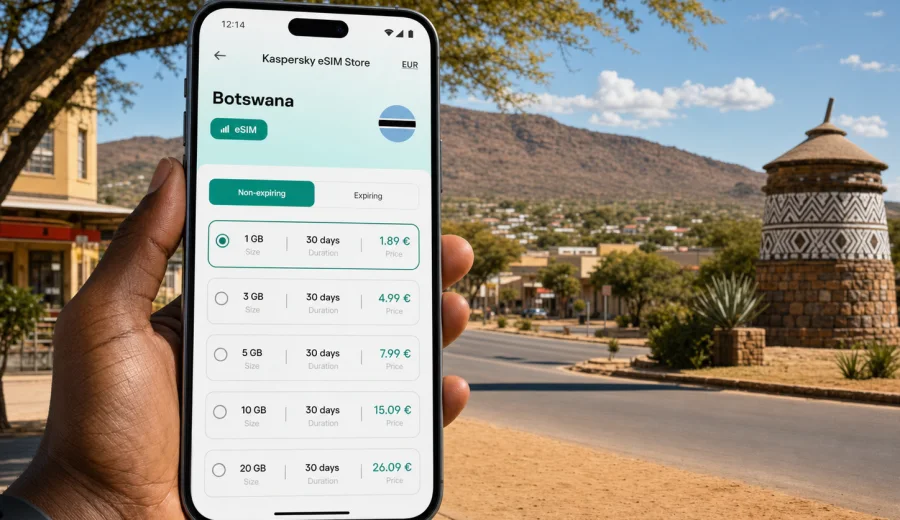
Serowe eSIM: mobile connection and internet for a practical Botswana trip
Serowe is not the kind of place where you want to spend your first hour searching for a SIM counter, asking for Wi-Fi passwords, or trying to explain a route while your map is still offline. The town is one of Botswana's important inland centers, known for its links to the Bangwato, the Khama family, educational institutions, government services, and road connections across the Central District. Visitors may come for work, family, study, heritage sites, wildlife routes, or a stop between larger Botswana destinations. In each case, mobile internet is part of the trip plan, not an afterthought.
An eSIM can make a Serowe visit easier because it lets you prepare mobile data before you need it. Instead of relying only on hotel Wi-Fi, a physical SIM card, or roaming that you did not compare in advance, you can set up a digital SIM profile on a compatible device and use it for maps, messaging, transport coordination, bookings, and work tools. Kaspersky eSIM Store is an app and website where you can choose, arrange, install, and activate an eSIM with a suitable data plan for mobile internet during an international trip.
This guide focuses on Serowe itself: arrival, town movement, local errands, short business stays, onward drives, and the details that matter when your phone is your map, booking folder, payment helper, and contact point.
Why mobile connection matters in Serowe
Serowe is a practical town. The travel experience is often built around road movement, appointments, local directions, guesthouses, campus visits, heritage stops, and onward travel toward places such as Palapye, Gaborone, Francistown, or wildlife areas farther north and east. You may not be moving through dense metro infrastructure, but you still need reliable access to everyday digital tasks.
Common Serowe scenarios where mobile internet helps:
- checking a map after arriving by road from Gaborone, Palapye, or Francistown;
- messaging a guesthouse, host, driver, colleague, or local contact;
- confirming business meetings, school visits, or administrative appointments;
- looking up opening hours before crossing town;
- using translation, email, cloud documents, and messenger calls;
- navigating between residential areas, campuses, shops, fuel stops, and local landmarks;
- planning a drive onward without waiting for hotel Wi-Fi.
The useful point is not that eSIM replaces every other option. It gives you one more controlled way to prepare mobile data before the trip. You still need a compatible, unlocked device and you still need to read the chosen plan's conditions, but you avoid making mobile internet a last-minute errand after arrival.
Serowe arrival: where eSIM fits into the first hour
Many visitors reach Serowe by road, often through Palapye, which connects to major routes across eastern Botswana. Some travelers arrive after flying into Gaborone or Francistown and continuing by car, shuttle, or business transport. Others come as part of a regional itinerary with several stops. That means the first online moments may happen before you enter Serowe, on the approach road, at a fuel station, or while coordinating pickup details.
If your eSIM is already installed before arrival, your first-hour checklist becomes simpler:
1. Land or cross into Botswana and connect to available mobile service according to your plan conditions.
2. Make sure mobile data is assigned to the eSIM profile.
3. Open your map app and save your guesthouse, meeting point, or first stop.
4. Message your host or driver with your estimated arrival time.
5. Keep your primary physical SIM available for calls or banking messages if you still need it.
This is especially useful if you are arriving in the evening, traveling with luggage, or trying to coordinate a ride to accommodation. Public Wi-Fi may be enough for a quick message in some places, but it is not something to build an arrival plan around.
Local movement: maps, taxis, guesthouses, and errands
Serowe is spread out enough that visitors benefit from having maps and messaging available. A short stay can still include several practical stops: accommodation, a meeting venue, a shop, a health or education facility, a heritage site, and a departure point for the next leg of travel. Mobile data helps you move between these points without making every question dependent on someone else's connection.
Use mobile internet in Serowe for:
| Situation | Why data helps | Practical tip |
|---|---|---|
| Finding a guesthouse | Street names and entrances may be easier to confirm by map and chat | Save the address and a screenshot before you start moving |
| Coordinating transport | Drivers and hosts often rely on messenger updates | Share a live location only when useful and with people you trust |
| Business meetings | Email, calendar changes, and document access may be needed between stops | Keep key files available offline as a backup |
| Local errands | Shops, banks, pharmacies, and offices may require route checks | Avoid using mobile data for large app updates |
| Family or group travel | Plans can change during the day | Create one messaging thread for logistics |
For a visitor, the main benefit is continuity. You can leave one place, check the next route, contact someone if the plan changes, and keep your day moving.
How much data do you need for a Serowe trip?
Data use depends on habits, device settings, and trip length. A traveler who mostly uses maps and messaging will use far less than someone who streams video, uploads large files, or joins video meetings. It is better to estimate by activity than to choose a plan only by the number of days.
Typical data planning for Serowe:
- Light use: maps, messenger text, email checks, ride coordination, and occasional browsing.
- Moderate use: maps, image sharing, social media, cloud documents, and regular messenger calls.
- Heavy use: video calls, hotspot use, frequent uploads, media streaming, and work apps.
For a short stopover or a one-night business visit, a smaller data package may be enough if you keep streaming and cloud backups off. For a week in Serowe with side trips, a larger package can be more comfortable, especially if you use your phone as the main navigation and communication tool. If you plan to use hotspot mode for a laptop, check whether tethering is allowed by the chosen plan and expect faster data use.
Before you choose a plan
The most important preparation step is device compatibility. Before paying for any eSIM plan, check your device and confirm that it supports eSIM and is not locked to a mobile operator. Some phone models differ by region, and an older or carrier-locked device may not be able to add an eSIM profile.
Also check these points:
- whether the plan covers the destination and dates you need;
- how much data is included;
- how long the plan remains valid;
- when the validity period starts;
- whether voice calls and SMS are included, if you need them;
- whether roaming data must be enabled for the eSIM profile;
- whether the eSIM can be reinstalled if you change phones.
In many travel eSIM scenarios, the plan is for mobile data. It may not include a local phone number, regular voice calls, or SMS unless the terms say so. For calls and messages, you can usually use internet-based apps when mobile data is active.
Choosing mobile internet for Serowe, not just Botswana in general
A country-wide travel plan may look simple, but a city-focused trip changes the way you choose data. Serowe visitors often need practical, steady use rather than high-volume entertainment. You may need enough data for maps, messages, email, and a few calls while moving between local points. If Serowe is part of a wider Botswana itinerary, the plan should also fit the road sections before and after the town.
Ask yourself five questions:
1. Will I arrive directly in Serowe or travel from another city first?
2. Will I stay mostly in town or drive onward to rural areas?
3. Do I need mobile data for work calls or only for travel coordination?
4. Will I use hotel or office Wi-Fi for heavy tasks?
5. Do I need data for one phone only, or also for hotspot use?
If your route includes several Botswana stops, choose a plan that matches the whole route rather than only the first night. If your itinerary also includes neighboring countries, compare whether a country plan, regional plan, or broader route-based option is more practical for your travel pattern.
When you are ready to compare available options, you can use Kaspersky eSIM Store to review mobile internet plans for Africa that may fit your Botswana route. Check the destination coverage, data amount, validity period, and activation conditions before choosing a plan for Serowe.
Installation: do it before travel when possible
Installing an eSIM before you leave gives you time to check the setup calmly, while you still have a stable internet connection. You do not always need to activate mobile data before the trip, but adding the eSIM profile early can remove one task from the arrival day.
A simple installation flow looks like this:
1. Confirm that your phone supports eSIM and is not carrier-locked.
2. Choose the destination and a suitable data plan.
3. Complete the order and open the eSIM details in your profile or app.
4. Add the eSIM to your phone using the QR code or on-screen instructions.
5. Keep your primary SIM active if you need calls, SMS, or banking verification.
6. When you are ready to use data in Botswana, select the eSIM for mobile data.
7. Enable data roaming for the eSIM profile if the plan instructions require it.
For device-specific steps, use the Android installation guide or the iOS installation guide. Follow the instructions for your actual device model, because menu names can vary by manufacturer and operating system version.
A practical Serowe data checklist
Before the trip:
- Install the eSIM while you have a stable connection.
- Save your accommodation, meeting addresses, and key contacts offline.
- Download an offline map area for Serowe and the road approach.
- Turn off automatic video downloads in messengers.
- Pause cloud photo backups until you are on trusted Wi-Fi.
- Keep the QR code or eSIM details accessible.
On arrival:
- Select the eSIM as the line for mobile data.
- Check whether data roaming must be enabled for that profile.
- Test a light page or messenger message before leaving the arrival point.
- Keep your main SIM available if you need SMS codes.
- Monitor data use during the first day to see whether your estimate is realistic.
During the stay:
- Use Wi-Fi for large downloads where available and trusted.
- Avoid app updates over mobile data.
- Use low-data mode for maps, cloud storage, and social apps.
- Check remaining data before a long drive out of town.
Business travel in Serowe
Serowe can be part of professional travel linked to education, administration, development work, meetings, research, or regional operations. For business visitors, the value of eSIM is less about sightseeing and more about predictability. You may need to join a call from accommodation, send documents from a vehicle, or respond to a changed meeting time between appointments.
For work trips, prepare mobile internet around tasks:
- Email and calendars: low to moderate data use, but frequent checks require steady access.
- Cloud documents: moderate use if files are small; high use if presentations or media are involved.
- Video meetings: high data use and sensitive to connection quality.
- Hotspot for a laptop: convenient, but it can drain both data and battery quickly.
- Maps and travel coordination: low use, but essential when moving between local points.
If your work depends on video calls, do not rely on one connection method only. Keep key documents offline, confirm whether your accommodation or office has Wi-Fi, and reserve mobile data for movement, urgent tasks, and backup access.
Stopovers and short stays
Not every Serowe visit is a full itinerary. Some travelers stop overnight between longer drives or use the town as a base for nearby obligations. For a short stay, the eSIM plan should match the compressed rhythm of the trip: arrival, check-in, one or two local movements, messages, navigation, and departure.
For a one- or two-day Serowe stop, mobile data is useful for:
- confirming where to park or meet;
- finding fuel, food, or basic services;
- keeping family updated during the drive;
- checking weather and route conditions;
- sending proof of arrival, documents, or photos;
- managing bookings without waiting for Wi-Fi.
Short stays are also where overbuying data can happen. Choose enough for practical use, but do not assume you need a large package if your main tasks are maps and messaging.
Trips from Serowe
Serowe can be part of a wider Botswana route. Palapye is a common connection point, Gaborone and Francistown are important urban anchors, and longer journeys may continue toward wildlife, heritage, or cross-border routes. If you leave Serowe for smaller settlements or road stretches, plan mobile internet more carefully.
Before a road segment, do three things:
1. Download the map area while you still have a stable connection.
2. Send your route and expected timing to someone relevant.
3. Check your remaining data and battery level before departure.
Mobile internet supports navigation, but it should not be your only trip-planning tool. Keep offline maps, saved addresses, and essential phone numbers available. In rural or less populated areas, service conditions may vary by location and local network availability, so the safest approach is to prepare both online and offline options.
eSIM compared with roaming, Wi-Fi, and a physical SIM
There is no single best mobile internet option for every traveler. The right choice depends on device support, trip length, budget, route, and how much setup you want to handle after arrival.
| Option | Best for | Watch out for |
|---|---|---|
| Travel eSIM | Preparing data before arrival and avoiding a physical SIM swap | Requires a compatible, unlocked device and correct plan setup |
| Standard roaming | Keeping your existing mobile number and simple billing | Costs and included data vary by home operator |
| Public Wi-Fi | Large downloads at accommodation or offices | Availability, speed, and security can vary |
| Local physical SIM | Longer stays or users who need a local SIM card | Requires finding a sales point and following local purchase conditions |
For Serowe, a travel eSIM is often most convenient when you want mobile data ready for maps, messaging, and practical movement without making a SIM purchase your first local errand.
Common mistakes to avoid
- Installing the eSIM only after arrival, then discovering you need Wi-Fi to complete setup.
- Forgetting to select the eSIM as the mobile data line.
- Leaving automatic updates, cloud backups, and video auto-play enabled.
- Assuming the eSIM includes regular calls or SMS without reading plan details.
- Buying a plan for the wrong destination or validity period.
- Ignoring device compatibility or carrier-lock restrictions.
- Deleting the eSIM profile before the trip is over.
These are easy mistakes to prevent. Most of the work is done before departure: check the device, read the plan terms, install carefully, and keep a simple data plan for the first day.
Frequently asked questions
Is eSIM useful for a trip to Serowe?
Yes, if your phone supports eSIM and you want mobile data for maps, messaging, bookings, email, and transport coordination. It is especially useful when you arrive by road, need to contact local hosts, or plan to continue to other parts of Botswana.
Does an eSIM give me a Botswana phone number?
Not usually. In many travel eSIM plans, the focus is mobile data. Regular voice calls, SMS, or a local number are included only if the specific plan says so. You can use internet-based calling and messaging apps when data is active.
Should I install the eSIM before I arrive in Serowe?
Yes, when possible. Install it before travel using a stable connection, then activate mobile data according to the plan instructions when you need it. This reduces setup pressure during arrival.
Can I keep my usual SIM active?
Often, yes. Many eSIM-compatible phones allow one physical SIM and one eSIM, or multiple eSIM profiles with limits on active lines. Keep your usual SIM active if you need calls, SMS, or banking codes, and select the eSIM for mobile data.
What if I travel beyond Serowe?
Choose a plan based on your full route. If you will visit Palapye, Gaborone, Francistown, rural areas, or another country, check destination coverage and validity before choosing.
Choose an eSIM plan for your Serowe trip
Serowe is easiest to navigate when your phone is ready for the ordinary details of travel: maps, messages, bookings, routes, work updates, and quick changes of plan. An eSIM can help you prepare mobile internet before the trip, avoid a physical SIM swap, and reduce dependence on public Wi-Fi.
Before you go, check device compatibility, compare data amounts and validity periods, install the eSIM while you have a stable connection, and keep offline backups for essential travel details. Then use Kaspersky eSIM Store to choose an eSIM plan for your Botswana and regional Africa travel route and arrive in Serowe with mobile internet already part of your plan.