
Travel connectivity guide
Sevan eSIM: Mobile Internet for Your Trip
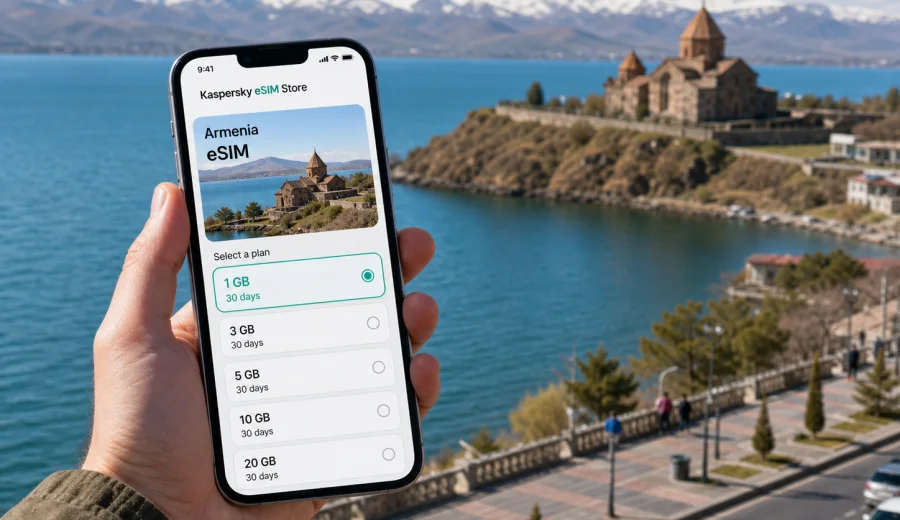
Sevan eSIM: mobile connection and internet for your trip
Sevan is one of Armenia's most practical short-trip destinations: close enough to Yerevan for a day journey, scenic enough for a longer lake stay, and spread out enough that mobile internet quickly becomes part of the travel plan. You may need maps from the road, messenger calls from a hotel, a taxi app after dinner, or quick access to booking details while moving between the town, the lakefront, the peninsula and nearby mountain routes. An eSIM helps you prepare that connection without searching for a physical SIM card after arrival.
This guide focuses on Sevan as a city and lake travel base, not on Armenia in general. It explains when eSIM can be useful around Sevan, how to estimate your data needs, what to check before buying a plan, and how Kaspersky eSIM Store can help you choose, arrange and activate an eSIM with a suitable data plan for mobile internet during your trip.
Why mobile internet matters in Sevan
Sevan looks simple on a map, but the trip often includes several separate movements. You might arrive from Yerevan by car, minibus or transfer, check in near the lake, visit Sevanavank, walk along the shore, continue to Dilijan or return to the capital in the evening. Each step is easier when your phone is already online.
Mobile internet is useful in Sevan for:
- checking the route from Yerevan or another Armenian city;
- confirming hotel, guesthouse or apartment details;
- coordinating with drivers, guides or colleagues;
- using maps around the lakefront and peninsula;
- translating menus, signs and messages when needed;
- checking weather before a boat trip, walk or mountain route;
- sending photos and updates without waiting for hotel Wi-Fi;
- using messenger calls if your eSIM plan does not include a phone number.
Arrival scenarios: from Yerevan to Lake Sevan
Most international visitors reach Sevan after arriving in Yerevan and then traveling by road. The first online tasks usually happen before you see the lake: checking a transfer location, messaging a driver, opening a map, comparing travel time and confirming the correct hotel address. If your mobile internet is ready before that road journey, the transfer feels less dependent on airport or station Wi-Fi.
Typical Sevan arrival scenarios:
| Scenario | Why data helps | Practical tip |
|---|---|---|
| Private transfer from Yerevan | You can share your location, confirm pickup and follow the route | Save the driver's contact and booking reference offline too |
| Minibus or shared transport | You may need maps, messaging and schedule checks | Keep the Armenian spelling of your stop or hotel saved |
| Rental car | Navigation, parking searches and route changes use data | Download offline maps before leaving Yerevan as a backup |
| Business trip with lake stay | Calendar, email and calls may be needed between transfers | Choose a plan with enough data for video calls or tethering if allowed |
| Stopover route | You may only have a few hours and need fast decisions | Prepare the eSIM before arrival to avoid setup during the short visit |
Sevan is also a common stop between Yerevan, Dilijan, Tsaghkadzor and other parts of northern or central Armenia. A country-level eSIM plan is usually more practical than thinking only about one town, because your data needs may start before Sevan and continue after you leave.
What an eSIM does during a Sevan trip
An eSIM is a digital SIM profile that can be installed on a compatible device. In a travel context, it is mainly used for mobile internet. With Kaspersky eSIM Store, you can choose the destination, review the available plan conditions, arrange the plan and activate the eSIM on your device. The product helps with the selection and activation flow; it is not a mobile network operator and does not provide its own mobile network.
For Sevan, that distinction matters because a travel eSIM is a preparation tool. It helps you avoid several common problems:
- looking for an offline SIM sales point when you would rather leave for the lake;
- relying on hotel Wi-Fi before you can message a driver or open a map;
- changing your primary SIM card when you still need your regular number for banking or messaging;
- guessing roaming costs without a clear prepaid data allowance;
- setting up mobile data in a hurry during a transfer.
An eSIM plan for mobile data usually does not include a local phone number, standard voice calls or SMS unless the plan conditions say otherwise. For most Sevan travel tasks, that is acceptable because navigation, messaging, translation, online bookings and internet calls use data. If you expect to receive regular SMS or voice calls through your home number, keep your primary SIM available and check your home operator's roaming conditions separately.
How much data to prepare for Sevan
Your data use in Sevan depends less on the city itself and more on how you travel. A lake weekend with offline maps and light messaging needs much less data than a business stay with video calls and hotspot use. Before choosing an eSIM plan, think about both the number of days and the type of online activity.
| Trip type | Likely data pattern | What to consider |
|---|---|---|
| Day trip from Yerevan | Maps, taxi messages, photos, translation | A smaller data package may be enough if you avoid streaming |
| Weekend by the lake | Navigation, restaurants, hotel Wi-Fi backup, social sharing | Choose a plan that covers both transfer days and lake time |
| Remote work stay | Email, cloud documents, calls, hotspot if allowed | Check data volume, validity period and tethering rules |
| Family trip | Multiple phones, maps, tickets, messaging, entertainment | Each traveler may need a separate setup or shared hotspot if permitted |
| Regional route | Sevan plus Dilijan, Tsaghkadzor or Yerevan | Make sure the selected plan covers Armenia for the whole route |
As a rule, map use, messaging and translation are moderate. Photo uploads, video calls, cloud backups and streaming can use data quickly. If you plan to use your phone as a hotspot for a laptop, check whether the selected eSIM plan allows tethering and choose more data than you would for phone-only use.
Choosing an eSIM plan for Sevan
When your destination is Sevan, choose a plan for Armenia rather than a city-specific product. The city belongs to Armenia, and your mobile internet will matter before, during and after the lake part of the journey. The most important plan details are coverage country or region, data volume, validity period, price and activation rules.
A practical selection checklist:
1. Confirm that the plan covers Armenia.
2. Match the validity period to your full travel window, not only the nights in Sevan.
3. Estimate data volume from your real activities: maps, messaging, calls, uploads and work.
4. Check whether hotspot use is allowed if you plan to connect a laptop or another device.
5. Review when the plan starts counting validity or data use.
6. Keep the installation instructions available before you leave reliable Wi-Fi.
If Sevan is part of a longer Armenian route, it is useful to prepare the eSIM before you depart for the lake. You can review the available options and choose an eSIM plan for your trip to Armenia in Kaspersky eSIM Store when you know your dates and expected data use. This is the first moment where choosing the country landing page becomes practical: you already understand the city scenario and can match the plan to the whole route.
Installation before departure or after arrival
You can install an eSIM before departure while you have stable Wi-Fi, then activate mobile data at the right time according to the plan instructions. Some travelers prefer to complete the setup after arrival in Armenia, especially if they want to avoid starting the validity period too early. The correct choice depends on the plan conditions, so read the activation details before you travel.
Before installation, check your device compatibility. Your phone or tablet must support eSIM, must not be locked by an operator in a way that blocks another mobile profile, and should be updated enough to handle eSIM setup reliably. Some models differ by region of sale, so do not rely only on the model name.
For setup guidance, use the relevant Kaspersky eSIM Store instructions: Android installation guide or iOS installation guide. In most cases, the basic flow is simple:
1. Choose the destination and plan.
2. Arrange the eSIM plan through the site or app.
3. Open the installation details or QR code.
4. Add the eSIM profile in your device settings.
5. Select the eSIM for mobile data when you are ready to use it.
6. Enable data roaming for the eSIM if the instructions or device require it.
7. Wait a few minutes for the device to register on a local network.
Do not delete the eSIM profile unless you are sure you no longer need it. Some eSIM profiles cannot be reinstalled on another device after activation, and transfer rules depend on the plan and device.
Sevan travel checklist for staying online
Use this checklist before leaving for the lake:
- Save your accommodation address in English and, if possible, Armenian.
- Download offline maps for Yerevan, Sevan and the road between them.
- Keep booking confirmations available without internet.
- Install the eSIM while you still have stable Wi-Fi, if the plan instructions allow it.
- Check which SIM or eSIM is selected for mobile data.
- Turn off automatic cloud backup or large app updates if you have a limited data package.
- Keep your primary SIM active only for the services you actually need.
- Confirm whether messenger calls will be enough or whether you need standard voice roaming from your home operator.
- Save support contacts and installation instructions before travel day.
eSIM, roaming and local SIM: what works best in Sevan
There is no single best option for every traveler. Standard roaming may be convenient if your home operator has a suitable package. A local physical SIM may work for longer stays if you have time to visit a sales point and understand the conditions. eSIM is often the practical middle ground when you want mobile data ready without replacing your main SIM card.
| Option | Good for | Limits to check |
|---|---|---|
| Travel eSIM | Short trips, lake weekends, business visits, multi-city routes | Device compatibility, data volume, validity period, hotspot rules |
| Standard roaming | Travelers who want to keep all services through the home operator | Cost, daily limits, speed or fair-use policies |
| Local physical SIM | Longer stays and users who need a local number | Time to buy, registration process, store hours, language barriers |
| Public Wi-Fi | Hotels, cafes, backup access | Availability, speed, login pages, privacy and reliability |
An eSIM does not remove the need for planning. It simply makes the mobile internet part more predictable: you review the plan, install the profile on a compatible device and use the selected data plan for the trip.
FAQ about eSIM in Sevan
Do I need a Sevan-specific eSIM?
No. For Sevan, choose an eSIM plan that covers Armenia. The same plan can support your mobile internet needs in Yerevan, on the road to Sevan and around the lake, subject to the selected plan conditions and local network availability.
Can I install the eSIM before flying to Armenia?
Often yes, but read the plan instructions first. Some plans can be installed before departure and start working after connecting to a local network, while others have specific activation rules. Stable Wi-Fi is recommended for installation.
Will the eSIM include calls and SMS?
Usually no, unless the selected plan states otherwise. Travel eSIM plans in this context are mainly for mobile internet. You can use messengers, internet calls and online services through data, while your regular SIM can remain available for services tied to your home number.
Is eSIM useful for a one-day Sevan trip?
Yes, if you need navigation, messaging, translation, bookings or driver coordination. For a very short trip, choose data volume carefully and avoid heavy streaming or uploads if the package is small.
What should I do if the eSIM does not connect?
Check that the eSIM is selected for mobile data, data roaming is enabled for that profile if required, airplane mode is off and the device has had a few minutes to register. If the issue continues, review the installation instructions and contact support through the available Kaspersky eSIM Store channels.
Prepare your Sevan trip with mobile internet in mind
Sevan is easiest to enjoy when your phone is ready before the lake becomes the focus. Mobile internet helps with the practical details: the road from Yerevan, the hotel address, the walk to Sevanavank, the restaurant booking, the weather check and the message home. It also gives you a backup when public Wi-Fi is unavailable or inconvenient.
Before you travel, confirm that your device supports eSIM, choose a data allowance that fits your route and install the profile while you have a stable connection. Then use your phone settings to control which line handles mobile data and keep your primary SIM available for the services you still need.
To prepare the mobile internet part of your route, choose an eSIM plan for Armenia in Kaspersky eSIM Store and match the plan to your Sevan dates, expected data use and onward travel.