
Travel connectivity guide
Seville eSIM: mobile internet travel guide
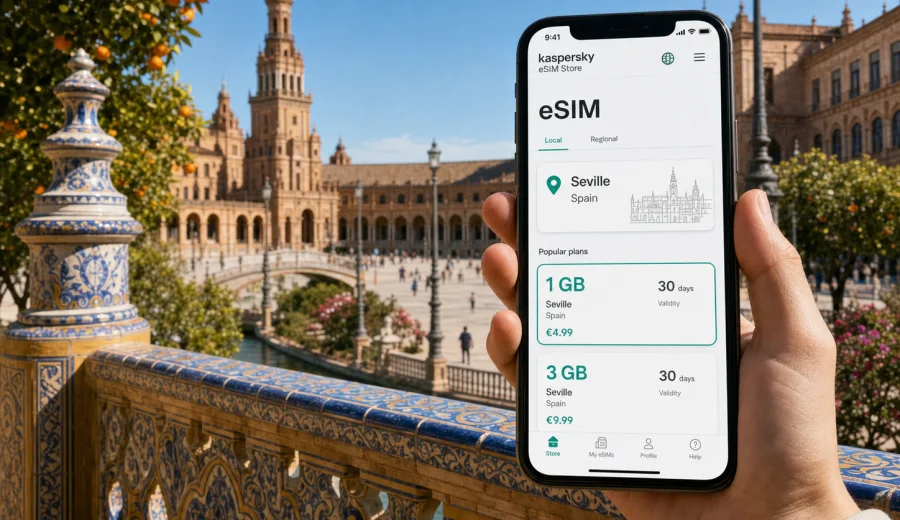
Seville eSIM: mobile connection and internet for your city trip
Seville is a city where mobile internet becomes useful before you reach your hotel. You may need a ride from the airport, a map for Santa Cruz, a digital ticket for the Alcazar, translation in a tapas bar, or a message to confirm a meeting near Nervion. An eSIM helps you prepare mobile data without making a local SIM shop your first stop.
This guide is for travellers who want city-focused advice: how to stay online in Seville, when to install an eSIM, how much data to use, and where mobile data matters.
Why mobile internet matters in Seville
Seville is compact enough to explore on foot, but it is not always simple to navigate. The historic centre is a maze of small streets, shaded courtyards, plazas and one-way roads. A short walk can turn into a detour if your map is offline or your hotel address is saved only in a booking app.
Reliable mobile data is useful for:
- route planning from Seville Airport to the city centre;
- checking bus, tram, metro and taxi options;
- opening hotel booking details at reception;
- navigating between Santa Justa station, the Cathedral area, Triana and Plaza de Espana;
- managing restaurant reservations and timed attraction entries;
- using ride-hailing, banking and translation apps;
- sharing documents or joining calls during a business trip.
Public Wi-Fi can help in hotels, cafes and transport hubs, but it rarely covers the whole day. In Seville, you often move between outdoor sightseeing, indoor courtyards, riverside walks, restaurants and day trips. A prepared eSIM gives you a data option that follows the rhythm of the trip instead of depending on the next open Wi-Fi network.
Arrival scenarios: airport, station and first route
Seville Airport is about 10 kilometres from the centre, and many travellers need data immediately after landing. If you arrive with eSIM already installed, you can switch it on after landing, check directions and message your host before leaving the terminal.
Common first-hour tasks include:
1. Confirm the hotel address and check-in instructions.
2. Choose between airport bus, taxi, private transfer or car rental.
3. Share your arrival time with family, colleagues or a tour provider.
4. Open a map for the final walk through the old town.
5. Check whether the hotel entrance is on a pedestrian street or in a restricted-traffic area.
Santa Justa railway station creates a different scenario. You may be coming from Madrid, Cordoba, Malaga or Granada, and your next step may be a short taxi ride, a bus connection or a walk to nearby accommodation. Mobile internet helps you compare options quickly, especially when you arrive with luggage or during hot afternoon hours.
Where eSIM is most useful in the city
Seville has several travel zones where a working data connection is especially practical.
| Area | Why data helps | Typical use |
|---|---|---|
| Santa Cruz | Small streets and many similar corners | Walking navigation, hotel access, restaurant bookings |
| Cathedral and Alcazar area | Timed tickets and crowds | Digital tickets, queues, meeting points |
| Triana | Riverside walks, markets and evenings out | Maps, messages, route back to hotel |
| Plaza de Espana and Maria Luisa Park | Large open spaces | Photos backup, route planning, ride request |
| Nervion | Business, shopping and stadium area | Work calls, transport updates, email |
| Santa Justa station | Regional train arrivals and departures | Tickets, platforms, onward connections |
The most important point is not speed for one single task. It is continuity. A city day can move from museum tickets to taxi apps, from online menus to video calls, from a map search to a hotel message. eSIM is useful because it supports many small tasks that become frustrating when you have to hunt for Wi-Fi.
How much data to plan for Seville
Your data needs depend on how you travel. A weekend visitor using maps and messaging may need far less than a remote worker or a family sharing routes, tickets and photos.
Use this as a practical guide:
| Trip style | Typical data use | What to watch |
|---|---|---|
| 2-3 day city break | Low to moderate | Maps, messages, ticket apps, light browsing |
| 4-7 day sightseeing trip | Moderate | Daily navigation, photos, restaurant research |
| Business trip | Moderate to high | Email, calls, file access, hotspot use |
| Family trip | Variable | Multiple devices, video, cloud photo backup |
| Andalusia route from Seville | Moderate to high | Train searches, maps between cities, hotel changes |
Video streaming, cloud backups and long video calls use data quickly. To keep your allowance predictable, download maps and large files on hotel Wi-Fi. Keep mobile data for outdoor tasks: routes, tickets, messaging, translation, banking and transport.
Roaming, public Wi-Fi and eSIM: the practical comparison
There is no single best option for every traveller. The right choice depends on your phone, your home operator, your route and how much control you want over data costs.
| Option | Strength | Limitation |
|---|---|---|
| Home roaming | Uses your existing SIM profile | Pricing and data limits depend on your operator |
| Public Wi-Fi | Convenient in hotels and cafes | Not continuous across streets, stations and queues |
| Local physical SIM | Can work well for longer stays | Requires a store visit and SIM slot availability |
| Travel eSIM | Can be prepared before arrival | Requires a compatible, unlocked device |
For a Seville trip, eSIM is often attractive because the city rewards being ready on arrival. You can keep your primary SIM for your usual number and use eSIM for mobile data, if your device and tariff settings support that configuration.
Choosing an eSIM setup for Seville
Before you choose a data option, think through the trip rather than only the destination name. Seville may be your only stop, or it may be the start of a wider route across Andalusia.
Ask yourself:
- Will you stay only in Seville, or also visit Cordoba, Cadiz, Jerez, Granada or Malaga?
- Do you need data for one phone or for several travellers?
- Will you use hotspot mode for a laptop or tablet?
- Do you need a short validity period for a stopover or a longer one for a full Spain route?
- Will you arrive late, when shops and service desks may be closed?
For city-focused travel, choose a data allowance and validity period that match your real schedule. A short visit with maps and messaging needs a different setup from a working week with video meetings and document access.
If you want to prepare before you fly, Kaspersky eSIM Store helps you choose, arrange and activate an eSIM with a suitable data tariff for the trip. You can choose a mobile internet option for Spain before travelling to Seville and then review the tariff details, data allowance, validity period and destination before activation.
Check your phone before you pay
An eSIM works only on compatible devices, and some phones can be locked to a mobile operator. This is worth checking before you buy any travel data option.
Before departure, confirm that:
- your smartphone or tablet supports eSIM;
- the device is not carrier-locked;
- you can access your email or QR code during installation;
- your operating system is up to date enough for eSIM setup;
- you know which SIM profile should handle mobile data after arrival.
If you are not sure, use the compatibility check before purchase: Check your device. This is especially important when you travel with an older phone, a company-managed device or a handset bought through a mobile operator contract.
When to install and when to activate
Installation and activation are related, but they are not the same thing. Installation adds the eSIM profile to your device. Activation and data use depend on the selected tariff conditions and your device settings.
A calm workflow for Seville looks like this:
1. Choose the destination and tariff before departure.
2. Install the eSIM while you still have stable Wi-Fi.
3. Keep your primary SIM active if you need calls or messages on your usual number.
4. After landing in Spain, select the eSIM for mobile data.
5. Enable data roaming for the eSIM if the instructions or tariff conditions require it.
6. Open a map or browser to confirm that data is working.
For detailed setup steps, follow the Android installation instructions or the iOS installation instructions. The exact screens may vary by device model and operating system version, so follow the sequence shown for your phone.
City movement: maps, taxis and public transport
Seville rewards walking, but mobile data makes each transfer easier. The metro has one line, the tram serves central routes, buses cover wider districts, and taxis are common. Many visitors also use trains for regional trips.
Mobile internet is useful when you need to:
- compare walking time with bus or taxi time;
- check the final part of a route through pedestrian streets;
- find a taxi pickup point near a busy square;
- confirm whether an address is in Triana, Arenal, Santa Cruz or Macarena;
- open a digital rail ticket at Santa Justa station;
- adjust plans during heat, rain or crowded festival periods.
For a first visit, save key places in your map app before departure: hotel, airport, Santa Justa station, Cathedral, Alcazar, Plaza de Espana and any booked restaurant. With eSIM active, those saved points become easier to use across the day.
Business trips and remote work in Seville
For business travellers, mobile data is less about sightseeing and more about reliability between fixed points. You may have hotel Wi-Fi in the morning and office Wi-Fi later, but the gaps still matter: airport transfer, taxi ride, lunch meeting, train platform, hotel lobby before check-in.
Prepare for:
- email and chat access during transfers;
- calendar changes while moving between districts;
- two-factor authentication messages or app prompts;
- hotspot use for a laptop when Wi-Fi is unstable;
- document access before a meeting.
If you expect video calls, large file uploads or hotspot sessions, choose a larger data allowance than a tourist who only needs maps. Also check whether hotspot use is allowed under the selected tariff conditions.
Stopovers and short stays
Seville is sometimes a short stop on a larger Spain route. You might arrive by train in the morning, store luggage, visit the centre and leave in the evening. In that case, mobile data is useful because there is little time to solve connection problems.
A short-stay checklist:
- install the eSIM before arrival;
- keep your train or flight ticket easy to open;
- mark two or three priority sights, not ten;
- use mobile data for route changes and timing decisions;
For stopovers, a smaller data package may be enough if you avoid streaming and uploads. The priority is dependable access to maps, tickets and messages.
Trips from Seville to other places in Spain
Seville is a strong base for Andalusia. Travellers often add Cordoba, Cadiz, Jerez, Granada or Malaga. If your plan includes more than one city, choose a Spain-focused data option rather than thinking only about central Seville.
Mobile internet helps with:
- checking train times and platform changes;
- navigating from stations to old-town hotels;
- translating signs, menus and local notices;
- messaging hosts when arrival times change;
When your route covers several cities, pay attention to validity period. A package that fits a weekend in Seville may not fit a 10-day Andalusia trip.
Practical Seville eSIM checklist
Before your trip:
- confirm that your phone supports eSIM and is not locked;
- choose a data allowance based on trip length and app habits;
- install the eSIM on stable Wi-Fi;
- save hotel, station and airport locations;
- check whether you need hotspot mode.
On arrival:
- select the eSIM for mobile data;
- enable data roaming for the eSIM if required;
- test a browser page or map search;
- keep your primary SIM available if you need your regular number;
- monitor data use during the first day.
During the trip:
- use Wi-Fi for heavy downloads and streaming;
- keep mobile data for maps, tickets, messages and transport;
- top up or adjust your data plan in advance if your route expands.
FAQ: eSIM and mobile internet in Seville
Can I use eSIM for calls and SMS?
Many travel eSIM tariffs focus on mobile data and may not include a regular phone number, voice calls or SMS. Check the conditions of the selected tariff. For calls, travellers often use internet-based apps over mobile data.
Should I install the eSIM before flying?
Installing before departure is usually more convenient because you can use stable Wi-Fi and avoid rushing at the airport. Activation and data use depend on the tariff conditions and device settings, so read the instructions before travel.
What if I visit other Spanish cities after Seville?
Choose a data option that fits the whole route through Spain, not only the first city. Validity period and data allowance matter more when you add Cordoba, Granada, Cadiz, Malaga or Madrid.
Prepare mobile internet before your Seville trip
Seville is easier to enjoy when your phone is ready for practical details: finding the hotel, opening tickets, checking routes, translating menus and adjusting plans during the day.
With Kaspersky eSIM Store, you can choose, arrange and activate an eSIM with a suitable data tariff for mobile internet in Spain. Before you travel, review the destination, data allowance, validity and device requirements, then prepare an eSIM option for your trip to Seville so your first online task in the city is not searching for a connection.