
Travel connectivity guide
eSIM for Seychelles: mobile internet guide
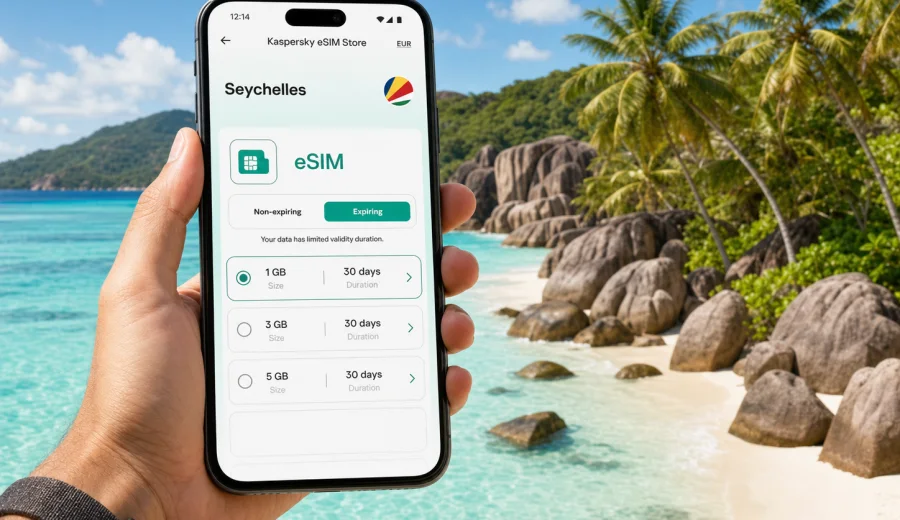
eSIM for Seychelles: mobile connection and internet for island travel
Seychelles is a trip where mobile internet matters from the first hour. You may land on Mahe, check a hotel transfer, message a host, confirm a ferry to Praslin, or open a map before the taxi leaves the airport. Later, the same connection helps with beach routes, restaurant reservations, diving schedules, weather updates, boarding passes, and messages to family while you move between islands.
An eSIM is a practical way to prepare that connection before you travel. Instead of looking for a physical SIM card after arrival, you can install a digital SIM profile on a compatible device and use a data plan for your trip. Kaspersky eSIM Store is an app and website that helps you choose, arrange, and activate an eSIM with a suitable mobile internet plan for overseas travel. It is useful when you want a clear data allowance, a defined validity period, and a setup process you can complete before or during the trip.
This guide focuses on Seychelles as a country, not only on Victoria or one beach resort. It covers Mahe, Praslin, La Digue, airport arrivals, ferry days, resort stays, work trips, and island-hopping routes where reliable access to maps and messages can make the journey smoother.
Why mobile internet in Seychelles needs planning
Seychelles is compact on the map, but travel often involves several small steps: flights, transfers, ferries, taxis, guesthouses, tour desks, beaches with limited facilities, and sometimes a change of island. A mobile connection helps you keep those steps under control.
You may need internet in Seychelles for:
- checking transfer details at Seychelles International Airport on Mahe;
- using maps between Victoria, Beau Vallon, Eden Island, Anse Royale, and hiking points;
- confirming ferry times between Mahe, Praslin, and La Digue;
- messaging a hotel, host, dive center, or car rental desk;
- showing booking confirmations without searching through offline files;
- checking weather before boat tours or beach days;
- using ride, navigation, banking, and translation apps;
- keeping work messages under control during a remote-work stay.
Public Wi-Fi can be helpful at hotels, cafes, and airports, but it is not always enough for a full trip. It may be slow, require a password, work only in a limited area, or be unavailable when you are already on the road. Roaming from your home operator may be convenient, but the cost and conditions can vary. A travel eSIM gives you another option: prepare a mobile data plan for Seychelles and use it on a compatible smartphone or tablet.
What an eSIM does during a Seychelles trip
An eSIM is a digital SIM profile built into many modern phones and tablets. It can be installed without inserting a plastic card. For a traveler, the main benefit is simple: you can keep your regular SIM in the device and add a separate data plan for mobile internet abroad.
For Seychelles, an eSIM can help when you want:
- data access soon after arrival;
- a plan chosen before departure;
- fewer steps at the airport or in town;
- a clear data package and validity period;
- a way to keep your primary number available for calls, banking messages, or two-factor authentication, depending on your device settings and home operator terms.
An eSIM plan for travel is usually focused on mobile data. It normally does not include a local phone number, standard voice calls, or SMS unless the specific plan states otherwise. For calls and messages, many travelers use internet-based apps while the eSIM handles data.
Before buying, check your device. It must support eSIM and should not be locked to a carrier that prevents adding another mobile plan. If you are unsure, check your device before you choose a plan. This step is especially important if your phone model has different regional versions.
Seychelles travel scenarios where eSIM is useful
The right data plan depends less on the country size and more on how you travel. A short beach break and a two-week island route do not use mobile internet in the same way.
| Travel scenario | Typical internet tasks | What to consider |
|---|---|---|
| Mahe resort stay | Transfers, maps, restaurant searches, messaging | A moderate plan may be enough if hotel Wi-Fi is reliable |
| Mahe plus Praslin | Ferries, car rental, maps, photo backup, messages | Choose enough data for transit days away from Wi-Fi |
| Mahe, Praslin, and La Digue | Navigation, ferry updates, tour coordination, weather | A longer validity period can be more convenient |
| Diving or boat tours | Messaging operators, checking schedules, sharing location before departure | Do not rely on mobile signal at sea; download key details first |
| Remote work stay | Email, chat, video calls, hotspot use | Estimate data carefully and check whether hotspot use fits your plan and device settings |
| Family trip | Several devices, navigation, bookings, entertainment | One eSIM supports one compatible device; plan shared use with care |
For many visitors, the busiest mobile data days are arrival day, ferry days, and the day before departure. These are the moments when you check routes, send messages, download documents, and coordinate timing. Beach days may use less data if you mostly take photos offline and connect to hotel Wi-Fi in the evening.
How much data might you need?
Data use depends on your apps, settings, and habits. The safest approach is to choose a plan based on what you actually do, not only on the number of travel days.
As a practical estimate:
- light use: maps, messaging, email, and booking apps can often fit into a smaller data package;
- moderate use: daily maps, social media, browsing, photo sharing, and travel apps need more room;
- heavy use: hotspot use, video calls, cloud photo backup, streaming, and remote work can consume data quickly.
Before your flight, reduce unnecessary mobile data use:
1. Download offline maps for Mahe, Praslin, and La Digue.
2. Save hotel addresses, ferry tickets, booking confirmations, and travel insurance files.
3. Disable automatic cloud photo backup on mobile data.
4. Update apps on Wi-Fi before departure.
5. Set video apps to Wi-Fi only.
6. Check whether your phone allows data roaming for the eSIM profile if the chosen plan requires it.
This does not replace mobile internet, but it helps your data package last longer. It also gives you a backup if signal is weak in a remote beach area or during a boat transfer.
When to set up your eSIM for Seychelles
You can usually prepare an eSIM before you leave, while you still have a stable home Wi-Fi connection. This is useful because installation involves downloading the eSIM profile or scanning a QR code. Activation and the start of the validity period depend on the terms of the selected plan, so read the conditions before you travel.
A simple timeline works well:
- 3 to 7 days before departure: check device compatibility and compare plan duration with your travel dates;
- 1 to 2 days before departure: install the eSIM profile if the plan instructions allow it;
- before boarding: keep your primary SIM active if you need messages from your bank or airline;
- after landing: switch mobile data to the eSIM profile and confirm that data roaming is set as required by the plan instructions;
- during the trip: watch data use in your device settings and in the product interface where available.
If your trip includes several destinations in the Indian Ocean or Africa, check whether a country plan or a regional plan better matches your route. For a Seychelles-only holiday, a dedicated Seychelles plan is usually easier to evaluate because the destination and validity are clear.
Choosing an eSIM plan for Seychelles
When comparing options, do not look only at the size of the data package. Match the plan to your route, duration, and risk of being away from Wi-Fi.
Use this checklist:
- Country: make sure the plan includes Seychelles.
- Validity: match the number of active days to your trip, including arrival and departure.
- Data allowance: choose enough data for maps, messaging, bookings, and your personal app habits.
- Device: confirm eSIM support before purchase.
- Installation method: check whether you will use a QR code, app instructions, or an on-screen profile.
- Activation rules: understand when the validity period starts.
- Hotspot needs: if you plan to share data with a laptop or another device, check whether that scenario is supported by your device and the plan conditions.
If you want to prepare the mobile internet part of your trip in one place, you can review eSIM options for Seychelles before you fly. Choose the plan by data volume and duration, then follow the setup instructions for your device.
eSIM versus roaming and local SIM cards in Seychelles
There is no single best option for every traveler. The useful question is which option gives you enough control for your route.
| Option | Advantages | Limits to check |
|---|---|---|
| Travel eSIM | Can be prepared before arrival, no physical SIM swap, clear data and validity conditions | Requires a compatible unlocked device; usually data-focused |
| Home operator roaming | Uses your existing number and may start automatically | Price, daily fees, fair-use rules, and speed conditions vary |
| Local physical SIM | Can be useful for longer stays or local calling needs | Requires an offline purchase process and may take time after arrival |
| Public Wi-Fi | Often available at hotels and some cafes | Not always available during transfers, beach days, or route changes |
For a short Seychelles holiday, eSIM is often attractive because the setup can be handled before the trip and the device does not need a physical SIM swap. For a longer stay with local calling requirements, you may still want to compare other options. If your main need is data for maps, messaging, bookings, and travel apps, an eSIM can keep the process straightforward.
Practical route notes for Mahe, Praslin, and La Digue
Most visitors pass through Mahe because the international airport is there. Mobile data is useful immediately: you may need to message a driver, open a map to Victoria or Beau Vallon, or check whether a ferry transfer still matches your arrival time. If you rent a car, keep offline maps ready, but mobile data helps with live route adjustments and search.
Praslin trips often include beaches, nature visits, and transfers. If you plan to move between accommodation, beaches, and ferry points, internet access helps with timing and coordination. Some places are quiet by design, so do not assume that every stop has convenient Wi-Fi.
La Digue is slower and smaller, but mobile data is still useful. You may use it to find a guesthouse, contact a bike rental, check the route to beaches, or coordinate a boat trip. Because the island encourages a lighter travel rhythm, many visitors use less data there than on arrival and transfer days.
For outer islands, private island stays, and boat-based activities, check connectivity expectations with your accommodation or tour operator. Mobile signal conditions can vary by location and environment. Download essential documents before you leave the main islands.
How to install and activate an eSIM
The exact steps depend on your device and the selected plan, but the general flow is simple. Install the eSIM while you have stable internet, then choose it for mobile data when you are ready to use it.
1. Confirm that your phone supports eSIM and is not carrier-locked.
2. Choose a plan that includes Seychelles and matches your dates.
3. Complete the plan setup in Kaspersky eSIM Store.
4. Install the eSIM profile by following the on-screen steps or scanning the QR code.
5. Name the profile clearly, for example "Seychelles data".
6. Set the eSIM as the mobile data line when you want to use it.
7. Enable data roaming for that eSIM if the plan instructions require it.
8. Test the connection after arrival and allow a few minutes for the device and local network to register.
For device-specific steps, use the Android installation guide or the iOS installation guide. Keep the QR code or setup details available until the installation is complete.
Common mistakes to avoid
Small setup mistakes can create unnecessary stress on arrival. Check these points before you depend on the eSIM for maps or messages.
- Do not wait until you are in a taxi queue with weak Wi-Fi to install the profile.
- Do not delete an eSIM profile unless you are sure you no longer need it; reinstalling may not always be possible under the same conditions.
- Do not assume a travel eSIM includes a phone number for calls and SMS.
- Do not leave cloud backups, app updates, or video streaming unrestricted on mobile data.
- Do not forget to set the correct SIM line for mobile data after landing.
- Do not ignore the plan validity period; a plan that is too short can expire before the final transfer.
- Do not buy before checking device compatibility and carrier lock status.
The most reliable setup is boring in a good way: check the device, choose the destination, install on Wi-Fi, read the activation rules, and keep the eSIM selected for data when you need it.
Quick preparation checklist
Use this before your flight to Seychelles:
- Passport, tickets, hotel address, ferry booking, and transfer details are saved offline.
- Phone supports eSIM and is not locked to one carrier.
- Primary SIM settings are clear, especially if you need banking or airline messages.
- Seychelles eSIM plan duration covers arrival and departure days.
- Offline maps for Mahe, Praslin, and La Digue are downloaded.
- Automatic app updates and cloud photo backup are limited to Wi-Fi.
- QR code or setup instructions are available on another device or in email.
- Power bank is charged for ferry and beach days.
- Important contacts are saved outside messaging apps too.
This checklist is useful even if you expect good hotel Wi-Fi. Travel days are when mobile internet is most useful and least predictable.
FAQ about eSIM and internet in Seychelles
Can I use eSIM in Seychelles for normal phone calls?
Usually, travel eSIM plans are designed for mobile data and do not include a standard phone number, voice calls, or SMS unless the selected plan says so. You can use internet-based calling and messaging apps over mobile data.
Should I install the eSIM before I arrive?
Installing before arrival is often easier because you can use stable Wi-Fi at home. Check the plan conditions so you understand when the validity period starts. If the instructions allow pre-installation, it can save time after landing.
Is eSIM enough for island hopping?
For many travelers, eSIM is useful for maps, messages, bookings, ferry coordination, and travel apps across Mahe, Praslin, and La Digue. Signal quality can vary by location, landscape, and local network conditions, so keep key documents available offline.
Can I keep my home SIM active?
On many dual-SIM devices, you can keep your primary SIM available and use the eSIM for mobile data. Check your phone settings and your home operator's roaming conditions, especially if you want to receive verification messages.
What if my phone does not support eSIM?
You will need another option, such as roaming from your home operator, a physical SIM where available, or Wi-Fi. Check compatibility before buying so you do not choose a plan that your device cannot use.
Is Kaspersky eSIM Store a mobile operator?
No. Kaspersky eSIM Store is an app and website that helps you choose, arrange, and activate an eSIM with a suitable mobile internet plan for overseas travel. Network access and plan conditions depend on the selected plan and local mobile network availability.
Final advice for a connected Seychelles trip
For Seychelles, mobile internet is not only about scrolling on the beach. It helps with airport arrival, ferry timing, maps, hotel messages, weather checks, reservations, and keeping your travel documents close at hand. An eSIM can make that part of the trip easier because you can prepare the plan before you travel and avoid searching for a physical SIM card after landing.
Before you go, confirm that your device supports eSIM, choose a data allowance that fits your route, install the profile on stable Wi-Fi, and keep offline backups of essential documents. If your trip is focused on Seychelles, you can choose an eSIM plan for your Seychelles trip and set up mobile internet in a calm, predictable way before your island itinerary begins.