Travel connectivity guide
Sfax eSIM: Mobile Data for Your Tunisia Trip
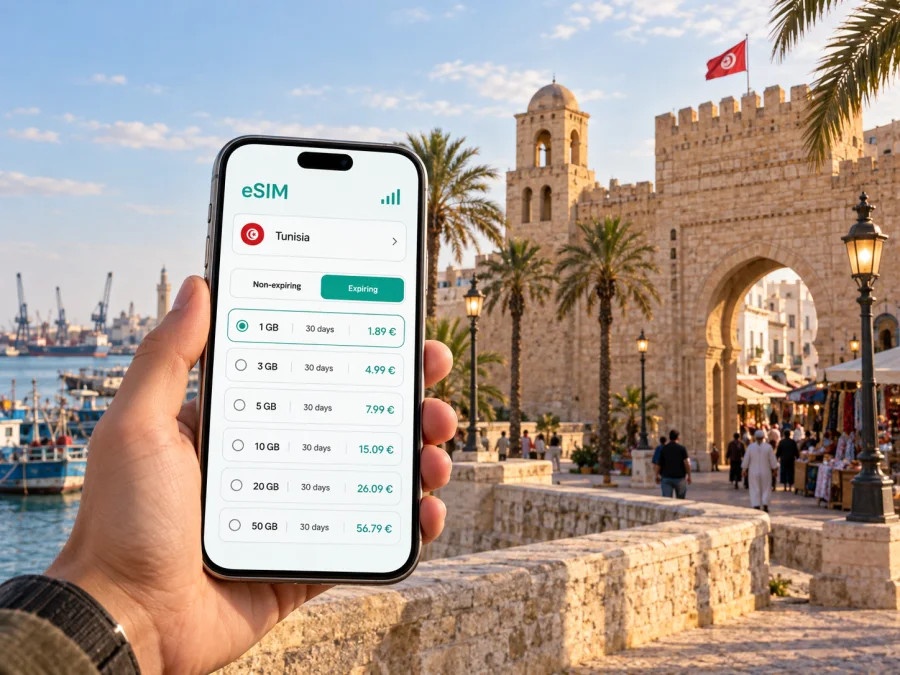
Sfax eSIM: mobile connection and internet for your city trip
Sfax is a working Mediterranean port city with a compact historic core and a wide modern urban area. A reliable way to get online on your phone can make the first hours easier: check your hotel address, message a driver, follow a route from the airport or railway station, and coordinate a meeting without searching for public Wi-Fi. An eSIM is useful when you want mobile data during a visit to Sfax while keeping your regular SIM in the phone.
The city rewards visitors who arrive with a little orientation. The old medina sits inside its walls, the commercial port lies by the coast, and everyday life extends well beyond the central streets. A map helps you understand these distances, but local names may appear in French or Arabic, and a saved pin is often more dependable than a translated street name. Keep your accommodation, station, airport and meeting points saved before leaving a stable connection.
What to prepare before you arrive
Think about the first few hours rather than trying to plan every detail. You may need to find the right exit, arrange a ride, check in, or tell someone that your arrival is delayed. Download an offline map as a backup, save your hotel’s location, and keep the address in a form you can show to a driver. Mobile data is most useful when these small tasks happen away from a familiar network.
Before choosing an eSIM, estimate how you will use your phone. Walking directions and text messages generally need less data than video calls, frequent photo uploads or streaming. Check the selected offer’s validity period, data allowance and country coverage against your dates in Tunisia. If you will continue from Sfax to another destination, confirm that the same plan covers the full route rather than assuming that a city name determines coverage.
A practical preparation list:
- Save your hotel or apartment pin and its address in the original spelling.
- Keep your rail or flight details accessible offline.
- Decide whether you will use maps, messaging, email, calls over data or hotspot sharing.
- Check how many travel days the data plan should cover, including the day you leave Sfax.
- Carry a power bank if you expect to use navigation for long walks or transfers.
- Keep your ordinary number available for calls and SMS if you need it; a travel data eSIM is not automatically a replacement for voice service.
Getting from the airport or station into town
Sfax–Thyna International Airport serves the city, but flight availability and schedules can change. Check your itinerary and arrival arrangements shortly before travel. At the airport, confirm the pickup point with your hotel or driver and keep the destination pin open. If you are meeting someone, share a clear landmark and your estimated arrival rather than relying on a vague description of a terminal exit.
The railway station is another important arrival point for people travelling overland. Tunisia’s national railway network includes Sfax on its main Tunis–Sousse–Monastir–Mahdia–Sfax–Gabès corridor. Timetables and service conditions can change, so verify the current departure details through the railway operator before setting out. Once you arrive, a map and a working data connection make it easier to compare the station area with your accommodation and choose whether to walk, take a taxi or contact your host.
Finding your way around Sfax
Sfax is not a single sightseeing zone. The medina is a dense historic quarter where narrow lanes and gates shape movement; outside the walls, the city opens into busier streets, neighbourhoods and commercial areas. A route that looks short on a map can feel different on foot if it passes through a maze of lanes or requires crossing a main road. Check the route at walking scale and use visible landmarks to confirm that you are heading in the right direction.
The old city’s gates are useful orientation points. Bab Diwan faces the waterfront side, while Bab Jebli is another major entrance on the northern side of the medina. Inside, the Great Mosque and the souks help you keep a mental sense of the centre. Save pins for places you actually intend to visit; a handful of well-named destinations is more useful than a crowded list of every café and shop you might pass.
For a first walk, start at an identifiable medina gate, check the next landmark before entering narrower lanes, and save a separate route back to your hotel. Pause somewhere safe to check the map rather than walking while staring at the screen.
Inside the medina, GPS positioning may be less intuitive than on open streets because lanes are close together and buildings can obscure a clear view of the route. Treat turn-by-turn directions as a guide, not a substitute for looking around. Downloading an offline map can help if the signal drops or your data runs low; it will not replace live information such as updated traffic or a message from your driver.
Choose mobile data for the way you travel
The right allowance depends on your routine. A business visitor who checks email, messaging and maps may have a different pattern from someone uploading photographs throughout the day. Avoid choosing by headline volume alone: compare validity, eligible destination, price and whether the data can be used on the dates you need. Details shown for a plan are the best basis for a decision; actual network performance can vary by location, building and local conditions.
| Your Sfax routine | Likely phone use | What to consider |
|---|---|---|
| Short city break | Maps, messaging, ride coordination, occasional browsing | A modest allowance may be enough if you use Wi-Fi for large downloads |
| Work visit | Email, calendar, video meetings, document access | Include the data needs of calls and any backup connection |
| Several stops in Tunisia | Navigation, rail or road updates, accommodation messages | Check that the plan covers every country on your itinerary |
| Photo-heavy trip | Uploads, cloud backups, social apps | Review background syncing and use Wi-Fi for large files where practical |
| Ferry day to Kerkennah | Timings, messages and map checks around the port | Save tickets or booking details offline and confirm the plan’s destination coverage |
An eSIM can separate travel data from the physical SIM you already use. Depending on your phone, you may be able to keep your regular line available for calls or verification messages while selecting the eSIM for data. Check the setup instructions and plan conditions for your device.
If you want to compare the available data options for your Tunisia itinerary, review the eSIM plans for Tunisia and match the destination, validity and allowance to your dates. Kaspersky eSIM Store is an app and website where you can choose, purchase and activate an eSIM with a suitable data plan for an international trip. The selected plan is provided under its stated conditions;
Staying oriented between the medina, hotels and work meetings
Many visitors use Sfax as a business destination as well as a stop on a longer trip. If a meeting is outside the walled centre, save both the venue and the nearest entrance or drop-off point. A building name alone may not be enough when similar names appear in more than one language. Ask your contact to share a map pin and, where useful, a nearby landmark or street name in Arabic or French.
For accommodation, record the precise entrance location. A hotel may be straightforward to find from a main road, while a smaller guesthouse can sit on a lane that is difficult to identify from a broad map view. Send the host an arrival message before you set off from the airport or station, and keep the check-in details available offline. If you arrive after a transfer, you can still show the address even when you are not connected.
When arranging a taxi or pickup, agree on a recognizable meeting point, such as the main entrance or a clearly marked gate. Keep the phone charged and share your arrival update in a concise message. Many travel eSIM plans are designed for data and do not include a conventional phone number; internet-based calls and messages can work when both parties use compatible apps.
From Sfax to Kerkennah or onward by rail
Sfax is a useful base for exploring nearby destinations, but every onward leg introduces a new timing and data question. Ferries to the Kerkennah Islands depart from the port area; check the current timetable and ticket arrangements before travelling, as services and conditions may vary. Save the port entrance, your accommodation and the return point. If a schedule changes, a charged phone and an available way to receive updates are valuable.
For rail journeys, Sfax lies on a north–south route connecting with places including Mahdia, Monastir, Sousse, Tunis and Gabès. This makes a train a possible option for a broader Tunisia itinerary, depending on the current service and your destination. Check the operator’s latest schedule close to departure rather than relying on an old screenshot. Keep your ticket or booking details accessible offline, and make sure the eSIM plan you selected applies beyond Sfax if you will continue travelling.
Road transfers and shared transport can be less predictable than a fixed reservation. Before setting out, agree where you will be collected, how you will identify the vehicle and what to do if you are delayed. A live map can help you communicate location, but the driver’s instructions and local signs remain important. Keep some battery for the rest of the journey instead of using navigation at full brightness without interruption.
eSIM setup and a few checks before purchase
Set up your eSIM while you have a dependable internet connection, preferably before your travel day. The steps depend on the phone and the instructions attached to the plan. Avoid deleting an installed eSIM profile unless the provider’s instructions tell you to do so; in some cases, a profile cannot simply be installed again. Before activation, check the plan’s coverage, validity start and data allowance so that they fit your travel dates.
A travel eSIM requires a device that supports eSIM and is not restricted by a carrier lock. Check whether your device supports eSIM before you choose a plan. When you are ready to install it, follow the relevant Android eSIM installation instructions or iPhone and iOS eSIM installation instructions. The wording of settings can vary between phone models and operating system versions.
After installation, review which line is selected for mobile data and whether data roaming needs to be enabled for the travel eSIM according to its instructions. Keep your home line settings as intended, and consider disabling data switching if your phone could otherwise use the wrong line. Do not assume that buying or installing a plan automatically starts it at the ideal moment; follow the plan’s activation details.
Before you leave, use this checklist:
- The eSIM is installed on the device you will carry.
- The plan is valid for Tunisia and for the relevant dates.
- You understand when its validity period begins.
- Mobile data is assigned to the intended line.
- Your important address, ticket and booking information is available offline.
- You know how to contact your accommodation if your arrival time changes.
Common questions about using an eSIM in Sfax
Will an eSIM replace my usual phone number?
Not necessarily. Many travel eSIM plans are intended for mobile data and do not include a standard voice number or SMS. You can keep using your usual line for calls or messages if your device and provider settings allow it, while using the eSIM for data. Confirm the exact inclusions of the plan you select.
Can I rely on mobile data everywhere in Sfax?
No mobile service should be treated as guaranteed in every building, street or travel situation. Reception and speed depend on the local network, surroundings, device and other conditions. Save essential information offline and use Wi-Fi when available for large downloads or backups.
Is mobile data useful inside the medina?
It can help with map checks, messages and meeting arrangements, but narrow streets may make orientation more difficult. Download an offline map in advance, note nearby gates and landmarks, and stop somewhere safe to check your position.
Should I activate an eSIM before landing?
You can install it before departure if the instructions and plan allow it. Activation timing varies by plan, so read the terms carefully. Preparing in advance can help you avoid doing setup while handling luggage or arranging a transfer.
What if I travel beyond Sfax?
Check that the destination in your plan matches your full route in Tunisia. Save tickets and addresses offline, and verify onward transport schedules shortly before travel. A city-focused itinerary can still include several regions, so do not assume coverage from the Sfax landing page or city name alone.
Make your Sfax arrival easier
A little preparation turns mobile data into a practical travel tool: you can check a route from Sfax–Thyna airport or the railway station, find a meeting point, navigate around the medina and stay in touch while plans change. Choose a data allowance that reflects how you will use your phone, keep important details offline and confirm the plan conditions for every stop on your itinerary.
When you are ready, use Kaspersky eSIM Store to choose, purchase and activate an eSIM plan for your trip. Compare eSIM options for Tunisia and select the allowance and validity that suit your time in Sfax and any onward travel.


