
Travel connectivity guide
Sharjah eSIM: Mobile Internet Travel Guide
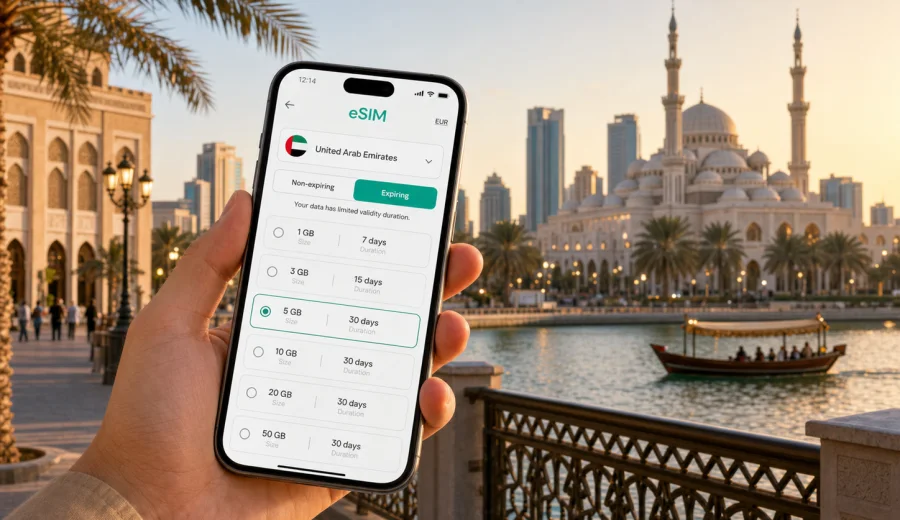
Sharjah eSIM: mobile connection and internet for a city trip
Sharjah is close to Dubai, but it is not just a quieter extension of a neighboring city. It has its own airport, museums, waterfronts, family hotels, business areas, university district, beaches, heritage streets and road links across the United Arab Emirates. A working eSIM makes the city easier to handle from the first hour: you can open maps, message your hotel, check a taxi route, translate a sign, confirm a booking and keep travel documents available without waiting for public Wi-Fi.
For many visitors, mobile internet in Sharjah is not about entertainment first. It is a practical travel layer. You may need it after landing at Sharjah International Airport, during a transfer from Dubai International Airport, while moving between Al Majaz Waterfront and the Heart of Sharjah, or when planning a day trip toward Mleiha, Ajman or Dubai. A travel eSIM helps you prepare mobile data in advance, while your regular SIM can stay in the phone for your main number if your device supports dual SIM settings.
This guide focuses on Sharjah as a city: arrival, local movement, districts, hotels, business trips, stopovers, family routes and the practical steps for choosing and installing an eSIM for a visit to the United Arab Emirates.
Why mobile internet matters in Sharjah
Sharjah is easy to enjoy when your phone is already connected. The city is spread across waterfront promenades, heritage streets, malls, beach areas, hotels and office districts. You may move by taxi, ride-hailing, private transfer or car, and a small route change can affect timing if traffic builds between Sharjah and Dubai.
Mobile data is useful in Sharjah when you need to:
- check the route from the airport to your hotel;
- message a driver or reception desk after arrival;
- use navigation around Al Majaz, Al Qasba, Al Khan and the Central Souq area;
- compare pickup points near malls, hotels and waterfront entrances;
- translate menus, museum information or transport signs;
- keep boarding passes, reservations and payment confirmations available;
- use messenger calls when the eSIM tariff includes data but not ordinary voice calls or SMS;
- plan trips from Sharjah to Dubai, Ajman, Mleiha or the east coast.
The main advantage is predictability. Hotel Wi-Fi and public networks can be useful, but they are not always available when you are outside a building, waiting at a pickup zone, walking along the waterfront or trying to find the correct entrance to a meeting.
Arrival: airport, transfer and first setup check
Sharjah International Airport is compact, but the first steps after landing still require coordination. You may need to confirm a pickup point, check the hotel address, share your location, or open a map before leaving arrivals. If your eSIM is installed before departure, you can usually switch the eSIM line on after landing and set it as the mobile data line, following the activation rules of the selected tariff.
Some travelers reach Sharjah after landing in Dubai. That route can be straightforward, but timing depends on traffic. With mobile internet active, you can check the current drive time, update a hotel or colleague, and avoid confusion if the booking says Sharjah while the flight arrives in Dubai.
Before leaving the airport area, run this short check:
1. Mobile data is assigned to the eSIM line.
2. Data roaming is enabled for the eSIM if the tariff instructions require it.
3. Your regular SIM remains available for bank messages or calls if needed.
4. Your hotel address and booking reference are saved on the phone.
5. Maps and messaging work before you get into the car.
This takes a minute and can prevent a difficult first ride. It also lets you keep your regular number separate from travel data, which is useful if you need SMS codes from home while using eSIM for internet.
Moving around Sharjah
Sharjah trips often combine cultural areas, malls, hotels, beaches and nearby emirates. Al Majaz Waterfront is popular for evening walks and family time. Al Qasba has restaurants and canal views. The Heart of Sharjah is important for heritage buildings, museums and souqs. Al Khan and the coastline are useful for beach hotels and waterfront stays. University City and industrial districts matter for conferences, education and business visits.
Mobile internet helps with ordinary but important details:
- following a driver's location instead of waiting at the wrong entrance;
- sharing a live location with family or colleagues;
- checking whether traffic makes a Dubai meeting realistic;
- choosing between walking and driving for nearby attractions;
- finding the right hotel tower, office gate or museum entrance;
- keeping children or group members coordinated during mall visits.
Sharjah is especially sensitive to timing when your day includes Dubai. A route may look short, then become slow during commuter traffic. With data active, you can check the route before committing to a dinner reservation, airport transfer or meeting time.
District and scenario guide
Use this table to match your data needs to the way you will use the city.
| Sharjah area or scenario | Why mobile data helps | Practical eSIM use |
|---|---|---|
| Sharjah International Airport | Arrival messages, taxi route, hotel contact | Turn on data after landing and confirm pickup details |
| Al Majaz Waterfront | Maps, restaurants, family coordination | Keep navigation and messenger apps ready during evening walks |
| Heart of Sharjah | Museums, heritage streets, souqs | Use maps, translation and digital tickets without searching for Wi-Fi |
| Al Khan and beach hotels | Transfers, beach plans, nearby attractions | Manage ride-hailing, restaurants and shared location |
| University City | Meetings, campus navigation, events | Use calendar, email, maps and messenger calls on mobile data |
| Sharjah plus Dubai | Cross-emirate traffic and longer routes | Check travel time before leaving the city |
| Mleiha or desert-style outings | Route planning and group communication | Save key information in advance and keep data for coordination where available |
The goal is not to use data constantly. It is to have a connection when a missed message, wrong entrance or outdated route can waste time.
Hotels and Wi-Fi limits
Many Sharjah hotels and serviced apartments offer Wi-Fi, but hotel internet is not a complete replacement for eSIM data. You still need a connection between the airport and hotel, outside a tower entrance, in a taxi, near a mall pickup point, or during a day trip. Hotel Wi-Fi can also require passwords, room numbers or repeated logins.
A good pattern is simple: use hotel Wi-Fi for heavy downloads, app updates and long video calls from your room; use eSIM mobile data for maps, messages, booking apps and route changes while moving.
Your accommodation style affects data needs:
- Beach resort stay: less navigation, more messaging, booking and photo sharing.
- Serviced apartment: more errands, delivery apps, route checks and taxi rides.
- Business hotel: more email, calendar changes, document access and messenger calls.
- Family hotel: more group coordination and repeated searches for food, transport and attractions.
If you plan to use a laptop through your phone, check whether hotspot or tethering is allowed by the selected tariff. Terms can vary, so do not rely on it until you have reviewed the details.
Estimating data for Sharjah
Data use depends on habits. Navigation, messenger text and booking apps are usually light. Video calls, cloud backup, streaming and large uploads use much more. Choose a data volume that fits the itinerary, not only the number of travel days.
| Trip style | Typical data behavior | Planning note |
|---|---|---|
| One-day stopover | Maps, messages, taxi apps, boarding pass | A small package may work if you avoid streaming |
| Weekend in Sharjah | Navigation, restaurants, photos, messenger calls | Choose enough data for active days outside hotel Wi-Fi |
| Family trip | Group chats, attraction searches, ride-hailing | Add margin for repeated planning and shared location |
| Business visit | Email, calendar, maps, calls, documents | Match data and validity to the full work schedule |
| Sharjah plus Dubai | Frequent route and traffic checks | Expect longer days away from hotel Wi-Fi |
| Longer UAE stay | Daily apps, occasional hotspot, cloud use | Match both duration and data volume to the full stay |
To save data, download offline maps where possible, update apps before departure, turn off automatic photo and video backup on mobile data, and use hotel Wi-Fi for large files. Keep mobile data for the tasks that matter when you are moving.
Choosing an eSIM for a Sharjah trip
For Sharjah, choose an eSIM tariff by destination, data volume and validity period. The destination should match the country where you will use mobile data, which means the United Arab Emirates for a Sharjah city trip. If your route includes other countries, compare whether a regional option is more suitable, but for Sharjah itself the UAE destination is the relevant starting point.
Kaspersky eSIM Store is an app and website where you can quickly choose, arrange and activate an eSIM with a suitable tariff for mobile internet in an international trip. For this city article, use the UAE destination page to review available options and prepare the connection before travel: choose an eSIM tariff for your trip to Sharjah.
When comparing options, check:
- destination: the tariff should cover the United Arab Emirates;
- data volume: enough for maps, messaging, booking apps and expected media use;
- validity period: long enough for arrival, stay and departure day;
- activation rules: when validity starts and which setup steps are required;
- hotspot availability: important for laptop use or sharing data;
- device support: the phone or tablet must support eSIM.
Do not choose only by the largest data number. A short business visit may need a smaller but reliable package. A family holiday may need more data because plans change often. A stopover may need only enough for navigation, messages and boarding information.
Device compatibility and setup
Not every phone supports eSIM, and some devices may be restricted by carrier settings. Before purchasing a tariff, confirm that your device supports eSIM and can add a new eSIM profile. This matters if you bought the phone through a mobile operator, use a regional model, or plan to keep your physical SIM active.
Before you choose a tariff, check your device. Then review your phone settings and decide which line will handle mobile data after arrival. If you use two lines, label them clearly, for example "Home SIM" and "Travel eSIM", so you do not accidentally use roaming data on the wrong line.
Compatibility checklist:
- The phone supports eSIM.
- The device is not locked in a way that prevents adding another eSIM.
- The operating system is updated enough to manage eSIM profiles.
- You know where the mobile data line setting is located.
- You understand whether the selected tariff is data-only.
- You keep the QR code or installation details accessible until setup is complete.
For many travelers, the best time to install the eSIM is before departure, while connected to stable Wi-Fi. Activation rules depend on the selected tariff, so read the instructions and avoid starting validity earlier than intended.
Installing and activating eSIM
The setup flow is usually: choose a tariff, receive installation details, add the eSIM profile, then select it for mobile data when you are ready to use it. If you need device-specific steps, use the Android installation guide or the iOS installation guide.
A practical sequence for Sharjah:
1. Choose the United Arab Emirates as the destination.
2. Select a tariff with enough data and validity for the itinerary.
3. Install the eSIM on reliable Wi-Fi.
4. Name the line clearly in phone settings.
5. Keep your regular SIM active if you need messages or calls.
6. After arrival, select the eSIM for mobile data.
7. Enable data roaming for the eSIM if the instructions require it.
8. Test a map search before leaving the airport or hotel.
Do not delete the eSIM profile unless you are sure you no longer need it. In many cases, an activated eSIM profile cannot simply be moved to another device.
Business travel, family trips and stopovers
Sharjah is relevant for meetings, education, industrial areas, conferences and cross-emirate workdays. A business traveler may start the morning in a Sharjah hotel, go to University City or an office district, then continue to Dubai or Ajman. Mobile internet helps with changed meeting locations, email, calendar updates, route checks, messenger calls and document access while in transit.
For work trips, review hotspot terms before you rely on a laptop connection. Also avoid unknown public Wi-Fi for confidential tasks. An eSIM gives you a personal mobile data option, but you should still use official apps, keep the phone locked and avoid sharing verification codes.
Sharjah is also strong for family travel because it has museums, waterfronts, beaches, aquarium visits, parks, malls and quieter accommodation options. A family trip uses data in many small moments: finding food, checking opening times, ordering a car, translating a menu, sharing a location or sending updates. If one adult is the navigation lead, that phone should have enough battery, enough data and the eSIM already set up.
For a stopover, the priority is speed. You may not want to spend limited time searching for a SIM counter or Wi-Fi login. If the eSIM is installed, you can leave the airport, check a compact route, visit one or two places and return for the next flight with less friction.
Trips from Sharjah to other UAE destinations
A Sharjah itinerary often expands beyond the city. You may go to Dubai for a meeting or sightseeing, Ajman for a coastal visit, Mleiha for archaeology and desert landscapes, or the east coast for a longer outing. Because Sharjah is part of the United Arab Emirates, a UAE-focused eSIM destination is the practical choice for domestic routes, subject to the selected tariff conditions.
Before a day trip, prepare like this:
- charge your phone and power bank;
- save hotel and pickup addresses;
- download tickets or reservation confirmations;
- check route timing before leaving;
- keep a messaging app available for drivers and group members;
- avoid starting large cloud backups on mobile data.
If you travel outside dense city areas, save key route information in advance. Mobile data is helpful, but route planning should also account for battery level, heat, road timing and local conditions.
FAQ about eSIM in Sharjah
Is a Sharjah eSIM different from a UAE eSIM?
For a city trip to Sharjah, you normally choose the United Arab Emirates as the destination because Sharjah is one of the emirates. The selected tariff conditions define data volume, validity and usage rules.
Can I keep my regular SIM active?
On many compatible phones, yes. You can keep your regular SIM for calls or messages and use the eSIM for mobile data. Check that the correct line handles data.
Does an eSIM include a local phone number?
Many travel eSIM tariffs are data-only. Ordinary voice calls and SMS may not be included unless the tariff details say otherwise. Messenger calls can often work through mobile data.
Should I install the eSIM before I arrive?
Installing before departure is often more convenient because you can use stable Wi-Fi and avoid airport setup pressure. Read activation rules before installing or turning on the line.
What if I also visit Dubai from Sharjah?
For travel within the United Arab Emirates, choose a tariff that covers the UAE and review its conditions. Mobile data is useful on cross-emirate routes because traffic timing can change.
Can I use public Wi-Fi instead?
Public or hotel Wi-Fi can help with heavy downloads, but it is not always available during transfers, taxi pickup, waterfront walks or day trips. An eSIM gives you a personal mobile data option while you move.
Prepare mobile internet for Sharjah
Sharjah is easiest to enjoy when your phone is ready before the first taxi ride, hotel check-in or evening walk. With an eSIM, you can prepare mobile internet for maps, messages, booking apps, translation, work updates and day trips across the UAE without relying only on roaming or public Wi-Fi.
Kaspersky eSIM Store helps you choose, arrange and activate an eSIM with a suitable tariff for mobile internet in an international trip. Before you fly, review the UAE options, check device compatibility, install the eSIM on Wi-Fi and keep the instructions available for arrival. When you are ready to plan the connection for this city trip, prepare an eSIM tariff for Sharjah.