
Travel connectivity guide
Sharm El Sheikh eSIM: Mobile Internet Guide
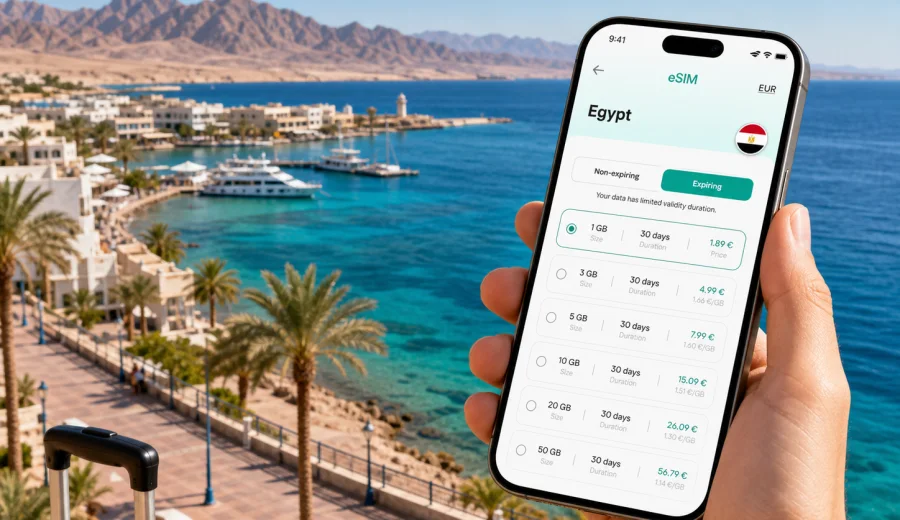
Sharm El Sheikh eSIM: mobile connection and internet for your trip
Sharm El Sheikh is a city where mobile internet quickly becomes part of the trip. You use it at the airport to message your hotel driver, on the way to Naama Bay to check the route, at the marina to confirm a diving pickup, and in the evening to book a table or call a ride. The city is spread along the Red Sea coast, with resort areas, beaches, diving centers, shopping streets, and hotels often separated by short but not always walkable distances.
An eSIM can make this simpler. Instead of looking for a local SIM counter after a flight, changing a plastic SIM card, or relying only on hotel Wi-Fi, you can prepare mobile internet for Egypt in advance and activate it on a compatible phone. For Sharm El Sheikh, that is useful because many key travel moments happen before you have settled in: airport arrival, transfer coordination, hotel check-in, first navigation, and day-trip planning.
This guide focuses on Sharm El Sheikh rather than Egypt in general. It explains where mobile connection matters in the city, how much data different travelers may need, what to check before choosing an eSIM plan, and how to use Kaspersky eSIM Store as an app or site to choose, set up, and activate a suitable eSIM plan for a trip abroad.
Why mobile internet matters in Sharm El Sheikh
Sharm El Sheikh is easy to enjoy, but it is not a compact walking city in the way many European old towns are. A typical trip may include the airport, a resort in Nabq Bay or Sharks Bay, evenings around Naama Bay, a boat departure from the marina, a visit to SOHO Square, and possibly a desert excursion or a day trip beyond the city. Mobile data helps connect those separate moments.
Reliable mobile internet is useful for:
- checking transfer messages after landing at Sharm El Sheikh International Airport;
- using maps between resort districts, beaches, restaurants, and dive centers;
- contacting hotel reception, tour operators, diving schools, or drivers;
- translating menus, signs, and short messages when English is not enough;
- sharing location with friends or family when the group splits up;
- using messenger calls when your eSIM plan does not include a regular phone number;
- checking booking confirmations and flight updates;
- managing online payments, banking approvals, and travel documents.
Hotel Wi-Fi can be helpful, but it is not a complete travel connection. Signal quality may vary between rooms, lobbies, beaches, pools, and restaurants. Public Wi-Fi in cafes or shopping areas can be convenient for light browsing, but it is not always the best option when you need maps, ride coordination, or access to booking details while moving around the city.
An eSIM is especially practical if Sharm El Sheikh is part of a wider Egypt route. You may arrive in Sharm, spend a few days by the Red Sea, then continue to Cairo, Luxor, Hurghada, or a Nile cruise. A country plan for Egypt can be easier to manage than treating each city as a separate connectivity problem.
Arrival at Sharm El Sheikh International Airport
The first hour after landing is one of the most important times to have data. You may need to find your driver, message the hotel, confirm which terminal exit to use, or check whether a group transfer is waiting outside. If you arrive late at night, the value of immediate mobile connection is even higher because you may not want to spend extra time looking for a SIM card counter.
Before your flight, save the essentials offline: hotel name, booking number, transfer phone number, and the QR code or installation details for your eSIM if your chosen setup requires them. Treat airport Wi-Fi as a backup, not as your only plan.
At the airport, a practical setup looks like this:
1. Keep your primary SIM active if you need to receive banking SMS or calls.
2. Install the eSIM before departure when possible, while you have a stable connection.
3. After landing, turn on the eSIM line for mobile data.
4. Check that data roaming is enabled for the eSIM if the plan instructions require it.
5. Open maps and your messenger before leaving the terminal.
This sequence helps avoid a common arrival problem: being physically in the right place but unable to contact the person who is meeting you. In Sharm El Sheikh, where many travelers use hotel shuttles and private transfers, a few minutes of working mobile data can remove a lot of uncertainty.
Moving between resort districts
Sharm El Sheikh has several areas that feel different from each other. Your mobile internet needs may change depending on where you stay and how often you leave the resort.
| Area or route | Why data helps | Typical use |
|---|---|---|
| Nabq Bay | Long resort strip and transfers to other areas | Maps, ride messages, restaurant searches |
| Sharks Bay | Resorts, beaches, airport proximity | Transfer coordination, hotel communication |
| Naama Bay | Evening walks, restaurants, shops | Navigation, messaging, reviews, payments |
| SOHO Square | Dining and entertainment area | Meeting points, ride pickup, group chat |
| Old Market | Shopping and local movement | Translation, maps, price checks |
| Marina and boat piers | Diving and snorkeling departures | Pickup times, weather checks, operator messages |
If you stay mostly inside one all-inclusive resort, a small or medium data package may be enough. If you expect daily movement between beaches, restaurants, dive centers, and shopping areas, choose more allowance and check hotspot conditions before relying on the plan for a laptop.
Choosing an eSIM plan for Sharm El Sheikh
When you compare eSIM plans, do not look only at the number of gigabytes. For a Sharm El Sheikh trip, the useful question is how the plan matches your schedule and habits.
Consider these points:
- Trip length: a weekend, a one-week resort stay, or a longer Egypt itinerary.
- Data volume: light messaging, everyday maps and browsing, or heavy media use.
- Validity period: the plan should cover arrival day and departure day, not only full vacation days.
- Activation rules: check when the validity period starts and how activation works.
- Hotspot needs: if you plan to share data with a laptop or another device, confirm the plan conditions.
- Device support: the phone must support eSIM and should not be locked to one carrier.
- Voice and SMS: many travel eSIM data plans focus on mobile internet and may not include a regular phone number.
For many travelers, the right plan is not the largest one. It is the plan that covers the moments when hotel Wi-Fi is not enough: arrival, navigation, messaging, translation, booking updates, and short trips from the city.
Before you choose, check your device compatibility. This is important because eSIM support depends on the phone model, region, and carrier lock status. A device can be modern and still have restrictions, so it is better to verify support before you pay for a plan.
Data scenarios for common Sharm El Sheikh trips
The table below is a practical way to think about your mobile internet needs. It does not replace the exact terms of a specific plan, but it helps match your trip style to a data allowance.
| Traveler scenario | Likely data pattern | What to prioritize |
|---|---|---|
| Resort weekend | Airport messages, maps, restaurant searches | Short validity, modest data volume |
| One-week beach holiday | Daily messaging, maps, web searches, photo sharing | Balanced data and full-trip validity |
| Diving or snorkeling trip | Operator messages, weather checks, photos, marina navigation | Reliable data during movement, enough allowance for media |
| Family vacation | Shared logistics, maps, messaging, occasional hotspot | Larger package, clear validity dates |
| Business stop in Sharm | Email, messenger calls, documents, ride coordination | Stable allowance, hotspot conditions if needed |
| Egypt multi-city route | Sharm plus Cairo, Luxor, or Hurghada | Country coverage for Egypt, longer validity |
If you want to prepare before departure, Kaspersky eSIM Store lets you choose a destination and suitable data package through the app or website, then install and activate the eSIM on a compatible device. For this city trip, you can view mobile internet options for Egypt and pick a plan that fits your Sharm El Sheikh schedule.
When to install and activate your eSIM
For most travelers, the safest approach is to install the eSIM before the trip and activate mobile data when it is needed according to the plan instructions. Installation and activation are related, but they are not always the same step. Installing adds the eSIM profile to your phone. Activation starts using the plan under its conditions.
A practical timeline:
1. A few days before departure: check that your phone supports eSIM and is not carrier-locked.
2. Before leaving home: choose an eSIM plan for Egypt and complete setup while your connection is stable.
3. At the airport before boarding: keep the eSIM installed, but do not change data settings unless instructed.
4. After landing in Sharm El Sheikh: switch mobile data to the eSIM and follow the activation instructions.
5. During the trip: monitor data use and top up or choose another plan if available and needed.
If you need setup guidance, use the official installation pages for your device type: Android eSIM installation instructions or iOS eSIM installation instructions. Follow the steps carefully, especially around QR code scanning, default line selection, and data roaming settings for the eSIM line.
Do not delete an eSIM profile during the trip unless you are sure you no longer need it. Some eSIM profiles cannot simply be moved to another phone after activation. If you are changing devices, check the conditions before making changes.
Hotels, transport, work, and excursions
Sharm El Sheikh travel often alternates between fixed places and short movements. You may spend hours at the beach, then need a quick connection to confirm a diving pickup, call a driver, or find the right meeting point at a marina. Resort Wi-Fi may work well in the lobby but become weaker near beach loungers, garden rooms, pools, or outdoor restaurants. Mobile data gives you a fallback when the trip moves outside the strongest hotel signal.
Transport is often arranged through hotels, tour companies, taxis, private drivers, or local ride options where available. Use mobile internet to check routes to Naama Bay or Old Market, send your live location, translate a destination name, and compare travel time before choosing where to have dinner. Save your hotel as a favorite place in your map app on the first day, especially if the resort has several entrances.
For diving, snorkeling, boat trips, Ras Mohammed National Park, desert programs, or a visit to Dahab, save pickup details and operator contacts before leaving the hotel. Mobile signal can vary offshore or in remote desert areas, so do not make the entire plan depend on being online there. The practical value is having data before departure, at return points, and during regular movement around the city.
Business travelers and short-stop visitors have a different pattern. You may need email, messenger calls, documents, banking approvals, or a hotspot for focused laptop work. If you expect to use tethering, check whether hotspot is allowed under the plan terms and remember that laptops can use data quickly through cloud sync, app updates, and large attachments.
Before you leave home: a quick checklist
Use this checklist before your Sharm El Sheikh trip:
- Check that your smartphone supports eSIM.
- Confirm that the device is not locked to a single mobile carrier.
- Choose an eSIM plan with enough data and validity for your full trip.
- Install the eSIM while you still have stable home Wi-Fi.
- Save hotel, transfer, and tour contacts offline.
- Download offline maps for Sharm El Sheikh and nearby routes.
- Disable large app updates and cloud backups on mobile data.
- Keep your primary SIM available if you need bank SMS or calls.
- Read the activation instructions before the flight.
- Save support information in case you need help during setup.
This preparation is especially useful if you arrive tired, late, or with children. The first hour of the trip should not depend on finding a desk, comparing unfamiliar offers, or using a weak public Wi-Fi signal.
FAQ: eSIM and mobile internet in Sharm El Sheikh
Is an eSIM useful if my hotel has Wi-Fi?
Yes. Hotel Wi-Fi can be a good base connection, while eSIM helps at the airport, in taxis, at marinas, in Naama Bay, at Old Market, and during excursions.
Does a travel eSIM give me a local phone number?
Many travel eSIM data plans focus on mobile internet and do not include a regular phone number, voice calls, or SMS unless this is stated in the plan conditions. Messenger calls can usually work over mobile data.
Choose a practical eSIM setup for Sharm El Sheikh
For Sharm El Sheikh, the best mobile internet setup is the one that covers real travel moments: landing at the airport, finding your transfer, moving between resort districts, joining boat or desert tours, using maps in the evening, and staying reachable outside hotel Wi-Fi.
Kaspersky eSIM Store is an app and website where you can choose, set up, and activate an eSIM with a suitable data plan for mobile internet during a trip abroad. Before you travel, check your device support, compare the plan volume and validity, install the eSIM carefully, and keep your activation instructions available.
If you want to prepare mobile internet before your Red Sea trip, choose an eSIM plan for Egypt and match it to your Sharm El Sheikh route, dates, and expected data use.