
Travel connectivity guide
Sheki eSIM Guide for Mobile Internet
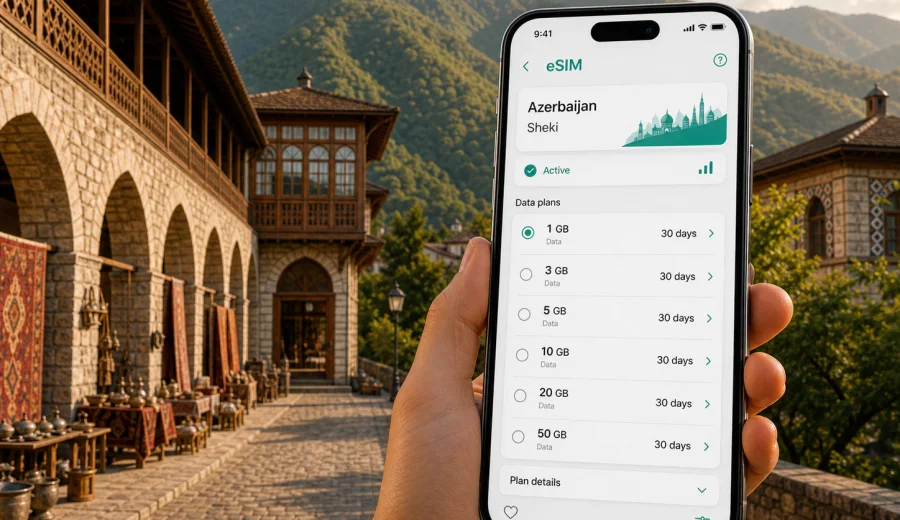
Sheki eSIM Guide: Mobile Connection and Internet for Your Trip
Sheki is one of Azerbaijan's most memorable city stops: a mountain-backed Silk Road town with old caravanserais, narrow streets, the Sheki Khan's Palace, craft workshops, tea houses, and day trips into the foothills of the Greater Caucasus. It is also a place where mobile internet quickly becomes practical. You may need maps to find your guesthouse, translate a menu, check bus times, message a driver, or coordinate the next leg of your Azerbaijan itinerary.
An eSIM can make that easier because you do not need to look for a physical SIM card shop when you arrive. With a compatible phone, you can prepare a digital SIM before the trip, install it through a QR code or app flow, and use mobile data when the selected plan becomes active. For Sheki, this is especially useful because many travelers reach the city after a long road journey from Baku, Ganja, Gabala, or another stop. By the time you arrive, you usually want directions, hotel messaging, and a working map, not another errand.
This guide focuses on Sheki itself: arrival, local movement, hotels, business trips, short stays, onward routes, and enough data for a calm trip.
Why mobile internet matters in Sheki
Sheki is compact, but it is not a city where every useful place is on one straight boulevard. The historic area climbs gently toward the palace and old caravanserai zone, while hotels, cafes, bus stops, markets, and residential streets spread across different parts of town. Mobile internet helps you move between them with fewer pauses.
Typical online tasks in Sheki include:
- checking your route from the bus station or railway station area to a hotel;
- using maps while walking between the old caravanserais, the palace area, workshops, and restaurants;
- contacting a guesthouse host when street names or entrances are hard to spot;
- translating Azerbaijani, Russian, or Turkish menu items and signs;
- comparing taxi or private transfer options for Kish, Gabala, or onward travel;
- keeping messaging apps active while your primary SIM stays in your phone;
- uploading photos only when you have enough battery and a stable connection.
Public Wi-Fi can be helpful in hotels and cafes, but it is not a reliable plan for movement. A travel eSIM is most useful in the gaps: the moment you step out of the vehicle, when you leave the hotel, or when you need to adjust plans outdoors.
Arrival in Sheki: where an eSIM helps first
Most visitors reach Sheki overland. The journey is part of the experience, but it also means your first practical need is usually orientation. You may arrive by intercity bus, shared car, private driver, rental car, or train connection. The exact arrival point can affect how quickly you need mobile data.
| Arrival situation | Why mobile data helps | Practical tip |
|---|---|---|
| Bus or shared car from Baku | Arrival may be away from your hotel and after several hours on the road | Save your hotel address offline, then use mobile data for the final walking or taxi route |
| Train to Sheki area | The station may require onward transport into town | Message your accommodation before departure and keep the route ready |
| Rental car | Mountain roads and turns near the city can be easier with live navigation | Download offline maps, but keep mobile data for traffic, rerouting, and messaging |
| Private transfer | Useful for coordination if pickup time or location changes | Keep your driver and hotel contact in a messaging app |
| Day trip from another city | Time is limited and delays matter | Use data for route checks, opening hours, and meeting points |
Sheki is not a huge urban maze, but arriving tired or in the evening changes the equation. A working mobile connection lets you confirm the exact entrance to a guesthouse, share your location, or find a nearby restaurant without relying only on Wi-Fi.
City focus: where you will use data in Sheki
The most popular visitor area is around the historic upper part of Sheki. The Sheki Khan's Palace, traditional houses, craft shops, the old caravanserai area, and hillside viewpoints make this part of town easy to explore on foot. Even here, mobile internet is useful because small lanes, slopes, and courtyard entrances can make a place feel closer on the map than it is in practice.
In the central and lower parts of the city, data helps with everyday travel tasks: finding markets, pharmacies, cafes, ATMs, and transport connections. Many travelers also visit Kish village, known for its historic church and mountain setting. The route is short, but a working map and messaging can still help if you use a taxi or private driver.
For a Sheki trip, think of mobile data in three layers:
1. Navigation data for maps, taxi coordination, hotel directions, and day trips.
2. Communication data for messaging, calls through internet apps, email, and travel updates.
3. Comfort data for photo backup, browsing, restaurant searches, translation, and itinerary changes.
You may not need heavy video streaming in Sheki, but you will likely use small amounts of data often.
How much data to prepare for Sheki
The right amount depends on how long you stay and whether Sheki is your only stop in Azerbaijan. A traveler spending one night in the city needs less data than someone using Sheki as a base for mountain villages, work calls, and onward planning.
| Trip style | Typical Sheki use | Data planning approach |
|---|---|---|
| Short stop, 1 night | Maps, hotel messaging, restaurant search, a few photo uploads | A small plan may be enough if you use hotel Wi-Fi for backups |
| Weekend stay, 2-3 days | Walking navigation, Kish trip, messaging, translation, browsing | Choose enough data for frequent map and app use |
| Azerbaijan route with Sheki included | Baku, Sheki, Gabala, Ganja, or other stops | Pick a plan for the full country route, not only the city |
| Business trip | Email, messengers, documents, possible hotspot use | Choose a larger allowance and check tethering needs in plan details |
| Family or group travel | Multiple people using maps and messaging | Each traveler should have their own plan or a clear sharing setup |
As a practical rule, maps and messaging are light, video and cloud backups are heavy, and hotspot use can drain a data allowance quickly. If you plan to use your phone as a modem for a laptop, check the plan conditions before relying on it.
Before buying: check device compatibility
An eSIM only works on devices that support eSIM and are not restricted by an operator lock. Before you plan your Sheki mobile internet setup, check your device and make sure your phone can add a travel eSIM profile.
You should also check:
- whether your device supports dual SIM use, so your primary SIM can remain active for calls or banking messages if needed;
- whether the eSIM can be installed before departure and activated later according to the plan conditions;
- whether data roaming must be enabled for the eSIM profile;
- whether your phone has the latest operating system updates;
- whether your primary SIM has any travel roaming setting you want to disable to control costs.
Do this before the trip, not in the hotel lobby after a long transfer. If something needs attention, it is easier to handle it while you still have your usual connection and account access.
Choosing an eSIM plan for Sheki and Azerbaijan
For a city article, the key point is simple: choose a plan for Azerbaijan, then use it during your stay in Sheki. The city does not need a separate eSIM destination if your trip is within the same country. If Sheki is one stop on a larger Azerbaijan route, consider the whole route, including Baku, airport arrival, road transfers, Gabala, Ganja, mountain villages, and the return journey.
When you compare options, look at:
- destination coverage in the plan details;
- data allowance in GB;
- validity period in days;
- price and currency;
- activation rules;
- whether top-up is available;
- whether hotspot use is allowed or limited;
- support options if installation or activation needs attention.
Kaspersky eSIM Store is an app and website where you can choose, arrange, install, and activate an eSIM with a suitable mobile internet plan for an international trip. If Sheki is part of your Azerbaijan route, you can prepare an eSIM plan for Azerbaijan before you travel and keep the setup ready for arrival, local movement, and onward transport.
Setup timing: before departure or after arrival
For Sheki, it is usually easier to install the eSIM before the long overland part of the trip, then activate or use it according to the selected plan conditions. If you fly into Baku and travel onward, handle setup while you have stable Wi-Fi. Do not delete an installed eSIM profile unless you are sure it is no longer needed.
How to install an eSIM for the Sheki trip
The usual process is straightforward: choose the destination and plan, complete the purchase flow, install the eSIM profile, name it clearly, and select it for mobile data when you want to use it. If your phone asks for data roaming on the eSIM profile, follow the plan instructions.
For detailed setup steps, use the official guides for your device: Android installation instructions and iOS installation instructions.
A quick setup checklist:
- Install the eSIM while you have stable Wi-Fi.
- Label the line clearly, for example "Azerbaijan data".
- Keep your primary SIM available if you need banking messages or regular calls.
- Set the eSIM as the mobile data line when you are ready.
Most travel eSIM plans are focused on mobile data and may not include a local phone number, regular voice calls, or SMS unless the specific plan says so. For calls and messages in Sheki, many travelers use internet-based apps over the data connection.
Moving around Sheki with mobile data
Sheki rewards walking, but it also includes slopes, uneven streets, and routes that feel different with luggage. Mobile data helps you adjust as you go.
Useful scenarios include:
- Old town walking: follow a route between the palace, caravanserai area, craft shops, and cafes.
- Hotel check-in: message your host if the entrance is inside a courtyard or your arrival time changes.
- Taxi coordination: share your location for Kish, the bus station, a viewpoint, or a restaurant.
- Food and cafes: compare nearby options, translate menus, and check opening hours.
- Weather changes: use live forecasts before deciding whether to walk, wait, or take transport.
Offline maps are still worth downloading. They reduce data use and help if the signal is weaker indoors or in the hills.
Hotels, guesthouses, and Wi-Fi expectations
Sheki has hotels, boutique stays, restored historic properties, and smaller guesthouses. Many offer Wi-Fi, but quality can vary by room location, building thickness, and the number of guests online.
Use hotel Wi-Fi for backups, software updates, long video calls, and large file uploads. Use mobile data for movement, check-in coordination, payment confirmations, and messages outside the property.
For remote work or business travel, ask your accommodation about Wi-Fi quality before booking, but keep an eSIM plan as a backup for essential communication. If your work depends on video calls, do not assume mobile data will replace a stable fixed connection in every room or building.
Business trips, stopovers, and routes from Sheki
Business travel to Sheki may involve meetings, regional site visits, hospitality projects, tourism work, or local partners. Prepare data for email, messaging, maps, and calendar changes, and keep offline copies of key documents. If hotspot use matters, check the selected plan conditions first.
For a short Sheki stop, save the palace route, pin your hotel or luggage drop-off point, keep a driver or station contact in a messenger, and download the local map before the journey.
For trips from Sheki, Kish is the classic nearby route, while Gabala, Ganja, and the road back toward Baku are common parts of longer itineraries. Use mobile data for route checks, driver messaging, weather changes, and next-hotel coordination, but keep offline maps for the broader region.
To make a moderate plan last longer, turn off automatic cloud backups on mobile data, save large uploads for hotel Wi-Fi, disable app updates, and check usage daily.
FAQ: eSIM and mobile internet in Sheki
Do I need an eSIM only for Sheki? Usually no. Choose a plan for Azerbaijan and use it in Sheki and other covered parts of the country.
Can I install the eSIM before I travel? In many cases, yes. Check when the validity period starts and when activation happens.
Will an eSIM give me a local phone number in Azerbaijan? Most travel eSIM plans are for mobile data. Regular voice calls and SMS are not included unless the plan details say otherwise.
Is hotel Wi-Fi enough in Sheki? It may be enough inside your accommodation, but it will not help with arrival, walking routes, taxis, translation, or day trips once you are outside.
Final checklist before you leave for Sheki
Before departure, confirm eSIM support, choose data for your Azerbaijan route, install the profile on stable Wi-Fi, save key addresses offline, and pack a power bank for long transfers.
Sheki is a city where the best moments often happen while walking: a quiet street near the old caravanserai, a mountain view, tea after a palace visit, or a quick side trip to Kish. Prepare the basics before you arrive and choose a data plan that matches your real route.
For a smooth Sheki visit, choose an eSIM plan for Azerbaijan through Kaspersky eSIM Store before you need maps.