
Travel connectivity guide
Shkoder eSIM for mobile internet in Albania
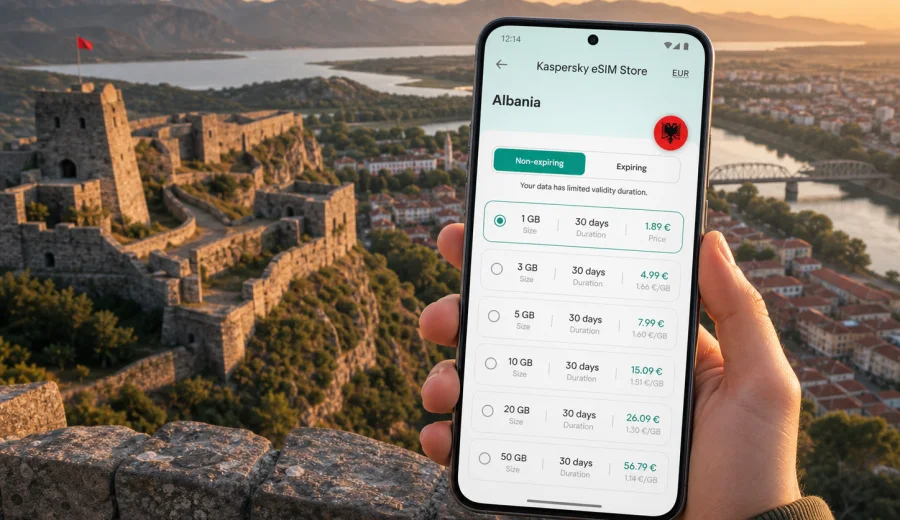
Shkoder eSIM: mobile connection and internet for your city trip
Shkoder is one of the easiest Albanian cities to enjoy slowly, but it is not a place where you want to depend only on hotel Wi-Fi. You may arrive by road from Tirana, Podgorica or the Adriatic coast, then move between the old center, Rozafa Castle, Lake Shkoder, the Buna River, guesthouses and day-trip routes toward the Albanian Alps. A working mobile connection helps with maps, taxi messages, bookings, translation and staying in touch while plans change.
An eSIM can make that first day simpler. Instead of looking for a local SIM card after arrival, you prepare a digital SIM profile on a compatible phone and use a prepaid data plan for Albania. Kaspersky eSIM Store is an app and website where you can choose, arrange and activate an eSIM with a suitable mobile internet plan for a trip abroad.
Why mobile internet matters in Shkoder
Shkoder feels compact on a map, yet many practical moments happen outside a hotel lobby. You may need navigation on the road up to Rozafa Castle, a ride back after sunset, a route to the lake shore, or a message thread with a guesthouse owner. Public Wi-Fi can help in cafes and hotels, but it is not always available when you are between places.
For most visitors, mobile internet in Shkoder is useful for:
- finding the right entrance, parking point or viewpoint around Rozafa Castle;
- checking walking directions between the pedestrian center, museums, restaurants and hotels;
- messaging drivers, guides and accommodation hosts;
- using maps on day trips to Lake Shkoder, Shiroka, Zogaj or the foothills north of the city;
- sharing location with travel companions when the group separates;
- using translation tools in shops, pharmacies and transport conversations;
- joining calls or sending files during a business stop in northern Albania.
An eSIM does not turn your phone into a local voice line unless the selected plan states that calls or SMS are included. In most travel scenarios, it is a mobile data solution. Calls and messages usually work through internet-based apps, so you should keep your usual number active if you need bank messages, airline notices or verification codes.
City situations where an eSIM is practical
Shkoder is not only a historic center. It is also a base for lake trips, cycling routes, regional buses and mountain transfers. That makes a data plan more than a convenience.
| Shkoder moment | Why mobile internet helps | Practical note |
|---|---|---|
| Arrival by road | You can message the hotel, follow the route and check the final address | Save the accommodation address offline as a backup |
| Walk to Rozafa Castle | Maps help with the approach, viewpoint timing and return route | The hill route is easier when your phone battery is charged |
| Lake Shkoder outing | You may need directions to Shiroka, Zogaj or a lakeside restaurant | Coverage can vary by terrain and local network conditions |
| Old town evening | You can call a ride, share location or find reviews | Do not rely on a cafe Wi-Fi network after you leave the venue |
| Business trip | Email, files and messenger calls can continue between meetings | Choose a data volume that fits video calls and hotspot use |
| Mountain transfer | You can coordinate pickup times and weather checks before departure | Download key maps before leaving the city |
The benefit is control: you know which data plan you selected, how long it is valid, and how much traffic it includes before you start using it.
Before you travel: check your phone first
The most important preparation is device compatibility. eSIM works only on phones, tablets and other devices that support embedded SIM profiles, and some devices can be locked by an operator. Before you choose a plan, check your device and confirm that it supports eSIM for mobile data abroad.
Also check these details before departure:
1. Your phone is not locked to a single mobile operator.
2. You know which SIM line will stay active for calls and SMS.
3. You have enough storage and battery to complete installation.
4. You can access email or your account to receive installation details.
5. You understand when the selected plan starts and how long it remains valid.
6. You have saved hotel addresses, transfer details and essential maps offline.
If you install the eSIM before leaving home, keep your primary SIM settings unchanged until you are ready to switch mobile data to the travel eSIM. On some devices, data roaming must be enabled for the eSIM profile for mobile data to work on the local partner network. Follow the conditions shown for your selected plan rather than guessing.
How much data to plan for Shkoder
Data use depends less on the city and more on your habits. A light traveler who checks maps, messages and tickets uses much less than someone who uploads video, makes long calls or shares a hotspot with a laptop.
Use this simple estimate before choosing an eSIM plan:
| Traveler type | Typical Shkoder use | Data planning idea |
|---|---|---|
| Light weekend visitor | Maps, chats, restaurant search, tickets, weather | A smaller package may be enough |
| Active explorer | Frequent maps, photos, lake routes, translation, ride messages | Choose more data for flexibility |
| Remote worker | Email, cloud files, messaging, occasional calls | Allow extra traffic and check hotspot rules |
| Family organizer | Navigation, bookings, shared location, child entertainment | Plan for several devices or controlled hotspot use |
| Mountain-route traveler | Offline maps plus weather, transfer messages and accommodation contact | Save maps offline and keep mobile data for updates |
Avoid choosing only by price. A plan that expires too early, lacks enough data or does not match your route can be less useful than a slightly larger plan with a validity period that fits your trip. Kaspersky eSIM Store lets you review plan details such as destination, traffic volume, validity period and cost before you arrange the eSIM.
Choosing an eSIM plan for a Shkoder itinerary
For a city article, the right destination is the country that includes the city. Shkoder is in Albania, so a country plan for Albania is the natural starting point. If your route also includes Montenegro, Kosovo, North Macedonia or several European countries, compare whether a regional option is more suitable for your full itinerary. The simplest choice is often the one that matches where you will actually spend most of your mobile-data time.
When you compare plans, look at four details:
- Destination coverage: confirm that Albania is included in the selected direction.
- Data volume: estimate maps, messaging, calls, uploads and hotspot use.
- Validity period: match the plan to your arrival and departure dates.
- Activation rules: read when the plan begins and what action starts data use.
If Shkoder is the main base for your trip, you can choose an eSIM plan for travel in Albania and set it up before the first transfer. This is useful if you land in Tirana, cross from Montenegro, or arrive by bus.
Arrival routes and first-hour connectivity
Many travelers reach Shkoder after a longer journey rather than by direct flight into the city. That first hour is when mobile internet is most useful because you are combining transport, luggage, addresses and timing.
From Tirana or Tirana International Airport
If you land near Tirana and continue north, mobile data helps with transfer messages, ride-hailing apps where available, map checks and hotel arrival updates. The road journey can take longer depending on traffic, stops and season, so a prepaid eSIM gives you a prepared data option before you reach Shkoder.
From Podgorica or Montenegro
Shkoder is a common stop for travelers coming from Montenegro. If your route crosses a border, confirm whether your selected plan covers only Albania or a wider region. Do not assume that one country plan automatically covers the neighboring country. For a Shkoder-focused stay, switch your mobile data settings according to the plan conditions once you are in Albania.
From the Albanian coast
Travelers coming from Durres, Shengjin or the coast may use Shkoder as a northern base. Mobile internet helps with road navigation, accommodation updates and lake or castle plans after arrival. Keep a saved copy of the hotel name and address because local spelling and map pins can vary.
Moving around Shkoder with mobile data
Shkoder rewards flexible movement. You might walk the central streets in the morning, cycle toward the lake in the afternoon, and visit Rozafa Castle around golden hour. A data connection helps you change plans without returning to the hotel.
Useful city habits:
- Pin your hotel, bus stop and main landmarks before leaving.
- Save the route back from Rozafa Castle, especially if returning after sunset.
- Keep translation available for transport and small shops.
- Use mobile data for ride messages instead of waiting for Wi-Fi.
- Download offline maps for lake and mountain routes, then use eSIM data for live updates.
- Keep a power bank if you use navigation and photos heavily.
The city center is walkable, but the lake shore, castle hill and regional routes make mobile data more valuable. If you use a bicycle or scooter rental, protect your battery and keep the route visible safely.
Hotels, guesthouses and remote work
Shkoder has hotels, hostels and guesthouses for different travel styles. Wi-Fi quality can vary by building, room location and router load, so a travel eSIM is a useful backup for late check-in messages, door codes, weather checks and short work tasks. If you plan to use hotspot mode for a laptop, read the plan details first and choose enough data for calls, files and cloud sync.
Installation and activation steps
The installation process depends on your phone and the selected plan, but the general flow is straightforward. Keep a stable internet connection during setup, and do not delete the eSIM profile after installation unless you are sure you no longer need it.
Basic steps:
1. Check that your phone supports eSIM and is not operator-locked.
2. Choose Albania or the route that matches your trip.
3. Select a plan by data volume and validity period.
4. Follow the installation flow in your account, app or email instructions.
5. Set the eSIM as the mobile data line when you are ready to use it.
6. Enable data roaming for the eSIM if the plan instructions require it.
7. Keep your primary SIM available for calls and SMS if you need your usual number.
For setup details, use the official Android eSIM installation guide or the iOS eSIM installation guide. The exact screens may differ by phone model and operating system version, so follow the prompts on your device.
Shkoder travel scenarios and the right data mindset
| Trip style | Data mindset |
|---|---|
| One-night stopover | Keep maps, arrival messages, dinner plans and onward transport covered; save maps in advance if you choose a small package |
| Long weekend | Allow more data for photos, route changes, lake plans and restaurant searches |
| Business visit | Choose extra allowance for email attachments, cloud files and messenger calls |
| Base before the Albanian Alps | Use Shkoder connectivity to organize transport, download maps, message accommodation and check weather before leaving the city |
If the eSIM is installed but mobile data is not working, check the basics: the eSIM is selected for mobile data, data roaming is enabled if required by the plan, airplane mode is off, the plan is active, and the data allowance has not been used up. If you still need help, connect through hotel Wi-Fi and contact support with screenshots of the plan and device settings.
FAQ: eSIM and internet in Shkoder
Is an eSIM useful if my hotel has Wi-Fi?
Yes. Hotel Wi-Fi helps inside the building, while eSIM data supports arrival, transfers, walking routes, lake trips and messages after you leave.
Does an eSIM include a local Albanian phone number?
Usually no. Travel eSIM plans are commonly focused on mobile data. Calls and SMS are included only if the selected plan explicitly says so.
Should I choose Albania or a regional plan?
Choose Albania if Shkoder and other Albanian destinations are the main route. Consider a regional plan if your trip also includes several neighboring countries, and always confirm the destination list.
Will mobile data work the same in the mountains as in Shkoder?
Not necessarily. Terrain and distance from towns can affect signal quality, so download maps, accommodation details and transport contacts before leaving Shkoder.
Final checklist before you leave for Shkoder
Use this short checklist the day before travel:
- Your phone supports eSIM and is not operator-locked.
- You know whether you need only Albania or a wider regional plan.
- You have selected enough data for maps, messages, calls and work.
- You have read when plan validity starts.
- The Android or iOS installation instructions are available.
- Hotel, transfer and emergency details are saved offline.
- Your power bank and charging cable are packed.
- Your usual SIM remains available if you need calls or SMS.
With these basics ready, Shkoder becomes easier to manage from the moment you arrive. You can focus on the castle view, lake routes, old streets, guesthouse check-ins and onward travel.
Prepare your mobile internet before the trip and choose an eSIM plan for Albania through Kaspersky eSIM Store. Review the data volume, validity period and activation details, then install the eSIM on a compatible device so your Shkoder itinerary starts with a clearer connection plan.