
Travel connectivity guide
Siem Reap eSIM for Mobile Internet
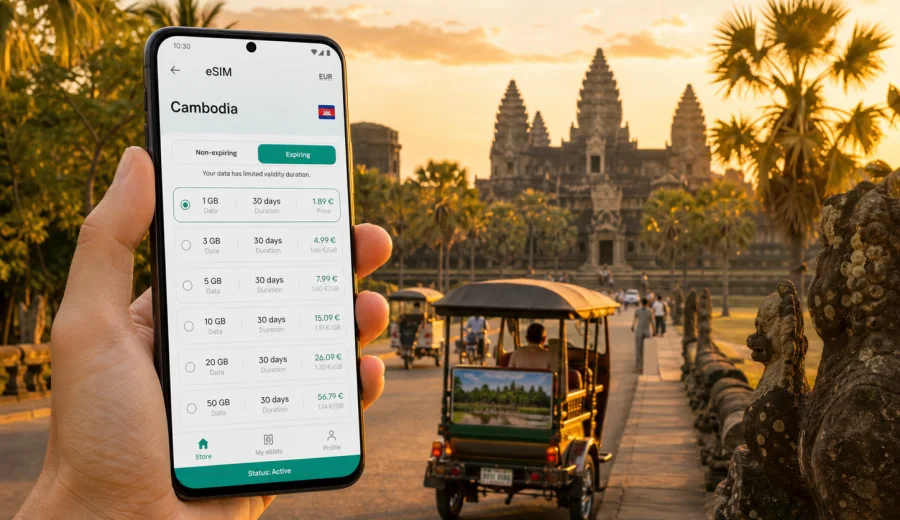
Siem Reap eSIM: mobile connection and internet for your Cambodia trip
Siem Reap is one of those cities where mobile internet becomes useful before the trip really begins. You may need it at the airport to confirm a transfer, at sunrise when you are trying to find the right temple gate, or late in the evening when a tuk-tuk driver asks for the exact location of your guesthouse. A Siem Reap eSIM helps you prepare mobile data for this routine without relying only on hotel Wi-Fi, airport counters, or a physical SIM card.
The city is compact, but the travel pattern is not. Many visitors arrive through Siem Reap-Angkor International Airport, stay near the Old Market, Wat Bo, Taphul Road, or the river, and then spend full days moving between Angkor Wat, Angkor Thom, Ta Prohm, Banteay Srei, Tonle Sap villages, cafes, and restaurants. Each of those moments becomes easier when maps, messages, ride details, tickets, translations, and payment confirmations are available on your phone.
This guide is focused on Siem Reap, not Cambodia in general. It explains where eSIM data is useful in the city, how to estimate the amount of internet you need, what to check before activation, and how Kaspersky eSIM Store can help you choose, arrange, install, and activate an eSIM with a suitable data plan for a trip to Cambodia.
Why mobile internet matters in Siem Reap
Siem Reap travel is built around timing. Sunrise at Angkor Wat starts early. Popular temples are spread across a large archaeological area. Restaurants and massage salons can be hidden down small streets. Hotels may use similar names. A driver may ask for a pin rather than a written address. If you plan to visit Tonle Sap or Banteay Srei, you may leave the city for several hours and still need basic connectivity for messages, route checks, or itinerary changes.
Mobile internet is especially helpful for:
- airport arrival and transfer coordination;
- sending your location to a driver or tour guide;
- using maps around the Angkor Archaeological Park;
- translating short phrases in restaurants, shops, and ticket offices;
- receiving booking confirmations and hotel messages;
- checking opening times or pickup points before a day tour;
- using messengers for calls when your eSIM plan is data-only.
Where eSIM is useful during a Siem Reap trip
| Travel moment | Why mobile data helps | Practical example |
|---|---|---|
| Airport arrival | You can contact the hotel, driver, or tour coordinator | Send your flight delay notice or share your live location |
| Hotel check-in | Booking apps and email confirmations are easier to access | Show a reservation if the front desk asks for details |
| Angkor temple days | The sites are spread out and routes can change | Confirm the next stop with your driver after Angkor Thom |
| Old Market and Pub Street | Streets are busy and meeting points can be unclear | Send a pin to friends after dinner |
| Wat Bo and river area | Small hotels and cafes may be tucked away | Use maps to find the right alley or entrance |
| Day trips | You may spend hours outside the city center | Message your group from Banteay Srei or Tonle Sap |
| Stopovers | Time is limited and mistakes cost more | Check transport timing before choosing what to visit |
The main advantage of preparing an eSIM is control. You can review the data volume, validity period, destination, and price before you travel, then install the eSIM on a compatible phone and have it ready for activation according to the plan conditions.
Arrival in Siem Reap: what to prepare before landing
The current international airport serving Siem Reap is outside the central hotel areas, so the transfer is long enough for mobile data to be useful. If your hotel has arranged pickup, you may need to message the driver. If you booked a private transfer, you may want to confirm the vehicle number or meeting point. If you are taking a taxi, you may still want maps to understand the direction and estimated travel time.
Before your flight, prepare the following:
- save your hotel address in English and Khmer if the hotel provides it;
- download an offline map of Siem Reap and the Angkor area as a backup;
- keep your booking confirmations available offline;
- install your eSIM profile while you still have stable Wi-Fi, if the plan instructions allow it;
- check when the plan validity starts, because this can vary by plan;
- make sure your primary SIM settings will not trigger unwanted roaming data;
- keep the installation details accessible until setup is complete.
This preparation is useful even if you expect strong Wi-Fi at the hotel. The first connection problem usually appears before you reach that Wi-Fi: at baggage claim, in the arrivals hall, during the transfer, or when the driver cannot find your name board.
How much data do you need in Siem Reap?
Data needs depend on your travel style. A visitor who uses maps, messaging, restaurant search, and light browsing needs far less than someone who uploads videos, joins work calls, or uses cloud backups. For many Siem Reap trips, the key is not constant heavy use but dependable access during movement.
| Trip style | Typical mobile data use | Planning note |
|---|---|---|
| Short stopover, 1-2 days | Maps, chat, hotel messages, a few searches | A smaller data package may be enough if you use hotel Wi-Fi |
| Classic temple trip, 3-5 days | Navigation, messaging, tickets, photo sharing, restaurant search | Choose enough data for full days outside the hotel |
| Remote work plus sightseeing | Email, calls, documents, hotspot use, backups | Consider a larger package and control background syncing |
| Family or group travel | Shared locations, multiple bookings, transport coordination | One connected phone can become the group coordination point |
| Multi-city Cambodia route | Siem Reap plus Phnom Penh, Battambang, or islands | Pick a plan that fits the full Cambodia part of the route |
For a practical estimate, separate essential use from optional use. Essential use includes maps, messaging, booking apps, translation, and email. Optional use includes video streaming, large photo uploads, automatic cloud backup, app updates, and long video calls. If you keep the optional use for hotel Wi-Fi, your eSIM data lasts longer and is easier to predict.
Choosing an eSIM plan for Siem Reap
An eSIM for Siem Reap should be selected for Cambodia, because the city belongs to the Cambodia destination. You do not need a separate city-specific landing page or a special Angkor plan. What matters is that the selected eSIM plan covers Cambodia, has a suitable validity period, and includes enough mobile data for the way you will actually use your phone.
When comparing options, check:
- destination: Cambodia, or a regional option that includes Cambodia if your route crosses borders;
- data volume: enough for maps, messaging, bookings, and any work needs;
- validity period: long enough for your arrival day, temple days, and departure day;
- activation rules: when the plan starts and what action triggers validity;
- tethering rules: whether hotspot use is allowed, if you need it;
- supported device: your phone must support eSIM and be free to use it;
- voice and SMS: many travel eSIM plans focus on data, not a regular phone number.
If you want to prepare before departure, Kaspersky eSIM Store can help you choose an eSIM plan for travel in Cambodia and set up mobile internet for the Siem Reap part of your trip. Review the plan details carefully before purchase, especially the amount of data, validity period, destination, and activation conditions.
Device checks before you buy
Not every phone can use eSIM, and some models vary by region or carrier lock status. Before choosing a plan, check your device and confirm that eSIM is supported in your phone settings. Also make sure the device is not locked in a way that prevents adding another cellular plan.
A simple pre-trip check looks like this:
1. Open your phone settings and look for an option to add an eSIM, cellular plan, or mobile plan.
2. Confirm that your phone is connected to stable Wi-Fi before installation.
3. Keep your regular SIM active if you still need calls or SMS on your usual number.
4. Decide which SIM will use mobile data after arrival.
5. Turn off data roaming on your primary SIM if you do not want it to use roaming data.
6. Keep the eSIM installation instructions open until setup is complete.
If your phone supports dual SIM, you can often keep your regular number active for messages or banking confirmations while using the eSIM for mobile data. Exact behavior depends on your device and settings.
Installing and activating eSIM for Cambodia
The best time to install an eSIM profile is usually before you need it urgently. Many travelers install the profile on stable Wi-Fi, then activate mobile data according to the plan instructions. Read the plan conditions first, because the start of validity may depend on activation or first network connection.
For setup, follow the relevant guide for your phone: Android setup instructions or iOS setup instructions. Keep your phone charged, stay on Wi-Fi during installation, and avoid deleting the eSIM profile unless support instructions tell you to do so. Some eSIM profiles cannot simply be moved to another device after activation.
After installation, set the eSIM as the mobile data line when you are ready to use it in Cambodia. Keep your regular SIM available for calls or SMS if you need them, but check roaming settings so the wrong line does not use data unexpectedly. If mobile data does not start at once, review the eSIM settings, data roaming setting for the eSIM line, and plan status.
Siem Reap neighborhoods and connectivity scenarios
Siem Reap is easy to navigate compared with larger capitals, but its hotel areas have different travel patterns. Near the Old Market and Pub Street, mobile data helps with meeting friends, checking restaurants, and finding your ride after dinner. In Wat Bo, Taphul Road, and Sivutha Boulevard, it helps with boutique hotels, cafes, laundry, massage bookings, and pickup points.
Temple days have a different rhythm. You may leave before sunrise, move between several entrances, and spend long periods away from city Wi-Fi. A connected phone helps with route confirmation, weather checks, driver messages, and quick research. The most useful apps are simple ones: maps, messaging, translation, email, and browser search.
For trips outside the city, such as Banteay Srei, Phnom Kulen, or Tonle Sap floating village areas, mobile data is useful for coordination but should not be your only travel backup. Save key details offline, keep your driver's contact, and agree on meeting points in advance.
Practical checks for temple days, work, and stopovers
Siem Reap creates many photos, early starts, and location changes, so protect your data before a full day outside the hotel. Download offline maps, pause cloud photo backup on mobile data, disable automatic app updates, turn off video autoplay, and keep large uploads for Wi-Fi. If you are visiting for work, test mobile data before an important call, carry a power bank, and check whether hotspot use is allowed in the selected plan. If you only have a stopover, save your hotel, airport, and driver details offline so mobile data is used for updates rather than basic searching.
Before your first temple morning, check that the eSIM profile is visible in phone settings, the correct line is selected for mobile data, your primary SIM roaming data is off if you do not want it used, and your driver or guide contact is saved. The most common mistakes are buying data for too few days, installing in a hurry, leaving automatic backups on, and expecting a data-only eSIM to include a regular phone number. A calm setup the evening before is easier than changing phone settings before sunrise.
FAQ: eSIM, mobile connection and internet in Siem Reap
Is an eSIM useful for Siem Reap if my hotel has Wi-Fi?
Yes. You may need mobile data at the airport, during tuk-tuk rides, around Angkor, at restaurants, or on day trips. Hotel Wi-Fi is useful, but it does not replace mobile internet while you are moving.
Should I choose a Siem Reap eSIM or a Cambodia eSIM?
Choose a plan that covers Cambodia. Siem Reap is the city focus, but the eSIM destination should match the country or region where the plan is valid.
Can I use eSIM for maps around Angkor Wat?
Yes, mobile data can support map apps, saved places, driver communication, and route checks. Still, download offline maps as a backup.
Does an eSIM include a Cambodian phone number?
Many travel eSIM plans are focused on mobile data and do not include a regular phone number, calls, or SMS unless the plan conditions say so. You can use messengers and internet calling apps over data.
When should I activate the eSIM?
Read the plan conditions first. Some plans start when installed or activated, while others start when they connect in the destination. Install on stable Wi-Fi and activate mobile data when you are ready to use it according to the instructions.
Final preparation before you travel
A good Siem Reap mobile internet setup is not complicated. Choose a Cambodia data plan that fits your travel dates, confirm eSIM compatibility, install the profile carefully, and keep heavy uploads for Wi-Fi. Then use mobile data for the parts of the trip where it matters most: airport arrival, temple routes, transport coordination, hotel messages, maps, translation, and day trips from the city.
If Siem Reap is your main destination, prepare the connection before the first busy travel day. Kaspersky eSIM Store helps you choose an eSIM plan for Cambodia so you can set up mobile internet for your Siem Reap trip with clearer conditions and less last-minute searching after arrival.