
Travel connectivity guide
Sigatoka eSIM: Mobile Internet for Fiji Trips
Sigatoka eSIM: mobile connection and internet for your trip
Sigatoka is a practical Fiji base for travelers who want the Coral Coast, the town market, the Sigatoka River valley, beach hotels, and short trips toward Nadi or Suva in one itinerary. It is not a city where every useful place sits within one small tourist district. You may arrive through Nadi International Airport, spend the first hour on Queens Road, check in at a resort outside the town center, and then move between beaches, river tours, local shops, restaurants, and nature stops.
That is why mobile internet matters in Sigatoka. You may need maps before your transfer starts, a message thread with your hotel, weather checks before the dunes or beach, a booking confirmation for a river valley excursion, or flight updates before the return drive to Nadi. Hotel Wi-Fi can help in the evening, but the most useful connection moments often happen between Wi-Fi spots.
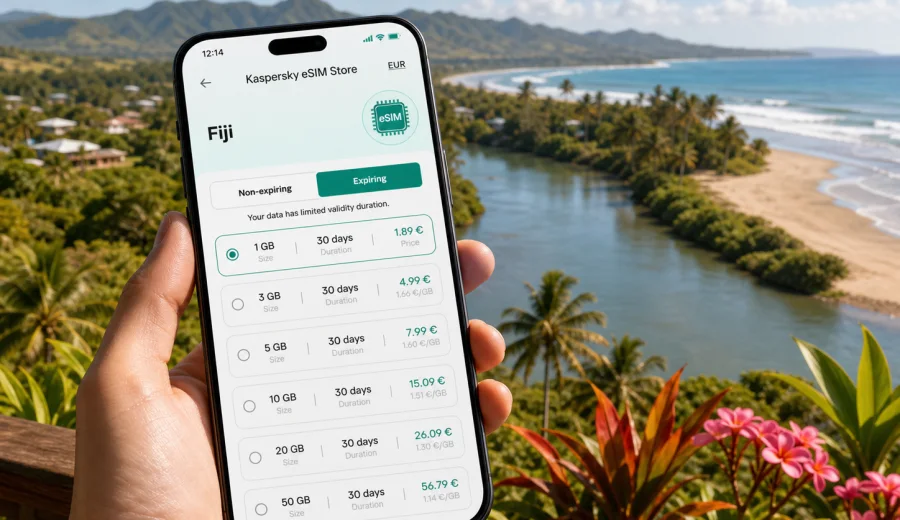
An eSIM can make this simpler if your phone supports it. Instead of looking for a physical SIM card after arrival, you can prepare a digital SIM profile in advance, choose a prepaid data plan for Fiji, and use mobile data when you are ready. Kaspersky eSIM Store is an app and website where you can choose, arrange, and activate an eSIM with a suitable data plan for mobile internet during an international trip.
When eSIM is useful in Sigatoka
Sigatoka trips often involve short movements that still require coordination. The town center is walkable, but many hotels are along the Coral Coast, tour pickups can be near the river, and day plans may change with weather or road timing. A working mobile connection helps you make decisions without waiting to return to the hotel lobby.
Useful Sigatoka scenarios include:
- confirming a transfer from Nadi airport to a Coral Coast hotel;
- checking route progress on Queens Road;
- finding the correct stop near Sigatoka Market or the bus stand;
- messaging a tour guide before a Sigatoka River or valley trip;
- using maps around the town center, riverside area, and hotel strip;
- checking weather before the Sigatoka Sand Dunes, beach time, or inland drives;
- receiving restaurant, spa, activity, or pickup confirmations;
- sharing arrival times with family or colleagues;
- keeping flight and transfer updates available on the return journey.
Arrival from Nadi to Sigatoka
Most international visitors reach Sigatoka through Nadi International Airport. The road journey to the Coral Coast usually begins soon after landing, so the first useful connection moment can happen before you reach your accommodation. If your eSIM is already installed, you can use data to message the hotel, confirm the transfer desk, check the route, or tell someone your estimated arrival time.
Before the flight, save the essentials offline:
- hotel name, address, and contact number;
- transfer confirmation or rental car details;
- offline maps for Nadi, Queens Road, Sigatoka, and your hotel area;
- booking references for tours or activities;
- eSIM installation instructions or QR code access;
- emergency contacts and a charged power bank.
If you activate mobile data only after landing, allow a few minutes for the phone to register on a local network. The experience depends on the selected plan, your device, and local network conditions. Avoid leaving setup until you are already on the road with no stable Wi-Fi and no saved instructions.
Getting around town and the Coral Coast
Sigatoka works best when you think in zones: town center, market, river, coastal hotels, beach stops, and day-trip routes. Mobile data helps connect those zones.
| Travel moment | Why mobile internet helps | Practical habit |
|---|---|---|
| Airport transfer | Messages, route checks, hotel updates | Install the eSIM before travel and activate data when appropriate |
| Town center walk | Maps, meeting points, opening times | Save pins for the market, hotel, and pickup spot |
| Market visit | Translation, messages, ride coordination | Keep your hotel location available offline |
| River valley excursion | Guide contact and schedule changes | Confirm details before leaving Wi-Fi |
| Coral Coast hotel stay | Backup when Wi-Fi is busy or limited | Use mobile data for essential tasks, Wi-Fi for heavy downloads |
| Return to Nadi | Flight updates and transport timing | Keep enough data for the last travel day |
The same logic applies if you stay outside Sigatoka town but use its name as the nearest destination. Many visitors say they are going to Sigatoka while staying at Coral Coast properties near beaches or villages nearby. In that case, mobile internet is useful for restaurant rides, beach movement, hotel messages, and day tours rather than just walking around town.
Local places where connection helps
Sigatoka Market and town center. This is where visitors often combine shopping, food stops, transport questions, and meetups. Data helps with maps, translation, booking confirmations, and quick messages.
Sigatoka River and valley routes. Inland drives and river activities may start from town or from a nearby pickup point. Save the guide contact and meeting instructions before you leave. If signal quality changes during the trip, offline details are still useful.
Coral Coast hotels. Resort Wi-Fi can be enough for evening browsing, but mobile data is helpful when you are between the hotel, beach, restaurant, and transfer vehicle. It is also a useful backup if public Wi-Fi is crowded.
Sand dunes and nature stops. The Sigatoka Sand Dunes area is a common local outing. Download maps first, then use mobile data for live weather, route updates, and transport coordination where available.
Trips toward Nadi or Suva. If Sigatoka is one stop in a wider Fiji route, choose a data plan for the whole journey, not only the hours spent in town.
How to choose a data plan for Sigatoka
Start with your itinerary rather than the biggest data amount. A two-night resort stay with reliable hotel Wi-Fi is different from a week of beach hopping, family messaging, route planning, video calls, and remote work. eSIM plans usually differ by destination, data volume, validity period, and price. Review the plan terms before payment so you understand what is included.
Before choosing, ask:
1. How many days will you spend in Sigatoka or along the Coral Coast?
2. Will you arrive and depart through Nadi?
3. Do you need data mainly for maps and messages, or also for calls and work?
4. Will your hotel Wi-Fi handle large downloads and photo backup?
5. Are you continuing to another Fiji destination after Sigatoka?
6. Does your phone support eSIM and allow another mobile profile?
For a simple leisure trip, a moderate data plan may be enough if you use Wi-Fi for system updates, long video streaming, and cloud backup. For family travel, multi-stop movement, or work, choose more carefully. Video calls, hotspot use, and automatic uploads can consume data quickly.
When you are ready to prepare mobile internet for this route, you can choose a suitable eSIM data plan for Fiji and match the data amount and validity period to your Sigatoka stay.
Data planning examples
Use these planning patterns as a guide, not as guarantees about a specific tariff.
| Traveler type | Typical Sigatoka use | Data approach |
|---|---|---|
| Short stay | Transfers, maps, a few messages, check-in | Keep data for essential tasks and use Wi-Fi for heavy use |
| Resort guest | Weather, restaurant searches, occasional navigation | Choose enough data for movement outside the hotel |
| Active explorer | River valley tours, market visits, beach trips | Use a larger plan and save maps offline |
| Remote worker | Email, documents, video calls, hotspot | Check validity, hotspot rules, and data volume carefully |
| Family group | Messaging, routes, shared plans, entertainment | Avoid background downloads and coordinate who needs data |
If you use your phone as a hotspot, check whether tethering is allowed by the selected plan and your device settings. Even when it is available, use hotspot data deliberately. A laptop update or cloud sync can use more data than maps and messages for an entire day.
How to install eSIM before the trip
The easiest time to install an eSIM is while you still have reliable internet at home or at your hotel before changing locations. Installation and activation are related, but not always the same action. Depending on the plan and device, you may be able to install the eSIM profile first and start using mobile data later. Always follow the instructions for your selected plan.
Before ordering, check whether your device supports eSIM. Your phone also needs to be free from restrictions that prevent another mobile profile from being used.
General setup steps:
1. Choose Fiji as the destination and select a plan with suitable data and validity.
2. Complete the order and open the eSIM details in your profile, email, or app.
3. Install the eSIM with the displayed instructions or QR code.
4. Label the profile clearly, for example "Fiji data".
5. Keep your usual SIM available for calls or messages if you need it.
6. Select the eSIM profile for mobile data when you are ready to use it.
For device-specific setup, use the Android eSIM installation guide or the iOS eSIM installation guide. Keep the guide open before you switch networks, especially if this is your first eSIM trip.
What to check before using eSIM in Sigatoka
An eSIM is convenient, but it still depends on the selected plan, device, and local mobile network conditions. Check these details before you rely on it during the trip:
- Compatibility: your smartphone or tablet must support eSIM.
- Carrier lock: a locked phone may not accept another mobile profile.
- Validity: confirm when the plan starts and how long it remains active.
- Destination: choose a plan that includes Fiji for your whole route.
- Data-only use: many travel eSIM plans focus on mobile internet and may not include a regular phone number, voice calls, or SMS unless stated in the terms.
- Roaming data setting: some devices require data roaming to be enabled for the eSIM profile.
- Hotspot: if you plan to share data, check plan and device rules.
- Top-up: see whether more data can be added for the selected plan.
These checks matter around Sigatoka because you may move between town, river routes, coastal hotels, and airport transfers. Solve setup questions before you are outside with luggage, trying to message a driver.
Business trips, stopovers, and day trips
Sigatoka is mostly a leisure and resort destination, but work and short-stay scenarios still happen. You may join a hotel meeting, work remotely from the Coral Coast, attend an event, or pass through town between Nadi and Suva. For work, use hotel Wi-Fi for video meetings and large downloads, then keep eSIM data for email, messaging, maps, and urgent documents.
For a one-day stop, prioritize pickup times, flight updates, weather, maps, and hotel communication. For day trips from Sigatoka, save route details offline, message the guide before leaving Wi-Fi, keep enough battery for the return ride, and pause automatic photo backup until you are back on Wi-Fi.
This approach keeps the eSIM plan focused on the moments when mobility matters most: road transfers, live schedule changes, navigation, and quick communication.
First-day checklist
Use this checklist before your Nadi arrival and during the first transfer toward Sigatoka:
- install the eSIM profile while connected to reliable Wi-Fi;
- save the QR code or installation email where you can access it;
- download offline maps for Nadi, Queens Road, Sigatoka, and your hotel area;
- save accommodation, transfer, and tour contacts;
- turn off automatic photo backup on mobile data if your plan is limited;
- decide which SIM handles calls and which profile handles mobile data;
- test that mobile data is assigned to the eSIM profile when you activate it.
The goal is to have connection ready for arrival, transport, navigation, messaging, and schedule changes.
FAQ: eSIM and mobile internet in Sigatoka
Can I install an eSIM before flying to Fiji?
In many cases, yes. Install the eSIM profile while you have reliable internet, then follow the plan instructions for activation and data use. The timing depends on the selected plan and device.
Will eSIM give me a local phone number in Sigatoka?
Many travel eSIM plans are data-only. They are intended for mobile internet and may not include regular voice calls or SMS unless the plan terms say otherwise. You can usually use internet-based calling and messaging apps over mobile data.
Is eSIM useful if I stay at a Coral Coast resort outside town?
Yes. It can help with transfers, restaurant trips, beach movement, day tours, and communication when you are away from hotel Wi-Fi.
Prepare mobile internet for Sigatoka
A Sigatoka trip works best when mobile connection is ready before the first problem appears: at Nadi airport, on the Queens Road transfer, in the town center, at a Coral Coast hotel, or during a day trip into the valley.
Kaspersky eSIM Store helps you choose, arrange, and activate an eSIM with a suitable prepaid data plan for international travel. Before ordering, check compatibility, review the data volume and validity period, and keep installation instructions available. Then prepare an eSIM data plan for your Fiji trip so Sigatoka navigation, transfers, and everyday travel messages are easier to manage.