
Travel connectivity guide
Singapore eSIM: mobile connection and internet
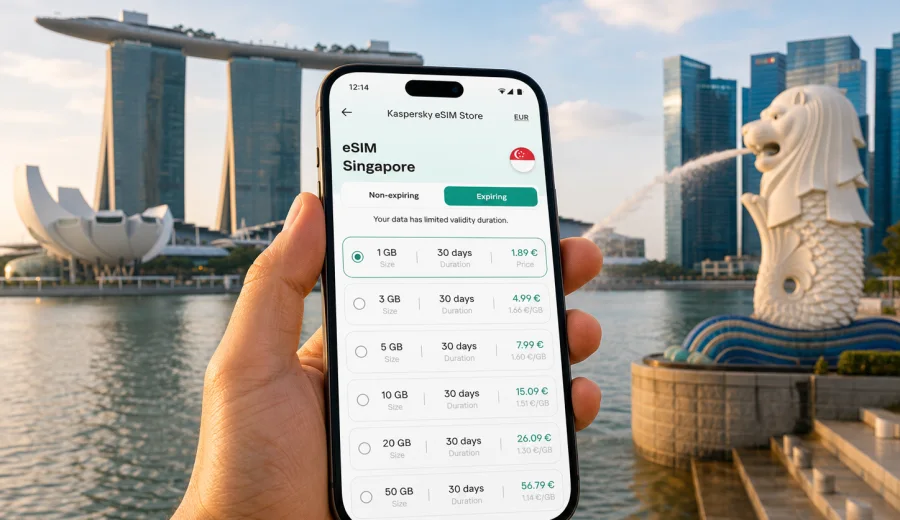
eSIM for Singapore: mobile connection and internet for your trip
Singapore is a compact country, but a trip there can be surprisingly data intensive. You may land at Changi Airport, follow a hotel route by MRT, pay for transport, call a ride, open a digital ticket, translate a menu, join a work call, or coordinate with friends between Marina Bay, Orchard Road, Sentosa, Little India, Chinatown, and business districts. In each of these moments, mobile internet is not a luxury add-on. It is part of how the trip works.
An eSIM can help you prepare that mobile connection before you arrive or shortly after landing, without searching for a physical SIM card counter. With a compatible phone or tablet, you install a digital SIM profile, select it for mobile data, and use a prepaid tariff for the destination. Kaspersky eSIM Store is an app and website where you can choose, arrange, and activate an eSIM with a suitable tariff for mobile internet in an international trip.
This guide explains how to use eSIM for Singapore in a practical way: when it is useful, how to estimate data, what to check before purchase, how installation works, and how to avoid common mistakes while travelling.
Why eSIM is useful in Singapore
Singapore is easy to navigate, but many everyday travel actions depend on a connected phone. Airport transfers, route planning, restaurant bookings, delivery apps, digital maps, messaging, boarding updates, and payment confirmations all work better when you do not have to wait for hotel Wi-Fi or stand near a public hotspot.
An eSIM is especially useful when you want mobile data ready at the start of the trip. You can keep your usual SIM in the phone for your regular number and use the eSIM for travel internet. In most travel scenarios, an eSIM tariff is focused on mobile data. Calls and SMS are not included unless the selected tariff clearly says otherwise, so many travellers use internet-based apps for voice calls and messages.
For Singapore, eSIM can help if you want to:
- use maps from the first minutes after arriving at Changi Airport;
- check MRT routes, walking directions, and taxi or ride-hailing details;
- receive booking confirmations and travel alerts while moving around the city;
- keep your primary SIM available for banking messages or your usual number;
- reduce dependence on public Wi-Fi in airports, malls, cafes, and hotels;
- choose a prepaid data package with visible traffic volume and validity period;
- prepare a data connection for a business visit, stopover, family trip, or regional route.
The main advantage is planning. Instead of making a hurried choice after arrival, you can compare the destination, data allowance, validity period, and tariff terms in advance.
Where mobile internet matters during a Singapore trip
Singapore is small on the map, but travellers often move through several types of environments in one day: airport, MRT, hotel, business venue, waterfront area, shopping mall, restaurant, museum, beach, and night route. Each environment can create a different data need.
| Travel moment | Why mobile data helps | What to plan for |
|---|---|---|
| Arrival at Changi Airport | Messaging, transfer route, ride app, hotel address, flight changes | Enough data for the first hour without depending on airport Wi-Fi |
| MRT and city navigation | Route changes, station exits, walking directions | Reliable access to maps and transport information |
| Marina Bay and waterfront areas | Tickets, bookings, photo sharing, group coordination | Moderate daily data if you upload photos often |
| Business districts | Email, calendars, calls through apps, hotspot for a laptop | Larger allowance if you work away from hotel Wi-Fi |
| Sentosa and leisure days | Maps, tickets, messaging, restaurant search | Data for long days outside the hotel |
| Regional route | Singapore plus Malaysia, Indonesia, Thailand, or other countries | Check whether a country, regional, or global tariff matches the itinerary |
The best setup is not always the largest package. A short stopover may only need maps, messages, and boarding updates. A week with work calls, hotspot use, and cloud photo backup needs more careful planning.
How much data do you need in Singapore?
Data use depends on habits more than geography. Singapore has strong digital travel patterns: people use phones for transport, food, bookings, navigation, payments, messages, and work. That does not mean every traveller needs a large allowance, but it does mean you should estimate usage before choosing a tariff.
Use this as a practical planning model:
- Light use: maps, messengers, email, booking apps, and occasional browsing. This can suit a stopover or a short city break if you avoid video and large uploads.
- Medium use: daily navigation, social media, restaurant search, ride apps, photo sharing, and regular browsing. This is common for a three- to seven-day visit.
- Heavy use: video calls, streaming, hotspot sharing, cloud backups, large work files, or frequent high-resolution uploads. Choose a larger allowance and watch usage closely.
You can reduce unnecessary mobile data use by changing a few settings before the trip:
1. Turn off automatic app updates on mobile data.
2. Pause full-resolution cloud photo and video backup.
3. Download offline maps or key documents before departure.
4. Save hotel addresses, tickets, and booking confirmations for offline access.
5. Use trusted Wi-Fi for large files when it is available.
6. Keep mobile data for essential travel tasks: maps, tickets, banking, transport, and communication.
This approach keeps your eSIM traffic focused on the moments when you actually need a connection away from Wi-Fi.
eSIM, roaming, and physical SIM cards
Most travellers compare three options for mobile internet in Singapore: home operator roaming, a physical SIM card, or a travel eSIM. Each option can make sense, but they solve different problems.
| Option | Strengths | Trade-offs |
|---|---|---|
| Home operator roaming | Familiar line, no separate setup in some cases | Cost and data conditions depend on your home operator |
| Physical SIM card | Can be suitable for longer stays or local voice needs | Requires a physical card, purchase time, and sometimes a SIM swap |
| Travel eSIM | Can be prepared before or shortly after arrival, no physical SIM card needed | Requires a compatible device and careful review of tariff terms |
An eSIM is a good fit when your main need is mobile internet for travel tasks. It is not a full replacement for a local mobile contract, and it may not include a local phone number, regular calls, or SMS. If those features are important, check the selected tariff terms before purchase.
How to choose an eSIM tariff for Singapore
Start with the route. If the whole trip is in Singapore, a Singapore country tariff is usually the clearest choice. If Singapore is one stop in a wider Southeast Asia route, compare country, regional, and global options carefully. A regional tariff may be useful for some multi-country trips, but only if its coverage and validity match the places where you will actually use mobile data.
Then check the three variables that matter most:
| What to compare | Why it matters | Practical question |
|---|---|---|
| Data allowance | Determines how much browsing, navigation, messaging, and app use you can do | Will you only use essentials, or will you stream, call, upload, or share hotspot? |
| Validity period | Determines how long the tariff remains usable | Does it cover arrival day, full stay, and departure day? |
| Destination terms | Determines where the tariff is intended to work | Is the tariff for Singapore only, or for the region that includes your route? |
Also check whether hotspot use is allowed if you plan to connect a laptop or another device. Hotspot can be useful during business travel, but it can consume data quickly. If several people travel together, each traveller should check device compatibility and consider whether a separate eSIM setup is more practical than depending on one shared phone.
If you are preparing your trip now, you can choose an eSIM tariff for Singapore and compare available options by destination, data allowance, validity period, and price before you travel.
Do not choose only by the biggest data number. A smaller tariff may fit a short trip with maps and messaging. A larger one may be more comfortable for remote work, frequent uploads, or a longer stay.
What to check before buying
Most eSIM problems are preventable. Before you arrange a tariff, check your device, route, and setup conditions.
- Device compatibility. Your phone or tablet must support eSIM. If you are not sure, check your device before purchase.
- Carrier lock. Some devices are locked to a mobile operator and may not allow another SIM or eSIM profile.
- Operating system. Keep your device updated, but avoid starting a major system update when you already rely on limited travel data.
- Internet for setup. You need an internet connection to install the eSIM profile, so it is often convenient to do this before departure or while connected to trusted Wi-Fi.
- Destination. Confirm that the selected tariff is intended for Singapore or for the region that includes Singapore.
- Validity and start rules. Check how long the tariff is valid and when the validity period or data usage begins.
- Calls and SMS. Treat the eSIM as mobile-data focused unless the tariff terms clearly state otherwise.
- Hotspot use. If you plan to share data, check whether hotspot is supported by the tariff and by your device settings.
How to install and activate eSIM for Singapore
Installation differs slightly between iOS and Android, but the logic is similar. After arranging the selected tariff, the eSIM profile becomes available with setup details. You add the profile to your device, name the line clearly, and select it for mobile data when you are ready to use it.
For device-specific steps, use the official guides: Android installation instructions and iOS installation instructions.
Typical setup flow:
1. Confirm that your device supports eSIM and is not locked to another operator.
2. Choose Singapore as the destination and select a tariff that matches your data and duration needs.
3. Arrange the selected tariff in Kaspersky eSIM Store.
4. Add the eSIM profile to your phone using the provided instructions or QR code.
5. Name the line clearly, for example "Singapore data", so you do not confuse it with your main SIM.
6. Select the eSIM as the line for mobile data when you are ready to use it.
7. Enable data roaming for the eSIM profile if the instructions require it.
8. Wait a few minutes for the phone to register on a local network.
Practical Singapore travel scenarios
Different trips need different data habits:
- Short stopover: focus on airport navigation, airline updates, messaging, maps, and transfer details.
- Weekend city break: plan for route search, restaurant bookings, digital tickets, photo sharing, and messages.
- Business trip: allow extra data for email, calendars, app-based calls, document access, and possible hotspot use.
- Family or group trip: check eSIM support on each phone instead of relying only on one shared hotspot.
- Regional route: compare Singapore-only, regional, and global options if you also visit Malaysia, Indonesia, Thailand, or another country.
Quick preparation checklist
Use this checklist a few days before departure:
- Confirm your phone or tablet supports eSIM.
- Check that the device is not carrier locked.
- Decide whether you need a Singapore-only, regional, or global tariff.
- Estimate data for maps, messengers, browsing, work, photos, and hotspot use.
- Review validity period and activation rules.
- Install the eSIM while you have reliable internet.
- Turn off automatic app updates and heavy cloud sync on mobile data.
- Know where to find support if installation or activation questions appear.
FAQ about eSIM for Singapore
Is eSIM useful for travel in Singapore?
Yes, if your device supports eSIM and your main need is mobile internet. It can help with maps, transport apps, bookings, messages, browsing, payment confirmations, and work tools.
Can I install eSIM before flying to Singapore?
In many cases, yes. Installing before departure is often convenient because you can use a stable home or office internet connection. Check when validity or data usage starts.
Does a travel eSIM include a local phone number?
Usually you should treat a travel eSIM as mobile-data focused unless the selected tariff states otherwise. If you need regular calls or SMS, read the tariff terms carefully before purchase.
What if the eSIM does not connect after arrival?
Check that the eSIM is selected for mobile data, data roaming is enabled if required, airplane mode is off, and the tariff is valid for Singapore. Give the phone a few minutes to register on a local network. If the issue remains, contact support with your device model.
Prepare mobile internet for Singapore before you travel
A good eSIM setup for Singapore is simple: check device compatibility, choose a tariff for your route and trip length, install the eSIM profile while you have reliable internet, and select it for mobile data when you are ready to use it. That gives you a clearer plan for maps, messages, tickets, transport apps, and bookings.
Kaspersky eSIM Store helps you choose, arrange, and activate an eSIM with a suitable tariff for mobile internet in an international trip. Before departure, review eSIM options for Singapore and choose the tariff that fits your travel dates, data needs, and device.