
Travel connectivity guide
Sitra eSIM: mobile internet for Bahrain trips
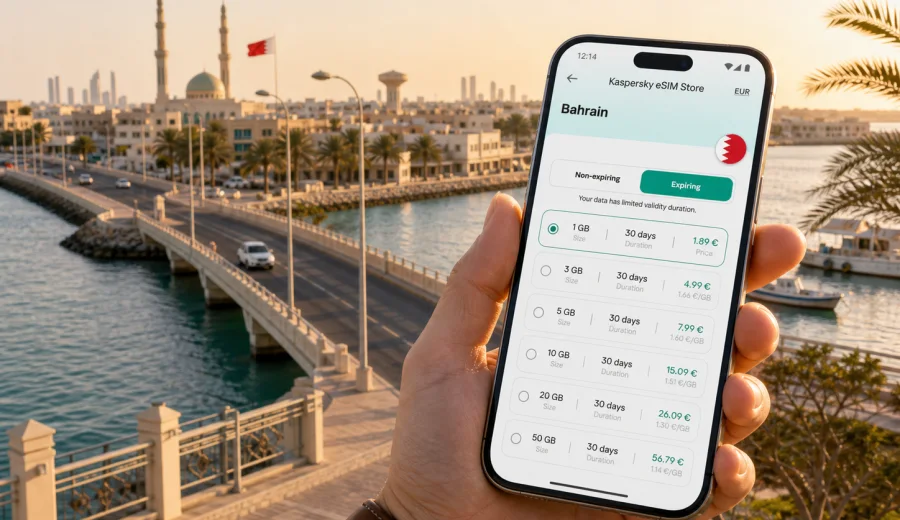
Sitra eSIM: mobile connection and internet for a trip to Sitra, Bahrain
Sitra is a practical Bahrain destination: close to Manama, connected by causeways, shaped by ports, business areas, residential neighborhoods, workshops, waterfront roads, and short drives to the rest of the kingdom. It is where a work visit, supplier meeting, family stay, hotel base, or road route can depend on simple mobile internet from the moment you leave the airport.
An eSIM is useful in Sitra because the trip is usually mobile. You may arrive through Bahrain International Airport, cross Manama, continue toward Sitra, check maps near causeways, message a driver, find a warehouse entrance, or join a video call from a hotel lobby. Public Wi-Fi can help in a mall or hotel, but it is not the same as having data while moving between districts.
This guide explains how to plan mobile internet for Sitra with an eSIM, what to check before departure, and how to choose a suitable eSIM tariff for Bahrain.
Why Sitra needs a city-focused connectivity plan
Sitra sits in a compact but busy part of Bahrain. The distance from central Manama may look short on a map, yet the practical experience depends on bridges, traffic, industrial access roads, hotel locations, and whether your day includes meetings outside the island. A city-focused mobile connection plan is useful because it covers the moments when you cannot rely on a hotel network.
Sitra situations where mobile internet matters:
- airport pickup coordination after landing in Muharraq;
- navigation from Manama, Juffair, Seef, or Adliya toward Sitra;
- ride-hailing or taxi messaging when meeting points are unclear;
- checking business addresses, gates, and delivery entrances;
- translating short messages or menus during local errands;
- hotspot use for a laptop in a hotel, cafe, or waiting area;
- route planning for trips from Sitra to Manama, Riffa, Amwaj, or the King Fahd Causeway area;
- keeping messengers online when local Wi-Fi requires registration or is not available.
For a short stop, the main value is speed: you can open maps, contact your host, and confirm the next move. For a longer business trip, the value is predictability: you can plan a data allowance and validity period before your schedule becomes busy.
Arrival: from Bahrain International Airport to Sitra
Most international travelers arrive at Bahrain International Airport on Muharraq Island. From there, Sitra is usually reached by road through the Manama area, with bridges, urban traffic, and fast changes between main roads and smaller access streets.
Mobile internet helps during the first hour because arrival tasks are small but time-sensitive:
1. Open the airport pickup message or hotel address.
2. Check whether the driver is waiting at arrivals, parking, or a nearby pickup zone.
3. Load the route to Sitra before leaving the terminal area.
4. Share your live location if the meeting point changes.
5. Keep payment, booking, and messenger apps available while moving.
If you install the eSIM before travel, keep the activation steps ready and switch data settings after arrival. If you prefer to activate only when you land, make sure you have enough Wi-Fi to complete the final setup. Activation flow and timing can depend on the selected tariff and device settings, so read the tariff conditions before you travel.
Sitra movement: bridges, roads, hotels, and business addresses
Sitra is often part of a wider Bahrain itinerary. You may sleep in Manama but work in Sitra, stay near Sitra but meet colleagues in Seef, or use Sitra as one point in a day that includes Riffa, Tubli, or the airport.
Navigation in Sitra can involve:
- causeway approaches and waterfront roads;
- industrial zones and service entrances;
- residential streets with similar-looking turns;
- meeting points that are easier to confirm by pin than by street name;
- short detours caused by traffic or road works;
- parking searches near offices, workshops, or local shops.
For hotels, mobile internet is useful even when the property has Wi-Fi. You may need data in the taxi before check-in, outside the hotel, or when hotel Wi-Fi is slow during evening peak hours.
How much data do you need in Sitra?
The right data volume depends less on the city size and more on your habits. Navigation and messaging use modest amounts. Video calls, cloud files, social video, and laptop tethering use much more. Choose a tariff based on your realistic day, not on the best-case version of the trip.
| Trip style in Sitra | Typical mobile tasks | Practical data approach |
|---|---|---|
| Airport transfer and one meeting | maps, messaging, email checks | a small short-validity package may be enough |
| Weekend with Manama and Sitra | maps, ride-hailing, restaurant searches, photos | choose a moderate package with several days of validity |
| Business week | mail, calendars, maps, messengers, light hotspot | prioritize validity period and a comfortable data buffer |
| Heavy laptop use | hotspot, file sync, video calls | choose more data and monitor usage daily |
| Family trip | several devices, maps, social apps, streaming | avoid underestimating data if hotspot sharing is planned |
As a rule, navigation, messengers, and browsing are predictable. Streaming and video meetings are the main reasons a plan runs down faster than expected. If your Sitra visit includes remote work, disable automatic cloud backups and app updates on mobile data before you start using the eSIM.
What to check before choosing an eSIM tariff
Before you choose an eSIM tariff for Sitra, check the details that affect real travel use. These checks take a few minutes and prevent most avoidable problems.
- Destination: choose Bahrain for a Sitra trip, even if you also spend time in Manama or Muharraq.
- Validity period: match it to the full trip, including arrival and departure days.
- Data amount: allow a buffer for navigation, ride-hailing, messengers, and unexpected hotspot use.
- Activation rules: check when the validity period starts and whether you should install before departure or after arrival.
- Device compatibility: your phone or tablet must support eSIM and should not be locked to another carrier.
- Hotspot use: if you plan to share data with a laptop, check whether your device and tariff conditions allow it.
- Voice and SMS: eSIM tariffs for travel data usually focus on mobile internet; ordinary voice calls and SMS are not included unless a specific tariff says otherwise.
If you need to confirm support before arranging a tariff, check your device. This is especially important for older phones, some regional device versions, and devices supplied through mobile operators.
A practical Sitra day with eSIM
For a business traveler arriving in Bahrain in the morning, the first mobile data tasks begin before reaching Sitra: message the host, open the route, check traffic, and confirm whether the meeting point is an office reception or a site entrance.
During the day, mobile internet supports these small actions:
1. Save the hotel address and meeting pins.
2. Keep a messenger available for driver and host updates.
3. Use maps while crossing from Manama toward Sitra.
4. Download a document before entering a meeting area.
5. Use a hotspot briefly if the office guest network is unavailable.
6. Book a return ride or adjust the next stop.
These tasks are simple, but they become inconvenient without data. An eSIM lets you prepare the mobile internet part before local logistics begin.
For a Sitra visit, you can use Kaspersky eSIM Store to choose an eSIM tariff for Bahrain based on the trip length, data volume, destination, and tariff conditions shown before purchase.
Installation: prepare before the road gets busy
The best time to set up an eSIM is when you are not standing at a curb with luggage. If your tariff conditions allow installation before the trip, install the eSIM on a stable Wi-Fi connection at home, in the office, or at your hotel. Then keep mobile data disabled for that eSIM until the correct activation moment, according to the instructions for the selected tariff.
General preparation steps:
1. Check that your device supports eSIM and is not carrier-locked.
2. Choose Bahrain as the destination.
3. Select a data amount and validity period that match your Sitra schedule.
4. Complete the arrangement process in the app or on the website.
5. Install the eSIM profile using the provided instructions.
6. Name the line clearly, for example “Bahrain travel data”.
7. After arrival, select the eSIM for mobile data and enable data roaming for that line if the instructions require it.
For detailed setup, use the Android installation guide or the iOS installation guide. The exact screens can differ by phone model and operating system version, so follow the instructions shown for your device.
Local movement scenarios in and around Sitra
Sitra trips often mix practical errands with short travel distances. A traveler may go from the airport to a Manama hotel, continue to Sitra, visit a supplier, stop for dinner, and return through another route. Mobile internet keeps this chain simple because every step depends on current maps, messages, and timing.
If your meeting is at a plant, workshop, warehouse, or logistics office, save the contact name, phone number, and entrance details offline as a backup. Then use mobile data to confirm the final turn, send arrival updates, open a return route, or download a document before a meeting.
Many visitors who need Sitra access stay in Manama, Juffair, Seef, or another hotel area because they offer more accommodation and evening options. In that case, the route may be short in kilometers but still dependent on traffic and driver coordination. An eSIM helps when you leave hotel Wi-Fi and need maps or messenger access until you reach the exact destination.
For a stopover, keep the plan lean: save the airport address, hotel or meeting point, contact thread, booking reference, and a screenshot of the eSIM setup instructions. A small data package may be enough, but it should cover the full active window of the stopover.
Data-saving settings for a Sitra trip
Good data habits keep the eSIM available for the tasks that matter: maps, messaging, transport, and work.
Use this checklist before arrival:
- turn off automatic app updates on mobile data;
- pause automatic photo and video backup;
- download offline maps for Manama and Sitra;
- download hotel confirmations and meeting files on Wi-Fi;
- set streaming apps to Wi-Fi only;
- monitor data use during the first day;
- keep your primary SIM for calls or banking messages if needed, while using the eSIM for data.
If you plan to use hotspot mode for a laptop, set limits. Cloud sync, system updates, browser tabs, and video calls can use data quickly.
eSIM compared with roaming, airport SIM cards, and public Wi-Fi
There is no single perfect option for every traveler. The useful question is which option fits your Sitra schedule, device, and setup time.
| Option | Useful when | Limitations to consider |
|---|---|---|
| eSIM travel data | prepare mobile internet before or soon after arrival | compatible, unlocked device required |
| Standard roaming | keep continuity with your home operator | costs and data rules may vary |
| Physical local SIM | use a local SIM after arrival | requires a physical slot and purchase time |
| Public Wi-Fi | work from a hotel, cafe, airport, or office | not available while moving |
For Sitra, eSIM is often attractive because many tasks happen between fixed Wi-Fi points. You can keep mobile data ready for the road and still use hotel or office Wi-Fi for heavier downloads.
Common mistakes to avoid
Avoid choosing the wrong destination because your hotel is outside Sitra, forgetting that arrival and departure days also use data, or installing the eSIM without selecting it for mobile data. Also check whether data roaming must be enabled for the eSIM line, do not assume ordinary calls or SMS are included, and avoid starting setup for the first time during a taxi ride.
FAQ: eSIM and mobile internet in Sitra
Is Sitra covered by a Bahrain eSIM tariff?
Choose the country tariff for Bahrain. Sitra is in Bahrain, so the relevant destination is Bahrain rather than a separate city tariff.
Can I use the eSIM for calls and SMS in Sitra?
Travel eSIM tariffs usually focus on mobile internet. Voice calls and SMS are not included unless the chosen tariff specifically states otherwise.
Should I install the eSIM before flying to Bahrain?
If the tariff instructions allow it, installing before departure can save time. Activation and validity rules vary, so follow the selected tariff instructions.
Will an eSIM replace hotel Wi-Fi?
Treat eSIM and Wi-Fi as complementary. Use Wi-Fi for large downloads and eSIM for maps, transport, messaging, and backup connectivity.
What if I stay in Manama but travel to Sitra daily?
Choose Bahrain as the destination and plan enough data for daily navigation, driver coordination, work messages, and hotspot use.
Final preparation before your Sitra trip
A good Sitra connectivity plan needs a compatible phone, the right Bahrain destination, a data allowance that fits your schedule, and clear activation timing.
Kaspersky eSIM Store is an app and website that helps you choose, arrange, and activate an eSIM with a suitable mobile internet tariff for international travel. Before your Sitra visit, prepare an eSIM tariff for your Bahrain trip, check the validity period and data amount, and keep the installation instructions ready before you leave for the airport.