
Travel connectivity guide
Skagen eSIM for Mobile Internet in Denmark
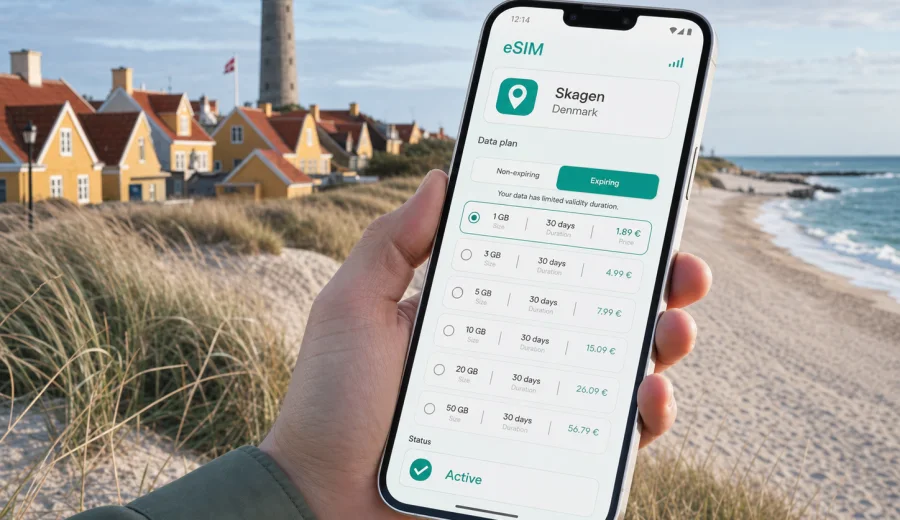
Skagen eSIM: mobile connection and internet for a trip to Denmark's northern coast
Skagen is a compact town, but it can make mobile internet feel more important than in a larger city. You may arrive by train through Frederikshavn, drive across North Jutland, check into a small hotel near the harbor, walk toward Grenen where two seas meet, or move between beaches, museums, cafes and summer houses. In each of these moments, a reliable data plan helps with maps, booking details, weather checks, messaging, taxi apps and route changes.
An eSIM is useful in Skagen because it can be prepared before the trip and used without looking for a physical SIM card after arrival. Kaspersky eSIM Store is an app and website where you can choose, arrange and activate an eSIM with a suitable data plan for mobile internet during an international trip. It is not a mobile operator and does not replace local emergency services or a normal phone number, but it can make the data part of your journey much easier to manage.
This guide focuses on Skagen itself: arrival, local movement, coastal walks, hotels, business trips, stopovers and routes from the town to other parts of Denmark. The goal is practical: know when mobile data matters, how much you may need, what to check before you buy a plan and how to avoid depending only on public Wi-Fi.
Why mobile internet matters in Skagen
Skagen is easy to enjoy, but not always easy to improvise offline. Distances are short inside the town center, yet the places people come for are spread along the coast: Grenen, the harbor, the lighthouse area, Gammel Skagen, beaches, galleries and nearby nature spots. If you are visiting for the first time, you will probably use your phone many times before lunch.
Common mobile internet tasks in Skagen include:
- checking the next train or bus connection after arrival;
- opening walking or cycling routes between the station, hotel and harbor;
- finding the best route to Grenen without missing the last return option;
- confirming accommodation details when reception is not open all day;
- messaging your host, travel group or business contacts;
- checking wind, rain and sunset times before a beach walk;
- using translation, restaurant booking and payment-related apps;
- sharing your location if you split up around the harbor or town center.
The local rhythm is different from Copenhagen or Aarhus. Skagen is quieter, more seasonal and more dependent on weather. A sunny hour can change your plan; a windy afternoon can move you from the beach to a museum or cafe. Mobile data gives you the flexibility to adjust without returning to the hotel lobby for Wi-Fi.
Arrival scenarios: where an eSIM helps first
Most visitors do not fly directly into Skagen. They arrive through a larger transport point and finish the journey by train, car, bus, taxi or ferry connection through North Jutland. That final stretch is where a prepared eSIM can be especially useful.
| Arrival scenario | Why data helps | What to prepare |
|---|---|---|
| Train via Frederikshavn | Timetables, platform changes and walking directions after arrival | Install the eSIM before the trip and keep your ticket app ready |
| Car from Aalborg or other parts of Jutland | Navigation, parking, weather and charging or fuel stops | Download offline maps as backup and keep mobile data for updates |
| Ferry route through nearby ports | Late arrivals, onward transfers and hotel communication | Save booking references and keep messenger apps available |
| Summer-house stay outside the center | Check-in instructions, address details and local services | Confirm the exact location before travel and keep the host contact offline |
| Short stop in Skagen | Fast route decisions and luggage planning | Mark the station, harbor and main sights in advance |
If you arrive tired, in bad weather or outside normal shop hours, you may not want to solve connectivity at the same time as transport. With eSIM, the practical idea is simple: choose a data plan before you need it, install it on a compatible device, and use mobile internet when you reach Denmark.
Local movement: station, harbor, beaches and Grenen
Skagen's center is walkable, but the full travel experience is not just the center. You may start at Skagen Station, go to a hotel near the harbor, continue to the art museum, walk to the beach, then plan a trip to Grenen. Mobile internet is useful because these small choices depend on timing, weather and energy.
For a first day in Skagen, mobile data can help with:
1. Checking whether it is better to walk, cycle, take a local bus or use a taxi.
2. Finding the exact hotel entrance or key collection point.
3. Choosing a route that avoids exposed windy stretches.
4. Checking opening hours before walking to a museum or cafe.
5. Planning the trip to Grenen with enough time for photos and return travel.
6. Sharing your live location with companions if you separate near the harbor.
Grenen deserves special mention. It is the northern tip of Jutland and one of the main reasons people visit Skagen. The route is not complicated, but weather and timing matter. If you rely only on hotel Wi-Fi, you may leave without the latest route, transport or rain information. An eSIM data plan gives you the option to check details while already outside.
How much data do you need for Skagen?
Data needs depend more on your habits than on the size of the town. Skagen can be a low-data destination if you use offline maps and hotel Wi-Fi for large uploads. It can also become data-heavy if you stream video, use cloud photo backup, join work calls or navigate all day.
| Traveler type | Typical use in Skagen | Practical data approach |
|---|---|---|
| Weekend visitor | Maps, messaging, restaurant search, weather | A small short-term data plan may be enough |
| Family trip | Navigation, shared photos, booking apps, kids' entertainment | Choose more data and watch video use carefully |
| Remote worker | Email, documents, hotspot, video meetings | Pick a larger allowance and test hotel Wi-Fi as a backup |
| Road-trip traveler | Navigation across North Jutland, parking, route changes | Select a plan that covers Denmark for the whole route |
| Photographer or content creator | Cloud backup, social posting, location research | Use Wi-Fi for large uploads when possible and keep data for field use |
As a rough planning method, separate essential data from comfort data. Essential data includes maps, tickets, banking apps, messaging, email and weather. Comfort data includes streaming, large uploads, video calls and social media browsing. If you keep comfort data mostly on Wi-Fi, your mobile data plan can last longer.
Choosing an eSIM plan for a city trip to Skagen
For a city article, the correct plan is normally a country plan for the country where the city belongs. Skagen is in Denmark, so your plan should cover Denmark unless your trip continues through several countries and a regional plan is more suitable. Check the destination, data allowance, validity period and activation conditions before you decide.
When you compare options, focus on these details:
- Destination coverage: the plan should include Denmark for a Skagen trip.
- Validity period: match the plan to the full trip, including arrival and departure days.
- Data allowance: consider maps, messaging, transport apps and any work tasks.
- Start of validity: read when the plan period begins and when data starts counting.
- Device compatibility: your phone or tablet must support eSIM and be unlocked for eSIM use.
- Hotspot needs: if you plan to share data with a laptop, check whether this fits the plan conditions and your device settings.
If your itinerary is Skagen plus Aalborg, Frederikshavn, Hirtshals or Aarhus, a Denmark-focused plan is usually the simplest option. If you cross into Sweden, Norway or Germany on the same trip, compare whether a regional or multi-country option fits your route better.
A practical route-based data checklist
Use this checklist before you leave for Skagen:
- Save your hotel address and check-in instructions offline.
- Download an offline map of Skagen and North Jutland as backup.
- Keep train, ferry, car rental and accommodation confirmations available without internet.
- Install your eSIM while you still have a stable connection.
- Check that mobile data can be assigned to the eSIM line.
- Keep your primary SIM available for calls or SMS if you need it.
- Turn off automatic cloud photo or video backup on mobile data.
- Save emergency and travel insurance contacts separately from chat apps.
This preparation matters because eSIM is about mobile data, not about replacing every part of phone service. Many travel eSIM plans are data-only unless the terms say otherwise. For regular calls and SMS, keep your main SIM active if you need it, and use internet-based messaging when appropriate.
Where the first data plan decision fits in your trip
The best time to choose a data plan is before mobile internet becomes urgent. For Skagen, that usually means before you start the final leg to North Jutland. You can review eSIM plans for a trip to Denmark and choose an option that matches the length of your stay, your data habits and the rest of your route.
This is especially useful if you are arriving late, traveling with family, carrying work equipment or moving between several towns. You avoid turning the first hour in Denmark into a search for a SIM card, a shop, a local explanation or a hotel Wi-Fi password.
Hotels, apartments and summer houses
Accommodation in and around Skagen can include hotels, guesthouses, apartments and summer houses. Each has a different connectivity pattern. A hotel in the center may have good Wi-Fi in the room but weak signal in the lobby or courtyard. A summer house may have instructions sent by message and a key box outside. A small guesthouse may have limited reception hours.
Mobile data helps in these accommodation moments:
- opening a message with the door code or check-in procedure;
- contacting the host if you arrive later than planned;
- finding the exact entrance when addresses are similar;
- checking restaurant options after reception closes;
- navigating from the station or parking area with luggage;
- using translation if house rules or appliance labels are unclear.
Do not assume that accommodation Wi-Fi will solve every situation. It usually starts helping after you are already inside. The difficult moments often happen before that: finding the place, contacting someone, confirming details and handling a change of plan.
Business trips and remote work in Skagen
Skagen can also be part of a business trip connected with shipping, tourism, food, design, art, local services or regional meetings in North Jutland. For work, treat eSIM data as a practical backup: use it for email, calendar changes, maps, messenger calls and urgent documents, but keep large uploads and long video meetings for trusted Wi-Fi when possible. If you plan to use a laptop hotspot, choose a larger data allowance and check whether tethering fits your device settings and plan conditions.
Installing eSIM before or after arrival
The easiest method is to install the eSIM before you travel, while you still have a reliable internet connection. After you choose a plan, follow the instructions for your device and keep the QR code or in-app setup available. If you install after arrival, connect to a trusted Wi-Fi network first, then complete the setup.
General steps:
1. Check that your device supports eSIM and is not locked by a mobile operator.
2. Choose the correct destination plan for Denmark or for your wider route.
3. Install the eSIM profile using the on-screen instructions or QR code.
4. Select the eSIM line for mobile data when you are ready to use it.
5. Enable data roaming for the eSIM line if the plan instructions require it.
6. Wait a few minutes for the device to register on a local network.
For device-specific setup, use the Android installation guide or the iOS installation guide. The exact screens can differ by device model, operating system version and regional device variant.
Check device compatibility before you buy
Before you arrange a plan, check whether your device supports eSIM. Compatibility is not only about the phone model name. Some regional versions differ, some devices may be locked to an operator, and some tablets or laptops support eSIM only in specific configurations.
Check these points:
- the device supports eSIM in its settings;
- the device is not locked to a mobile operator;
- the operating system is up to date enough for eSIM setup;
- you have internet access during installation;
- you understand whether your plan is data-only;
- you know which SIM line will handle mobile data after activation.
This check takes a few minutes and prevents a common travel problem: paying for a plan and then discovering that the device cannot install it or cannot use it as expected.
Public Wi-Fi, stopovers and day trips
Public and accommodation Wi-Fi can help with photo backup, app updates and longer browsing sessions, but it often becomes available only after you are already inside a hotel, cafe or rental property. Use trusted Wi-Fi for large downloads and uploads, and keep eSIM mobile data for maps, transport, messaging, door codes and urgent checks.
This is especially useful if Skagen is a short stop in a wider North Jutland route. You may come for one afternoon, continue to Frederikshavn, travel toward Aalborg, take a ferry connection from a nearby port or drive along the coast. For a short stay, keep a map route from the station or parking area, a return plan, weather checks and enough battery for tickets and navigation.
What not to expect from a travel eSIM
An eSIM data plan is not magic, and it should not be described as one. Coverage and speed depend on the local network environment, your device, the plan conditions and where you are. Coastal areas, thick building walls, crowded events or remote stretches can affect performance. Connection can also take a few minutes after activation.
Also remember:
- a data-only eSIM usually does not include a regular phone number;
- ordinary calls and SMS may still need your primary SIM or another service;
- plan validity and data allowance depend on the option you choose;
- eSIM profiles may not be transferable to another device after activation;
- support can help with setup questions, but device compatibility must be checked before purchase.
These limits are normal for travel eSIM use. The value is not in promising perfect service everywhere. The value is that you can prepare mobile data for Denmark in advance and manage the trip with fewer offline interruptions.
FAQ: eSIM and mobile internet in Skagen
Is an eSIM useful for Skagen if the town is small?
Yes. Skagen is small, but many travel tasks happen outdoors or in transit: maps, weather, hotel messages, transport checks and routes to Grenen. A data plan can be useful even if you use Wi-Fi for heavier tasks.
Should I choose a Skagen plan or a Denmark plan?
For a Skagen city trip, choose a plan that covers Denmark. Skagen does not need a separate city-only plan. If your journey continues across borders, compare Denmark coverage with regional options.
Can I install eSIM after I arrive in Denmark?
Yes, but it is usually easier to install it before travel while you have stable internet. If you install after arrival, connect to trusted Wi-Fi first and follow the device instructions.
Will eSIM replace my normal phone number?
Usually no. Travel eSIM plans for mobile internet are often data-only unless the plan conditions say otherwise. Keep your primary SIM available if you need normal calls or SMS.
How can I reduce data use in Skagen?
Download offline maps, use Wi-Fi for photo uploads, disable automatic backups on mobile data, and avoid streaming video unless your data allowance comfortably supports it.
Choose an eSIM plan for your Skagen trip
Skagen is a place where plans change with the light, wind, train times and coastal weather. Preparing mobile internet in advance helps you move from the station to the harbor, from the hotel to Grenen, and from Skagen to the rest of Denmark without relying only on public Wi-Fi or a physical SIM search after arrival.
Before you go, check your device compatibility, choose a data allowance that matches your route and install the eSIM while you still have a stable connection. In Kaspersky eSIM Store, you can choose an eSIM plan for travel in Denmark and keep mobile data ready for the practical parts of your Skagen trip.