
Travel connectivity guide
Slovakia eSIM: Mobile Internet for Travel
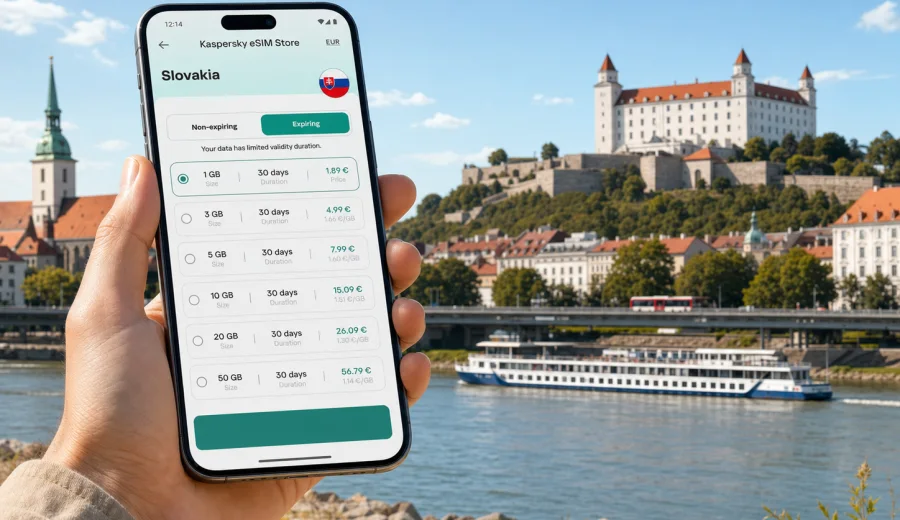
eSIM for Slovakia: mobile connection and internet for your trip
Slovakia is compact, varied and easy to cross in a single itinerary: Bratislava on the Danube, the High Tatras, spa towns, castles, caves, ski resorts and small historic centers are often combined in one trip. That makes mobile internet more than a convenience. You may need maps for mountain roads, train times between regions, hotel messages, taxi apps, tickets, translation tools and banking confirmations on the same day.
An eSIM helps you prepare mobile connection for Slovakia without looking for a physical SIM card after arrival. Instead of changing the SIM in your phone, you install a digital SIM profile on a compatible device, choose a data plan for the destination and use mobile data when the profile is active. Kaspersky eSIM Store is an app and website where you can quickly choose, arrange and activate an eSIM with a suitable data plan for mobile internet in an international trip.
This guide explains how to choose an eSIM for Slovakia, what to check before buying, how much data different travel scenarios may need and how to avoid common setup mistakes.
Why mobile internet matters in Slovakia
Slovakia is friendly to travelers, but many practical tasks are easier when your phone is online. In Bratislava, mobile data helps with public transport tickets, restaurant reservations, ride-hailing, parking apps and navigation between the Old Town, the castle, business districts and the airport. Outside the capital, internet access becomes useful for route changes, weather checks and accommodation messages, especially if you are driving or moving between smaller towns.
An eSIM can be especially useful when you want to:
- check directions immediately after landing or crossing the border;
- use maps while walking in Bratislava, Kosice, Banska Stiavnica or Trencin;
- coordinate with hotels, hosts, drivers and colleagues through messengers;
- keep tickets, boarding passes and confirmations available online;
- avoid relying only on public Wi-Fi in airports, cafes and hotels;
- continue using your main SIM for calls or banking messages, while the eSIM handles mobile data.
The main advantage is preparation. You can choose a plan before the trip, install the eSIM while you still have stable Wi-Fi, and activate mobile data when it is time to use it. The exact activation behavior, validity period and data conditions depend on the selected plan, so always read the plan details before payment.
What an eSIM does and does not do
An eSIM is a digital SIM profile built into supported smartphones and tablets. For a Slovakia trip, it is usually used for mobile internet, not as a full replacement for your home number. In many travel scenarios, this is exactly what you need: maps, messengers, email, search, bookings and app-based calls all work over data.
It is still important to set expectations correctly.
| Topic | What to expect |
|---|---|
| Mobile data | The eSIM plan gives access to internet traffic according to the plan conditions. |
| Phone number | Travel eSIM data plans usually do not include a regular local phone number unless stated in the plan. |
| Calls and SMS | Use messengers or internet calling apps unless voice/SMS are clearly included. |
| Validity | Some plans start counting from activation, others from first connection; check the terms. |
| Device support | The phone or tablet must support eSIM and must not be locked to a carrier. |
| Coverage | Actual connection quality depends on local mobile networks, location, device settings and network conditions. |
This framing matters because eSIM is not a magic switch that makes every connection perfect. It is a practical way to prepare mobile internet for travel, with conditions you can review in advance.
How much data to choose for Slovakia
There is no single correct data amount, because usage depends on habits. A traveler who uses offline maps and hotel Wi-Fi may need little data. A traveler who watches videos, uploads photos and uses laptop tethering can use several gigabytes quickly.
Use this table as a planning reference, not as a guarantee:
| Travel style | Typical online tasks | Data approach |
|---|---|---|
| Light use | Maps, messengers, email, occasional search | Choose a smaller package and keep video for Wi-Fi. |
| Standard city trip | Navigation, bookings, social apps, photo messages | Choose a mid-sized package for more flexibility. |
| Road trip | Maps, route changes, parking, weather, music streaming | Consider more data, especially if maps are always online. |
| Remote work | Email, cloud documents, video calls, hotspot for laptop | Choose a larger package and monitor usage daily. |
| Family or group support | One person manages maps, tickets and shared bookings | Choose a plan with enough buffer for unexpected tasks. |
Before choosing, ask yourself four questions:
1. How many days will you spend in Slovakia?
2. Will you use hotel Wi-Fi for heavy tasks?
3. Do you need mobile hotspot for a laptop or another traveler?
4. Is Slovakia the only destination, or one part of a wider route?
The safest approach is to match the plan to the real job your phone must do. Do not choose data only by the lowest price or the largest number. Check the validity period, data amount, destination coverage and any activation notes.
What to check before buying
Before you prepare an eSIM for Slovakia, check the basics. Most setup problems are caused by device compatibility, carrier locks, timing or incorrect mobile data settings.
Use this checklist:
- Check whether your device supports eSIM.
- Confirm that your device is not locked to a specific carrier.
- Check that your phone operating system is up to date enough to install an eSIM.
- Read the plan conditions: country, data amount, validity period and activation rules.
- Make sure you have Wi-Fi available for installation before departure or at your accommodation.
- Keep your primary SIM active if you need SMS from your bank, airline or home operator.
- Decide which SIM profile will handle mobile data after arrival.
If you are not sure whether your phone supports eSIM, check before payment. Support depends on the exact device model, region and carrier restrictions. A phone model name alone is sometimes not enough, because some regional versions differ.
Choosing a Slovakia eSIM plan in Kaspersky eSIM Store
Kaspersky eSIM Store helps you choose and arrange an eSIM with a suitable data plan for a foreign trip. For Slovakia, focus on destination, traffic volume and validity period. The service should be treated as a convenient way to prepare mobile internet through an eSIM, not as a mobile network operator.
When comparing options, look at:
- Destination: the plan should include Slovakia or the region you need.
- Data amount: match it to maps, messaging, work and hotspot use.
- Validity: choose a period that covers your arrival, stay and departure day.
- Activation timing: understand when the validity period begins.
- Device requirements: install only on a compatible, unlocked device.
- Top-up or balance options: check whether additional data can be added if needed.
If you already know your route and want to prepare before departure, you can choose an eSIM plan for Slovakia in advance, then install it while you still have reliable internet access. This is usually more comfortable than trying to solve connectivity at the airport, railway station or hotel reception after a long journey.
eSIM, roaming, local SIM or public Wi-Fi
Travelers usually compare four ways to stay online abroad: standard roaming, a local physical SIM, public Wi-Fi and eSIM. Each option has a place.
| Option | When it may suit you | What to watch |
|---|---|---|
| Standard roaming | Short trips, simple setup, occasional data | Prices and limits depend on your home operator. |
| Local physical SIM | Long stays, need for local calls, local documents if required | Requires finding a store and changing or adding a SIM card. |
| Public Wi-Fi | Hotels, cafes, planned laptop work | Availability, quality and security vary. |
| eSIM | Prepared mobile data without a physical SIM | Requires a compatible unlocked device and correct setup. |
For many visitors, eSIM is the practical middle ground. It can reduce dependence on roaming and public Wi-Fi, while keeping the setup digital. It is also useful if your phone has only one physical SIM slot and you do not want to remove your home SIM.
How to install and activate an eSIM
Install the eSIM when you have a stable internet connection. You can do this before your flight, at home, in a hotel or anywhere with reliable Wi-Fi. The exact screens differ by device, but the sequence is usually similar.
Basic steps:
1. Check that your device supports eSIM and is not carrier-locked.
2. Choose Slovakia as the destination and select a suitable data plan.
3. Complete the order and open the eSIM details in your profile, app or email.
4. Add the eSIM to your device using the on-screen instructions or QR code.
5. Name the profile clearly, for example Slovakia Data.
6. When you are ready to use it, select the eSIM for mobile data.
7. Enable data roaming for the eSIM if the installation instructions or device settings require it.
8. Test the connection after arrival and check that mobile data is using the correct profile.
For device-specific setup, use the official internal guides: Android installation instructions and iOS installation instructions. Follow the steps for your phone carefully, because deleting an eSIM profile after activation may prevent reuse depending on the plan conditions.
Practical scenarios in Slovakia
Arrival in Bratislava
If you arrive at Bratislava Airport, Vienna Airport with a transfer, or by train from Austria, Hungary, Czechia or Poland, mobile data is useful immediately. You may need directions, ride-hailing, public transport, hotel messages or a QR ticket. If the eSIM is already installed, you only need to switch mobile data to the eSIM profile and confirm that the phone connects.
Weekend in the capital
For a two- or three-day stay in Bratislava, common data tasks include maps, restaurant search, tickets, messaging and photo sharing. Download offline maps before the trip if you want to save data. Keep streaming and large cloud backups for Wi-Fi.
High Tatras and outdoor routes
In mountain areas, no mobile connection method can guarantee the same quality in every valley, trail or cable car route. Use eSIM for practical tasks such as weather, maps, transport updates and group messages, but download key information offline before hiking. Keep battery reserve and do not depend only on real-time navigation in remote areas.
Road trip across the country
Driving between Bratislava, Trnava, Nitra, Banska Bystrica, Poprad and Kosice often involves navigation, parking, fuel searches and accommodation communication. A larger data package can make sense if maps stay online for hours or if several people rely on one phone for trip management.
Business travel
For meetings, conferences and remote work, eSIM helps you avoid repeated Wi-Fi logins. If you expect video calls, file uploads or hotspot use, choose a plan with more traffic and check data usage during the day. For critical calls, keep a backup option such as hotel Wi-Fi.
Settings that prevent common issues
After installing an eSIM, review your phone settings before depending on it. Small mistakes can make it look as if the plan does not work.
Check these points:
- Mobile data line: set the Slovakia eSIM as the active data profile when needed.
- Data roaming: enable it for the eSIM if required by the setup instructions.
- Default voice line: keep your main SIM for calls if you still need it.
- Low data mode: turn it on if you want to reduce background usage.
- App updates and cloud backup: pause them on mobile data.
- Hotspot: use it only if the plan and device settings support it.
- APN or network settings: follow the instructions provided with the eSIM if manual settings are needed.
If the phone does not connect after arrival, restart the device, confirm the correct data line, check signal, turn airplane mode on and off, and review whether the plan is active. If questions remain, contact support with your device model, destination, screenshots of settings and the order information available in your account.
How to save data during the trip
Even a comfortable data package can disappear quickly if the phone syncs in the background. A few habits help you keep mobile internet for the tasks that matter most.
Useful settings:
- Download offline maps for Bratislava, the Tatras or your route before departure.
- Disable automatic app updates on mobile data.
- Turn off automatic photo and video backup until Wi-Fi is available.
- Use lower video quality in streaming apps.
- Send compressed photos in messengers when quality is not critical.
- Monitor data use in your phone settings every day or two.
- Use hotel Wi-Fi for large files, but avoid sensitive tasks on unknown networks when possible.
Data planning is not only about saving money. It also prevents stress near the end of the trip, when you may still need maps, boarding passes and bank confirmation messages.
Quick planning table
| Before the trip | During the trip | Before leaving Slovakia |
|---|---|---|
| Check eSIM support and carrier lock. | Use the eSIM as the mobile data line. | Confirm you still have enough data for airport or train station tasks. |
| Choose Slovakia or a regional plan for your route. | Track data use and pause heavy background activity. | Keep the eSIM installed until the trip is fully over. |
| Install the eSIM on stable Wi-Fi. | Use Wi-Fi for large files when practical. | Switch mobile data back to your regular SIM if needed. |
| Save installation instructions and booking details. | Contact support if setup questions appear. | Review whether you need another plan for the next destination. |
FAQ about eSIM for Slovakia
Can I use eSIM in Slovakia instead of roaming?
Yes, an eSIM data plan can be an alternative to standard roaming for mobile internet, provided your device supports eSIM and the plan covers Slovakia. Compare the data amount, validity and price with your home operator's roaming terms before deciding.
Will I get a Slovak phone number?
Usually, travel eSIM data plans are focused on mobile internet and do not include a regular local phone number unless the plan states otherwise. For calls and messages, you can use internet-based apps over mobile data.
Should I install the eSIM before departure or after arrival?
Installing before departure is often easier because you can use stable Wi-Fi and avoid setup pressure at the airport. Activation and validity rules depend on the selected plan, so read the instructions before installing or turning the eSIM on.
Can I keep my main SIM active?
In many dual-SIM phones, yes. You can keep your regular SIM for calls or SMS and use the eSIM for mobile data. Check your phone settings so the correct line handles data, calls and messages.
Is eSIM enough for the High Tatras?
It can help with maps, weather and messages, but mountain terrain can affect any mobile network. Download key maps and route information offline, keep a power bank and do not rely only on a live connection for safety-critical navigation.
What if my phone does not support eSIM?
You will need another option, such as roaming, public Wi-Fi or a physical SIM where available. Before choosing an eSIM plan, use the compatibility check and confirm that your device is unlocked.
Can I share eSIM data by hotspot?
This depends on the selected plan, device and local network conditions. If hotspot is important for work or group travel, check the plan conditions and choose enough data for laptop use.
What should I do if the eSIM does not connect?
Check the active mobile data line, data roaming setting for the eSIM, signal, plan status and installation instructions. Restart the phone or toggle airplane mode. If the problem continues, contact support with clear details about your device and settings.
Final checklist before you travel
Before your Slovakia trip, make sure you can answer these questions:
- Is my phone eSIM-compatible and unlocked?
- Does the selected plan include Slovakia and cover my travel dates?
- Do I understand when the validity period starts?
- Have I installed the eSIM while connected to reliable Wi-Fi?
- Do I know which SIM profile will handle mobile data after arrival?
- Have I saved the Android or iOS setup instructions in case I need them later?
- Have I downloaded essential maps, tickets and hotel details offline?
If these points are clear, mobile internet becomes one less thing to solve on arrival. You can focus on the route, meetings, family plans or mountain weather instead of searching for a SIM counter or a reliable Wi-Fi network.
Choose mobile internet for Slovakia before departure
Preparing eSIM in advance is a practical way to keep your Slovakia trip organized. You can review available data options, choose a validity period that fits your stay, install the eSIM on a compatible device and use mobile internet when the profile is active.
Before you leave, prepare an eSIM plan for your trip to Slovakia through Kaspersky eSIM Store, then keep the setup instructions close until the connection is working on your device.