
Travel connectivity guide
Sofia eSIM: mobile internet for your trip
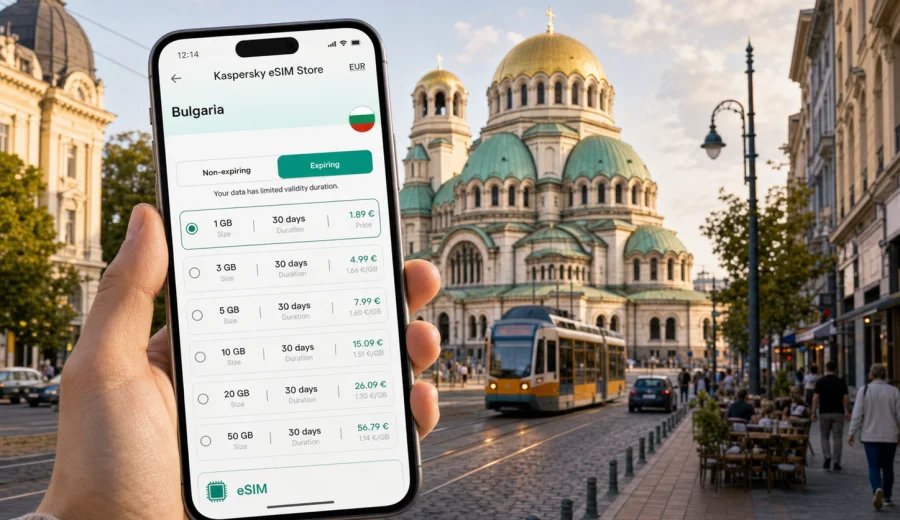
Sofia eSIM: mobile connection and internet for your city trip
Sofia is a practical city for a connected trip: the airport is close to center, metro lines cover useful routes, taxis are common, and many travel decisions happen on a phone. You may need mobile internet before you reach your hotel, while checking metro at Serdika, confirming dinner near Vitosha Boulevard, or joining a work call.
An eSIM can make that first hour in Sofia easier because you do not need to look for a physical SIM card counter after landing. You choose a suitable data plan for Bulgaria, install the eSIM on a compatible device, and use mobile data for maps, messaging, bookings, transport apps, email, and browser searches during the trip. Kaspersky eSIM Store is an app and website that helps you choose, arrange, and activate an eSIM with a suitable mobile data plan for travel abroad.
This guide covers Sofia rather than Bulgaria in general. The goal is to help you plan mobile connection and internet for the city: arrival at Sofia Airport, movement between districts, hotel check-in, business days, short stopovers, and trips from Sofia to nearby places.
Why mobile internet matters in Sofia
Sofia is not difficult to navigate, but it rewards travelers who can check information in real time. Street names may appear in Cyrillic and Latin forms, transport options can change during the day, and many useful decisions depend on your exact location.
Common moments when mobile data helps in Sofia:
- following the route from Sofia Airport to the center by metro or taxi;
- checking whether your hotel is closer to Serdika, NDK, Vitosha Boulevard, Lozenets, Oborishte, or Studentski Grad;
- using maps around Alexander Nevsky Cathedral, the Largo, the National Palace of Culture, and the central mineral baths;
- ordering a ride, translating a sign, or confirming apartment entry details;
- checking weather before a walk toward Vitosha Mountain or a day trip.
Public Wi-Fi can be useful in hotels, cafes, and the airport, but it is not a complete travel plan. You may need the internet while walking, waiting for transport, entering a building, or solving a booking issue outside business hours.
Arrival at Sofia Airport
Sofia Airport is close to the city, so your first route is usually short. That does not mean you can ignore connectivity. The first 30 minutes often include several small tasks: checking the terminal exit, reading transfer instructions, choosing between metro and taxi, notifying your hotel, and confirming the address in your booking.
If you use mobile internet as soon as the plane lands and local network access is available, you can:
1. Open your booking and copy the exact hotel address.
2. Check the metro route from the airport station to the nearest stop.
3. Compare travel time by taxi, metro, and private transfer.
4. Message your host or reception if your arrival time changes.
5. Save a map pin before leaving the terminal.
For many travelers, the metro is the simplest option when the hotel is near central stations such as Serdika, NDK, Vasil Levski Stadium, or European Union. Taxis are useful for late arrivals, bulky luggage, family travel, or addresses away from the metro. In both cases, mobile internet helps you verify the route and avoid guessing at the curb.
City movement: metro, tram, taxi, and walking
Sofia is a city where different movement styles can work on the same day. You may take the metro from the airport, walk through the historic center, use a tram for a local route, and order a car after dinner. A travel eSIM is useful because each transport choice often starts with a quick phone check.
| Sofia situation | Why mobile data helps |
|---|---|
| Metro from the airport | Check the direction, transfer station, and walking route from the stop |
| Tram or trolleybus | Confirm the line, stop name, and expected arrival |
| Taxi or ride-hailing | Share pickup points and check the route to the hotel |
| Walking in the center | Use live maps around pedestrian streets and landmarks |
| Evening return | Message the hotel, check transport availability, and avoid getting stranded offline |
Walking is especially common around the central area. The distance between Alexander Nevsky Cathedral, the National Theatre, the Largo, Serdika ruins, and Vitosha Boulevard is manageable, but it is easy to take a longer route than necessary. Mobile maps help you choose side streets, find entrances, and adjust your plan when weather or traffic changes.
Choosing a data plan for a Sofia trip
The right eSIM plan depends less on the city name and more on your trip pattern. A weekend visitor using maps and messaging needs less data than a remote worker who joins video calls, uploads documents, and uses hotspot mode.
Use this simple planning table:
| Trip type in Sofia | Typical mobile data needs | What to check before choosing |
|---|---|---|
| Short stopover or one-night stay | Light data for maps, messages, transport, and bookings | Validity period and activation timing |
| Weekend city break | Moderate data for navigation, searches, photos, and restaurant bookings | Data volume and whether top-up is available |
| Business trip | Higher data for email, documents, calendars, and calls through apps | Reliability of your setup, device compatibility, and backup Wi-Fi |
| Remote work week | Higher data, especially if using hotspot or video meetings | Hotspot rules, plan duration, and data allowance |
| Sofia plus day trips | Moderate to high data for maps outside the center | Country coverage and route needs within Bulgaria |
Avoid choosing only by the lowest price. Check the data amount, validity period, destination, activation rules, and whether the plan fits the way you will use your phone. eSIM data plans usually focus on mobile internet; regular voice calls and SMS are not included unless the specific plan says so. For calls and messages, you can normally use internet-based apps.
Sofia districts where connectivity is especially useful
Sofia has a compact center, but visitors often stay or work in different neighborhoods. Around Serdika, Alexander Nevsky Cathedral, the Largo, and Vitosha Boulevard, mobile maps help with short walks, restaurant bookings, and finding entrances on older streets. Around NDK, Lozenets, European Union station, Business Park Sofia, Mladost, and Studentski Grad, mobile data is useful for metro changes, ride pickup points, office addresses, apartment check-in, and late returns after dinner or events.
When to set up eSIM for Sofia
For a smooth trip, prepare the eSIM before departure while you still have reliable home internet. Install the eSIM profile, read the activation instructions, and keep your primary SIM settings clear. Some plans start counting validity only after activation on a local network, while others may have different conditions, so always check the selected plan before you travel.
A sensible preparation flow:
1. Check that your phone supports eSIM and is not locked to one carrier.
2. Choose a data plan for Bulgaria that matches your Sofia itinerary.
3. Install the eSIM while you have stable Wi-Fi.
4. Keep your primary SIM for calls or banking messages if you need it.
5. After arrival, select the eSIM for mobile data and follow the plan instructions.
6. Test maps and messaging before leaving the airport or hotel.
Before choosing a plan, you can prepare an eSIM data plan for your trip to Sofia through the Bulgaria destination page in Kaspersky eSIM Store. The page is country-based because a city trip to Sofia uses the relevant Bulgaria travel destination rather than a separate city-only plan.
Device compatibility before you leave
Do not wait until you are in the arrival hall to learn that your phone cannot use eSIM. Compatibility depends on the device model, region, software, and carrier lock status. Even if your phone model usually supports eSIM, it is still worth checking the exact device you will take to Sofia.
Use this checklist before purchase:
- your smartphone or tablet supports eSIM;
- the device is not locked by your home carrier;
- you have updated system software if required;
- you can access email or your account to receive setup details;
- you understand which SIM profile will handle mobile data;
- you know whether your primary SIM should stay active for calls or SMS.
If you are unsure, use the compatibility check before choosing a plan: Check your device. This is especially important for business travelers carrying a company phone, travelers using devices bought in another region, and anyone who needs banking or two-factor authentication messages on the primary SIM.
Installing eSIM for a Sofia trip
Installation is usually easiest before departure, but activation and data use should follow the conditions of the selected plan. After arranging the eSIM, the profile may appear in your account or app, and setup can be completed using on-screen instructions or a QR code, depending on your device and plan flow.
Basic steps:
1. Connect your phone to stable Wi-Fi.
2. Open the eSIM setup details from your account, app, or email.
3. Add the eSIM profile to your device.
4. Name it clearly, for example "Bulgaria travel" or "Sofia data".
5. Keep your home SIM active only for the services you still need.
6. After arrival in Sofia, select the travel eSIM for mobile data.
7. If the instructions require it, enable data roaming for the eSIM profile.
For device-specific setup, follow the Android installation guide or the iOS installation guide. Setup details can vary by device, so use the relevant guide and the instructions shown for your selected plan.
Data use, work trips, and short stays
There is no single correct data amount for Sofia. Maps and messaging are usually light, while video calls, hotspot mode, cloud backup, and large file uploads use more. Download offline maps before departure, disable automatic media backup on mobile data, and keep app updates for hotel Wi-Fi.
For a business trip, choose more data than a leisure weekend if you expect email, shared documents, calendar changes, calls through apps, or hotspot use. Install the eSIM before flying and test the data profile before the first meeting. If you use a company phone or security tools, confirm that the device supports eSIM and that your required apps work over mobile data.
Hotels and apartments in Sofia often involve digital steps: entry codes, host messages, online check-in, map pins, or reception instructions. Save the address, contact details, check-in notes, nearest metro stop, and a backup route before leaving the airport or station. Even when accommodation Wi-Fi is available, mobile data helps you reach the building first.
Sofia also works for stopovers and short stays. If you have only a few hours, use mobile maps to judge whether there is enough time for the center, luggage storage, and the return route to the airport. For day trips from Sofia to Vitosha Mountain, Boyana, Plovdiv, Rila Monastery routes, or smaller towns, save key route details offline and make sure your plan fits travel within Bulgaria. If your itinerary continues across borders, review regional plan conditions before relying on one eSIM for the wider route.
Common mistakes to avoid
Avoid choosing a plan without checking validity, assuming every recent phone supports eSIM, installing only after leaving home Wi-Fi, deleting the eSIM profile too early, forgetting to select it for mobile data, or expecting a data-only plan to include a regular phone number. If something does not work, first check the selected data line, roaming data setting for the eSIM profile, remaining data, plan status, and whether the device is connected to a local network.
FAQ
Is eSIM useful for a short visit to Sofia?
Yes, especially if you want mobile data immediately for maps, transport, hotel messages, and ride pickup points. For a very short stay, choose a plan with a suitable validity period and avoid paying for more data than you will use.
Can I use eSIM from Sofia Airport to the city center?
You can use mobile data after the eSIM is installed, activated according to the plan rules, and connected to a local network. Prepare the profile before departure so you are not setting it up while handling luggage.
Does a travel eSIM include calls and SMS?
Many travel eSIM plans are data-only. Regular phone calls and SMS are not included unless the selected plan says otherwise. You can use internet-based calling and messaging apps over mobile data.
Should I install eSIM before flying to Sofia?
It is usually more convenient to install it before departure using stable Wi-Fi. Check when the plan validity starts and follow the instructions for your selected plan.
Can I use one plan for Sofia and other places in Bulgaria?
For Sofia and routes within Bulgaria, choose a plan for Bulgaria and check its conditions. If you continue to another country, review regional or additional destination options before travel.
Prepare your mobile internet for Sofia
A Sofia trip is easier when your phone is ready before you land. With an eSIM-compatible device, you can arrange a data plan for Bulgaria, install the eSIM in advance, and use mobile internet for transport, maps, messaging, bookings, and work tasks throughout the city.
Kaspersky eSIM Store helps you choose, arrange, and activate an eSIM with a suitable data plan for travel abroad. Before departure, check your device, review the plan conditions, install the eSIM on stable Wi-Fi, and save your hotel and route details. When you are ready, you can choose an eSIM data plan for your Sofia trip and keep your city movement, arrival, and daily plans easier to manage.