Travel connectivity guide
Sohar eSIM: Mobile Internet in Oman
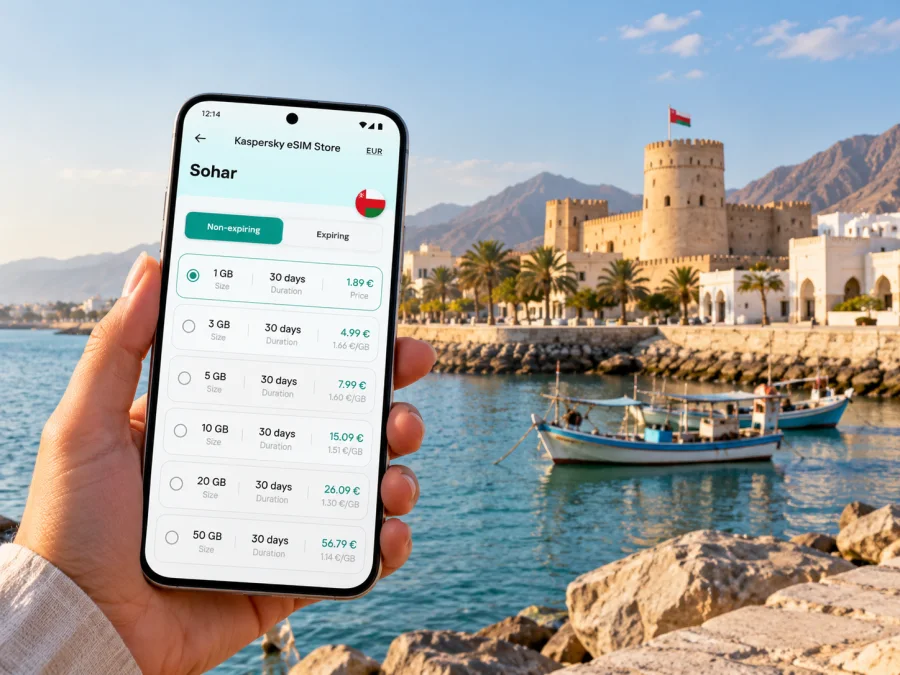
Sohar eSIM: mobile connection and internet for your trip
Sohar is a coastal city in Oman’s North Al Batinah Governorate, known for its maritime heritage, working port, and the historic fort that bears its name. A visit can combine business appointments, time by the sea, souq shopping, and day trips toward the mountains. Mobile internet helps connect those plans: check a hotel address, coordinate a pickup, translate a sign, or reopen a route when you change your mind.
An eSIM can make that preparation simpler if your phone supports it. You choose a plan for Oman, install its digital SIM profile, and use it for mobile data according to the plan’s terms. The experience still depends on the plan’s partner network, local coverage, device settings, and where you are. This guide focuses on using mobile data in Sohar and planning the practical details around it.
Sohar at a glance: what matters for getting around
Sohar sits on Oman’s Gulf of Oman coast, north of Muscat, in North Al Batinah. The governorate includes coastal settlements, forts, agricultural areas, and mountain landscapes. Sohar itself is both a regional urban centre and an industrial and port city. That mix affects a visitor’s day: the old fort and souq are one kind of destination; a meeting in a business district, port-related site, or hotel outside the centre is another.
A map pin alone may not tell you how a trip will feel. Before leaving, check the exact entrance or meeting point, travel time for your chosen hour, and whether the destination is in central Sohar or beyond it. Some areas are spread out, and a short-looking line on a screen can involve a highway or a road junction rather than a walkable street.
| Trip need | How mobile data helps in Sohar |
|---|---|
| First arrival | Open the hotel pin, message your host, and confirm the pickup location. |
| City orientation | Compare the fort, souq, waterfront, and your accommodation on one map. |
| Business visit | Share a live arrival update and keep meeting details available on your phone. |
| Day trip | Check the route and saved destination before leaving the urban area. |
| Short stopover | Keep directions and booking information ready without relying on hotel Wi-Fi. |
The city’s historic identity is closely tied to the sea. Sohar Fort is a landmark and museum associated with the area’s maritime heritage, while the souq offers a different view of everyday commerce. These are useful map anchors, but they do not define all of Sohar: the modern city and surrounding governorate extend well beyond the heritage core.
Arriving in Sohar: keep the first hour simple
Plan your arrival around the confirmed itinerary rather than assuming a particular flight or connection. Sohar Airport is part of Oman’s airport system, but its current passenger routes and schedules can change. Check the details on your ticket and with the airline before treating it as your entry point. Depending on your itinerary, you may arrive through another Omani airport and continue overland. North Al Batinah is accessible from the capital, but the time needed depends on the route, traffic, and stopovers.
Before departure, save essential details where you can reach them offline:
- accommodation name, address, and phone number;
- the name and location of your first appointment;
- airport, station, or pickup instructions supplied by your carrier;
- booking confirmations and any entry documents you need;
- a map area or route, if your navigation app supports offline downloads.
When you arrive, connect to the network available to you and confirm that the destination pin matches the address from your booking. If someone is meeting you, agree on a recognizable pickup point and share it in a message. A mobile connection is useful for coordination, but it does not remove the need to confirm who is collecting you or where the car will stop.
If your journey includes a drive from Muscat or another city, avoid navigating from a single screenshot. Keep the destination saved in a map app and review the route before setting off. When you are the driver, make route changes only while safely parked or ask a passenger to manage the phone. A local data plan can keep map traffic and messages available when Wi-Fi is not nearby; it cannot guarantee signal along every stretch of road.
Getting around: central landmarks and wider North Al Batinah
For a first visit, group nearby stops rather than trying to cross the city repeatedly. Sohar Fort and the souq can anchor a heritage-focused outing; the coast and waterfront make a different stop, while a work visit may lie well away from both. Check opening times for attractions on the day, and use the address or official location pin because hours, access, and event arrangements can change.
Do not assume that a place with “Sohar” in its name is within easy walking distance of the fort. Confirm the map pin, the entrance, and the road access. In warm weather, a short drive can be more comfortable than a long exposed walk. Ask your accommodation or host about local transport options for the specific destination; availability can vary by time and neighbourhood.
| If your plan is… | Prepare this before leaving |
|---|---|
| A walk around the heritage centre | Save the fort and souq pins; carry water and check current visitor information. |
| A hotel-to-meeting transfer | Confirm the building entrance and share your arrival time with the host. |
| A coastal stop | Pin the access point, not only the name of the shoreline. |
| A drive to Wadi Al Jizzi | Check road conditions and the route in advance; do not rely on continuous mobile coverage. |
| A trip to another town in North Al Batinah | Keep the destination and return route saved before leaving central Sohar. |
Wadi Al Jizzi is one of the outdoor destinations in the wider North Al Batinah area. It is not simply another central-city neighbourhood. If you plan to go there, treat it as a separate excursion: check the route, daylight, access conditions, and any local guidance before departure. A city-focused mobile plan may be useful for navigation and coordination, but service can vary away from populated areas. Downloading a map in advance gives you a fallback if data becomes unavailable.
Sohar’s airport, port, and free-zone references can also lead to different parts of the wider urban area. For a business visit, ask the meeting contact for a precise entrance or gate and any access instructions. Do not put a broad industrial-zone name into navigation and assume the pin will take you to reception. A working phone connection is most helpful when it supports a clear address, a saved contact, and an agreed check-in time.
Plan mobile data around your actual itinerary
The right amount of data depends more on how you use your phone than on the city name. Navigation, messaging, translation, email, and web browsing usually consume less than long video calls, cloud backups, or streaming. If Sohar is one stop on a route through Oman, account for the whole itinerary and check that the plan applies to the country or region you will visit. A city article cannot establish the coverage or terms of an individual plan.
At this point, you can review eSIM options for travel in Oman and compare the plan details with your dates and expected use. Check the country or region, data allowance, validity period, supported network information, activation conditions, and any top-up terms shown for the specific plan. Network partners and plan conditions can differ; a listing for Oman should not be read as a promise of identical service in every neighbourhood or on every route.
Use these questions to estimate your needs:
- How many days will you use mobile data? Include arrival and departure days if you will need maps or messages then.
- Will you navigate by car? Map loading and rerouting add to normal browsing, especially if you regularly switch destinations.
- Will work depend on your phone? Email and messaging are different from long video meetings or file transfers.
- Will you use hotel Wi-Fi for larger tasks? If so, reserve cellular data for travel, coordination, and tasks that need a connection while you are out.
- Does your route leave Sohar? Check plan geography before travel to another governorate or across a border.
A simple rule: choose based on the total trip, not a guess about “average Sohar usage.” Leave room for the activities you know you will do, and read the plan’s stated limits. If you use two SIMs, decide which line handles mobile data and which one should remain available for calls or messages from home. Your home operator may charge for roaming even when a travel eSIM is active, depending on the line settings and use.
Oman coverage is location- and network-specific
Oman has several mobile network operators. The national regulator’s coverage service lets users inspect coverage by provider and technology, including Omantel, Ooredoo, and Vodafone. This is a useful reminder that “Oman coverage” is not one uniform signal map. A third-party travel eSIM may connect through a particular partner network listed in its own plan details; the plan page is the place to check which network applies.
Coverage can differ between a hotel room, a busy street, a coastal road, and a more remote excursion. Buildings, terrain, congestion, device bands, and network selection can all affect the experience. The regulator’s map is an overview, not a guarantee of indoor reception at a specific address. If an important meeting depends on data, ask the venue about Wi-Fi and save the address and contact information before you go.
The proximity of Sohar to the United Arab Emirates does not make the two countries one mobile market. A plan for Oman may not include the UAE. If your itinerary crosses the border, verify the exact plan geography and roaming terms before travel; do not infer cross-border use from the route on a map.
Check your phone’s exact eSIM variant
eSIM support can vary by model, hardware variant, and sales market. Two phones with nearly identical product names may have different SIM capabilities; some regional versions omit eSIM, and a carrier-locked device may restrict activation. Check the manufacturer’s specifications for the exact model number and the country or region where it was sold. Then confirm that the phone is unlocked and that its operating system supports adding an eSIM profile.
Check whether your device supports eSIM before choosing a plan. Do not rely only on a general list of phone families or on the appearance of an eSIM setting in a different device variant. If the device was purchased through a carrier, ask that carrier whether it is unlocked for international eSIM use.
A short pre-purchase check:
- [ ] Confirm the exact model or model number, not just the product family.
- [ ] Check the manufacturer’s support information for the device’s sales region.
- [ ] Confirm the phone is not locked to a home operator.
- [ ] Make sure you can access a stable internet connection while installing the profile.
- [ ] Keep access to your account and the eSIM installation details until setup is complete.
Install before travel, activate with care
If your phone is compatible and unlocked, install the profile while you have reliable internet access and enough time to follow the on-screen steps. The exact menu names differ by operating system and device version. Follow the instructions for Android or iOS, and use the activation information supplied with your chosen plan.
A practical sequence is:
- Read the plan conditions. Confirm where it works, how validity begins, and whether any settings such as data roaming are required for that eSIM.
- Connect to Wi-Fi. Keep your phone online during installation; adding a profile may take several minutes.
- Add the eSIM profile. Use the supplied installation method and follow the prompts on your device.
- Label the line. Choose a clear name such as “Oman data” so you can identify it later.
- Choose the data line. Set the travel eSIM as the line for mobile data when you intend to use it.
- Keep your home line settings deliberate. Review roaming and default voice settings to avoid unintended use on your home plan.
- Wait until the right time to connect. If validity begins only after connection or activation, follow the plan’s stated timing and avoid switching it on early by mistake.
- Check the connection. Once the plan should be active, confirm that mobile data is assigned to the correct line and try a simple webpage or message.
If you prefer to install after arriving, keep the activation instructions accessible and make sure you can connect to Wi-Fi first. Do not delete an eSIM profile as a troubleshooting shortcut unless the plan instructions say it can be installed again. Some profiles are intended for one installation, and removing one can make recovery difficult. If activation takes longer than expected, wait a few minutes, check the selected data line and plan instructions, then contact the relevant support channel with the error message.
Practical scenarios
One day in Sohar
You arrive for a short visit, leave your bag at the hotel, and want to see the fort and souq before dinner. Confirm whether the fort is open, save both locations, and ask the hotel about the easiest way to reach the first stop. Use data for navigation and messages rather than streaming in the background. Before returning, check your pickup point and send a clear location to your driver or host.
A work trip near the port or free zone
A broad company name may not be enough to find the correct gate. Ask your contact for a pin, entrance name, visitor instructions, and a phone number. Save them before the meeting and share your expected arrival time. Keep meeting files available offline if you may need them in an area with variable indoor reception. For a video call, test the connection from the actual venue or use its Wi-Fi if available.
If mobile data does not connect
Troubleshoot in a calm order and avoid deleting the profile until you know it can be reinstalled:
- Check that the eSIM line is enabled and selected for mobile data.
- Confirm that the plan has started and remains valid under its terms.
- Turn airplane mode on briefly, then off, or restart the phone.
- Check the plan instructions for manual network selection or data roaming settings.
- Move to another location, especially if you are indoors or beyond the urban area.
- Compare the location with the regulator’s provider coverage information where useful.
- Contact the support channel connected to your plan and provide the device model and any displayed error.
A phone showing signal bars does not always mean the data line is configured correctly. Conversely, a temporary gap in coverage does not necessarily mean the profile has failed. Confirm the line settings first, then consider location and network conditions.
Questions travellers ask about Sohar eSIM
Is Sohar in Oman or the United Arab Emirates?
Sohar is in the Sultanate of Oman, in North Al Batinah Governorate. The city’s proximity to the UAE does not change the country where the phone is connecting. Verify the plan’s country list if your trip includes both countries.
Does an eSIM guarantee mobile internet everywhere in Sohar?
No. Service depends on the selected plan, its partner network, local coverage, the device, and indoor or outdoor conditions. Check the plan details and use the regulator’s coverage information as a guide, not a guarantee for an individual building or road.
Can I use a travel eSIM for calls and SMS?
Usually a travel data eSIM is intended for mobile internet and does not add a regular phone number, voice calls, or SMS unless the plan specifically says otherwise. You can use internet-based calling and messaging apps when you have data and the other person can receive them.
Should I install the eSIM before I reach Sohar?
Installing before departure is convenient if your device is compatible and you have stable Wi-Fi. Check when the plan’s validity begins so that you do not activate it earlier than intended. If you install after arrival, you will need an internet connection to complete setup.
Will the same eSIM plan work in the UAE as well?
Not necessarily. Sohar is in Oman, and the UAE is a separate country and mobile market. Check that both countries are explicitly covered by the specific plan and review any regional conditions before crossing a border.
What if my phone has a different regional version?
Verify the exact model number and sales region with the manufacturer. eSIM support may differ between variants carrying similar commercial names, and carrier locks can also prevent activation. Check compatibility before you choose a plan.
Sohar rewards a flexible plan: heritage stops in the city, meetings in its wider business area, and excursions across North Al Batinah can each require a different route. Before leaving, confirm your precise destinations, eSIM compatibility and plan terms, and keep essential addresses available offline.
Prepare your eSIM for Sohar
Use the Kaspersky eSIM Store app or website to choose, purchase, and activate an eSIM with a suitable mobile-data plan for your trip abroad. Compare the Oman plan’s conditions with your dates, expected data use, and any onward travel, then install it on a compatible unlocked device. Choose an eSIM plan for your trip to Oman and keep your key Sohar destinations saved before setting out.


