
Travel connectivity guide
Soufriere eSIM: Internet for Dominica Trips
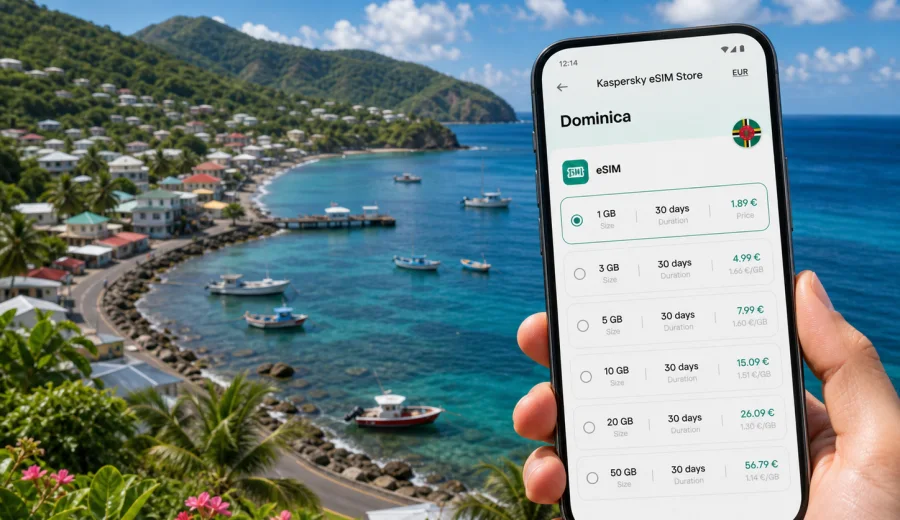
Soufriere eSIM: mobile connection and internet for a trip to Dominica
Soufriere is a compact coastal village on Dominica's southwest shore, where a trip can move quickly from airport transfer to hillside guesthouse, waterfront walk, snorkeling plan, and a route toward Scotts Head or Roseau. In that kind of itinerary, mobile internet is not only for posting photos. It helps you confirm a pickup, open maps on narrow coastal roads, message a hotel, check ferry or flight updates, and keep travel documents available when you are away from reliable Wi-Fi.
An eSIM can make that first day simpler if your phone supports it. Instead of looking for a physical SIM card after arrival, you can prepare a digital SIM profile and choose a prepaid data plan for Dominica before you travel or when you already have a stable connection. Kaspersky eSIM Store is an app and website where you can choose, arrange, install, and activate an eSIM with a suitable mobile data plan for an international trip.
This guide focuses on Soufriere city scenarios: arrival, local movement, navigation, transport, hotels, short stays, remote work, diving and snorkeling plans, and trips from Soufriere to other parts of Dominica. It also explains what to check before you buy an eSIM, how to estimate data, and where the country-level Dominica plan page fits into the city journey.
Why mobile internet matters in Soufriere
Soufriere is small, but a small destination can make connectivity more important, not less. Many practical tasks happen between places: on the road from the airport, near the coast, at a guesthouse reception desk, on the way to a dive operator, or while arranging a day trip. If you rely only on hotel Wi-Fi, every change of plan can become slower.
Mobile internet is useful in Soufriere for:
- finding your accommodation after a long transfer;
- sharing your live location with a driver or host;
- checking maps before walking on unfamiliar roads;
- confirming dive, snorkel, or boat-trip timings;
- messaging family when you are outside the hotel;
- using translation, banking, ride, or airline apps;
- keeping a backup connection if public Wi-Fi is slow or unavailable.
An eSIM is especially practical when you want your main SIM card to stay in the phone. On many compatible devices, you can keep your usual number active for messages while using the eSIM profile for mobile data in Dominica. The exact behavior depends on your device, your home operator, and the selected eSIM plan, so it is worth checking settings before you travel.
Arrival in Dominica and the first hours after landing
Most international travelers reach Soufriere after arriving elsewhere on the island. The transfer can involve a long drive through mountain and coastal roads, so the first useful connection may be needed before you reach your room. If your arrival is late, if a driver is waiting for you, or if your accommodation is small, having mobile data ready can reduce uncertainty.
Typical first-day tasks include:
1. Opening the booking confirmation for your hotel or guesthouse.
2. Messaging your host with an updated arrival time.
3. Checking the route from the airport or ferry area toward Soufriere.
4. Confirming whether you need cash, a pickup point, or a gate code.
5. Letting someone at home know you arrived safely.
With an eSIM, you can prepare the mobile data setup while you still have stable internet at home. Some travelers install the eSIM before departure and activate it according to the plan instructions. Others prefer to complete the final activation step after landing. In both cases, read the plan details carefully because the validity period and the start of data usage can vary by plan.
City focus: where eSIM helps around Soufriere
Soufriere is not a city of long metro rides or large business districts. It is a coastal base where your connection supports practical movement between the village, the waterfront, nearby viewpoints, accommodation areas, restaurants, and routes toward Scotts Head, Roseau, and nature sites. That makes the right data plan different from what you might choose for a week in a large capital.
| Soufriere situation | Why mobile data helps | Data pattern |
|---|---|---|
| Airport or ferry transfer | Driver messages, maps, booking details | Short bursts of data |
| Guesthouse check-in | Contacting host, opening confirmations | Light use |
| Waterfront walks | Maps, weather, messaging | Light to moderate |
| Snorkeling or diving plans | Confirming meeting time and location | Light use before and after activity |
| Day trip to Roseau or Scotts Head | Navigation, route changes, search | Moderate use |
| Remote work from accommodation | Email, documents, hotspot if allowed | Higher use |
The most important point is not maximum speed all day. It is reliable access when you need to make a decision, find a place, or contact someone. Public Wi-Fi may be enough at the hotel, but it does not help much on the road or at the waterfront.
Choosing an eSIM data plan for Soufriere
For a Soufriere trip, choose the plan by the whole Dominica itinerary, not only by the village name. City articles use the country plan because the eSIM plan is selected for the country or region where you travel. If you will stay in Soufriere for two nights and then continue to Roseau, Portsmouth, or other parts of Dominica, your data plan should cover that wider route.
Use these questions before choosing:
- How many days will you be in Dominica?
- Will you use mobile data mainly for maps and messaging, or also for work?
- Will your hotel Wi-Fi be reliable enough for video calls?
- Do you plan to use hotspot mode from your phone?
- Are you traveling only in Dominica or combining islands on the same trip?
- Do you need data from the airport transfer onward?
For a short leisure stay, a smaller data allowance may be enough if you use mobile data for maps, messaging, restaurant searches, and booking confirmations. For a work trip or a longer island itinerary, consider a larger allowance because navigation, cloud documents, video calls, and frequent photo backups can use data quickly.
Data planning examples for real Soufriere trips
There is no single correct allowance for every traveler, but you can estimate your needs by scenario. Avoid choosing a plan only because the number looks large. Match the data volume and validity period to how you actually travel.
| Trip style | Likely mobile data needs | Practical note |
|---|---|---|
| Weekend stop in Soufriere | Maps, messages, booking apps, weather | A light plan may be enough if hotel Wi-Fi is good |
| Diving or snorkeling break | Messaging operators, maps, photos after activity | Keep data available for schedule changes |
| Family holiday | Several devices, shared plans, navigation | Check whether hotspot is allowed in the selected plan |
| Business stay near Roseau with Soufriere visit | Email, calls over apps, document access | Choose extra allowance for work tasks |
| Island route from Soufriere | Maps, transport, accommodation changes | Validity period matters as much as gigabytes |
Data is also affected by habits. Streaming video, cloud photo backup, social media uploads, and video meetings can use much more data than maps and messaging. Before you leave, turn off automatic app updates and heavy cloud sync on mobile data if you want your allowance to last longer.
Prepare before you leave
The easiest eSIM experience usually happens before the trip. You are less tired, your home Wi-Fi is stable, and you have time to check device settings calmly. Soufriere is a relaxed destination, but arrival logistics can still be busy if you have luggage, a transfer, and a host waiting for you.
Before departure:
- Check whether your device supports eSIM.
- Make sure the phone is not locked to one carrier.
- Read the selected plan's country, data allowance, validity, and activation rules.
- Keep your regular SIM settings under control to avoid unintended roaming charges.
- Save your accommodation address offline as a backup.
- Install maps for the area if you expect weak signal on rural roads.
- Keep the QR code or installation instructions accessible.
This preparation does not replace checking local conditions, but it gives you a cleaner start. If your device is compatible and the selected plan fits your route, you can arrive with a clearer idea of which SIM profile should handle mobile data.
How to install and activate an eSIM for Dominica
The exact steps depend on your phone, but the general process is consistent: choose the destination, arrange the eSIM plan, install the eSIM profile, then select it for mobile data when you are ready to use it. If you need device-specific steps, use the Android installation guide or the iOS installation guide.
A practical setup flow looks like this:
1. Open Kaspersky eSIM Store on the website or in the app.
2. Select Dominica as the destination for your Soufriere trip.
3. Compare available data allowances, validity periods, and plan details.
4. Arrange the selected eSIM plan and save the installation instructions.
5. Install the eSIM profile on a compatible device while you have internet access.
6. When appropriate, set the eSIM as the mobile data line.
7. Check whether data roaming must be enabled for that eSIM profile.
Do not delete the eSIM profile after installation unless the plan instructions or support team tell you to do so. Some eSIM profiles cannot be moved to another device after activation. If you are changing phones before the trip, complete the setup on the device you will actually take to Dominica.
Where the Dominica plan page fits into a Soufriere trip
Soufriere does not need a separate city tariff. The useful choice is the country destination that covers your travel in Dominica. Once you know your dates and likely data use, you can choose a mobile data plan for Dominica in Kaspersky eSIM Store and then use it as part of your Soufriere preparation.
This link belongs in the planning stage, not the first sentence of your trip research. First decide how you will use the connection: light navigation, a family holiday, a work stay, or a route across the island. Then compare plan conditions by data volume, validity, and activation rules.
When you review the plan page, look for:
- destination coverage;
- included data volume;
- validity period;
- price and currency shown at checkout;
- activation and installation rules;
- whether hotspot use is supported by the selected plan;
- support options if you have installation questions.
Kaspersky eSIM Store helps you choose and prepare the eSIM plan, but it is not a mobile network operator and does not own local network coverage. Actual service conditions depend on the selected plan, local network availability, your device, and the place where you are using mobile data.
Soufriere movement: maps, transport, and local planning
In Soufriere, mobile data is often most useful in short moments: checking the road before leaving, confirming a meeting point, or deciding whether to continue toward Scotts Head or return to your accommodation. If you are not driving, data can help you coordinate with a driver, tour contact, or hotel.
Use mobile data for:
- checking the route before you start moving;
- saving your accommodation location;
- confirming pickup times in messaging apps;
- checking weather before coastal or water activities;
- translating short messages if needed;
- opening travel insurance, booking, or payment apps.
Do not assume that every rural or coastal road will feel the same as a city center connection in a large destination. Download key maps offline and keep addresses in notes as a backup. The eSIM is a useful part of your travel setup, while offline preparation still matters in a hilly island environment.
Hotels, guesthouses, and Wi-Fi in Soufriere
Accommodation Wi-Fi can be enough for many evening tasks: longer messages, photo backup, or browsing. The gap appears when you leave the property. If your hotel is on a hillside road, near the coast, or outside the busiest part of the village, you may want data before you return to Wi-Fi.
For hotel stays, use this simple split:
| Task | Better on Wi-Fi | Better with mobile data |
|---|---|---|
| Large photo backup | Yes | Only if you have enough allowance |
| Map route before leaving | Either | Yes, if you are already outside |
| Contacting a driver | Either | Yes |
| Video call | Usually Wi-Fi | Only with enough data and signal |
| Restaurant or activity search | Either | Yes when walking |
| Flight update | Either | Yes during transfer |
If you are working remotely, do not treat the eSIM as your only plan. Ask your accommodation about Wi-Fi quality, keep important files available offline, and check whether your selected eSIM plan supports hotspot use before relying on it for a laptop.
Business trips and work calls
Soufriere itself is more often a leisure base than a business hub, but business travelers may combine meetings in Roseau with a stay on the southwest coast or work remotely for a few days. In those cases, keep email and chat apps available on mobile data, save important files offline, and confirm whether hotspot use is allowed in the selected plan before relying on a laptop connection.
Calls and SMS are not always included with travel eSIM data plans. If a selected plan is data-only, use internet-based calling and messaging apps, and keep video calls for Wi-Fi when possible.
Short stopovers and day trips from Soufriere
Soufriere can be part of a short island route: one night by the coast, a day near the marine reserve, a visit to Roseau, or a move toward another part of Dominica. For short stays, the value of eSIM is often in reducing friction. You may not need heavy data, but you do need the connection at the right moment.
A short-stay checklist:
- Install the eSIM before travel if your device is compatible.
- Save the hotel address, driver contact, and booking details offline.
- Set the eSIM as the data line after arrival or according to the plan rules.
- Test maps and messaging before leaving the airport or ferry area.
- Keep roaming on your home SIM disabled if you do not plan to use it.
- Monitor data use after photo uploads or video calls.
If your route continues to another country or island, check whether a country plan for Dominica is enough. A regional or multi-destination option may be more suitable for some routes, depending on what is available and where you go next.
Common mistakes to avoid
The technical setup is usually straightforward, but small mistakes can create avoidable stress. Check these points before your trip:
- Buying a plan before confirming eSIM support on the phone.
- Installing the eSIM on a device you will not bring to Dominica.
- Confusing Dominica with the Dominican Republic when choosing a destination.
- Forgetting to set the eSIM as the mobile data line.
- Leaving heavy cloud backup enabled on mobile data.
- Assuming a data-only plan includes a local phone number.
- Deleting the eSIM profile while troubleshooting.
- Waiting until a weak connection area to install the profile.
The Dominica and Dominican Republic point is especially important. They are different destinations with different plan pages. For a Soufriere article, the country is Dominica, and the correct country context is the Dominica plan page.
Quick answers about eSIM in Soufriere
Can I use an eSIM for mobile internet in Soufriere?
Yes, if your device supports eSIM, is not restricted by a carrier lock, and you choose a suitable plan for Dominica. Local availability and performance depend on the selected plan, local networks, and your device.
Should I install the eSIM before arriving in Dominica?
It is often easier to install it before travel while you have reliable Wi-Fi. Check the plan instructions so you understand when validity starts and when to activate mobile data.
Will an eSIM give me a local phone number?
Many travel eSIM plans are data-only. Use internet-based calls and messages if voice and SMS are not included in the selected plan.
Is eSIM useful if my hotel has Wi-Fi?
Yes. Hotel Wi-Fi helps inside the property, while mobile data helps during transfers, walks, day trips, and schedule changes.
How much data do I need for Soufriere?
Light users may need only maps, messaging, and booking apps. Remote work, hotspot use, video calls, and photo backup require a larger allowance.
Final checklist before you go to Soufriere
Before you close your suitcase, make the connection part of your travel checklist:
- Confirm your phone supports eSIM.
- Check that the phone is not carrier-locked.
- Choose Dominica as the destination, not a similarly named country.
- Match the data allowance to your route and trip length.
- Install the eSIM while you have stable internet.
- Save instructions for Android or iOS in case you need them later.
- Keep your hotel address, driver contact, and booking details offline.
- Review which SIM line handles mobile data and which handles calls.
For a Soufriere trip, mobile internet is most valuable when it removes uncertainty from the day: finding a guesthouse, confirming a pickup, checking maps, or changing plans after a coastal walk. Kaspersky eSIM Store helps you prepare that setup through the app or website, where you can review available options and arrange an eSIM plan for your international trip.
When your dates, device, and data needs are clear, prepare an eSIM plan for your trip to Dominica before you head to Soufriere. A few minutes of planning can make the first transfer, the first check-in, and the first day by the water much easier to manage.