
Travel connectivity guide
South Africa eSIM: mobile internet guide
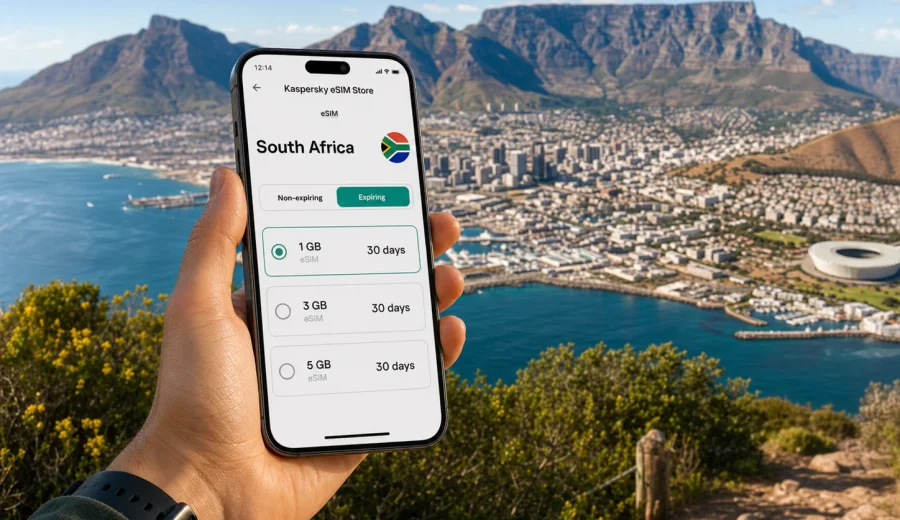
eSIM for South Africa: mobile connection and internet for your trip
South Africa is a country where mobile internet quickly becomes part of the travel plan. You may land in Johannesburg, connect through Cape Town, drive the Garden Route, work from a hotel in Durban, or move between safari lodges, coastal towns and city districts in the same week. In each case, a reliable way to get online helps you check routes, message accommodation, order transport, translate menus, manage bookings and stay in touch.
An eSIM can make that preparation simpler. Instead of looking for a physical SIM card after arrival, you install a digital SIM profile on a compatible phone and use a selected data plan during the trip. For many visitors, this is a practical middle ground between expensive standard roaming, public Wi-Fi and buying a local SIM in person.
This guide explains how to plan mobile connection and internet in South Africa with an eSIM, what to check before you travel, how much data you may need, and how Kaspersky eSIM Store can help you choose, arrange and activate an eSIM with a suitable mobile data plan for your route.
Why mobile internet matters in South Africa
South Africa rewards flexible travel. A day can start with a ride-share in Cape Town, continue with a hike near Table Mountain, and end with a restaurant booking in the city. Business travelers may need video calls, email and messaging from airports, hotels and coworking spaces. Road-trip travelers often rely on maps, fuel stops and accommodation messages across long distances.
Mobile internet is useful for:
- navigation in cities and on intercity routes;
- ride-hailing, airport transfers and car rental coordination;
- hotel, lodge and apartment check-in messages;
- mobile boarding passes and travel documents stored in the cloud;
- restaurant bookings, local delivery and card-payment confirmations;
- messaging through WhatsApp, Telegram, Signal or other apps;
- sharing photos and short videos without waiting for hotel Wi-Fi;
- checking opening hours, weather and traffic before changing plans.
What an eSIM does for a South Africa trip
An eSIM is a digital SIM profile built into a compatible smartphone, tablet or certain other devices. You do not insert a plastic card. You install the profile by following the instructions on your device, then choose it for mobile data when you want to use the plan.
For a trip to South Africa, an eSIM is mainly about mobile data. It normally does not replace a full local phone contract. Unless the selected plan states otherwise, do not expect a local phone number, traditional voice calls or SMS. For calls and messages, you can usually use internet-based apps while the data plan is active.
The main advantages are practical:
- you can prepare before departure, not at a shop counter after landing;
- you can keep your physical SIM in the phone for calls or banking messages if your device supports dual SIM use;
- you can choose a data amount and validity period that fit the trip;
- you can see plan conditions before payment;
- you can reduce dependence on hotel Wi-Fi and airport kiosks;
- you avoid handling a small physical SIM while traveling.
There are still conditions to check. Your device must support eSIM, it must not be locked to another carrier, and the selected plan must be suitable for South Africa. Coverage and speed depend on the local mobile networks and the plan conditions, not on the app or website where you prepare the eSIM.
South Africa travel scenarios and data needs
There is no single correct data allowance for every traveler. Your usage depends on how often you navigate, stream, make video calls, back up photos or share your connection with a laptop. The table below gives a planning baseline.
| Trip style | Typical online activity | Practical data approach |
|---|---|---|
| Short city break | Maps, messaging, ride apps, restaurant searches | A smaller plan may be enough if you use hotel Wi-Fi for heavy tasks |
| Business visit | Email, calls, documents, cloud apps | Choose more data and a validity period that covers arrival and departure days |
| Garden Route or self-drive trip | Navigation, accommodation messages, weather, route checks | Allow extra data for maps, detours and backup communication |
| Safari or lodge stay | Messaging, photo sharing, limited browsing | Check expectations carefully because remote areas may have variable signal |
| Family trip | Several phones, shared planning, photo uploads | Each traveler may need a separate plan or careful hotspot use |
| Long stay | Daily navigation, work tasks, social apps, media | Pick a larger allowance or plan for top-ups if available |
As a rough planning idea, light users may focus on messaging, maps and bookings. Moderate users should allow for social media, browsing and occasional cloud use. Heavy users should be careful with video streaming, large file uploads, automatic photo backup and laptop tethering, because these can use data quickly.
Before you buy: device compatibility and travel checks
Before choosing any eSIM plan, confirm that your device can use eSIM and is not restricted by your carrier. Many recent iPhone, Samsung Galaxy, Google Pixel and other models support eSIM, but support varies by region, model number and purchase channel.
Use this checklist before payment:
- Check your device for eSIM support.
- Confirm that the phone is unlocked for mobile service use.
- Update your operating system before the trip if an update is pending.
- Make sure you can access the email or account where installation details will arrive.
- Keep your primary SIM active if you need bank verification messages.
- Review the data amount, validity period and destination before confirming.
- Read when the validity period starts: after installation, after activation, or after connection to a supported network, depending on the plan.
- Avoid deleting an installed eSIM profile unless you are sure you no longer need it.
If you travel with more than one device, check each device separately. A tablet that supports eSIM may be useful for work, but your phone is usually the device that matters most for maps, transport and emergency communication.
eSIM, roaming, local SIM and Wi-Fi: what to choose
Travelers usually compare four options for mobile internet in South Africa. Each can work in the right situation.
| Option | Good for | Limitations to consider |
|---|---|---|
| Standard roaming | Keeping your home SIM active with minimal setup | Pricing and data limits may be less predictable; check your operator conditions |
| Local physical SIM | Longer stays or users who need a local number | Requires in-person purchase and setup; availability and requirements can vary |
| Public Wi-Fi | Hotels, airports, cafes and large downloads | Not always available when moving; quality and access rules vary |
| Travel eSIM | Data-focused trips, early preparation, flexible arrival | Requires compatible unlocked device; usually data only unless stated otherwise |
An eSIM is often attractive when you want to prepare before travel and do not need a local phone number. It is especially useful if you prefer to land with mobile data ready, keep your home SIM installed, and choose a plan based on trip length instead of solving connectivity at the airport.
How to choose an eSIM data plan for South Africa
Start with the route, not only the price. South Africa can involve different connection needs in different parts of the same itinerary. A business trip to Johannesburg has different usage patterns from a two-week holiday across Cape Town, the Winelands and the Garden Route.
Use these questions:
- How many days will you be in South Africa, including arrival and departure?
- Will you mainly use messaging and maps, or will you also stream, upload videos and join calls?
- Do you need data from the moment you land?
- Will you use your phone as a hotspot for a laptop or another traveler?
- Are you visiting remote areas where signal may vary?
- Do you want one larger plan or a smaller plan with a possible top-up option?
If you are unsure, choose a plan that covers the core trip and leave heavy downloads for trusted Wi-Fi. Offline maps, downloaded boarding passes and pre-saved hotel addresses also reduce pressure on your mobile data allowance.
For a direct starting point, you can choose an eSIM data plan for South Africa through Kaspersky eSIM Store and review the available data amounts, validity periods and plan conditions before you travel.
Installation and activation: practical steps
The exact installation flow depends on your phone and operating system, but the logic is similar: choose a plan, complete the order, install the eSIM profile, then select it for mobile data when you are ready to use it.
Basic setup steps:
1. Open Kaspersky eSIM Store on the website or in the app.
2. Select South Africa as the destination.
3. Compare data amount, validity period and price.
4. Confirm that your device supports eSIM.
5. Complete the order and follow the installation instructions.
6. Add the eSIM profile to your device.
7. Name the line clearly, for example "South Africa data".
8. When appropriate, select the eSIM for mobile data.
9. Enable data roaming for the eSIM if the plan instructions require it.
10. Keep your primary SIM settings as needed for calls, SMS or bank messages.
For device-specific setup, use the official step-by-step guides: Android eSIM installation instructions and iOS eSIM installation instructions.
Install the eSIM while you have a stable internet connection. Many travelers prefer to install the profile before departure and activate or switch data settings after arrival, but you should follow the timing rules shown for your selected plan. If a plan starts counting validity only after connection to a supported network, that is different from a plan that starts after installation.
Data-saving tips during the trip
A travel eSIM works best when you manage data deliberately. Small settings can make the difference between a plan that lasts the whole trip and one that runs out early.
Useful habits:
- Download offline maps for Cape Town, Johannesburg, Durban or your driving route before departure.
- Disable automatic cloud photo and video backup on mobile data.
- Download music, podcasts and streaming content on Wi-Fi.
- Limit app updates to Wi-Fi.
- Use lower video quality for calls when the connection is enough for it.
- Turn off background mobile data for apps you do not need during the trip.
- Avoid large file uploads from a safari lodge, airport queue or moving car.
- Monitor data use in your phone settings and in the plan interface where available.
Kaspersky eSIM Store and product positioning
Kaspersky eSIM Store is an app and website where you can quickly choose, arrange and activate an eSIM with a suitable tariff for mobile internet during an international trip. It helps you prepare the mobile data part of your journey in one place, with plan details such as data allowance, validity period, destination and price shown before you confirm.
Kaspersky eSIM Store is not a mobile network operator and does not replace local network infrastructure. The actual connection experience depends on the selected plan, supported local networks, your device, settings, location and other technical conditions.
FAQ: eSIM and mobile internet in South Africa
Can I use an eSIM for calls in South Africa?
Most travel eSIM plans are designed for mobile data. Unless the plan conditions say otherwise, they do not include a traditional phone number, voice calls or SMS. You can usually use internet-based calling and messaging apps over mobile data.
Should I install the eSIM before I fly?
Installing before departure can be convenient because you can use a stable home Wi-Fi connection. Activation timing depends on the selected plan, so read the instructions before switching the eSIM on for mobile data.
Can I keep my home SIM active?
On many dual SIM phones, yes. You can keep the home SIM for calls or messages and use the eSIM for mobile data. Check settings to avoid unwanted roaming data use on the home SIM.
Is eSIM enough for a road trip?
It can be a useful part of the plan, especially for maps and messages, but you should still download offline maps and key booking details. Signal can vary on long roads and in remote areas.
Final travel checklist
Before your South Africa trip, make sure you have:
- a compatible unlocked phone;
- the latest practical device updates installed;
- offline copies of flight, hotel and car rental details;
- maps downloaded for key areas;
- a clear data plan for arrival day;
- your home SIM data settings checked;
- eSIM installation instructions saved;
- support access through the app or website if you need help.
A little preparation can make the first hour after landing much easier. You can leave the airport with maps, messages and booking details ready instead of searching for a SIM shop or waiting for public Wi-Fi.
Choose an eSIM plan for South Africa
If you want to prepare mobile internet before your trip, use Kaspersky eSIM Store to review data plans, validity periods and conditions for your destination. Choose the option that fits your route, install it on a compatible device, and keep your travel connection ready for arrival.
You can prepare an eSIM data plan for your South Africa trip and then follow the installation steps for your phone before you travel.