
Travel connectivity guide
South Korea eSIM for mobile internet
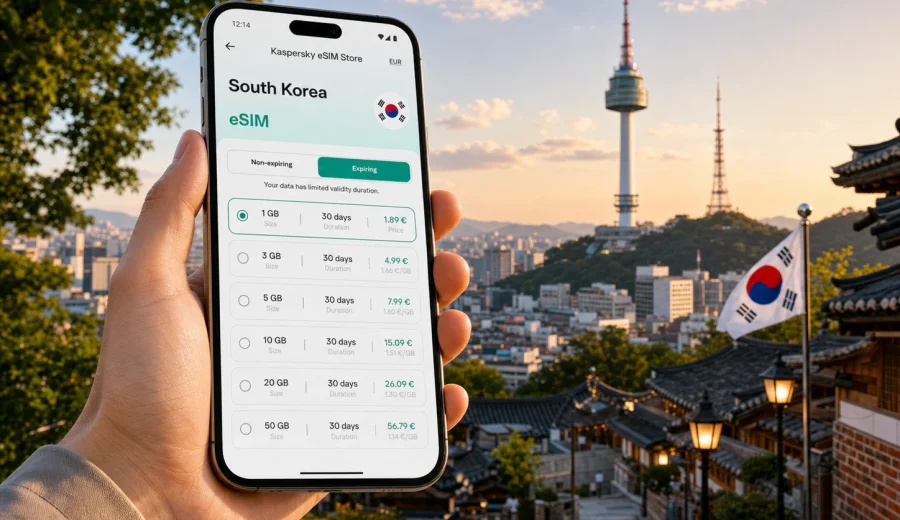
eSIM in South Korea: mobile connection and internet for your trip
South Korea is one of those destinations where mobile internet quickly becomes part of the trip itself. You may need maps as soon as you leave Incheon International Airport, translation in a restaurant, a train app for travel between Seoul and Busan, messages for meeting friends, or a stable connection for work calls from a hotel. An eSIM can make this easier because it lets you prepare mobile data for the trip without buying a physical SIM card after arrival.
This guide explains how to use eSIM for South Korea, how to estimate the amount of data you may need, what to check before purchase, and how Kaspersky eSIM Store can help you choose, set up, and activate an eSIM tariff for mobile internet abroad. The focus is practical: what to do before you fly, what to expect in the first hours after landing, and how to avoid common mistakes with compatibility, roaming settings, and data use.
Why eSIM is useful in South Korea
South Korea is highly digital, especially in large cities. Many travel tasks are easier when your phone is online: checking airport train routes, opening hotel booking details, translating Korean menus, comparing public transport options, and using messengers with local contacts. Public Wi-Fi may be available in airports, hotels, cafes, and shopping centers, but it is not always convenient when you are moving between places.
With eSIM, you can install a digital SIM profile on a compatible phone and use a selected mobile data tariff for the destination. You do not need to remove your regular SIM card, search for a shop after a long flight, or rely on Wi-Fi just to call a taxi or check the address of your accommodation. For many travelers, the main benefit is control: you can review the data volume, validity period, destination, and price before choosing a tariff.
An eSIM is especially convenient in South Korea if you plan to:
- arrive late at night or early in the morning and need maps immediately;
- move between Seoul, Busan, Jeju, Gyeongju, or other regions;
- use translation, navigation, transport, and payment-related apps often;
- keep your physical SIM card in the phone for calls or banking messages;
- avoid changing SIM cards during a multi-country trip in Asia;
- manage mobile data from the same phone without visiting a local store.
eSIM is not a replacement for every mobile service. Most travel eSIM tariffs are designed for mobile internet. Voice calls and SMS are usually not included unless the conditions of the selected tariff say otherwise. For calls and messages, you can use internet-based apps while your data connection is active.
Mobile internet scenarios across the country
South Korea is compact, but the way you use data can change by route. A short city break in Seoul is different from a two-week itinerary that includes KTX trains, coastal cities, national parks, and Jeju Island. Before choosing an eSIM tariff, think about where you will be and how often you will use your phone outside Wi-Fi.
| Travel scenario | Typical data use | What to consider |
|---|---|---|
| 2-4 days in Seoul | Light to moderate | Maps, messengers, translation, restaurant searches, transport apps |
| 5-7 days in Seoul and Busan | Moderate | Intercity routes, hotel changes, navigation in several neighborhoods |
| Business trip | Moderate to high | Email, calendar, hotspot use, video calls if Wi-Fi is unreliable |
| Jeju Island trip | Moderate | Navigation, ride-hailing, weather checks, routes between attractions |
| Content-heavy travel | High | Uploading photos, short videos, cloud backups, social media |
If you mainly use maps, messengers, translation, and browsing, a smaller data package may be enough. If you watch video, back up photos, use your phone as a hotspot, or work from the road, choose a larger data allowance. It is better to estimate honestly than to select the smallest package and run out of data during a transfer.
Before you buy: compatibility and phone settings
The most important check is whether your phone supports eSIM. Many recent iPhone, Samsung Galaxy, Google Pixel, and other flagship models do, but support depends on the exact model, region, and carrier lock status. Some devices sold in certain markets may have restrictions, and some phones may be locked to a mobile operator.
Before choosing a tariff, check your device and confirm three points:
- your phone supports eSIM installation;
- the device is not locked to one carrier;
- you have a stable internet connection for the installation process.
You should also check whether your phone can use your regular SIM and eSIM at the same time. Many dual-SIM phones allow this, but settings vary. In a typical travel setup, your usual SIM remains available for calls or SMS, while the eSIM is selected for mobile data. This can be useful when banking or account services still send verification messages to your regular number.
Keep in mind that some eSIM profiles cannot be transferred to another device after activation. Install the eSIM on the phone you plan to use during the trip, and do not delete the profile unless you are sure you no longer need it. If you have questions, review the tariff conditions and installation steps before activating.
How to choose an eSIM tariff for South Korea
Choosing a tariff is easier when you look at four variables: destination, data volume, validity period, and your travel style. The destination should match South Korea or a region that includes it. The data volume should fit your expected app use. The validity period should cover the full trip, including arrival and departure days. Your travel style decides whether you need a light, balanced, or larger package.
A practical decision process:
1. Confirm that the tariff covers South Korea.
2. Match the validity period to the length of your stay.
3. Estimate how much data you use per day.
4. Check whether hotspot use is important for your laptop or another device.
5. Review when the validity period starts and how activation works.
6. Keep the installation instructions available before departure.
For a short trip, focus on enough data for maps, translation, messaging, and ticket checks. For longer routes, leave a buffer for unexpected usage, especially if you will use navigation outside major cities or upload media often. For work travel, consider whether hotel Wi-Fi will be reliable enough for heavy tasks; if not, choose a tariff with more data and keep video calls on Wi-Fi when possible.
How much data do you need?
There is no single correct number because apps behave differently, and travel habits vary. Still, you can estimate your needs by thinking in daily tasks instead of abstract gigabytes.
| Activity | Data impact | Practical note |
|---|---|---|
| Messaging and email | Low | Attachments and media increase usage |
| Maps and navigation | Low to moderate | Offline maps can reduce data use |
| Translation apps | Low to moderate | Camera translation may use more data |
| Social media browsing | Moderate | Video-heavy feeds use data quickly |
| Video streaming | High | Use Wi-Fi when possible |
| Cloud photo backup | High | Pause automatic backup on mobile data |
| Laptop hotspot | Moderate to high | System updates can consume data silently |
For many travelers, mobile data is most important during movement: airport arrival, transfers, walking routes, museum tickets, restaurant searches, and messaging. Heavy tasks can often wait for hotel Wi-Fi. Before the trip, download offline maps, airline documents, hotel addresses, and translation packs. This keeps your eSIM data for the moments when being connected really matters.
Setting up mobile connection before departure
The best time to prepare eSIM is before you are under pressure. You can choose a tariff while you still have reliable home Wi-Fi, review the instructions, and install the eSIM profile on the device you will carry. Depending on the tariff conditions, activation or validity may start at a specific moment, so read the details before switching the eSIM on.
Kaspersky eSIM Store is an app and website where you can quickly choose, arrange, and activate an eSIM with a suitable mobile internet tariff for an international trip. It helps you compare available options for the destination, check data volume and validity, and manage the eSIM through the site or app.
If you are planning your route now, you can choose an eSIM tariff for your trip to South Korea after you have checked device compatibility and estimated your data needs. This is the first point in the trip plan where the country landing page becomes useful: you already know the destination, the length of stay, and the type of mobile internet use you expect.
How to install and activate eSIM
The exact flow depends on your phone and the selected tariff, but the general logic is simple: choose the destination, select a tariff, install the eSIM profile, and make it the mobile data line when you are ready to use it. If you need device-specific steps, use the Android installation guide or the iOS installation guide.
A typical setup looks like this:
1. Connect the phone to reliable Wi-Fi.
2. Open the eSIM details after purchase.
3. Install the eSIM using the on-screen instructions or QR code.
4. Label the eSIM profile clearly, for example “South Korea data”.
5. Keep your regular SIM as the default line for calls if needed.
6. Select the eSIM as the mobile data line when the tariff should be used.
7. Enable data roaming for the eSIM if the instructions or device settings require it.
8. Test mobile data after arrival and keep Wi-Fi off briefly to confirm the line works.
Do not delete the eSIM profile after installation unless you are sure the tariff is no longer needed. If the phone shows no data connection after arrival, check that mobile data is assigned to the eSIM, data roaming is enabled for that line if required, airplane mode is off, and the device has selected a local network. Connection may take a few minutes and depends on the device and local network conditions.
Practical arrival checklist for South Korea
The first hour after landing is when mobile internet matters most. You may need to confirm your terminal, find airport rail or bus information, open a hotel address, message your host, or check local transport. A prepared eSIM helps reduce the number of things you must solve while tired or in a crowded arrival area.
Use this checklist before you leave the airport:
- Turn off airplane mode after landing.
- Select the eSIM profile for mobile data.
- Enable data roaming for the eSIM if required.
- Open a simple webpage or map to test the connection.
- Keep your hotel address saved offline as a backup.
- Avoid large app updates on mobile data.
- Check that cloud photo backup is paused unless you want to use data for it.
If you are transferring from Incheon to Seoul, mobile data can help with airport railroad routes, bus schedules, ride-hailing, and messaging. If you arrive at Gimhae for Busan or Jeju International Airport, the same logic applies: test mobile data before you leave the airport so you can navigate confidently.
eSIM, roaming, local SIM, and Wi-Fi: what is different?
Travelers often compare eSIM with standard roaming, a physical local SIM, and public Wi-Fi. The right option depends on your phone, budget, trip length, and how much convenience matters.
| Option | Strength | Limitation |
|---|---|---|
| Travel eSIM | Can be prepared in advance, no physical SIM swap, clear data package | Requires compatible unlocked device |
| Standard roaming | Uses your existing SIM and phone number | Costs and conditions depend on your home operator |
| Local physical SIM | May suit longer stays or local voice needs | Requires store visit, SIM change, and local process |
| Public Wi-Fi | Useful in hotels and cafes | Not always available while moving |
An eSIM can be a good middle ground for visitors who mainly need mobile internet. It gives you a way to prepare data before the trip while keeping your regular SIM in the phone. It may also reduce dependence on public Wi-Fi, especially during transfers and outdoor routes. However, you should still compare the selected tariff conditions with your personal needs, because no travel option is ideal for every case.
Tips for saving mobile data in South Korea
South Korea’s fast digital environment can make it tempting to use your phone constantly. A few small settings can help your data package last longer.
- Download offline maps for Seoul, Busan, Jeju, and any planned day trips.
- Save hotel addresses in English and Korean before the trip.
- Turn off automatic app updates on mobile data.
- Pause cloud photo and video backup until Wi-Fi is available.
- Use lower quality for video calls if you must use mobile data.
- Download translation packs in advance.
- Check which apps are allowed to use mobile data in the background.
- Use Wi-Fi for large uploads, streaming, and software updates.
If you travel with family or colleagues, decide whether everyone needs a separate eSIM or whether one person will occasionally share a hotspot. Hotspot use can consume data quickly, especially if a laptop starts syncing files or downloading updates. If you plan to share data often, choose a package that reflects that behavior.
Common mistakes to avoid
Most eSIM problems come from preparation gaps rather than from the idea of eSIM itself. These are the issues worth checking before departure:
- buying a tariff before confirming that the phone supports eSIM;
- installing the eSIM on a backup phone instead of the travel phone;
- forgetting that many travel eSIM tariffs are data-only;
- expecting voice calls or SMS when they are not listed in the tariff conditions;
- deleting the eSIM profile too early;
- leaving mobile data assigned to the home SIM after arrival;
- forgetting to enable data roaming for the eSIM line if required;
- using video streaming or cloud backup on mobile data without noticing.
A simple way to avoid these mistakes is to prepare the phone at home, keep the instructions accessible offline, and test the data line calmly after landing. If something does not work immediately, check the basic settings first before changing the eSIM profile.
FAQ: eSIM and internet in South Korea
Can I use eSIM for mobile internet in South Korea?
Yes, if your device supports eSIM, is not locked to a carrier that prevents eSIM use, and you choose a tariff that covers South Korea. Always check the selected tariff conditions before purchase.
Do I get a Korean phone number with eSIM?
Usually, travel eSIM tariffs are for mobile data and do not include a regular phone number, voice calls, or SMS unless the tariff conditions clearly say otherwise. You can use internet-based messengers and calling apps over mobile data.
Should I install eSIM before flying or after arrival?
It is usually more convenient to install the eSIM while you still have stable Wi-Fi before departure. Read the activation and validity conditions first, because timing may depend on the selected tariff.
Can I keep my regular SIM active?
On many dual-SIM phones, yes. You can keep your regular SIM for calls or SMS and select the eSIM for mobile data. Check your device settings and carrier lock status before relying on this setup.
Is public Wi-Fi enough for a trip to South Korea?
Public Wi-Fi can be useful in hotels, airports, cafes, and some public spaces, but it may not cover every transfer, street route, or outdoor plan. eSIM gives you another way to stay online while moving.
What if my eSIM does not connect immediately?
Check that the eSIM is installed, selected for mobile data, and allowed to use data roaming if required. Restarting the phone or toggling airplane mode can also help. Connection may take a few minutes and depends on the device and local network.
Final preparation before your trip
Before you pack, make mobile internet part of your travel checklist. Confirm your phone supports eSIM, decide how much data you need, save key addresses offline, and choose a tariff that matches your route and length of stay. This gives you a clearer plan for the first hours in South Korea, when navigation, translation, transport, and messages matter most.
Kaspersky eSIM Store helps you prepare an eSIM for international travel through the app or website, review tariff details, install the profile on a compatible device, and manage the connection during the trip. When your itinerary is ready, prepare an eSIM tariff for South Korea so mobile internet is one less thing to solve after landing.