
Travel connectivity guide
Southampton Bermuda eSIM: Mobile Internet Guide
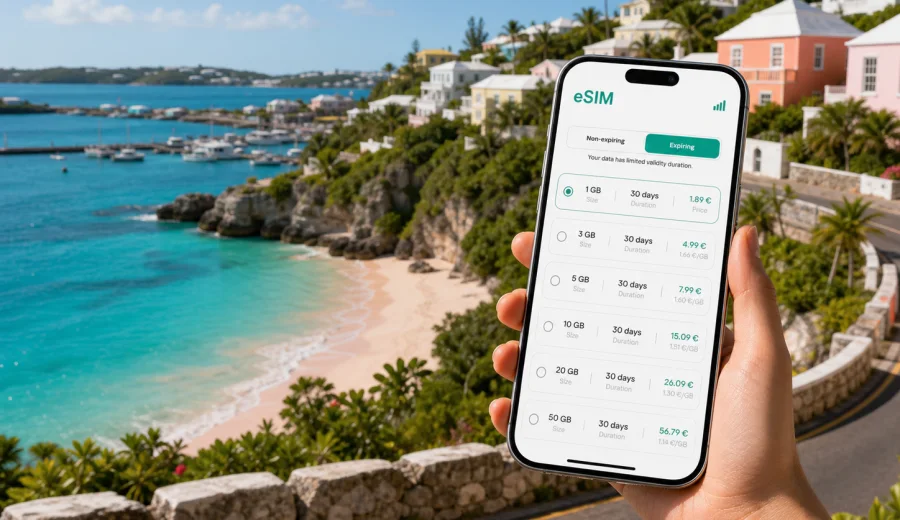
Southampton eSIM: mobile connection and internet for a Bermuda trip
Southampton is one of Bermuda's most useful bases if your trip is built around the South Shore: beach days at Horseshoe Bay, cliff walks, resort stays, golf, family holidays, weddings, conferences, or a quiet stop between Hamilton and the Royal Naval Dockyard. It is not the place where you want to spend your first hour hunting for Wi-Fi just to check a transfer time, open a booking, or message your hotel. For many travelers, an eSIM is a practical way to prepare mobile internet before arrival and keep the first day calm.
An eSIM is a digital SIM profile installed on a compatible phone or tablet. Instead of changing a physical SIM card, you choose a data plan for your destination, install the eSIM, and use it for mobile data during the trip. For Southampton, Bermuda, that can be useful from the moment you leave L.F. Wade International Airport, while moving along Middle Road or South Road, checking beach access, coordinating with a taxi driver, or sharing your location with family.
This guide focuses on real Southampton travel situations: arrivals, hotels, beaches, scooters, taxis, buses, work trips, day trips, and the small but important checks that help mobile internet work smoothly abroad.
Why mobile internet matters in Southampton
Southampton looks relaxed on a map, but it is not always a walkable one-point destination. Hotels, beaches, restaurants, bus stops, golf courses, and viewpoints can sit on different parts of the parish. A short ride may involve a coastal road, a narrow lane, a transfer through Hamilton, or a connection toward Dockyard. Mobile internet helps you make those decisions without depending on a hotel lobby, cafe network, or someone else's hotspot.
Typical moments when data matters include:
- checking the route from the airport to your hotel or villa;
- messaging a taxi driver or private transfer service;
- opening a booking confirmation at check-in;
- comparing bus routes toward Hamilton, Dockyard, or Warwick;
- navigating to Horseshoe Bay, Church Bay, Gibbs Hill Lighthouse, or nearby restaurants;
- using maps when walking between beaches along the South Shore;
- checking weather before a beach or boat day;
- joining a work call from a hotel, rental property, or conference space;
- using messenger calls when your plan does not include a local phone number.
Public Wi-Fi can still be useful, especially at hotels, but it is not a complete travel plan. You may need data in a taxi, on a bus, at a beach entrance, in a car park, or while deciding whether to continue toward Warwick Long Bay or return to the hotel. An eSIM gives you another option for mobile internet when Wi-Fi is inconvenient or unavailable.
What an eSIM does and does not do
For a Bermuda trip, an eSIM is best understood as a data connection for travel tasks. It helps you use online maps, messaging apps, email, booking apps, ride coordination, translation, cloud documents, and browser searches. It usually does not replace every part of a local mobile subscription.
| Travel need in Southampton | How an eSIM can help |
|---|---|
| Airport transfer | Open maps, message your driver, check hotel address |
| Beach days | Check weather, tides, route options, restaurant hours |
| Hotel stay | Use mobile data away from the property or when Wi-Fi is unstable |
| Business trip | Access email, calendars, documents, and messaging apps |
| Family coordination | Share locations and use messenger calls over data |
| Island day trips | Navigate toward Hamilton, Dockyard, St. George's, or nearby beaches |
Important limits to keep in mind:
- many travel eSIM plans are data-only;
- a regular phone number, voice calls, and SMS are not included unless the selected plan says so;
- messenger calls and chats can work over mobile data;
- network performance depends on local coverage, device settings, and the selected plan;
- some devices require data roaming to be enabled for the eSIM profile;
- an eSIM cannot be installed on every phone, so compatibility matters.
That last point is worth checking early. Before you choose a plan, check your device and make sure it supports eSIM and is not locked to a carrier that blocks other mobile profiles.
Southampton arrival scenarios where eSIM is useful
Most visitors reach Southampton after landing at L.F. Wade International Airport on the eastern side of Bermuda. The drive to Southampton crosses a good part of the island, so the first practical question is simple: can you get online before you reach your hotel? If you installed an eSIM in advance, you can usually switch to the eSIM data line after landing, wait for the device to register on a local network, and continue with the tasks you need.
For a resort arrival, mobile data can help you confirm the exact entrance, share an estimated arrival time, or contact reception if your room details are unclear. For a villa or apartment stay, it can be even more useful, because self-check-in instructions may be in email or a booking app. For a group trip, one person with working data often becomes the coordinator for bags, transfers, dinner bookings, and location sharing.
If you arrive by cruise and plan a Southampton day from Dockyard, mobile internet has a different role. You may use it to compare a taxi, bus, or prearranged tour, check travel time to Horseshoe Bay, coordinate a return to the ship, or decide whether there is enough time for Gibbs Hill Lighthouse and a beach stop. In that situation, a plan with enough data for maps and messaging can be more useful than relying on port Wi-Fi.
For a business trip, Southampton may be a quieter base while meetings take place in Hamilton or at a hotel event space. Mobile data supports calendar changes, email, document access, and messenger calls between meetings. It also gives you a backup when moving between hotel Wi-Fi, venue Wi-Fi, and transport.
How to choose an eSIM plan for Southampton
Start with your real itinerary, not with the city name alone. Southampton sits inside Bermuda, so the relevant destination is Bermuda. If your trip is only within Bermuda, choose a plan that covers Bermuda. If you combine Bermuda with other destinations, compare whether a regional or global option better matches the full route.
Use this simple planning method:
1. Count the number of travel days, including arrival and departure.
2. List your heavy-data tasks: video calls, hotspot use, cloud files, navigation, social uploads.
3. Separate hotel Wi-Fi time from time spent on the road, at beaches, or away from accommodation.
4. Check whether your phone supports eSIM and is unlocked.
5. Choose a data amount and validity period that fit the whole stay, with some reserve.
Here is a practical way to estimate data use:
| Trip style | Likely data pattern | Plan choice logic |
|---|---|---|
| Weekend beach stay | Maps, messaging, bookings, light browsing | Smaller data package may be enough |
| One-week resort stay | Daily navigation, social sharing, restaurant searches | Medium package gives more flexibility |
| Work trip | Email, calls, documents, hotspot in short bursts | Choose extra data and check hotspot rules |
| Family holiday | Several devices, maps, messaging, uploads | Plan for more usage or separate eSIMs |
| Cruise day visit | Maps, timing, messaging, return planning | Short-validity plan can be convenient |
Kaspersky eSIM Store helps you choose, order, and activate an eSIM with a suitable data plan for an overseas trip. When you are ready to compare options, you can prepare an eSIM plan for Bermuda before your Southampton trip and review the data amount, validity period, destination coverage, and price before payment.
Local movement: taxis, buses, scooters, and walking
Southampton travel often combines short scenic rides with small decisions. You might take a taxi from a resort to Hamilton, a bus toward Dockyard, a scooter to a beach, or a walk from one South Shore viewpoint to another. Mobile internet helps with the small details that make those movements easier.
For taxis and transfers, keep your hotel name, address, and booking reference available offline as well as online. Mobile data helps when you need to send a location pin, confirm a pickup point, or explain that you are at a beach entrance rather than a hotel lobby. If your plan is data-only, use messenger apps for calls and messages.
For buses, data helps you check routes and timing, but you should still leave buffer time. Bermuda roads are narrow, travel can feel slower than the map suggests, and beach days or cruise arrivals can change demand for transport. If you are heading from Southampton to Hamilton for dinner or to Dockyard for an excursion, download or screenshot the key route details before leaving.
For scooters, electric mini cars, or rental transport where available, mobile data is useful for navigation, but do not depend on live directions in a way that distracts you. Set the route before you move, stop safely before checking the screen, and keep battery reserve. Southampton's coastal scenery is part of the appeal, but the roads require attention.
For walks, especially around Horseshoe Bay, Church Bay, and nearby coastal sections, data helps with route checks and weather updates. Still, beach access paths and coastal routes can be uneven. Save the hotel address and a return route before you start.
Installing an eSIM before the trip or after arrival
You can usually prepare an eSIM before travel, then activate mobile data when you are ready to use it. The exact steps depend on your device and the selected plan, so follow the instructions shown after purchase.
A simple installation flow looks like this:
1. Confirm that your phone or tablet supports eSIM.
2. Choose Bermuda as the destination and select a plan with suitable data and validity.
3. Complete the order and open the eSIM details in your profile, email, or app.
4. Install the eSIM using the QR code or on-screen steps.
5. Label the eSIM line clearly, for example "Bermuda data".
6. When you arrive or when the plan should start, select the eSIM for mobile data.
7. Enable data roaming for the eSIM if the instructions or device settings require it.
8. Test a lightweight page or messenger message before relying on it for navigation.
For device-specific setup, use the official Android installation guide or iOS installation guide. These links are useful to save before departure, especially if you will install the eSIM while still connected to home Wi-Fi.
Do not delete an installed eSIM profile unless you are sure you no longer need it. Some eSIM profiles cannot be reinstalled after removal, depending on the plan conditions.
What to check before buying
Most eSIM problems are easier to prevent than to fix at the airport. Before you pay for a plan, check these points:
- Device support: your phone or tablet must support eSIM.
- Carrier lock: some devices are restricted to one carrier and cannot use another mobile profile.
- Destination: the plan must cover Bermuda, not only a nearby region with different coverage terms.
- Validity: the plan should remain valid for your full Southampton stay.
- Data amount: allow enough data for maps, messaging, booking apps, and work tasks.
- Start rules: check when the validity period begins.
- Roaming setting: some eSIM profiles need data roaming enabled to connect.
- Hotspot use: if you plan to share data with a laptop or another device, check whether tethering is allowed.
- Voice and SMS: assume the plan is for mobile data unless the conditions clearly say otherwise.
Keep your primary SIM active only if you need calls or SMS on your usual number. Many travelers use the home SIM for essential SMS and the eSIM for mobile data, but roaming fees depend on the home carrier, so check those settings carefully.
A quick Southampton eSIM checklist
Before departure:
- choose a Bermuda-compatible eSIM plan;
- install it while you have stable Wi-Fi;
- save the installation instructions;
- check device compatibility and carrier unlock status;
- store hotel and transfer details offline;
- label the eSIM line clearly in phone settings.
After landing:
- switch mobile data to the eSIM line;
- enable data roaming for that eSIM if needed;
- wait a few minutes for network registration;
- test maps or messaging;
- keep your primary number settings under control to avoid unexpected roaming costs.
Before a beach or island day:
- charge your phone and consider a power bank;
- screenshot the return route;
- keep your hotel address offline;
- use mobile data for navigation and messages, not large updates;
- confirm pickup points before leaving Wi-Fi.
Business, family, and group use
For business travelers based in Southampton, eSIM data is most useful for email, calendars, route changes, messenger calls, and documents between hotel Wi-Fi and meeting venues in Hamilton or at resorts. If you need to tether a laptop, check hotspot rules in the selected plan before relying on it.
For families and groups, decide whether one person will handle navigation or several people need their own data. Use hotel Wi-Fi for large uploads and streaming, and keep mobile data for maps, messages, bookings, and meeting points.
FAQ: eSIM and mobile internet in Southampton, Bermuda
Is an eSIM useful if my Southampton hotel has Wi-Fi?
Yes, because hotel Wi-Fi mainly helps when you are on the property. An eSIM can be useful in taxis, on buses, at beaches, during day trips, and when you need maps or messages before check-in.
Should I choose a Southampton plan or a Bermuda plan?
For a city article like this, the practical destination is Bermuda. Choose a plan that covers Bermuda and use it in Southampton and other parts of the island according to the plan conditions.
Can I install the eSIM before I fly?
In many cases, yes. Installing before departure is convenient because you can use stable home Wi-Fi and avoid setup stress after landing. Check the plan rules so you understand when validity begins.
Will an eSIM give me a Bermuda phone number?
Do not assume that. Many travel eSIM plans are for mobile data only. If you need calls and messages, use internet-based apps over data or check whether your selected plan includes voice or SMS.
Can I use the eSIM for trips from Southampton to Hamilton or Dockyard?
If your selected plan covers Bermuda, it is intended for use within the covered destination according to its terms. Southampton, Hamilton, Dockyard, and St. George's are all common Bermuda travel points, but local network conditions can vary.
Final preparation before your Southampton trip
A good mobile internet plan is not the most visible part of a Bermuda trip, but it affects many small moments: finding your hotel, meeting a driver, checking the beach route, answering a work message, changing dinner plans, or getting back from Dockyard on time. Preparing an eSIM before you travel can make those moments easier, especially if you want to reduce dependence on public Wi-Fi and avoid looking for a physical SIM card after arrival.
Before you go, check that your device supports eSIM, choose a data amount that fits your itinerary, install the profile while you have a stable connection, and save the setup instructions. If Southampton is your base for beaches, resorts, business meetings, or island day trips, you can choose an eSIM plan for your Bermuda trip through Kaspersky eSIM Store and activate it on a compatible device when you are ready to use mobile data.