
Travel connectivity guide
Spain eSIM: mobile connection and internet
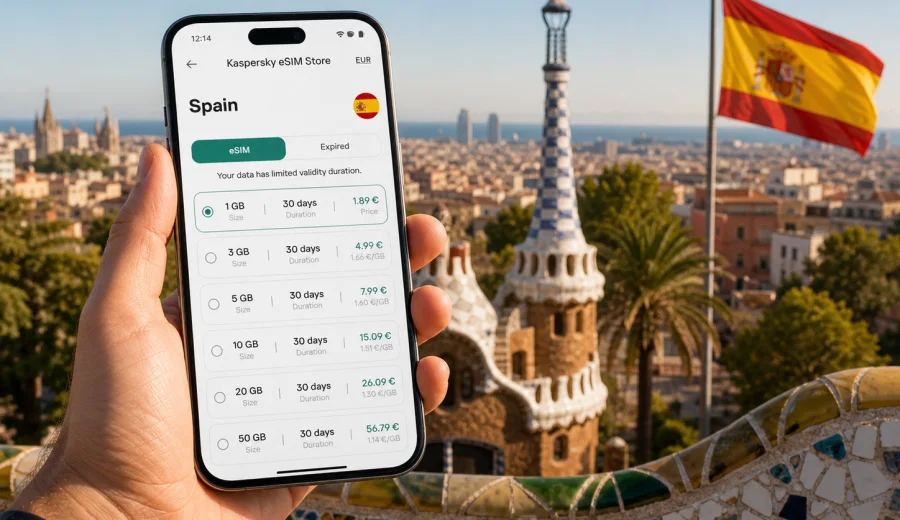
Spain eSIM: mobile connection and internet for your trip
Travelling in Spain is easier when your mobile internet is ready before the first airport transfer, train connection or hotel check-in. A mobile internet for a trip to Spain can help you stay online without looking for a physical SIM card after arrival, especially if your route includes more than one city or island. Instead of waiting until you find a shop, you can prepare a data plan in advance, install it on a compatible phone and use mobile internet when the local network becomes available.
Spain is a country where travellers often move quickly between different settings: the centre of Madrid, the beach districts of Barcelona, the old streets of Seville, the islands, mountain roads, airports, rail stations and conference venues. In all of these situations, mobile connection is not just about scrolling. It supports maps, ride-hailing, hotel messages, digital tickets, translation, restaurant bookings, banking alerts and calls through messengers.
This guide explains how to use eSIM for Spain in a practical way: when it is useful, how to choose a data plan, what to check before purchase, how installation works, and how to avoid common mistakes during a trip.
What an eSIM changes for a trip to Spain
An eSIM is a digital SIM profile that can be installed on a compatible smartphone or tablet. It lets you use mobile internet through a data plan without inserting a physical SIM card. For many travellers, the main benefit is preparation: you can arrange the mobile internet part of the trip before you need it.
With a physical SIM card, the first steps often happen after landing. You need to find a store, compare offers, understand the conditions and change the SIM in your device. With eSIM, the main steps can be completed before departure or from your hotel Wi-Fi after arrival. The exact activation moment depends on the selected plan, the device and the local network conditions.
For Spain, eSIM is especially useful when:
- you arrive late and do not want to search for a SIM counter at the airport;
- you plan to use maps immediately after landing in Madrid, Barcelona, Malaga, Valencia, Alicante or Palma;
- you travel with a phone that has one physical SIM slot and you want to keep your home SIM active;
- you need mobile data for tickets, messengers and travel apps, not a new local phone number;
- you prefer to see the data volume, validity period and price before choosing a plan.
Quick answer: who should consider eSIM in Spain?
eSIM is a good option for travellers who need mobile internet in Spain and use a compatible device. It is usually most convenient for short holidays, city breaks, business trips, family travel, island trips and multi-city routes. It is less suitable if your phone does not support eSIM, is locked to another operator, or if you specifically need a local number for regular calls and SMS.
In practice, most travel tasks rely on data rather than a traditional phone number:
| Travel task in Spain | Why mobile internet matters |
|---|---|
| Airport transfer | Open maps, find the pickup point, message a driver |
| Rail travel | Check platform changes, tickets, delays and station maps |
| City navigation | Use walking routes, public transport apps and translation |
| Hotel check-in | Receive booking messages and upload documents if required |
| Restaurants and events | Book tables, open QR menus, show tickets and confirm times |
| Work trip | Join calls, receive email and use cloud documents on the move |
An eSIM data plan does not automatically replace every mobile service you may have at home. If voice calls, SMS or a local number are important, check the conditions of the selected plan before you travel.
How to choose an eSIM data plan for Spain
Start with your route and your real data habits. Spain has many types of trips, and the right data volume for a quiet beach holiday may not match a work-heavy week in Madrid.
Use this simple planning method:
1. Count the number of travel days.
2. List the apps you rely on every day.
3. Decide whether you will have stable hotel or apartment Wi-Fi.
4. Estimate how often you use video, cloud files or hotspot sharing.
5. Choose a plan with a validity period that covers the full route, not only the first city.
For light use, maps, messengers, emails, tickets and occasional browsing may be enough. For heavier use, add a larger allowance if you expect video calls, social media uploads, frequent navigation, remote work or shared internet with another device. Avoid choosing only by price. A plan that is too small can be inconvenient if you have to monitor every megabyte.
Kaspersky eSIM Store helps you compare available plan conditions for the selected destination: data volume, validity period, destination and price. The service is designed as a clear app and website flow where you can choose, arrange, install and activate an eSIM with a suitable data plan for mobile internet during an international trip.
A practical data estimate for Spain
Data use varies by device, app settings and personal habits, but the table below can help you think clearly before choosing a plan.
| Travel style | Typical online behavior | Planning note |
|---|---|---|
| Light city break | Maps, chats, tickets, restaurant searches | Keep background updates under control |
| Standard holiday | Navigation, photos in messengers, regular browsing | Choose enough data for days away from Wi-Fi |
| Island or road trip | Maps, translation, transport apps, beach and weather checks | Offline maps can reduce daily use |
| Business travel | Email, calendars, cloud files, calls through apps | Consider a larger data allowance |
| Family trip | Multiple bookings, shared logistics, child entertainment | Be careful with hotspot and video use |
If you expect to stream video, upload many high-resolution photos, use a laptop through hotspot or join long video meetings, choose more data or use trusted fixed Wi-Fi for those tasks. eSIM is best treated as your travel mobile internet layer: reliable enough for mobility, but still worth managing sensibly.
Before you buy: device and route checklist
Before choosing a plan for Spain, check the basics. This avoids most installation problems and helps you pick a plan that matches the trip.
- Make sure your phone or tablet supports eSIM.
- Check that the device is not locked to a single mobile operator.
- Confirm that the plan covers Spain and the validity period fits your dates.
- Read whether the plan is data-only or includes any extra services.
- Check when the validity period starts: at installation, at activation, or when it first connects to a supported network.
- Keep a stable internet connection available during installation.
- Save your QR code or installation details until the eSIM is working.
If you are unsure whether your model supports eSIM, use the device compatibility check before you choose a plan: Check your device. Compatibility can depend on the exact model, regional version and operator lock status, so it is worth checking rather than assuming.
When to install your eSIM for Spain
Many travellers prefer to install the eSIM before leaving home, while they still have stable Wi-Fi and time to read each screen carefully. Others install it after arrival using airport, hotel or apartment Wi-Fi. Both approaches can work, but preparation is usually more comfortable.
The key point is to distinguish installation from use. Installing an eSIM profile places it on your device. Activation and data consumption depend on the plan rules and on connection to a supported local network. Always read the selected plan details so you know when the validity period begins.
For a smooth start, prepare these items:
- the phone you will use in Spain;
- a stable Wi-Fi connection;
- access to your email or Kaspersky eSIM Store profile;
- enough battery for setup;
- your device passcode and mobile data settings;
- the instructions for your operating system.
If you want a direct setup guide, follow the Android installation instructions or the iOS installation instructions and keep your main travel SIM settings clear before departure.
Mid-trip action: prepare the plan before you need it
The best time to solve travel internet is before it becomes urgent. If your trip includes airport transfers, train tickets, apartment check-in or a rental car, choose your data option early and make sure the eSIM profile is ready on the right device.
You can open the Spain destination page in Kaspersky eSIM Store, compare the available data volumes and validity periods, and choose a plan that fits your route: choose an eSIM plan for Spain. Keep the final decision based on your dates, device compatibility and expected data use rather than on a single number.
This is especially useful if you land at a busy airport such as Madrid-Barajas, Barcelona-El Prat, Malaga, Alicante, Palma de Mallorca or Tenerife South. Airport Wi-Fi can be useful for setup, but it is not the ideal place to make every connectivity decision from zero.
How to reduce data use without making the trip harder
Good data habits make any plan last longer. You do not need to turn your phone into a restricted device, but a few settings can make the difference between comfortable use and constant checking.
Before or soon after arrival:
- download offline maps for the cities or islands on your route;
- turn off automatic cloud photo uploads on mobile data;
- update apps over Wi-Fi, not mobile data;
- disable autoplay video in social apps;
- keep large file transfers for trusted Wi-Fi;
- use messenger calls instead of video when the signal is weak;
- check which apps are allowed to use background data.
These habits are useful in Spain because travel days often include long periods away from hotel Wi-Fi. You may be walking through a city, driving along the coast, waiting at a station or moving between islands. Mobile internet should support the trip, not become another thing to manage every hour.
eSIM, roaming and local SIM: what is different?
There are three common ways to use mobile internet in Spain: home operator roaming, a local physical SIM card, or an eSIM data plan. The right choice depends on your device, trip length and comfort with setup.
| Option | Strength | Possible limitation |
|---|---|---|
| Home roaming | Uses your existing SIM and number | Costs and included data depend on your home operator |
| Local physical SIM | Can suit long stays or local number needs | Requires finding a store and changing or adding a SIM |
| eSIM data plan | Can be prepared in advance and used without a physical card | Requires compatible unlocked device and careful plan selection |
eSIM is often attractive because it separates travel data from your home mobile plan. You can keep your regular SIM in the phone and use the eSIM for mobile internet in Spain. However, it is still important to check plan conditions, device support and network behavior in the places you plan to visit.
FAQ about eSIM and mobile internet in Spain
Does eSIM for Spain include calls and SMS?
Many travel eSIM plans are designed for mobile data. They may not include a local phone number, regular voice calls or SMS unless the plan conditions clearly say so. For calls and messages, many travellers use internet-based apps.
Can I install eSIM before I fly to Spain?
In many cases, yes. Installing before departure can be convenient because you can use stable Wi-Fi and read the instructions calmly. Check when the selected plan starts counting validity, because this can differ by plan.
Will eSIM cover every place in Spain?
Coverage and speed depend on local network conditions, the selected plan, device support, buildings, terrain and congestion. Central districts and transport hubs may behave differently from mountain roads, small villages or some coastal areas.
Is eSIM only for Barcelona or Madrid?
No. A Spain data plan is for the destination shown in the plan conditions, not just one city. You can use it for routes that include cities, coastal areas or islands covered by the selected plan, subject to local network conditions.
Do I need Wi-Fi to install an eSIM?
You need an internet connection during setup, so stable Wi-Fi is usually the simplest option. After installation and activation, mobile data works according to the selected plan and network availability.
What should I do before deleting an eSIM?
Do not delete the eSIM profile until you are sure the trip is over and you no longer need the data plan. Reinstalling a deleted profile may not always be possible in the same way. Check the plan and support instructions first.
Short checklist for departure day
Before you leave for Spain, run through this list:
- eSIM-compatible device checked;
- phone unlocked for eSIM use;
- Spain data plan selected for the full route;
- eSIM installed or installation details saved;
- Android or iOS instructions available offline or bookmarked;
- mobile data line labelled clearly;
- home SIM roaming settings reviewed;
- hotel address, tickets and key maps saved offline;
- power bank packed for long travel days.
Choose an eSIM plan for Spain
If your device supports eSIM and your trip depends on maps, messages, tickets and travel apps, prepare mobile internet before you need it. Kaspersky eSIM Store helps you choose, arrange, install and activate an eSIM with a suitable data plan for Spain through the app or website.
Review the available data volumes, validity periods and destination details, then choose the option that matches your route and travel style: choose an eSIM plan for Spain.