
Travel connectivity guide
Split eSIM: Mobile Internet for Croatia Travel
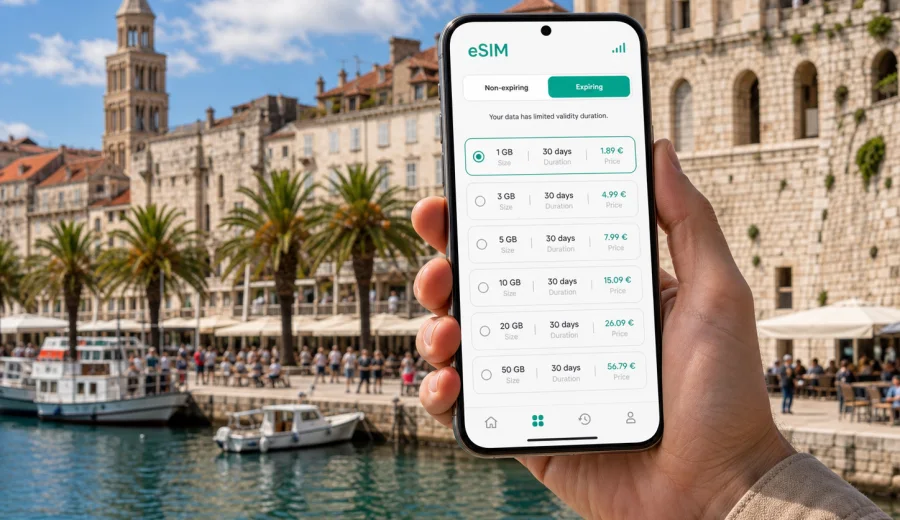
Split eSIM: mobile connection and internet for your Croatia trip
Split is a city where mobile internet starts helping before you reach the seafront. You may land at Split Airport, ride toward the harbor through Kastela, check into an apartment near the Old Town, or walk into Diocletian's Palace with luggage still in hand. A working mobile connection is practical for maps, booking messages, ferry tickets, restaurant reservations, hotel codes, ride apps, weather updates, and contact with people waiting for you.
An eSIM can make that first day easier because it lets you prepare mobile internet for Croatia without looking for a physical SIM card after arrival. You install a digital SIM profile on a compatible phone, choose a suitable data plan for the destination, and use mobile data while keeping your regular SIM available for calls or messages if your device supports dual SIM use. Kaspersky eSIM Store helps you choose, arrange, and activate an eSIM with a suitable data plan for mobile internet in an international trip.
This guide focuses on Split itself: airport arrival, local transport, the Old Town, ferries, business trips, hotels, beach days, and short routes from the city. Croatia matters because the plan must match the country, but the travel scenario is city-first.
Why mobile internet matters in Split
Split is compact, but it is not a city where every useful place is next to every other useful place. The ferry port, bus station, railway station, Riva promenade, Varos, Bacvice, Marjan, Poljud, and the airport route all create small decisions where online access can save time.
Common moments when mobile internet is useful in Split:
- finding an apartment entrance near Diocletian's Palace;
- messaging a host before check-in;
- finding the right bus platform or ferry pier;
- comparing walking, taxi, bus, and ride options;
- opening digital ferry tickets for Hvar, Brac, Vis, or Korcula;
- checking beach weather for Bacvice, Kasjuni, Znjan, or Bene;
- keeping work email and two-factor authentication available;
- using maps when stone streets and steps become hard to read from signs alone.
Public Wi-Fi can help in hotels, cafes, and coworking spaces, but it is not a full travel plan. You may need internet before you reach a hotel, after a late ferry, or outside an apartment entrance. A travel eSIM reduces that dependence.
Arrival in Split: airport, transfer, and first hour online
Split Airport is outside the city, near Kastela and Trogir. For many travelers, the first practical question is simple: how do I get from the airport to the right part of Split? Mobile internet helps you confirm the route, contact your host, check traffic, and choose between shuttle, taxi, private transfer, or rental car.
If you arrive in high season, the airport road can be busy. With mobile data already available, you can follow the route, warn your hotel if you are delayed, and avoid searching for Wi-Fi before sending a message.
For a smooth arrival, prepare these items before landing:
- the address of your hotel or apartment saved offline and online;
- the check-in instructions copied into a note;
- the phone number or messenger contact for your host;
- the location of the airport bus stop, taxi area, or rental car desk;
- your ferry or bus connection if Split is only the first stop;
- an eSIM installed or ready to activate on a compatible device.
If you activate an eSIM after arrival, make sure you have an internet connection for setup. Many travelers install the eSIM profile at home, then turn on the eSIM line and mobile data when they reach Croatia. The exact moment when validity starts depends on the selected plan, so read the conditions before you travel.
Where an eSIM helps inside the city
Split is easy to enjoy on foot, but the city has several travel patterns. A cruise passenger may need a map and restaurant booking. A remote worker may need authentication and a coworking address. A family staying near Znjan may need beach directions. A ferry passenger may need ticket changes and pier information.
| City situation | Why mobile internet helps | Practical tip |
|---|---|---|
| Old Town and Diocletian's Palace | Narrow lanes, courtyards, and similar stone passages can make addresses harder to find | Save the exact pin for your hotel or meeting point |
| Riva and ferry port | Schedules, boarding areas, and delays can change your timing | Keep ferry tickets and booking emails accessible |
| Bacvice, Znjan, Kasjuni, Bene | Beach choice depends on transport, weather, and time | Check routes before leaving your accommodation |
| Marjan hill | Walking routes and viewpoints are easier with maps | Download an offline map as backup before you go |
| Business districts and meetings | Calendar changes and ride coordination matter | Keep mobile data available outside hotel Wi-Fi |
| Trips to Trogir, Omis, or Klis | Regional buses and route planning need quick checks | Confirm return options before the evening |
The strongest reason to prepare mobile internet in Split is not that the city is difficult. It is that plans change quickly: a beach becomes windy, a ferry sells out, a restaurant changes availability, or a host sends a new door code.
Choosing an eSIM data plan for Split
For a city trip to Split, start with the country. Split is in Croatia, so a Croatia plan is the natural choice for most visitors who will stay within the country. If your route includes nearby countries before or after Croatia, compare a country plan with a regional option and check the destinations covered by the selected plan.
Then match the data amount and validity period to your behavior. A light user who checks maps and messages may need far less data than someone who works from a laptop hotspot, uploads photos, uses video calls, or streams between islands.
Use this simple planning model:
1. Count your days in Split and Croatia.
2. List your high-data activities: video calls, cloud backup, streaming, hotspot use, large uploads.
3. Decide whether your accommodation Wi-Fi will handle heavy use.
4. Choose an eSIM plan with a validity period that covers arrival, city days, and departure.
5. Check whether the plan is for Croatia only, a region, or a broader route.
6. Confirm that your phone supports eSIM and is not locked to another carrier.
Maps, messaging, email, and ticket checks usually use modest amounts of data. Video calls, hotspot use, app updates, and photo or video backup can use much more. Turn off automatic cloud backup on mobile data if you want the plan to last longer.
Preparing before you travel
The most reliable eSIM setup is the one you do calmly, before you are standing in an airport queue. You can check device support, choose a suitable plan, and understand the activation steps before you need mobile data.
Before your trip to Split:
- Check whether your device supports eSIM and is not locked to one carrier.
- Make sure your phone software is up to date.
- Keep your primary SIM active if you need your usual number for banking or account verification.
- Save your accommodation address and ferry details offline.
- Read when the selected eSIM plan validity starts.
- Keep a stable internet connection available for installation.
- Save the QR code or profile access details in a place you can reach if needed.
Kaspersky eSIM Store helps you choose and arrange an eSIM plan for the destination, but the phone and selected plan conditions still matter. Some devices require data roaming to be enabled for the eSIM profile. Check the plan conditions before you rely on it for arrival.
When to add the Croatia plan for Split
If Split is your main destination, the simplest path is to prepare a Croatia plan before departure. That gives you a clear country match for the city and avoids choosing a plan while tired after a flight or ferry.
You can choose an eSIM plan for your Split trip in Croatia once you know your dates, data needs, and route. Split is the travel scenario; Croatia is the destination for the data plan.
For many travelers, the best timing is:
1. Choose the plan a few days before departure.
2. Install the eSIM profile while connected to home Wi-Fi.
3. Keep your usual SIM selected for calls and messages if you need it.
4. Turn on the eSIM for mobile data when you arrive in Croatia.
5. Test maps and messaging before leaving the airport or port area.
Do not delete an eSIM profile unless you are sure it is no longer needed. An activated eSIM may not be movable or reinstallable like an app.
Installing eSIM for a Split trip
Installation is usually straightforward, but it is still worth treating it as a travel task rather than something to do while boarding a ferry. You need a compatible device, internet for setup, and the eSIM details provided after arranging the plan.
General installation flow:
1. Open the eSIM details in your Kaspersky eSIM Store profile or email.
2. Add the eSIM profile in your phone's mobile settings.
3. Follow the on-screen steps or scan the QR code if your setup uses one.
4. Label the line clearly, for example "Croatia travel" or "Split data".
5. Choose the eSIM line for mobile data when you are ready to use it.
6. Enable data roaming for the eSIM if the plan instructions require it.
7. Wait a few minutes for connection if the network does not appear immediately.
For detailed device steps, use the Android installation guide or the iOS installation guide. The exact screens differ by phone model and operating system version, so follow the instructions for your device carefully.
Movement, hotels, and work in Split
Split is a walking city at the center, but it is also a transport hub. The ferry port, bus station, railway station, airport route, taxi zones, and neighborhood buses sit close enough to be convenient and far enough to create timing mistakes if you are offline. Mobile data helps you check walking time, order a ride with luggage, find a bus toward Znjan or Marjan, and confirm the right pier before boarding.
Accommodation is another city-specific reason to stay connected. Many Split apartments sit in historic buildings, courtyards, or pedestrian lanes where check-in depends on exact instructions: which gate, staircase, bell, or lockbox. Save the address, map pin, host contact, entry code, and nearest landmark before arrival.
For business trips, mobile internet is about continuity. You may need calendar updates, route planning, two-factor authentication, digital receipts, or hotspot backup when venue Wi-Fi is overloaded. If you use hotspot mode, check the plan conditions and pause automatic updates or cloud sync on the laptop.
Ferries, islands, and day trips from Split
Split is a gateway to central Dalmatia, so a country-matched eSIM can help beyond the Old Town. Common routes include Hvar, Brac, Vis, Trogir, Omis, Klis Fortress, and Salona. Before leaving, check the return schedule and save tickets offline. For island routes, carry a power bank if your phone is your map, ticket wallet, camera, and payment tool.
Keeping data under control
Travel data disappears fastest when the phone behaves as if it is on home Wi-Fi. For a Split trip, turn off automatic app updates, pause cloud photo backup, download offline maps, save ferry tickets and check-in details offline, and use lower video quality if you stream. Reserve mobile data for arrival, movement, tickets, maps, communication, and urgent changes.
eSIM limits to understand before relying on it
An eSIM for travel is mainly about mobile internet. It may not include a local phone number, voice calls, or SMS unless those features are clearly included in the selected plan conditions.
Also check these limits:
- your device must support eSIM;
- some phones differ by region or carrier lock status;
- the plan must cover Croatia or the region you will visit;
- the validity period must match your travel dates;
- data roaming may need to be enabled for the eSIM line;
- connection quality depends on plan conditions, local networks, buildings, and congestion;
- an activated eSIM may not be transferable to another phone.
Quick answers for Split travelers
Is eSIM useful for a short trip to Split?
Yes. Even on a weekend, mobile internet helps with airport transfers, maps, ferry tickets, apartment check-in, restaurant bookings, and messages.
Should I choose a Split plan or a Croatia plan?
Split is the travel focus, but the data plan should match the country or region where you use it. For most Split-only trips, look for Croatia coverage. If your route crosses borders, compare a regional option.
Does eSIM replace my normal phone number?
Not usually. Unless the plan states otherwise, a travel eSIM does not provide a regular phone number, voice calls, or SMS. You can often keep your usual SIM active for your main number.
What if my phone does not support eSIM?
You will need another option, such as standard roaming, a physical SIM, or Wi-Fi. Check compatibility before arranging an eSIM plan, especially if your phone was bought through a carrier or in a region with model variations.
Final preparation for Split
Before you leave for Split, treat mobile internet as part of the trip plan. Check that your device supports eSIM, choose a data amount that matches your habits, install the profile while you have reliable internet, and keep key travel details saved offline.
For Split, eSIM is practical: you can find your apartment, message a host, confirm a ferry, navigate to the beach, or coordinate with colleagues. Kaspersky eSIM Store helps you choose, arrange, and activate an eSIM with a suitable plan for your trip.
Choose an eSIM plan for Croatia and prepare your phone for arrival.