
Travel connectivity guide
eSIM Sri Lanka: mobile internet for travel
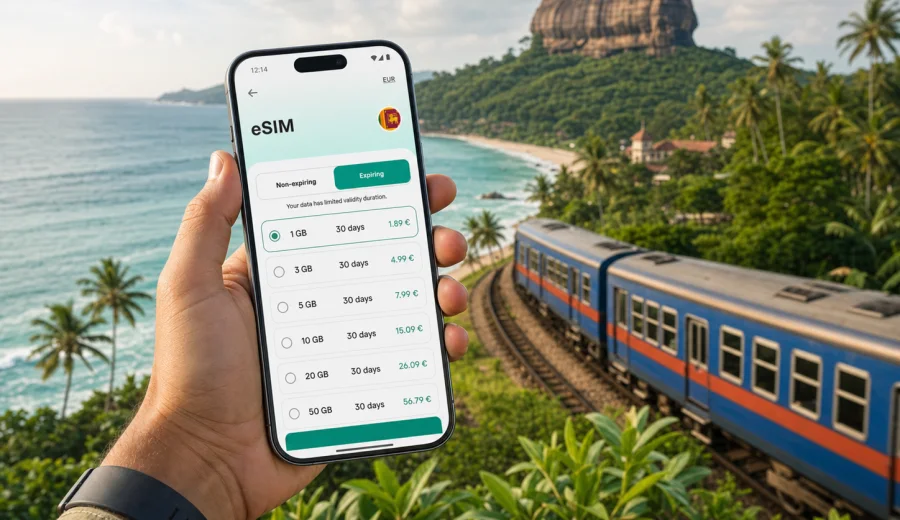
eSIM for Sri Lanka: mobile connection and internet for your trip
Sri Lanka is a compact country, but a trip there can move quickly between very different places: Colombo streets, beach towns on the south coast, the hill country around Kandy and Ella, wildlife parks, tea estates, ancient cities, and airport transfers that may start or end late in the evening. In all these moments, mobile internet is not just a convenience. It helps you use maps, check bookings, message drivers, translate signs, manage online payments, and stay in touch without waiting for hotel Wi-Fi.
An eSIM can make this easier because you do not need to buy a physical SIM card after arrival. You choose a suitable prepaid data plan before or during the trip, install the eSIM on a compatible device, and use it for mobile data in Sri Lanka according to the conditions of the selected plan. This is especially useful if you want to land at Bandaranaike International Airport and already have a clear connection plan for the first ride into Colombo, Negombo, Galle, Kandy, or another destination.
Kaspersky eSIM Store is an app and website where you can choose, arrange, and activate an eSIM with a suitable mobile data plan for an international trip. The key point is preparation: you can review the data amount, validity period, destination, and price before you decide what fits your itinerary.
Why eSIM is useful for Sri Lanka
Sri Lanka rewards flexible travel. A visitor may spend one day in Colombo, the next on a train toward the central highlands, and the following days on the coast. Your mobile connection needs can change along the way. You may use little data during a beach stay, then need more for navigation, ride-hailing, remote work, video calls, and cloud backups.
An eSIM helps with several practical tasks:
- navigation from the airport, railway stations, bus stops, and hotels;
- checking ride details, transfer times, and accommodation messages;
- using maps when moving between Colombo, Kandy, Ella, Galle, Mirissa, Sigiriya, or national parks;
- messaging family, guides, hosts, drivers, and colleagues;
- opening travel documents, tickets, and booking confirmations;
- making internet calls through messaging apps when the plan includes data only;
- using translation, weather, banking, and travel apps during the day.
The main advantage is not that eSIM replaces every possible travel connection option. It is that it gives you a practical way to prepare mobile internet for a foreign trip without hunting for a physical SIM card at the first possible moment.
What an eSIM plan usually covers
For most travel use cases, an eSIM plan is a prepaid mobile data plan. It is designed for internet access on a compatible smartphone or tablet. It usually does not include a local phone number, standard voice calls, or SMS unless the specific plan conditions say otherwise.
That distinction matters in Sri Lanka. If your hotel, driver, or tour operator wants to call you by a regular phone number, you may still rely on your main SIM, roaming, or internet-based calling apps. For everyday travel communication, many visitors can manage with mobile data and messaging apps, but you should check your own needs before choosing a plan.
| Travel need in Sri Lanka | How eSIM can help | What to check |
|---|---|---|
| Airport arrival and transfer | Use maps, messages, ride apps, and booking details | Install eSIM before departure or while connected to Wi-Fi |
| City days in Colombo or Kandy | Navigate, translate, pay online, and coordinate meetings | Data amount for frequent app use |
| Hill country route | Use maps and messages between towns | Coverage depends on local network conditions |
| Beach stay | Messaging, restaurant searches, calls via apps | Smaller plans may be enough for light use |
| Remote work | Email, hotspot, file access, video calls | Larger data allowance and device tethering rules |
| Longer route around the island | Consistent setup across multiple stops | Validity period and top-up options |
How much data you may need in Sri Lanka
The right data amount depends on your trip style. A short break with maps, messaging, and occasional browsing needs much less than a remote-work stay with hotspot sharing and video meetings. It is better to estimate by activity instead of choosing only by trip length.
For light use, messaging, maps, email, and occasional browsing may fit into a modest data package. If you stream video, upload many photos, use cloud backup, join video calls, or share internet with a laptop, data use can grow quickly. Public Wi-Fi may help in hotels and cafes, but it is not always available when you need transport, route changes, or confirmations on the move.
Use this simple planning model:
- 1-3 days: focus on arrival, maps, messaging, and essential app use.
- 4-7 days: choose enough data for daily navigation, social apps, bookings, and several route changes.
- 8-14 days: allow extra data for photos, longer travel days, and less predictable Wi-Fi access.
- Remote work or hotspot use: check whether the plan supports tethering and choose a larger data allowance.
Do not choose a plan only because it looks large. A suitable plan is the one that matches your route, trip duration, and habits. You should also check when the validity period begins and how unused data is handled under the plan conditions.
Before you buy: device compatibility and settings
The most important check is your device. eSIM works only on compatible phones and tablets, and some devices may be locked to a mobile operator. Before choosing a plan, check your device and confirm that eSIM is supported for your model.
Also check these points before your Sri Lanka trip:
- your phone is not locked to one mobile operator;
- you have a stable internet connection for installation;
- you know which SIM profile will be used for mobile data;
- data roaming can be enabled for the eSIM profile if the instructions require it;
- your main SIM can stay active for calls or banking SMS if you need it;
- you understand whether the plan includes only data or additional services.
Many travelers install the eSIM before departure while connected to home Wi-Fi, then activate mobile data after arrival. This can save time at the airport. However, you should follow the instructions for your selected plan because activation timing and validity rules may differ.
A practical way to prepare mobile internet for Sri Lanka
Once your device is ready, compare plans by destination, data amount, validity, and price. If you want to prepare in advance, you can use Kaspersky eSIM Store to choose an eSIM plan for travel to Sri Lanka and review the available options for this destination before your trip.
This first decision is usually about your travel pattern:
1. Single-city or short beach trip. You may need enough data for maps, messaging, restaurant searches, and confirmations.
2. Island route with several stops. Choose a plan that covers the full length of the route, not only the first few days.
3. Work plus travel. Give priority to a larger data allowance and read the plan terms carefully.
4. Group or family trip. Each traveler may need their own connection, especially if the group separates during the day.
5. Backup connection. Some travelers keep their home SIM active for calls and use the eSIM only for data.
The goal is not to overcomplicate the purchase. It is to avoid the common problem of choosing too little data, too short a validity period, or a plan that you cannot use because the device was not checked in advance.
How to install and activate eSIM
Installation is usually a short process, but it should be done carefully. After purchase, the eSIM is available in your account, app, or email instructions depending on the flow. You may install it by following on-screen steps or using a QR code. If you need platform-specific guidance, use the Android installation guide or the iOS installation guide.
A typical setup sequence looks like this:
1. Check that your device supports eSIM and is not operator-locked.
2. Choose Sri Lanka as the destination and select a suitable data plan.
3. Complete the purchase.
4. Install the eSIM profile while connected to reliable Wi-Fi.
5. Name the new profile clearly, for example "Sri Lanka data".
6. Keep your main SIM for calls if needed, and set the eSIM as the mobile data line.
7. After arrival, enable the eSIM profile and data roaming if required by the instructions.
8. Test maps, messaging, and browser access before leaving the airport or hotel.
Do not delete an installed eSIM profile unless you are sure it is no longer needed. In many cases, an eSIM cannot simply be moved to another device after activation. If something does not work as expected, check the profile settings and instructions first, then contact support.
Sri Lanka travel scenarios where mobile internet matters
Sri Lanka is not only one destination. It is a set of routes, distances, and small decisions that often depend on being online at the right time.
Arrival in Colombo or Negombo
Most international travelers arrive through Bandaranaike International Airport. The first hour can involve finding a driver, confirming accommodation, checking currency exchange locations, or navigating to Colombo, Negombo, Galle, Kandy, or another first stop. Having mobile internet already prepared can make that arrival smoother.
Colombo city days
In Colombo, mobile data is useful for ride apps, maps, meeting points, restaurant searches, digital payments, and staying in touch with hosts or business contacts. If your trip includes meetings, plan for email, calendar, cloud documents, and video calls.
Hill country and train routes
The route through Kandy, Nuwara Eliya, and Ella is popular, but travel days can be long. You may need maps, ticket details, hotel messages, weather checks, and transport updates. Network conditions can vary in mountainous areas, so save essential documents offline as a backup.
South coast and beach towns
Galle, Unawatuna, Mirissa, Weligama, Tangalle, and nearby beach areas often combine relaxation with day trips. Mobile internet helps with scooter routes, surf lessons, restaurant reservations, taxi coordination, and sending location pins to friends.
Cultural Triangle and wildlife parks
When visiting Sigiriya, Dambulla, Anuradhapura, Polonnaruwa, Yala, Udawalawe, or Minneriya, you may move between hotels, park entrances, guides, and early morning transfers. Data helps with confirmations and route planning, but remote areas may not have the same signal quality as cities.
What to download before the trip
Even with a prepared eSIM, a good offline setup is useful. It reduces stress if coverage is weak, your battery is low, or you need key information quickly.
Prepare this before departure:
- offline maps for Colombo, Kandy, the south coast, and your main route;
- hotel addresses in English and local language if available;
- airport transfer details and driver contact information;
- booking confirmations and travel insurance documents;
- passport copy stored securely offline;
- bank app and payment authentication method;
- messaging apps you use with family, hosts, and drivers;
- the eSIM installation instructions and QR code if provided.
This preparation does not replace mobile internet. It gives you a backup layer, while the eSIM gives you a cleaner way to stay connected during normal travel days.
eSIM compared with other connection options
Travelers usually compare eSIM with roaming, a local physical SIM, and public Wi-Fi. Each option can make sense depending on the trip.
| Option | Strength | Limitation |
|---|---|---|
| eSIM for travel | Can be prepared before arrival, no physical SIM card, clear plan conditions | Requires compatible unlocked device |
| Home operator roaming | Keeps your existing number active and may be simple | Can be expensive depending on your operator and package |
| Local physical SIM | May suit long stays or local calling needs | Requires time, shop availability, and a physical SIM slot |
| Public Wi-Fi | Useful in hotels, cafes, and airports | Not always available when moving, and quality varies |
For many Sri Lanka trips, eSIM is the practical middle path: prepare data access in advance, keep your usual SIM in place if needed, and avoid depending entirely on public Wi-Fi or first-day SIM shopping.
Common mistakes to avoid
The most common eSIM problems are usually preventable. Before you travel, avoid these mistakes:
- buying before confirming device compatibility;
- assuming that every eSIM includes voice calls and SMS;
- choosing a validity period shorter than your trip;
- installing the eSIM on the wrong device;
- deleting the eSIM profile after installation;
- forgetting to set the eSIM as the mobile data line;
- leaving cloud photo backup or video autoplay active on mobile data;
- relying only on online maps without saving important areas offline;
- waiting until the airport exit to test the connection.
If your phone has dual SIM settings, label each line clearly. For example, keep your main SIM for calls and set the Sri Lanka eSIM for data. This reduces the risk of using the wrong line for roaming data.
Data-saving tips for Sri Lanka
You can make a data plan last longer without making your trip inconvenient. The biggest savings usually come from controlling background activity.
Use these settings:
- download offline maps for the regions you will visit;
- turn off automatic cloud backup on mobile data;
- reduce video streaming quality;
- disable autoplay in social apps;
- update apps only on Wi-Fi;
- use messaging calls instead of video calls when possible;
- monitor data usage daily in your phone settings;
- keep large downloads for hotel Wi-Fi.
If several people travel together, do not assume one hotspot will solve everything. Hotspot use can drain battery and data quickly, and not every plan handles tethering in the same way. Check the plan conditions before depending on it for laptops or group sharing.
Quick checklist before flying to Sri Lanka
Use this checklist a day or two before departure:
- Your phone supports eSIM.
- The device is not locked to one operator.
- You chose a plan with enough data and validity for Sri Lanka.
- The eSIM is installed or you have the installation details ready.
- You know when to activate the plan.
- Your main SIM settings are clear.
- Offline maps and booking documents are saved.
- Battery pack and charger are packed.
- Important contacts are available offline.
- Data-saving settings are configured.
This checklist is especially useful if your flight arrives late or you have a long transfer immediately after landing. The fewer connection decisions you leave for arrival, the easier the first day becomes.
FAQ about eSIM for Sri Lanka
Can I use eSIM in Sri Lanka without removing my physical SIM?
Yes, on many compatible phones you can keep your physical SIM installed and add an eSIM profile for mobile data. Your exact options depend on the device model and SIM settings.
Does an eSIM plan include a Sri Lankan phone number?
Travel eSIM plans are usually focused on mobile data. They may not include a local phone number, standard calls, or SMS unless the plan conditions specifically mention them.
Should I install the eSIM before departure or after arrival?
Many travelers prefer to install it before departure using stable Wi-Fi, then enable the data line after arrival. Always follow the instructions for the selected plan because validity and activation rules may differ.
Will eSIM replace hotel Wi-Fi?
Not always. Hotel Wi-Fi can still be useful for large downloads, video calls, and backups. eSIM is most useful when you are moving around, using maps, coordinating transport, or need internet away from Wi-Fi.
What if mobile internet is weak in a remote area?
Signal quality depends on local network conditions, terrain, and location. In hill country, wildlife areas, and remote beaches, keep essential documents and maps offline as a backup.
Can I top up or choose another plan?
Options depend on the selected plan and account flow. Check the plan conditions in Kaspersky eSIM Store and keep an eye on your data usage during the trip.
Choose a plan before your Sri Lanka trip
Sri Lanka is easier to enjoy when the basics are prepared: route, documents, accommodation, payment method, and mobile internet. An eSIM helps you handle the connection part without looking for a physical SIM card as soon as you arrive.
Before you travel, check device compatibility, choose the data amount and validity period that fit your route, and install the eSIM while you have a stable connection. Then you can use mobile internet for maps, bookings, messages, and everyday travel tasks from the first day of the trip.
If Sri Lanka is your next destination, you can prepare an eSIM plan for Sri Lanka in Kaspersky eSIM Store and review the available options before departure.