
Travel connectivity guide
St George's eSIM for Bermuda Travel
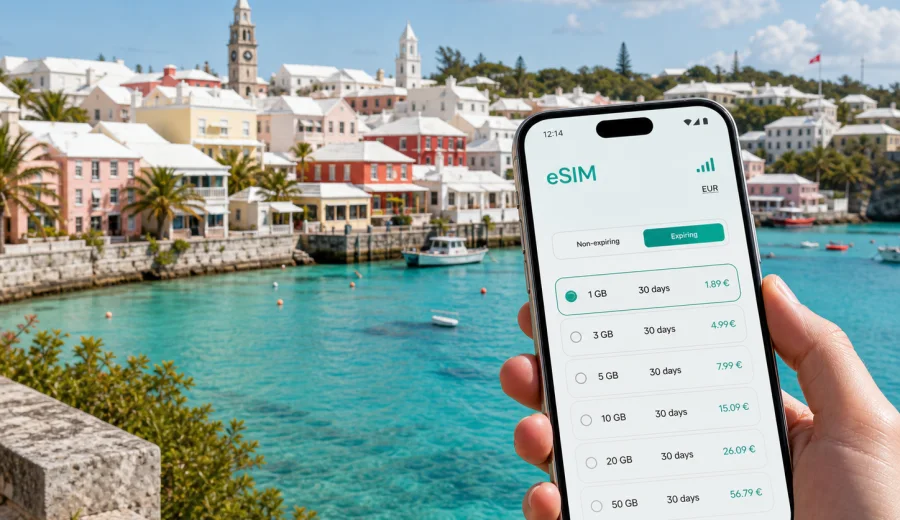
St George's eSIM: mobile connection and internet for a Bermuda trip
St George's is one of the easiest places in Bermuda to enjoy slowly: pastel houses, white limestone roofs, narrow lanes, historic squares, a compact harbor, beaches within a short ride, and ferry or road links to the rest of the island. It is also the kind of destination where mobile internet matters from the first hour. You may need maps from the airport, a message to your hotel, a ferry timetable, a restaurant booking, a taxi contact, or a quick route to Tobacco Bay, Fort St Catherine, St David's, Hamilton, or the Royal Naval Dockyard.
An eSIM helps you prepare mobile data before you start moving around St George's. Instead of looking for a physical SIM card after arrival, you can choose a data package for Bermuda, install it on a compatible phone, and keep your main SIM for calls or banking messages if your device supports dual SIM use. For a small historic town with island-wide day trips, that practical setup can make the trip feel simpler.
This guide focuses on St George's itself: arrival, walking routes, local transport, hotels, business stops, beach time, and short trips across Bermuda.
Why mobile internet is useful in St George's
St George's is compact, but it is not a place where you want to rely only on memory or hotel Wi-Fi. Many useful decisions happen while you are outside: whether to walk to a beach, call a taxi, check a bus connection, confirm a reservation, or decide if you have enough time to visit another part of Bermuda before dinner.
Mobile data is especially helpful for:
- navigation through narrow streets around King's Square, Water Street, Duke of York Street, and the harbor;
- checking transport options between St George's, the airport, Hamilton, beaches, and ferry points;
- messaging hosts, hotels, guides, colleagues, or travel companions;
- using maps when walking to Fort St Catherine, Tobacco Bay, Achilles Bay, or nearby viewpoints;
- checking opening hours, weather, banking apps, email, and bookings without waiting for Wi-Fi.
The main benefit is control. In St George's, a delay of ten minutes can decide whether you catch a connection, reach a beach before sunset, or have time to continue toward Hamilton.
Arrival: from the airport to St George's
St George's is close to L.F. Wade International Airport, so the transfer is usually one of the simpler parts of a Bermuda trip. Even so, mobile internet can be useful immediately after landing. You may need to message your accommodation, check where to meet a taxi, see if your room is ready, or confirm a short first stop before you drop bags.
If you install an eSIM before the flight, keep these practical points in mind:
1. Install the eSIM while you still have a stable connection at home, at the office, or on hotel Wi-Fi before departure.
2. Keep your primary SIM active if you need to receive banking codes or regular calls.
3. After arrival, make sure the eSIM is selected for mobile data.
4. If the selected tariff requires data roaming for the eSIM line, switch it on only for that eSIM profile and test a map search before leaving the airport area.
Moving around St George's
The town center is walkable, and walking is often the best way to understand St George's. You can move between King's Square, the waterfront, small museums, churches, shops, cafes, and lanes without long transfers. The challenge is not distance, but orientation: streets curve, landmarks can look similar, and the best route may change depending on heat, rain, daylight, or how much time you have.
For most travelers, mobile internet supports three types of movement:
| Situation in St George's | Why data helps | Practical tip |
|---|---|---|
| Walking through the historic center | Maps help you avoid backtracking in small lanes | Save your hotel and the waterfront as pinned places |
| Going to Tobacco Bay or Fort St Catherine | You may want walking time, weather, and return options | Check the route before you leave the center |
| Meeting a taxi, guide, or colleague | Messaging is easier when plans shift | Share a clear landmark, not only a street name |
| Day trip to Hamilton or Dockyard | Connections and timing matter more | Check current transport information before departure |
Because Bermuda is an island destination, routes often depend on timing as much as distance. Mobile data helps you make those checks without returning to your hotel.
Where St George's travelers use the most data
Data use in St George's is usually driven by navigation, messaging, photo sharing, and route planning. The town is scenic, and it is easy to upload more than expected if you share videos from the harbor, beaches, or ferry rides.
Use this simple estimate before you choose a package:
- light use: maps, messaging, email, booking confirmations, and occasional browsing;
- moderate use: maps, messaging, social media, photo uploads, restaurant searches, and regular web use;
- heavier use: video calls, remote work, cloud syncing, short videos, and hotspot use for a laptop or tablet.
For one or two days in St George's, a small package may be enough if video and cloud backup stay on Wi-Fi. For a longer stay, island trips, or business use, choose more room for maps, documents, video calls, and hotel Wi-Fi backup.
How an eSIM fits a St George's itinerary
An eSIM is most useful when it is part of your travel setup before the day gets busy. You do not need to make the mobile connection decision at the airport, in a taxi, or at reception. You can choose a Bermuda tariff in advance, install the eSIM on a compatible device, and activate it according to the tariff conditions when you are ready to use mobile data.
For St George's, that preparation works well in several real scenarios:
- a weekend stay focused on the historic town, Tobacco Bay, and nearby forts;
- a Bermuda holiday where St George's is the first or last stop because it is close to the airport;
- a cruise or yacht stop when time ashore is limited and you need reliable navigation;
- a business trip with meetings in or near St George's and transfers to Hamilton;
- a family trip where one person manages maps, bookings, and messages for the group.
When you are ready to compare options, you can choose an eSIM tariff for your trip to St George's through Kaspersky eSIM Store. The site and app help you select Bermuda as the destination, review available data packages, and prepare an eSIM for mobile internet during your trip. Check the tariff details carefully: data allowance, validity period, destination, price, activation rules, and any device requirements are more important than the package name alone.
Before you buy: device and trip checks
Not every phone supports eSIM, and some devices can be locked by an operator. Before you pay for any eSIM tariff, check your exact device model and its status. If you are unsure, use the compatibility window: check your device. It is also worth checking whether your phone can keep your regular SIM and the travel eSIM active at the same time, because that setup is useful for receiving calls or SMS on your main number while using mobile data through the eSIM.
Prepare these details before the trip:
- destination: Bermuda, with St George's as the city focus;
- trip length: number of days you expect to need mobile data;
- data use: light, moderate, or heavier use;
- device support: eSIM compatibility and no operator lock;
- installation time: before departure or on stable Wi-Fi before activation;
- primary SIM needs: calls, SMS, bank confirmations, or messaging apps;
- backup access: hotel Wi-Fi or another connection if you need support.
How to install and activate an eSIM for Bermuda
Installation steps can vary by phone model and operating system, but the general flow is familiar: choose a tariff, receive the eSIM details, add the eSIM to your phone, and select it for mobile data when you are ready. If you need detailed setup guidance, use the official Kaspersky eSIM Store instructions for your device: Android installation guide or iOS installation guide.
A calm setup order looks like this:
1. Choose Bermuda as the destination and select a tariff that fits your St George's itinerary.
2. Install the eSIM while connected to stable Wi-Fi.
3. Name the line clearly, for example "Bermuda data", so you do not confuse it with your main SIM.
4. Keep your main SIM available for regular calls or messages if needed.
5. When you arrive or when the tariff rules say it is time, select the eSIM for mobile data.
6. Check that mobile data works before starting a walk, transfer, or meeting.
Do not delete an eSIM profile unless you are sure you no longer need it. If something does not work as expected, check the setup instructions before making changes.
St George's routes where mobile data helps
The best St George's routes are short on paper but full of small choices. Mobile data lets you adjust the route without returning to the hotel lobby for Wi-Fi.
- Historic center walk: use maps around King's Square, the waterfront, small museums, churches, cafes, and shaded lanes.
- Fort St Catherine and beach time: check walking time, weather, and return options before continuing to Tobacco Bay or Achilles Bay.
- St David's and airport-side plans: share locations when bags, transfers, or check-in times make the day tighter.
- Hamilton day trip: check current transport information and allow extra time before leaving St George's.
- Royal Naval Dockyard or beaches farther west: plan more carefully because the journey crosses more of Bermuda.
Hotels, guesthouses, and remote work
Many St George's stays are built around small hotels, guesthouses, vacation rentals, or island-style accommodation. Wi-Fi may be good, but it is tied to a building. Mobile data gives you a separate connection while you are outside, in transit, waiting for check-in, or moving between meetings.
For remote work or business travel, treat eSIM data as a practical backup when you need to:
- join a short call before a taxi arrives;
- answer email while moving between St George's and Hamilton;
- share your location with a colleague;
- use hotspot mode for a laptop in a controlled way;
- keep messaging apps available if hotel Wi-Fi drops.
If you expect video meetings, choose more data than you would for leisure travel and check whether hotspot use is allowed by the selected tariff.
How much data to choose for St George's
There is no single correct package for every traveler. The right choice depends on trip length, habits, and whether you use the phone only for travel tasks or also for entertainment and work.
| Traveler type | Typical use | Data choice logic |
|---|---|---|
| Short-stay visitor | Maps, messages, bookings, light browsing | Small package may work if video is avoided |
| Sightseeing traveler | Maps, photos, social media, transport checks | Add margin for uploads and day trips |
| Family organizer | Routes, restaurant searches, group messages | Moderate package helps shared planning |
| Business traveler | Email, documents, calls, hotspot checks | More data is safer, especially for work apps |
To control data, download offline map areas when available, turn off automatic photo backup on mobile data, update apps on Wi-Fi, and avoid using hotspot mode as if it were home broadband.
Practical eSIM checklist for St George's
Use this checklist before departure:
- Confirm that your phone supports eSIM and is not locked to a single operator.
- Choose Bermuda as the destination, not a generic city name.
- Compare data allowance and validity period against your actual itinerary.
- Install the eSIM on Wi-Fi before you need it.
- Keep your regular SIM active if you need calls or SMS on your main number.
- Keep hotel, airport, and meeting locations saved in maps.
Use this checklist after arrival:
- Select the eSIM line for mobile data.
- Check whether data roaming must be enabled for that eSIM profile.
- Open maps and a basic webpage to confirm data is working.
- Monitor data use after the first day and adjust habits if necessary.
Common questions
Is an eSIM useful if St George's is walkable?
Yes. The town is compact, but mobile data is still useful for maps, transport checks, booking confirmations, messages, weather, and day trips across Bermuda.
Can I use an eSIM for normal phone calls and SMS?
Most travel eSIM tariffs are focused on mobile data. Voice calls and SMS are not included unless the specific tariff says otherwise. You can use internet-based calling and messaging apps over mobile data.
Should I activate the eSIM before flying to Bermuda?
Install it before departure on stable Wi-Fi, then follow the tariff rules for activation. Some tariffs start when installed, some when connected, and conditions can vary.
A reliable mobile internet plan for St George's
St George's rewards travelers who leave room for slow walks and quick changes: a longer look at the harbor, a move from the town center to Tobacco Bay, a last-minute dinner plan, or a day trip across Bermuda. Mobile internet supports those small decisions. It keeps maps, messages, bookings, transport checks, and work apps available when Wi-Fi is not nearby.
Before you travel, check that your phone supports eSIM, choose a data package that matches your trip length, and install the eSIM while you have a stable connection. For a practical start, prepare an eSIM tariff for Bermuda through Kaspersky eSIM Store and review the details before you arrive in St George's. A few minutes of setup can make the city easier to navigate from the airport transfer to the final walk along the waterfront.