
Travel connectivity guide
St John's eSIM for Mobile Internet
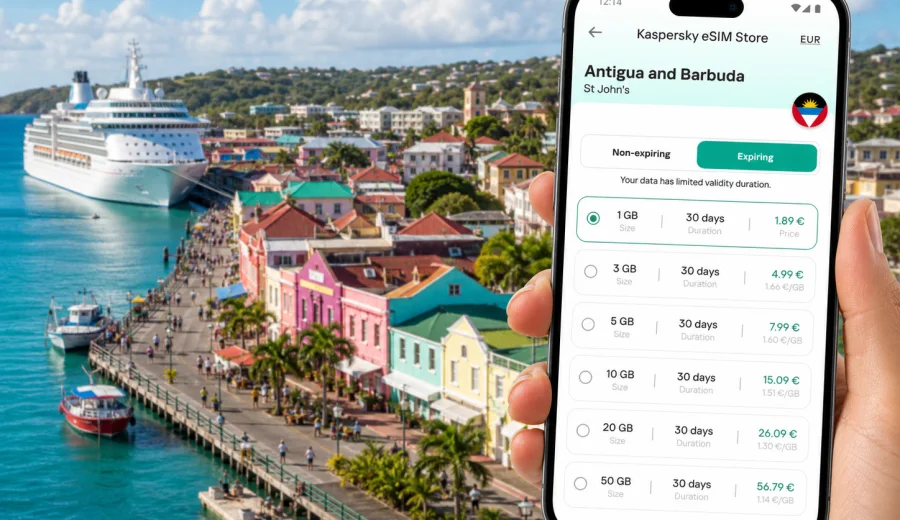
St John's eSIM: mobile connection and internet for your city trip
St John's is a compact Caribbean capital where mobile internet matters from the first hour of the trip. The airport is outside the city, the cruise port is close to the center, beaches are spread along different sides of the island, and many practical decisions depend on a working phone: finding your transfer, checking a hotel message, opening a map, booking a taxi, confirming a tour, or sending a quick update to family.
An eSIM can make that first day simpler because you do not need to look for a physical SIM card before you can use mobile data. You choose a suitable data plan for Antigua and Barbuda, install the eSIM on a compatible device, and use it for maps, messaging, ride coordination, restaurant searches, and travel admin while you move through St John's.
This guide focuses on St John's city scenarios: arrival through V. C. Bird International Airport, movement between the harbor, hotels, beaches, business districts, historic streets, and day trips from the capital. It also explains how to choose a data allowance, when to install an eSIM, and what to check before buying a plan.
Why mobile internet is useful in St John's
St John's is easy to enjoy, but it is not a city where every step is perfectly predictable. Your hotel may be near the waterfront, your meeting may be inland, your tour pickup may start early, and your beach plan may change because of weather, traffic, or cruise-port activity. Mobile internet gives you more control over those small travel decisions.
Common moments when a data connection helps:
- after landing, when you need your transfer details, hotel address, or confirmation emails;
- at the cruise port, when you want to message your group before leaving Heritage Quay or Redcliffe Quay;
- during a walk through the city center, when you use maps to connect shopping streets, cafes, museums, and the waterfront;
- on beach transfers to Dickenson Bay, Runaway Bay, Fort James, or other nearby areas;
- before a day trip to English Harbour, Nelson's Dockyard, Shirley Heights, or Jolly Harbour;
- during a business visit, when you need calendar updates, email, messaging apps, and cloud documents;
- on a stopover, when you have limited time and cannot afford to spend it searching for Wi-Fi.
Public Wi-Fi can still be useful at hotels, cafes, and terminals, but it is not always available at the exact moment you need it. With an eSIM data plan, you can rely less on open Wi-Fi networks and keep essential travel apps ready while you are outside.
Arrival: from the airport to the city
Most air travelers arrive through V. C. Bird International Airport, northeast of St John's. The route into the city is short compared with large metropolitan airports, but your first phone tasks often arrive all at once: checking the address, messaging your host, confirming pickup, reviewing the route, and finding payment or booking details.
If you install an eSIM before your flight, you can usually switch to the eSIM data line after arrival, once the aircraft has parked and mobile data use is allowed. In some cases, activation may depend on local network registration and device settings, so it is sensible to keep instructions available offline as well.
Useful airport checklist:
- save your hotel address and booking reference before departure;
- download key map areas for offline backup;
- keep your eSIM installation details accessible;
- check whether your device supports eSIM and is not locked to one operator;
- decide which SIM profile will handle mobile data after arrival;
- keep your primary SIM available for calls or SMS if you still need it.
For many visitors, the most important benefit is not speed for entertainment. It is having a working connection when the trip is still being assembled: immigration, luggage, taxi, hotel check-in, and the first route into the city.
City movement: harbor, streets, hotels, and beaches
St John's has several travel zones that can feel close on a map but require different movement choices. The cruise and shopping area around Heritage Quay is convenient for a short city walk. Redcliffe Quay has a different pace, with smaller streets, restaurants, and historic buildings. Fort James and nearby beaches shift the trip from city errands to leisure. Inland hotels, guesthouses, and business addresses may require taxis, arranged transfers, or local guidance.
Mobile data helps you move between those zones without treating every change as a separate planning task. You can check walking routes, compare drive times, message a driver, share your live location with a travel partner, or look up opening hours before crossing town.
Typical St John's scenarios:
| Scenario | Why mobile internet helps | Practical tip |
|---|---|---|
| Cruise-port visit | You may have only a few hours ashore | Pin the return point and keep ship time in mind |
| Airport transfer | Pickup details can change after landing | Save driver contacts before departure |
| Hotel check-in | Messages may arrive while you are in transit | Keep booking apps signed in |
| Beach afternoon | Plans may shift between Fort James, Dickenson Bay, and Runaway Bay | Check route and return timing before you leave |
| Business meeting | Calendar, documents, and messaging need continuity | Keep a low-data mode available for long days |
| Day trip | Routes from St John's can involve multiple stops | Download offline maps as a fallback |
The city is small enough that you do not need a complicated digital setup, but a working data line reduces friction. That is especially true if you are balancing luggage, heat, unfamiliar streets, or a limited stopover window.
How much data to plan for St John's
Your ideal data allowance depends on how you use your phone. Maps, messaging, email, ride coordination, and simple browsing are moderate uses. Video calls, cloud photo backup, streaming, and frequent social media uploads use much more data.
A practical way to estimate your needs:
- light use: maps, messaging, email, check-ins, restaurant searches;
- moderate use: all light uses plus photo uploads, cloud documents, and regular browsing;
- heavy use: hotspot sharing, video calls, streaming, large uploads, or remote work.
For a short city break, a smaller plan may be enough if you mostly use maps and messaging. For a week that includes St John's, beaches, day trips, and remote work, a larger allowance can be more comfortable. If you expect to use your phone as a hotspot for a laptop, check the plan conditions before relying on that.
Also think about trip shape, not only trip length. A two-day business visit with video calls may need more data than a five-day beach stay with light messaging. A cruise passenger may need less total data but needs the connection to work quickly during a narrow time window ashore.
Choosing an eSIM plan for Antigua and Barbuda from St John's
For a St John's trip, choose a plan that covers Antigua and Barbuda rather than looking for a city-only product. The city is the practical focus of your journey, but the mobile data plan is selected by country or region. That matters if you will land at the airport, stay in the capital, visit beaches outside the center, and take a day trip to another part of Antigua.
Before choosing a plan, compare:
- destination coverage: Antigua and Barbuda should be included;
- data allowance: match it to maps, messaging, work, uploads, and hotspot use;
- validity period: align it with your arrival and departure dates;
- activation rules: check when the plan starts and how installation works;
- device requirements: confirm eSIM support and operator-unlocked status;
- voice and SMS conditions: many travel eSIM data plans are for mobile internet, not a regular local phone number.
In Kaspersky eSIM Store, you can review available options and choose an eSIM data plan for Antigua and Barbuda before your St John's trip. The site and app help you select a destination, review plan conditions, arrange the purchase, and activate an eSIM on a compatible device.
When to install and activate your eSIM
Many travelers prefer to install the eSIM before departure and activate the data line when they arrive. This is often the calmest approach because airport Wi-Fi, queues, and time pressure do not become part of the setup. You can complete the installation at home or at the hotel before you depend on mobile data.
The basic process is simple:
1. Check that your phone supports eSIM and is not locked to one operator.
2. Choose the destination and plan that match your trip.
3. Follow the installation steps in the app, site, or QR-code instructions.
4. After arrival, set the eSIM as the mobile data line if needed.
5. Enable data roaming for the eSIM profile if the plan instructions require it.
6. Test maps and messaging before leaving the airport or hotel.
If you need step-by-step device guidance, use the Android installation instructions or the iOS installation instructions. Before buying a plan, also check your device for eSIM compatibility.
Do not delete the eSIM profile after installation unless the plan instructions or support team tell you to. Some eSIM profiles cannot be transferred to another device after activation, and deleting a profile can make recovery more difficult.
Practical St John's routes where eSIM helps
The value of mobile internet becomes clearer when you look at actual city movements rather than generic travel benefits.
Airport to waterfront hotel
You land, collect luggage, and need to reach a hotel near the city or waterfront. With mobile data, you can message the property, confirm your transfer, check the route, and share your estimated arrival. If the driver changes pickup point, you can receive the update without hunting for Wi-Fi.
Cruise port to Redcliffe Quay and city center
If your ship docks near the city, you may walk between shops, cafes, historic streets, and the waterfront. Maps are useful because streets can be busy on cruise days and groups can split easily. A data connection helps you coordinate a meeting point and return to the ship without losing time.
St John's to Fort James or Dickenson Bay
Beach plans often depend on weather, traffic, and timing. Mobile internet lets you check a route, contact a driver, compare return options, and make sure your group knows the pickup point. It is also useful if you decide to move from one beach area to another.
Business day in the capital
For business travelers, the practical need is continuity. Calendar changes, document links, authentication messages, and messaging apps may matter more than tourist navigation. An eSIM data plan can keep work tools available while you move between hotel, meeting room, cafe, and airport.
Day trip from St John's to English Harbour
Many visitors use St John's as a base for trips across Antigua. A route to English Harbour, Nelson's Dockyard, or Shirley Heights involves more than one stop and may run through areas where you do not want to depend only on hotel Wi-Fi. A working phone makes it easier to coordinate timings, maps, and return transport.
eSIM, roaming, local SIM, and Wi-Fi: which is better for the city?
There is no single best option for every traveler. The right choice depends on your phone, length of stay, budget, and how much setup you want to do after arrival.
| Option | Best for | Main advantage | What to check |
|---|---|---|---|
| Travel eSIM | Visitors who want mobile data without a physical SIM | Can be prepared before or during the trip | Device compatibility, data amount, validity, roaming settings |
| Home roaming | Travelers who need their usual number active | Simple if your operator has suitable terms | Price, fair-use limits, speed, included countries |
| Local physical SIM | Longer stays or users who need local voice options | May include local services depending on the operator | Store location, ID requirements, opening hours, phone compatibility |
| Public Wi-Fi | Backup at hotels, cafes, airport, or port | No mobile plan needed for occasional use | Availability, security, speed, login limits |
For St John's, eSIM is especially convenient if you want to prepare before arrival, avoid changing physical cards, and keep mobile data available during short movements around the city. It is still worth keeping offline backups for maps, bookings, and key addresses.
What to check before buying
The most important checks are technical, not tourist-related. A good plan will not help if the device cannot install an eSIM or if the phone is locked.
Before you travel, confirm:
- your device supports eSIM;
- your device is not locked to a single operator;
- the plan covers Antigua and Barbuda;
- the validity period fits your travel dates;
- you understand when the plan starts;
- you know whether data roaming must be enabled for the eSIM profile;
- you have a stable internet connection for installation;
- your primary SIM settings are clear, especially for calls and SMS;
- you have saved installation instructions offline.
If your regular number is important for banking messages or work authentication, keep it active according to your home operator's rules. Many travel eSIM plans are data-focused, so calls and SMS may not be included unless the chosen plan clearly says otherwise. Messaging apps usually work over mobile data, but regular phone-number services depend on your original SIM and operator.
Data-saving tips for St John's
A few small settings can make a plan last longer:
- download offline map areas before you leave home or while on hotel Wi-Fi;
- turn off automatic app updates on mobile data;
- pause cloud photo and video backup until Wi-Fi is available;
- use lower quality for video calls when the connection is only for coordination;
- close hotspot sharing when you are not actively using it;
- check data usage by app during longer stays;
- keep important documents in offline storage.
These habits are useful in St John's because travel days can include several short movements: airport to hotel, hotel to harbor, harbor to beach, beach to dinner, and then another transfer. Each step may use only a little data, but background apps can quietly use more than expected.
Short trips, stopovers, and cruise visits
For a short visit, the best eSIM setup is simple and ready before you need it. Cruise passengers may not want to spend time configuring a phone after leaving the ship. Stopover travelers may have a narrow window between airport, city center, and return transfer. Business visitors may have a meeting soon after arrival.
For these trips, focus on:
- installing the eSIM before travel;
- choosing enough data for navigation and messaging;
- testing the profile before leaving the arrival area;
- saving the port, hotel, airport, or meeting location as a map pin;
- keeping return transport details available offline;
- avoiding large downloads on mobile data.
If your trip is only a few hours, your main goal is reliable access to essentials, not a large entertainment data package. If your trip spans several days and includes beaches or day trips, choose a plan with more room for photos, maps, and messaging.
FAQ: eSIM for St John's
Do I need a St John's-specific eSIM?
No. For a trip to St John's, choose an eSIM data plan that covers Antigua and Barbuda. The city is your travel scenario, while the plan is selected for the country or region.
Can I install the eSIM before I fly?
In many cases, yes. Installing before departure can be convenient because you can follow the steps calmly on a stable connection. Check the selected plan's activation rules so you understand when validity and data usage begin.
Will an eSIM give me a local phone number?
Many travel eSIM plans are intended for mobile internet and do not include a regular phone number, voice calls, or SMS unless stated in the plan conditions. You can usually use internet-based messaging and calling apps over mobile data.
Is eSIM useful if my hotel has Wi-Fi?
Yes, because hotel Wi-Fi only helps when you are at the property. In St John's, mobile data is useful at the airport, in taxis, around the harbor, on beach transfers, and during day trips from the city.
Can I use eSIM and my regular SIM together?
Many modern phones allow a physical SIM and an eSIM, or multiple eSIM profiles, but exact behavior depends on the device. You can often keep your regular number for calls or SMS and use the eSIM for mobile data. Check your phone settings before departure.
What if the eSIM does not connect immediately?
Check that the eSIM is selected for mobile data, data roaming is enabled if required by the instructions, airplane mode is off, and the device has registered on a local network. If the issue continues, use a stable Wi-Fi connection to review the instructions or contact support.
Final preparation before your St John's trip
A good mobile setup for St John's is practical and light: choose the right country plan, install it on a compatible phone, keep your key travel details offline, and know which SIM profile handles mobile data after arrival. That is enough for the main city tasks: airport transfer, maps, hotel messages, harbor navigation, beach plans, day trips, and business communication.
Before departure, review the plan conditions, check device compatibility, and save installation steps. Then use Kaspersky eSIM Store to prepare an eSIM data plan for your trip to Antigua and Barbuda so mobile internet is ready when St John's becomes your base.