
Travel connectivity guide
St Moritz eSIM: Mobile Internet Guide
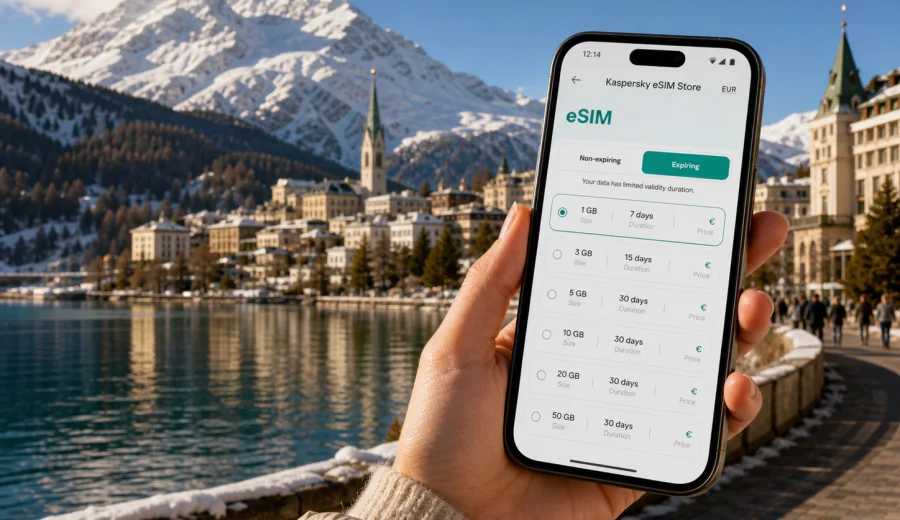
St Moritz eSIM: mobile connection and internet for your Swiss trip
St Moritz is compact on the map, but a trip there often depends on reliable mobile internet from the first hour. You may arrive by train through Chur, drive over an alpine pass, check into a hotel near the lake, meet colleagues in a mountain resort, or move between St Moritz Dorf, St Moritz Bad, Celerina, Pontresina, and Corviglia. In each scenario, maps, booking confirmations, ride details, messenger calls, weather updates, and mobile tickets are easier to manage when your phone is already prepared.
An eSIM can help you arrange mobile connection for St Moritz without searching for a physical SIM card after arrival. Instead of waiting until you find a shop, you can choose a suitable data plan before the trip, install the eSIM on a compatible device, and use it for mobile internet when local network conditions allow. Kaspersky eSIM Store is an app and website where you can quickly choose, arrange, and activate an eSIM with a suitable data plan for mobile internet during an international trip.
This guide is about St Moritz specifically: arrival routes, movement around the resort, mountain days, business trips, hotels, stopovers, and trips into the Engadin valley. Switzerland is the country context for choosing the right destination plan, but the practical focus stays on how you use mobile data in and around the city.
Why mobile internet matters in St Moritz
St Moritz is not a city where every travel day happens in one place. A typical itinerary may include a hotel in St Moritz Dorf, a spa or clinic appointment in St Moritz Bad, a rail connection from the station, a dinner reservation near the lake, a ski day on Corviglia, and a short trip to Pontresina or Samedan. Even if the distances are short, you often make decisions outdoors, in cold weather, or while moving between trains, buses, lifts, and hotel shuttles.
Mobile internet is useful for:
- checking train platforms and bus times when you arrive at St Moritz station;
- navigating on foot between the station, the lake, hotels, and the town center;
- confirming hotel check-in details and digital booking references;
- using messenger calls when your regular voice roaming is expensive or limited;
- following mountain weather, lift status, and route plans before leaving the hotel;
- booking restaurants, taxis, transfers, ski lessons, wellness appointments, or meeting rooms;
- sharing your live location with family, colleagues, or a driver;
- managing mobile banking, authentication codes, and work tools while abroad.
Public Wi-Fi can help in hotels, cafes, and some transport hubs, but it is not a complete travel plan. You may need data while walking from the station, standing outside with luggage, crossing the lake area, or changing vehicles in the Engadin valley. An eSIM gives you another option for mobile internet without relying only on public Wi-Fi.
Arrival scenarios: where an eSIM helps first
Many visitors do not fly directly into St Moritz. They arrive through Zurich, Milan, or another European hub, then continue by train, private transfer, or rental car. The final part of the journey can be beautiful, but it also requires coordination. You may need to message a hotel, check rail connections, follow a route over mountain roads, or send a revised arrival time.
| Arrival route | Mobile data use in practice | Why prepare before arrival |
|---|---|---|
| Train via Chur | Platform checks, connection timing, digital tickets, hotel messaging | Transfers can be tight, and you may not want to search for Wi-Fi between trains |
| Private transfer | Driver contact, live location, updated arrival time | Mountain traffic and winter road conditions can change timing |
| Rental car | Navigation, parking search, weather checks, route alternatives | Alpine roads require attention, and mobile maps are useful before you reach the hotel |
| Short business stay | Calendar updates, messenger calls, document access | You may go straight from the station or transfer to a meeting |
| Ski or winter holiday | Lift information, equipment bookings, group coordination | Plans often change with weather and snow conditions |
If you land in Switzerland first, a Switzerland data plan is usually the most straightforward option for the St Moritz part of the trip. If your route includes several countries before or after the Engadin, compare whether a country plan or a regional plan better fits your itinerary and the plan conditions shown before purchase.
Local movement in St Moritz
St Moritz has several practical zones that matter for mobile internet. St Moritz Dorf is the higher central area with hotels, shops, restaurants, and viewpoints. St Moritz Bad sits closer to the lake and spa facilities. The station is near the lake edge. Nearby Celerina, Samedan, Silvaplana, and Pontresina are close enough to become part of a normal day plan.
You may use mobile data while:
- walking from the station to a hotel and checking the safest route with luggage;
- comparing bus, taxi, hotel shuttle, and walking options;
- navigating to a restaurant entrance in the evening;
- coordinating with a ski group that started from a different lift;
- finding a pharmacy, clinic, equipment rental, or supermarket;
- checking whether a route around the lake is suitable in current weather;
- switching between personal and work apps during a business trip.
In winter, battery life and signal behavior can be affected by cold, terrain, and indoor-outdoor movement. Keep your phone charged, save key addresses offline, and avoid waiting until you are outside in poor weather to set up essential travel services.
How to estimate data for St Moritz
The right data amount depends on how you travel. A weekend with hotel Wi-Fi and light map use is different from a week of skiing, video calls, cloud work, and constant photo sharing. Before choosing a plan, think about your most data-heavy habits rather than only the number of days.
These rough categories help:
| Trip style | Likely data pattern | What to consider |
|---|---|---|
| Short stopover | Maps, messages, tickets, hotel details | A smaller data allowance may be enough if you avoid streaming |
| Ski weekend | Group chats, weather, lift info, photos, navigation | Choose enough data for outdoor use away from hotel Wi-Fi |
| Luxury leisure trip | Reservations, transfers, maps, photo sharing, social apps | Check both data volume and validity period |
| Business trip | Email, cloud files, authentication, calls over apps | Allow extra data for calls and document access |
| Multi-city Switzerland route | St Moritz plus Zurich, Lucerne, Zermatt, or Geneva | A Switzerland plan can keep the same eSIM data setup across the country |
Streaming video, large cloud backups, system updates, and automatic photo uploads can consume data quickly. If your plan has a limited allowance, switch off automatic updates on mobile data, download entertainment on Wi-Fi, and save offline maps before long train or car segments.
What to check before choosing an eSIM plan
Before buying any eSIM plan for St Moritz, confirm the practical details.
Checklist:
- Your phone, tablet, or laptop supports eSIM.
- The device is not locked to another mobile operator.
- The plan destination includes Switzerland.
- The data allowance matches your expected use.
- The validity period covers your arrival and departure dates.
- You understand when the validity period starts.
- You know whether voice calls and SMS are included; many travel eSIM data plans focus on mobile internet.
- You can receive email or open the app during setup.
- You have a stable internet connection for installation before travel or at the hotel.
- You know which SIM profile will be used for mobile data after activation.
If you are unsure about device support, check your device before arranging the plan. eSIM compatibility depends on the exact model, region, and carrier lock status.
When to arrange your St Moritz eSIM
The easiest time to prepare an eSIM is before departure, while you still have stable home Wi-Fi and time to check the settings calmly. You can install the eSIM profile in advance if the plan conditions allow it, then activate mobile data for that profile when you need it. Some plans start validity at installation, while others start after first connection to a supported network, so read the plan details before confirming.
If you forgot to prepare before travel, you can still arrange an eSIM after arrival if you have internet through airport Wi-Fi, hotel Wi-Fi, or another SIM. Installing an eSIM itself requires a connection, so avoid leaving setup until you are outside the station with no working data.
For a St Moritz trip, a practical sequence is:
1. Before departure, check that your device supports eSIM and is unlocked.
2. Choose Switzerland as the destination, unless your route requires a regional option.
3. Compare data volume, price, and validity period.
4. Install the eSIM while connected to stable Wi-Fi.
5. Keep your regular SIM active for calls or SMS if you need it.
6. On arrival, select the eSIM profile for mobile data.
7. Monitor data use during the trip and top up or choose another plan if available and needed.
For the St Moritz part of your route, you can use Kaspersky eSIM Store to choose a suitable mobile internet plan for Switzerland before you travel. This keeps the destination matched to the country where St Moritz is located, while daily use stays focused on maps, messages, bookings, and coordination in the city.
Installing an eSIM for the trip
Installation is usually a short process, but it is worth doing it carefully. After you arrange a plan, the eSIM appears in your profile on the website or in the app, and you may also receive setup details by email. Follow the on-screen steps or use the QR code if that is the method provided for your device.
If you need platform-specific setup help, use the Android installation guide or the iOS installation guide. Keep Wi-Fi available during installation, give the eSIM a clear label such as "Travel data" or "Switzerland", and make sure mobile data is assigned to the correct profile when you arrive.
Basic setup tips:
- Do not delete the eSIM profile unless you are sure you no longer need it.
- Keep your primary SIM available for your regular number if you need banking texts or calls.
- Enable data roaming for the eSIM profile if the plan instructions require it.
- Turn off mobile data switching if you want to avoid unexpected use of your regular roaming plan.
- Restart the device if the profile is installed but data does not connect after arrival.
- Contact support if installation or activation does not work as expected.
An eSIM plan for travel is primarily about mobile internet. It may not include a local phone number, traditional voice calls, or SMS unless the specific plan conditions say so. For most St Moritz travel tasks, messenger calls, email, maps, and booking apps over mobile data are the central use cases.
Practical St Moritz use cases
Ski days and mountain routes
On a ski day, mobile internet supports practical decisions: meeting points, group messages, weather updates, lunch reservations, and route changes. You may start from the town, move toward Corviglia, or coordinate with someone staying in Celerina or Suvretta. Keep your phone warm, start the day with enough battery, and download any essential resort information on Wi-Fi in case mountain coverage varies by terrain.
Hotels, apartments, and serviced residences
St Moritz accommodation can be spread across the town and nearby villages. Mobile data helps when you are confirming check-in time, opening digital instructions, finding the correct entrance, or messaging a host. If you arrive late, do not assume that Wi-Fi will be available before check-in. Having mobile internet ready makes the first hour smoother.
Business trips and events
St Moritz is also used for conferences, private meetings, brand events, and executive travel. For business travelers, an eSIM can support mobile email, secure app logins, calendar updates, document sharing, and messenger calls between venues. If you depend on video calls, choose a data allowance that leaves room for heavier use and avoid large uploads unless you are on trusted Wi-Fi.
Family travel
Families often split up during ski lessons, shopping, spa appointments, or lake walks. Mobile internet helps coordinate meeting points and share location updates. If children or older relatives depend on your hotspot, remember that tethering can use data quickly and may depend on the plan and device settings.
Day trips from St Moritz
The Engadin makes day trips easy: Pontresina, Samedan, Silvaplana, the Bernina route, and other mountain destinations may become part of your plan. A Switzerland data plan can be convenient when you move around the country, but always check the plan destination and conditions if your route crosses into another country, such as Italy.
eSIM, roaming, local SIM, and Wi-Fi: what fits St Moritz?
There is no single best connection method for every traveler. The right choice depends on your device, budget, length of stay, and need for convenience.
| Option | Good for | Possible limitation |
|---|---|---|
| Travel eSIM | Preparing mobile data before arrival, avoiding physical SIM shopping, short and medium trips | Requires a compatible unlocked device and correct setup |
| Home operator roaming | Keeping the same number active with minimal setup | Costs and data limits depend on your home plan |
| Local physical SIM | Longer stays or users who prefer a physical card | Requires finding a shop and may involve extra steps |
| Public Wi-Fi | Hotel work sessions, large downloads, streaming | Not always available when you are moving around town |
For St Moritz, the main advantage of eSIM is timing. You can prepare before you reach the resort, then use mobile data for arrival, navigation, and coordination. It does not replace every other connection method, but it can reduce dependence on public Wi-Fi and make the first travel day less fragmented.
Data-saving tips for an alpine resort trip
Small settings can make a limited data plan last longer:
- Download offline maps for St Moritz and the Engadin before leaving home.
- Save hotel addresses, booking confirmations, and train tickets in an offline wallet or files app.
- Disable automatic app updates over mobile data.
- Pause cloud photo backup until you are on Wi-Fi.
- Use lower data settings for messenger calls if the app supports them.
- Avoid streaming video on mobile data unless your allowance is large enough.
- Check data usage daily in your phone settings and in the relevant app profile.
- Keep your phone charged with a power bank during long winter days outdoors.
These steps are especially useful if your stay combines outdoor movement and hotel time. You can use mobile data for urgent travel tasks and reserve Wi-Fi for heavier downloads.
Common questions about eSIM in St Moritz
Do I need a St Moritz-specific eSIM?
No. For a city article, the correct practical destination is the country where the city is located. St Moritz is in Switzerland, so you should look for a plan that includes Switzerland or a suitable regional route if your trip covers several countries.
Can I install the eSIM before I travel?
Usually, yes, if your device supports eSIM and the plan conditions allow advance installation. Read the details carefully because validity timing can differ by plan. Install while you have stable Wi-Fi and activate mobile data when appropriate.
Will an eSIM include calls and SMS?
Many travel eSIM plans focus on mobile internet and may not include a regular phone number, voice calls, or SMS unless stated in the plan conditions. You can often use internet-based calling and messaging apps over mobile data.
Is public Wi-Fi enough in St Moritz?
It may be enough for light hotel use, but it is less reliable as a full travel strategy. You may need internet at the station, on the way to a lift, outside a restaurant, in a taxi, or during a day trip. Mobile data fills those gaps.
What if my phone does not connect after installation?
Check that the eSIM is selected for mobile data, data roaming is set according to the plan instructions, airplane mode is off, and the device has local signal. Restarting the phone can help. If the issue continues, contact support and include your device model and trip destination.
Final preparation before you leave for St Moritz
Before departure, make your connection setup part of the same checklist as passports, tickets, hotel bookings, and ski or business reservations. Confirm that your device supports eSIM, decide how much data you need, install the profile on stable Wi-Fi, and label the eSIM clearly in your settings. Keep key travel documents available offline, but plan to use mobile internet for real-time details once the trip starts.
If St Moritz is your main destination, choose a plan for Switzerland and match the data volume to your actual itinerary: arrival transfers, maps, resort movement, messaging, business tools, and day trips around the Engadin. You can prepare an eSIM plan for your St Moritz trip through Kaspersky eSIM Store and keep mobile internet ready for the moments when Wi-Fi is not enough.