Travel connectivity guide
Stavanger eSIM: Mobile Internet & Travel Guide
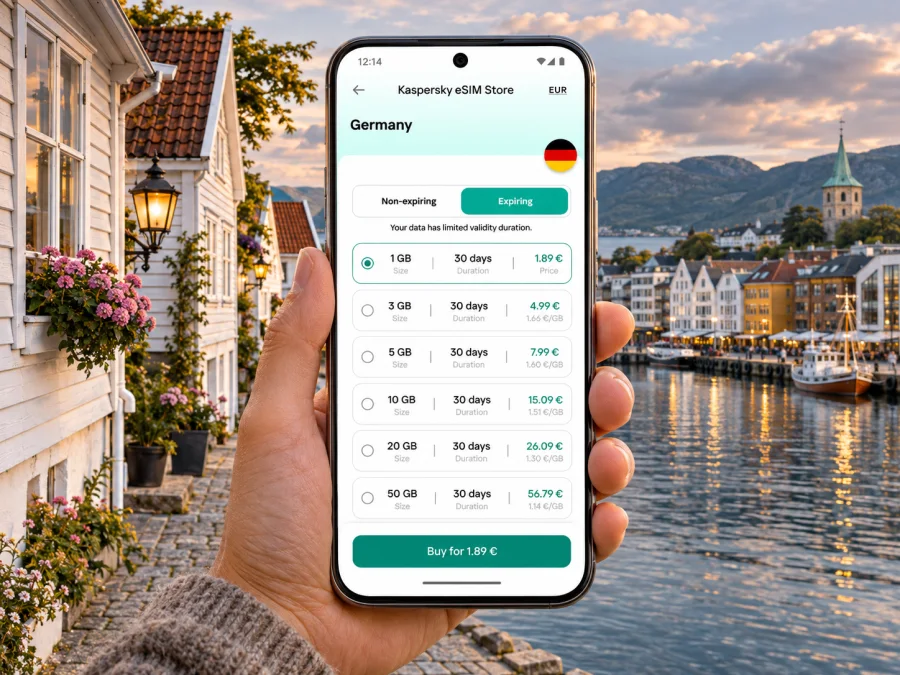
Stavanger eSIM for mobile connection and internet on your trip
Stavanger is a compact coastal city, but a visit can quickly stretch from the airport at Sola to a hotel near the harbour, a meeting in Forus, an island ferry, or a fjord departure point. Mobile internet helps with the practical transitions between them: checking a bus platform, finding a restaurant entrance, translating a sign, confirming a boat departure, or sending your location when plans change.
An eSIM can make data access easier to prepare before you arrive, provided your phone supports it and is not locked to a carrier. It does not replace every service a local phone number provides. Treat it as a way to use mobile data while travelling, and keep your usual SIM available for calls or messages if you need them.
What to plan for in Stavanger
Stavanger’s central area is walkable, with the harbour, central streets and many visitor stops close enough to combine on foot. Your phone becomes more useful when the trip moves beyond the centre. Stavanger Airport is in Sola, public transport links the airport and surrounding communities, and boats leave from waterfront terminals for islands and fjord routes. A day can involve several separate journey planners and ticket rules.
| Part of the trip | Where mobile data helps |
|---|---|
| Arrival at Stavanger Airport, Sola | Check the latest bus option, ticket instructions and the route to your accommodation |
| City centre | Find a hotel entrance, walking route, café or meeting address |
| Bus or local train | Compare stops, departures and transfer points as you move around the region |
| Waterfront and island trips | Confirm the correct terminal, boat time and any advance booking requirement |
| Excursions beyond the city | Keep route notes, weather updates and return arrangements accessible |
The table is a planning guide, not a promise that a particular mobile network or tariff works at every point. Coverage and speed depend on the travel eSIM’s partner network, your device, local conditions and the exact place you are using it. For a boat or mountain excursion, download essential tickets, directions and booking details before leaving the city.
Landing at Stavanger Airport, Sola
After landing, you may need to check baggage, find your transfer, tell a host when you will arrive or change a booking. If you have installed your travel eSIM in advance, you can select it for mobile data when its plan is ready to use. If you would rather wait, airport Wi-Fi or your home operator’s roaming can serve as a bridge while you connect. Keep roaming settings for your regular SIM under control so that background data does not create an unexpected charge.
Avinor lists an airport express bus to Stavanger with an approximate journey time of 20–30 minutes. It also lists Kolumbus route 42, which connects Jåsund, Tananger, Stavanger Airport, Sola, Forus, Kvadrat and Sandnes. The route is useful context if your destination is outside the centre, but route patterns and departures may change. Check the day’s timetable and any disruption notice before you set out; a journey planner that was correct when you booked the flight may not reflect a later adjustment.
A practical arrival sequence:
- Before leaving the terminal, open the current airport transport information and locate the correct stop.
- Compare the airport express bus with scheduled local services for your destination and arrival time.
- Confirm the ticket method and whether you need a separate fare for a transfer.
- Save the accommodation address and a map area for offline use in case the connection is not ready immediately.
- Once aboard, follow the live route and stop name rather than relying on a guessed travel time.
For a hotel in central Stavanger, a direct bus may be simplest when the departure time fits. For Forus, Sandnes or Sola, route 42 may be relevant, but the best option depends on the exact address and current timetable. If you arrive late, travel with bulky luggage or have a tight connection, compare a taxi or pre-arranged transfer as well. Mobile data helps you compare options; it cannot guarantee vehicle availability or remove the need to check the fare.
Getting around the centre and waterfront
The city centre is easier to navigate when you think in short walking segments rather than treating every stop as a separate drive. The harbour at Vågen is a useful orientation point for waterfront visits and boat departures. The streets around the old wooden houses of Gamle Stavanger, central shopping streets and the cathedral area are straightforward to explore with a saved map and a little attention to slopes, cobbles and weather.
Use a map for the first walk from the bus terminal or railway station to your accommodation, then keep an eye on street names as you approach. In older districts, an entrance may face a side street or a courtyard rather than the larger road shown in a booking pin. If you are meeting someone, send a named landmark or share your live location instead of writing “near the harbour.” For a scheduled appointment, add a time buffer: looking up the route after you have started walking is less useful when rain, luggage or a changed bus stop slows you down.
Mobile internet is also practical for small decisions that accumulate during a day: checking whether a café is open, translating a menu, finding an accessible entrance, confirming a museum’s current hours or messaging a host about key collection. Keep confirmation emails and reservation numbers available offline. A signal can be intermittent inside thick-walled buildings, underground spaces or crowded venues, so do not leave every essential detail in a page that must load at the last moment.
Choose a data plan around your itinerary
A short city break with maps and messaging has a different data pattern from a work trip with video meetings or a week of day trips. Decide what you expect to do on mobile data, then compare the plan’s data allowance, validity period, supported destination and usage conditions. Do not choose by the headline allowance alone: a large bundle is not automatically useful if your stay is brief, and a small one may run out quickly if you upload video or use a hotspot.
Kaspersky eSIM Store is an app and website where travellers can choose, purchase and activate an eSIM with a suitable plan for mobile data abroad. Available destinations and plan details can change, so check the current conditions shown for Norway before making a selection. You can review the available mobile data options for Norway and compare the stated data amount and validity with the actual dates and activities in your Stavanger itinerary. This destination page is for Norway; it does not guarantee service in a particular building, ferry or remote location.
A simple estimate helps keep the choice grounded:
- Mostly maps, messages and search: allow for regular route checks, web searches and a modest amount of photo sharing.
- Remote work: consider video calls, cloud files and hotspot use; these can consume substantially more data than text and map use.
- Frequent photo or video uploads: upload on trusted Wi-Fi where convenient, or choose a plan after checking its allowance and fair-use terms.
- Several days outside the city: download maps and tickets beforehand, and check whether the plan’s validity covers the complete trip.
These are usage categories, not fixed gigabyte promises. Actual consumption depends on app settings, video quality, automatic backups and how often a device refreshes data in the background. Turn off automatic photo backup over mobile data if you want to reserve your allowance for navigation and communication. Set a device-level data warning if your phone offers one.
Areas and trips where a connection is useful
Vågen and the waterfront: confirm the exact pier and boarding time; “Stavanger harbour” may be too broad for a scheduled boat. Gamle Stavanger: save a map for the walk through its historic wooden-house streets and pause safely before checking directions. Forus and Sandnes: search the full address and nearest stop rather than relying on a district name. Island ferries: Kolumbus serves Byøyene and Hommersåk, and a ferry runs to Vassøy; check the right terminal, ticket and any booking requirement. Lysefjord: excursions may start at different locations and are regional trips, not city neighbourhoods. Save the meeting point, return plan and weather updates before leaving.
For a hike, mobile data is a convenience rather than a navigation or safety plan. Carry the route information recommended by the provider, check local conditions, tell someone your itinerary and bring a charged power bank if you rely on your phone for the return.
eSIM readiness before you travel
Check your specific phone model and regional variant before you buy. Some devices that share a product name have different SIM features depending on the market where they were sold. Your handset also needs to be carrier-unlocked. The presence of a SIM settings menu alone is not proof that your particular variant can install an eSIM. You can check whether your device supports eSIM and confirm the result against the manufacturer’s specifications for your exact model.
Before departure, make sure you have a compatible, unlocked smartphone; reliable Wi-Fi for setup; purchase and activation details; enough battery; and a clear plan for which line handles data, calls and SMS. If your phone supports dual SIM, you may be able to keep your usual number active while choosing the travel eSIM for data, though the options vary by device. A travel plan may not include a phone number, voice calls or SMS unless its terms explicitly say so. Messaging and voice apps use data and may require both people to use the same service.
Install and activate without rushing
Install the eSIM over a stable internet connection and read the plan’s activation timing. Installation and activation may be separate steps. Do not delete an installed profile because data is not available yet; some profiles cannot be transferred freely to another handset.
- Connect to Wi-Fi and open the purchase or activation details.
- Follow the steps for your operating system: Android eSIM instructions or iOS eSIM instructions.
- Label the new line “Travel data” and check when the plan validity starts.
- In Norway, select the travel line for mobile data if required. Enable data roaming on that line only when the plan instructions say to.
- Test a simple page or map, then confirm which line is set for calls and SMS.
Menu names vary by device. If activation fails, confirm the phone is online, the eSIM line is enabled, the correct line is assigned to mobile data and the plan’s start conditions are met. Consult its troubleshooting information before removing a profile or changing other settings.
Keep your data available and predictable
Download an offline map of central Stavanger and save hotel contacts, meeting addresses, ferry confirmations and tickets as notes or screenshots. Use trusted Wi-Fi for large downloads and updates. Review photo backup and app data settings, especially before tethering a laptop that may sync files. Track the plan’s allowance separately from the phone’s data counter because their reset schedules may differ. If data stops, check the plan’s validity and remaining allowance before repeatedly changing settings.
Common travel situations
You arrive after a delayed flight
Check current transport information, compare the next airport express departure with local services, and message your host with an updated arrival estimate. If the eSIM is not ready, use Wi-Fi or home-SIM roaming only if you understand its charges.
You have a meeting in Forus
Search the precise address and the route for your departure time. Forus is a business area, not one stop, so the nearest bus may still leave a walk. Save the route and contact details before leaving.
You have a short stop in the city
For a brief layover, account for airport transfers before choosing a central walk or meal. Keep luggage and onward travel details in mind, and use data to check the return route and current airport information.
You are taking a boat trip
Confirm the terminal and boarding point; island services and fjord tours can use different locations and rules. Download the ticket and check-in details before leaving Wi-Fi, and keep enough battery for the return.
Your data connection does not start
Check that the eSIM line is on, mobile data is assigned to it and the plan’s start conditions are met. Review its roaming instructions. Restarting may help, but do not delete the profile unless support instructs you to. Use Wi-Fi to check troubleshooting steps or contact support.
Quick checklist for a Stavanger visit
Before the flight
- Confirm eSIM support and carrier-unlocked status for the exact handset variant.
- Compare Norway plan allowance and validity with your dates and data habits.
- Install the profile over a reliable connection and save the setup details.
- Download a city map, accommodation address, transport notes and tickets.
- Review roaming settings for your regular SIM.
On arrival
- Check current airport bus and local route information.
- Select the correct SIM for mobile data and follow the plan’s activation steps.
- Confirm your first transfer and accommodation route before leaving the terminal.
During the stay
- Recheck live departures and service notices before bus or ferry journeys.
- Keep departure tickets and meeting details available offline.
- Watch your data use if you stream, upload large files or tether a laptop.
- Carry a charged phone for long days and excursions beyond the centre.
Frequently asked questions
Will a travel eSIM give me a Norwegian phone number?
Not necessarily. A travel plan may provide data only. Check its terms if you need a local number, ordinary calls or SMS. Your home SIM may remain available for those services, subject to your operator’s settings and roaming terms.
Does an eSIM guarantee coverage throughout Stavanger and the fjord?
No. Reception can vary by network, device, buildings, terrain and distance from settlements. Check plan coverage terms and save essential information offline.
Can I install the eSIM after I arrive?
Usually, if you have internet access and the plan is available for installation, but setup before travel is simpler. Check activation timing; airport or hotel Wi-Fi may help if you install it later.
Should I leave my regular SIM on?
That depends on whether you need your usual number and what your operator charges abroad. If it stays active, select the travel eSIM for data where appropriate and review roaming settings. Dual-SIM behavior varies by device.
Is mobile data enough for buses, ferries and sightseeing?
It helps with routes and messages but does not replace a valid ticket or current timetable. Download confirmations and check whether your ferry or excursion needs a separate booking.
Prepare your connection for Stavanger
A well-planned connection is a practical part of a Stavanger itinerary: it helps you move from Sola Airport to the centre, find your way between neighbourhoods, keep a meeting on schedule and confirm waterfront departures. Check device compatibility, compare current plan terms for Norway, and install the eSIM with enough time to resolve setup questions.
Choose an eSIM plan for your trip to Norway through Kaspersky eSIM Store, the app and website for selecting, purchasing and activating an eSIM for mobile data abroad. Review the allowance, validity and activation instructions for the plan you select, then keep your transport tickets and essential route details accessible offline as you explore Stavanger.


