Travel connectivity guide
Subotica eSIM: Mobile Internet for Your City Trip
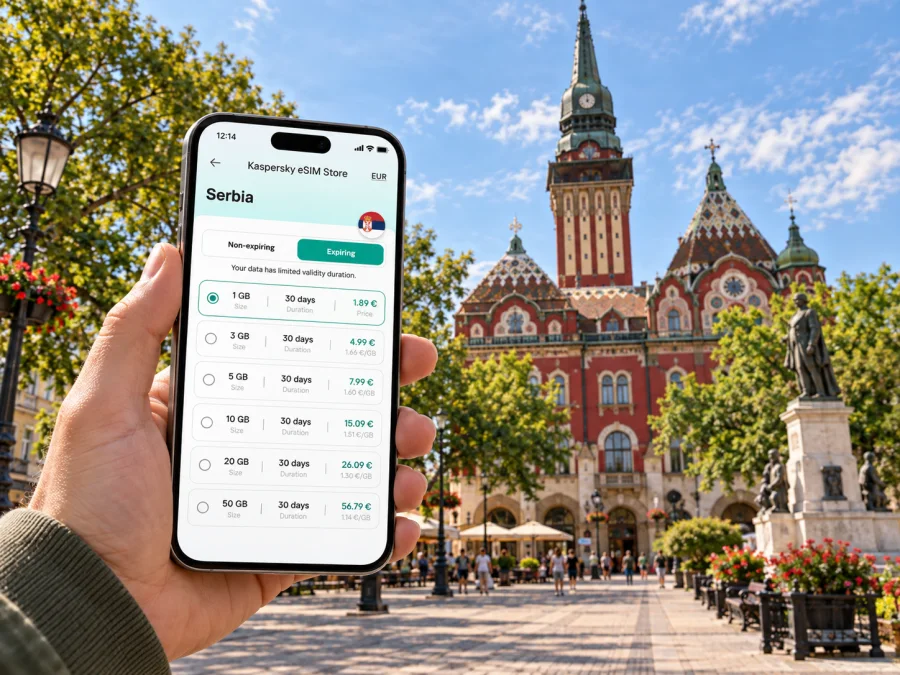
Subotica eSIM: mobile connection and internet for your city trip
Subotica is a rewarding city to explore at a measured pace: its ornate central buildings, cafés and cultural sites sit within a walkable core, while Lake Palić makes an easy nearby change of scene. A mobile connection can make the practical parts of the visit smoother, from checking your arrival details and finding your accommodation to following a map between landmarks or messaging a host when plans change. An eSIM gives you a way to prepare mobile internet for Serbia without replacing your physical SIM card.
The useful question is not simply whether you should be online all day. It is when you will need data, how much navigation and messaging your itinerary involves, and whether your route stays in Subotica or continues elsewhere. Thinking through those details before you travel helps you choose a suitable plan and arrive with a clear setup rather than making decisions while carrying luggage.
Where mobile internet helps around Subotica
The historic centre is a natural starting point for a first walk. Liberty Square, the City Hall, the Synagogue and Raichle Palace are among the landmarks visitors often group into a central itinerary. A map can help you orient yourself between them, locate a café or meeting point, and save a walking route before you leave your hotel. Pause for photographs or messages without planning every stop in advance.
A digital map is especially useful when your accommodation is on a smaller street rather than beside a familiar landmark. Save the address in the original spelling, pin the entrance if your host has shared a location, and keep the booking confirmation available offline as well. The mobile connection then becomes a backup for checking directions or contacting the property, instead of the only place where essential arrival information is stored.
Subotica’s centre is compact enough for many visitors to explore on foot, but a full stay may include destinations beyond the main square. Local tourist information describes buses, taxis and bicycles as ways to get around. Availability, routes, fares and operating arrangements can vary, so check current local information when you are planning a specific journey. Mobile data is helpful for looking up a stop, comparing a route with your map, contacting a taxi service you have selected, or checking whether a bicycle option fits your plans.
Palić, with its lake and promenade, is a popular outing from Subotica. The official tourism information places it about eight kilometres east of the city. That short distance makes it realistic to plan a half-day or a relaxed evening there, but it is still worth checking the current transport option and return timing before you leave. With mobile internet, you can keep the route, accommodation details and messages accessible while moving between the city centre and the lakeside area. If you prefer to disconnect during a walk, download the map area in advance and use data again when you need to confirm your return plan.
Small moments when a connection makes a difference
- On arrival: open your accommodation details, share an estimated arrival time and confirm the route from your station or drop-off point.
- Between sights: check walking directions, opening information supplied by the venue, or a saved note about the next stop.
- At a café: message your travel companions, review a reservation or translate a short phrase when you need help.
- On the way to Palić: confirm the route and return options before setting out, especially if your schedule is tight.
- During a work trip: join a planned online meeting from suitable accommodation or send updates between appointments, while keeping a stable Wi-Fi option as a backup for video calls.
A mobile plan does not replace local travel information or guarantee a signal in every place. It gives your phone a route to mobile data where the selected plan and local network are available. Keep important addresses, tickets and meeting details saved on the device too, so one weak signal does not interrupt the whole day.
Plan your connection around the itinerary
Start with the shape of your visit. A weekend focused on the central landmarks may use little data if you save maps and bookings on Wi-Fi. A longer stay with frequent map searches, photo uploads, work messages and day trips will usually need a larger allowance. There is no single data amount that suits every traveller; your habits and the plan’s conditions matter more than a generic estimate.
| Trip pattern | Likely data use | What to prepare |
|---|---|---|
| Short city break | Maps, messages and occasional searches | Save the city centre map and keep heavy uploads for Wi-Fi |
| Several days in Subotica | Navigation, bookings, calls through apps and sharing photos | Estimate daily use and leave a margin for unexpected changes |
| Work visit | Email, messaging, maps and possibly online meetings | Check how much data video meetings use; arrange reliable Wi-Fi for long calls |
| Subotica plus nearby trips | More route checks and time-sensitive coordination | Confirm the plan’s country or regional coverage and validity for the whole itinerary |
Before selecting a plan, compare four details: destination, data allowance, validity period and any usage conditions. If Subotica is one stop on a wider route, check that the plan applies to every destination where you expect to use it. Do not assume that a plan for one country includes a neighbouring country. Likewise, do not choose only by the headline data amount: a validity period that ends before your return or a destination mismatch can matter more than extra gigabytes.
For a city-only visit, think about how often you use live navigation, whether you stream or upload large files away from Wi-Fi, and whether you share a connection with another device. For a work trip, add email attachments, cloud documents and video calls to your estimate. For a relaxed sightseeing trip, offline maps and downloading tickets in advance can reduce the amount of data you need while keeping important information available.
When the destination and expected usage are clear, you can compare eSIM plan options for Serbia and review the allowance and validity shown for each available option. Kaspersky eSIM Store is an app and website that helps you choose, arrange and activate an eSIM with a suitable plan for mobile internet on an international trip. The plan details, rather than the city name alone, should guide your choice.
Five checks before choosing
- Will you stay in central Subotica or also visit Palić?
- Will you use live maps, video calls or frequent photo uploads?
- How many days must the plan remain valid?
- Does its coverage match every destination on your route?
- Can you top up if your needs change, and under what conditions?
Choose an allowance and validity that fit your habits without paying for data you are unlikely to use. Plan details can change, so check the current terms at selection.
Set up eSIM before leaving or after arrival
Installing an eSIM before departure can give you time to read each step and resolve questions while you still have access to your usual connection. Some travellers prefer to wait until arrival to activate or use the travel profile. Follow the instructions provided with the selected plan, because the installation and activation sequence can differ. Keep a reliable internet connection available during installation, and do not delete an eSIM profile unless the instructions or support team tell you to do so.
A practical preparation sequence is:
- Check the device. Confirm that your phone supports eSIM and is not restricted by a carrier lock. Check whether your device supports eSIM before choosing a plan.
- Review the plan. Confirm Serbia is included, then check the data allowance, validity and any activation notes.
- Install the profile. Use the steps for your device: installation instructions for Android or installation instructions for iOS.
- Label the line clearly. A name such as “Serbia travel” can help you distinguish the travel profile from your regular SIM in your phone settings.
- Set mobile data deliberately. When you are ready to use the plan, select the travel eSIM for mobile data and review the data-roaming setting if the plan instructions require it.
- Keep your regular number in mind. Decide whether your usual SIM should remain enabled for calls or messages, and check its roaming terms with your home provider to avoid unexpected charges.
Menu names vary by phone, so follow the device-specific guide. Keep internet access available during setup and use the QR code or manual details supplied with the plan. If installation seems delayed, check the connection and instructions before trying again.
After installation, verify that the travel profile is enabled and selected for mobile data. Review the plan’s activation notes and any required roaming setting. If service does not start, allow time to register and consult the plan guidance before removing the eSIM profile.
Use your phone thoughtfully around the city
Before leaving your accommodation, open the route, save the destination and note a nearby landmark in case an entrance is difficult to identify. For a meeting, share the exact address and an arrival estimate before you start moving. In central Subotica, a street name or recognizable building can be more useful than a broad map pin.
For an outing to Palić, confirm the route and return options before setting out. Local services can change, so verify details close to travel and leave flexibility in your schedule. Downloading the map area in advance gives you a backup if the connection drops or you decide to keep data off during a lakeside walk.
Where you stay also affects your routine. A central hotel may make many sights walkable, while accommodation in a quieter district can mean more route checks or local transport coordination. Save the full address and arrival instructions before you travel. For work, download documents in advance and use a tested Wi-Fi connection for longer calls where practical; mobile data is useful for messages and map changes between appointments.
Practical scenarios for different visits
First visit with luggage: save the accommodation address, booking details and route before arrival. Message your host if your timing changes, and keep essential details on the phone as well as online.
A short architecture-focused stay: group central landmarks into a walking route, save confirmed opening details and use live data for changes rather than repeating the same searches. Keep battery available for maps and photos.
An afternoon at Lake Palić: check how you will get there and return, save the area on your map, and coordinate with companions before separating. A little planning helps keep the outing relaxed if you need to adjust the schedule.
A business visit or stopover: store appointment addresses and departure details where you can reach them quickly. Use data for updates on the move and arrange dependable Wi-Fi for longer calls. If travelling onward beyond Serbia, verify that your plan covers the next destination; do not assume a Serbia plan works across a border.
Common questions
Is an eSIM useful for a short stay in Subotica?
It can help with maps, messages, accommodation coordination and transport information away from Wi-Fi. If you have downloaded essentials and expect little online use, your data needs may be modest. Match validity to your stay and check when it begins.
Can I use the same plan in Subotica and Palić?
Both are in Serbia, but the specific plan terms determine where it can be used. Check its listed destination coverage before purchase.
Does a travel eSIM include a local phone number?
Do not assume so. Travel eSIM plans are generally intended for mobile data unless the specific plan says otherwise. Internet-based messaging and calls can use data; ordinary calls and SMS may remain tied to your regular SIM.
Should I install the eSIM at home or in Subotica?
Either may suit you. Installing before travel gives you time to follow the steps; others wait until arrival to enable the profile. Check when installation, activation and validity begin, and keep internet access available during setup.
What if the phone shows no data connection?
Check that the eSIM is enabled and selected for mobile data, review activation notes and any required roaming setting, and confirm the destination is covered. Allow the device time to register. If it still does not connect, consult the plan guidance before removing the profile.
Before you set off
- Save your accommodation address, booking details and key contacts offline.
- Download a map around central Subotica and your lodging.
- Check current transport and return details for the trip to Palić.
- Review plan coverage, data allowance, validity and activation conditions.
- Confirm device compatibility and which SIM will handle mobile data.
- Carry a charging cable or power bank if you will use maps throughout the day.
Choose an eSIM plan for your Subotica trip
Prepare your mobile internet before the first walk, the trip to Palić or a meeting across town. In Kaspersky eSIM Store, use the app or website to select, arrange and activate an eSIM plan for your international trip, then review its destination, data and validity details before travelling. Choose an eSIM plan for Serbia that fits the length and data needs of your stay, and keep your arrival information available offline as a backup.


