
Travel connectivity guide
Suchitoto eSIM: Mobile Internet Guide
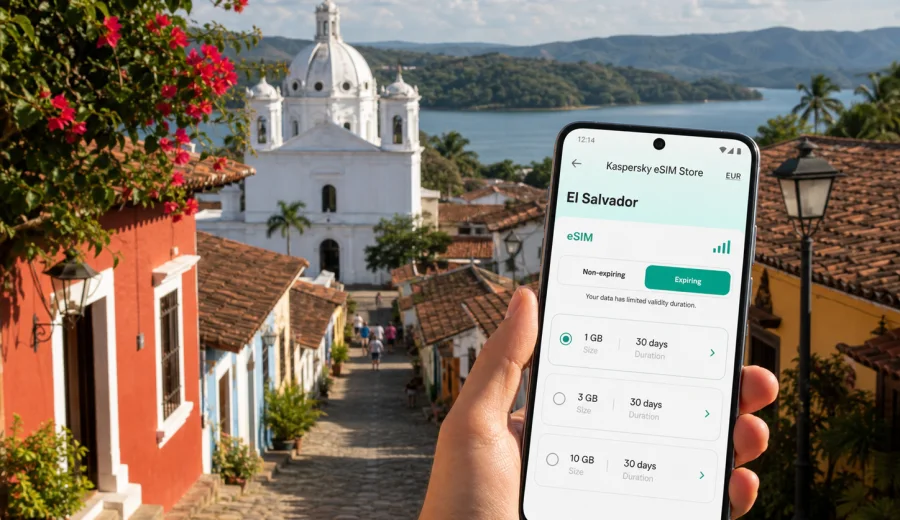
Suchitoto eSIM: mobile connection and internet for your trip
Suchitoto is a small city where travel feels slow, but mobile internet still matters. A typical visit starts with a flight into the San Salvador area or a stay in the capital, then continues by road to colonial streets, Santa Lucia Church, small hotels, galleries, cafes, and views toward Lake Suchitlan. If your phone is ready before that transfer begins, you can use maps, messages, booking details, translation, and ride coordination without looking for a physical SIM card on arrival.
Why mobile internet is useful in Suchitoto
Suchitoto is walkable, compact, and easy to enjoy without constant screen time. Still, "walkable" does not mean every detail is obvious. Streets can feel similar after dark, hotel entrances may sit on quieter side streets, and lake plans often require meeting points, timing, and return transport.
Mobile data helps most when you need to:
- confirm a driver, shuttle, or taxi after landing or leaving San Salvador;
- send your hotel or guesthouse an updated arrival time;
- navigate from the main square to a side street, viewpoint, restaurant, or gallery;
- check opening hours before walking across town in the heat;
- translate short messages, menus, directions, or transport notes;
- coordinate a visit toward Lake Suchitlan or a nearby viewpoint;
- stay reachable if your group splits up around the center;
- handle email, banking approvals, or work messages during a short stay.
The value is not only speed. It is control. With eSIM mobile internet ready on a compatible phone, you can handle small travel changes without depending only on hotel Wi-Fi, cafe Wi-Fi, or someone else's hotspot.
Arrival: from airport or San Salvador to the city
Suchitoto is usually reached after another travel step. Many visitors land near San Salvador, spend time in the capital, or book a day trip before continuing north to the town. Your connectivity plan should therefore cover the transfer as well as the city itself.
On arrival day, mobile data is useful for four practical moments:
1. Checking messages from your driver or accommodation.
2. Opening maps before leaving the airport or San Salvador.
3. Sharing your live location with someone you trust.
4. Keeping booking confirmations available if traffic or timing changes.
If you are visiting only for a few hours, this matters even more. A day trip can be simple, but the schedule is tight: central square, Santa Lucia Church, lunch, galleries, a viewpoint, perhaps a lake plan, then the return. Waiting to find Wi-Fi can take time away from the visit.
City scenarios where eSIM helps
| Suchitoto moment | Why mobile internet helps | Practical habit |
|---|---|---|
| Road transfer | Driver contact, maps, timing changes | Save the hotel address before departure |
| First walk in the center | Navigation, food searches, messages | Pin your hotel and the central square |
| Lake Suchitlan plan | Meeting point, weather, return transport | Confirm pickup details before going down |
| Galleries and cafes | Opening hours, payments, translation | Screenshot key locations as a backup |
| Evening return | Ride coordination and group messages | Keep enough battery for maps |
| Remote work | Email, calls over apps, authentication | Check Wi-Fi, but keep data as a fallback |
Suchitoto rewards unhurried travel, so you do not need to browse constantly. Use mobile data for the decisions that keep the day smooth: where to turn, when to meet, whether a place is open, and how to contact someone quickly.
How to choose an eSIM tariff for Suchitoto
For a city trip, the tariff logic is country-based. Suchitoto is in El Salvador, so look for an eSIM tariff that covers El Salvador. If your route also includes other countries in Central America, compare the country tariff with any relevant regional option and choose according to your full itinerary.
Before choosing, answer these questions:
- How many days will you be in El Salvador?
- Is Suchitoto a day trip, a weekend stay, or part of a longer route?
- Will you use data only for maps and messages, or also for video calls, photo backup, and work?
- Do you need hotspot use for a laptop or another phone, and do the tariff conditions allow it?
- Do you understand when the validity period starts?
| Traveler type | Typical data use in Suchitoto | Planning approach |
|---|---|---|
| Day-trip visitor | Maps, driver messages, restaurant checks | A smaller package may work if you avoid video |
| Weekend traveler | Navigation, bookings, messaging, photo sharing | Choose extra margin for the return route |
| Business traveler | Email, calls over apps, files, authentication | Check hotspot rules and allow more data |
| Family traveler | Shared maps, multiple messages, photos | Decide which phone needs always-on data |
| Multi-city traveler | Suchitoto plus San Salvador or other stops | Match coverage and validity to the whole route |
Kaspersky eSIM Store is an app and website where you can choose, arrange, and activate an eSIM with a suitable tariff for mobile internet during an international trip. It helps you review practical details such as destination, data amount, validity period, and tariff conditions before you travel.
Check device compatibility first
Before buying any eSIM tariff, confirm that your phone or tablet supports eSIM and is not locked by your mobile operator. This is essential: if the device is not compatible, the eSIM cannot be installed in the expected way. Two phones with similar names can also differ by model number or market.
Check your device before purchase, especially if your phone is older, was bought through a carrier contract, or came from a region where eSIM support can vary.
Use this checklist before your Suchitoto trip:
- Your device supports eSIM.
- The device is not carrier-locked.
- The operating system is updated.
- You can access your email or Kaspersky eSIM Store account after purchase.
- You know whether the eSIM tariff is data-only.
- You understand activation timing and validity period.
- You know whether data roaming must be enabled for the eSIM line.
If you travel with more than one phone, check the actual device you will use for navigation. Installing the eSIM on the wrong device can make the first travel day harder.
Install eSIM before the town feels urgent
Many travelers prefer to install eSIM before departure while they still have stable home Wi-Fi. Others install after arrival. Either approach can work if you follow the tariff conditions, but avoid doing the first setup while standing at the airport curb, checking into a hotel, or trying to meet a driver.
For setup help, use the relevant guide: instructions for Android or instructions for iOS. Phone menus can differ by manufacturer and system version, so follow the instructions for your device carefully.
Important setup notes:
- eSIM is for mobile data unless voice calls or SMS are specifically included in the selected tariff conditions.
- Internet-based calls and messages can usually be handled through apps when you have data.
- Some eSIM profiles require data roaming to be enabled for the eSIM line.
- Installation and activation can take several minutes depending on device and local network conditions.
- An activated eSIM may not be transferable to another device if the profile or tariff conditions do not allow it.
If you want to prepare before arrival, you can choose a mobile internet tariff for El Salvador and install the eSIM before the Suchitoto part of your route. This is the relevant country page for a city trip because Suchitoto belongs to El Salvador.
After installation, label the line clearly in phone settings, for example "El Salvador data" or "Travel eSIM". That small step makes it easier to select the correct mobile data line when you are tired after a flight or changing settings quickly before a transfer.
Where eSIM helps most inside Suchitoto
The main visitor area is concentrated around the central square, Santa Lucia Church, cafes, small hotels, galleries, and viewpoints. You may not need a large amount of data to enjoy it, but you do need data at the right moments.
Near the center, use mobile internet to check restaurant hours, send quick updates, translate a message, or find a side street without circling the same block. If you head toward Lake Suchitlan, use it to confirm a meeting point, check timing, and coordinate the return. If you visit nearby viewpoints or Los Tercios Waterfall, save offline maps first and treat eSIM data as a live backup.
For hotel stays, eSIM gives you another option if Wi-Fi is slow, limited to common areas, or unavailable for a short period. For business travelers, that backup is useful for authentication codes, calendar changes, and short calls over apps. For leisure travelers, it keeps simple plans from becoming complicated.
Data planning examples
The right data amount depends more on behavior than on the size of the city. A traveler who uses maps and messages may need far less than someone who uploads many photos or joins video meetings.
For a day trip:
- download an offline map before leaving San Salvador;
- keep mobile data for driver messages and live navigation;
- avoid automatic cloud backup until you are on trusted Wi-Fi;
- keep enough data for the return journey.
For a weekend:
- allow extra data for route changes, restaurants, and photo sharing;
- check hotel Wi-Fi before planning long calls;
- save booking confirmations offline;
- avoid large app updates on mobile data.
For remote work:
- test email, calendar, chat, and authentication apps before the first meeting;
- confirm whether hotspot use is allowed by the selected tariff;
- reduce video quality if voice and screen sharing are enough;
- download large files before travel when possible.
Hotels, business trips, and short stopovers
Where you stay changes how you use data. If your hotel is close to the central square, mobile internet may mostly support short walks, restaurant checks, and pickup points. If your accommodation is on a quieter edge of town or near a viewpoint, you may use data more often to coordinate transport after dark.
Useful hotel habits:
- save the hotel name, address, and phone number;
- pin the central square, Santa Lucia Church, your hotel, and any lake meeting point;
- ask the hotel how local drivers usually identify the location;
- keep screenshots of booking details in case signal varies indoors.
For business trips, do not assume hotel Wi-Fi will cover every task. Keep eSIM mobile data available for sign-in prompts, chat messages, meeting changes, and short calls over apps. For a stopover, set up the eSIM before the tight part of the day so you can move directly from arrival to the city plan.
Common mistakes to avoid
The most common eSIM mistakes are easy to prevent:
- buying before checking device compatibility;
- assuming a data-only eSIM includes a local phone number, voice calls, or SMS;
- installing the eSIM on the wrong phone;
- forgetting to choose the eSIM line for mobile data;
- disabling data roaming when the eSIM profile requires it;
- spending most of the package on cloud backup or video;
- starting installation for the first time during airport pickup or hotel check-in.
Another mistake is choosing data only by city name. For Suchitoto, the useful search intent is city-specific, but the tariff should cover El Salvador and match your whole route.
FAQ
Do I need eSIM for Suchitoto if my hotel has Wi-Fi?
Hotel Wi-Fi is useful, but eSIM helps between fixed places: airport pickup, road transfer, walks around town, lake plans, restaurants, and messages outside the hotel.
Is eSIM enough for maps in Suchitoto?
It can support live maps when the selected tariff is active and local network conditions allow data service. Download offline maps as a backup before the trip.
Can I use eSIM for calls?
Many travel eSIM tariffs focus on mobile data. Unless voice calls and SMS are included in the specific conditions, use internet-based calling and messaging apps over data.
Should I install eSIM before arriving in El Salvador?
Installing before departure is often easier because you can use stable Wi-Fi and avoid setup pressure during arrival. Always check the activation and validity rules for the selected tariff.
What if I visit Suchitoto only for a few hours?
A smaller data package may be enough for maps, messages, and transport coordination. Keep some data for the return route, not only for the time inside town.
Can one eSIM cover San Salvador and Suchitoto?
If the tariff covers El Salvador, it is intended for that destination according to the selected conditions. Review coverage, validity, activation rules, and data allowance before purchase.
Will eSIM replace my main SIM card?
No. You can usually keep your primary SIM for your regular number and use the eSIM line for travel data, depending on your phone settings and device support.
Prepare mobile internet for Suchitoto
Suchitoto is best experienced slowly, but your mobile connection should be ready before you need it. Check device compatibility, choose a tariff that covers El Salvador, install the eSIM with stable internet, and label the travel line clearly in your phone settings.
Kaspersky eSIM Store helps you choose, arrange, and activate an eSIM with a suitable mobile internet tariff for an international trip. Before your route through San Salvador, Suchitoto, Lake Suchitlan, and the rest of El Salvador, prepare an eSIM tariff for your El Salvador trip so maps, messages, bookings, and travel updates are available when they matter.