
Travel connectivity guide
Sucre eSIM: mobile internet for Bolivia travel
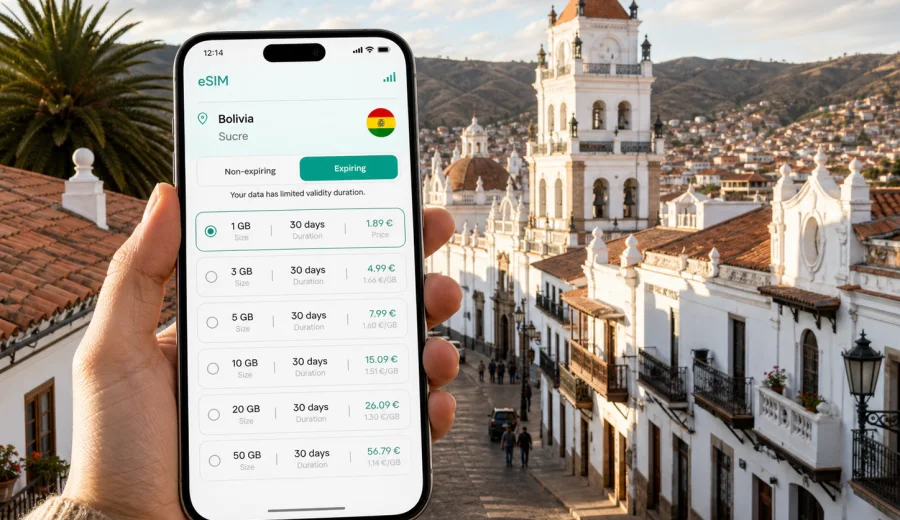
Sucre eSIM: mobile connection and internet for your trip
Sucre is one of Bolivia's most walkable cities, but a smooth visit still depends on reliable mobile internet. You may need maps when you leave Alcantari International Airport, a messaging app to confirm a hotel check-in, a translation tool in the market, or access to booking details before a bus trip to Potosi or Tarabuco. An eSIM helps you prepare mobile data before you start looking for a local SIM card or asking for Wi-Fi passwords.
This guide focuses on practical connectivity in Sucre: arrival, local transport, historic-center walks, hotel stays, business trips, short stopovers, and onward travel in Bolivia. It explains how to plan an eSIM tariff for the city, what to check on your device, and how to avoid small connection problems when you are tired, carrying luggage, or moving between unfamiliar streets.
Why mobile internet matters in Sucre
Sucre is compact compared with Santa Cruz de la Sierra or La Paz, but travelers still move between places where online access is useful: the airport outside the city, the bus terminal, the historic center, Recoleta, La Glorieta, Parque Cretacico, hotels, cafes, language schools, and tour meeting points. Many central streets are easy to explore on foot, yet a live map helps when you need to judge distance, slope, traffic, or the safest route back after dark.
Mobile internet is especially useful in Sucre for:
- checking a pickup location after landing at Alcantari International Airport;
- sharing your live location with a hotel, guide, or colleague;
- comparing taxi routes from the airport, bus terminal, and historic center;
- using maps on streets where colonial blocks can look similar;
- confirming restaurant, museum, and tour opening hours before walking uphill;
- translating menu items, signs, and transport instructions;
- keeping boarding passes, hotel bookings, and bus tickets available;
- calling through messaging apps when your travel eSIM tariff does not include a regular phone number.
Sucre rewards slow travel, but the first hours after arrival are not always slow. If you land late, come by bus from Potosi, or arrive after a long domestic route through Santa Cruz or La Paz, having mobile data ready can make the first transfer and check-in much calmer.
City scenarios where eSIM is useful
An eSIM is not only for heavy data users. In Sucre, it is often about having enough data at the right moments.
| Sucre travel moment | Why mobile data helps | Practical tip |
|---|---|---|
| Airport arrival | The airport is outside the city, so transfer details matter. | Save your hotel address and keep a map available before you leave the terminal. |
| Historic-center walks | Streets are walkable but can be confusing on first arrival. | Mark Plaza 25 de Mayo, your hotel, and your return route. |
| Recoleta viewpoint | The route can involve uphill walking and changing light. | Check walking time and arrange the return before your battery drops. |
| Business meetings | You may need calendars, maps, files, and messaging all day. | Choose a data volume that covers maps, calls, and document access. |
| Day trips | Tarabuco, Potosi, and nearby valleys require earlier planning. | Download offline maps, then use mobile data for updates and messages. |
| Bus terminal transfers | Departure gates and timing can change. | Keep ticket screenshots, booking references, and contact numbers ready. |
The advantage of preparing an eSIM is that you can choose a tariff for the destination before the trip, install it on a compatible device, and use mobile data when local conditions allow. You do not have to replace your physical SIM card, and you can usually keep your main number active for calls or messages if your phone supports dual SIM use.
Arrival in Sucre: airport, transfer, and the first hour
Sucre is served by Alcantari International Airport, which is located outside the city. The drive into the center can take time depending on road conditions, traffic, and where you are staying. This is a typical moment when travelers open several apps at once: a map, hotel booking, messaging, email, and sometimes a translation tool.
Before you leave the airport, check four things:
1. Your eSIM profile is installed on the phone you will use in Sucre.
2. Mobile data is assigned to the eSIM line if you want the travel tariff to handle data.
3. Data roaming for the eSIM line is enabled if the tariff instructions require it.
4. Your hotel address is saved in Spanish and in map form.
If you arrive by bus, the same logic applies. The bus terminal can be busy, and you may need to contact your hotel, choose a taxi, or find the correct direction for a short local ride. Public Wi-Fi is not a connection plan; it is a backup when available. An eSIM tariff gives you a more predictable way to use mobile data during the parts of the journey where you are carrying luggage, tired, or moving between unfamiliar streets.
Choosing data volume for a Sucre trip
Your data needs depend on how you travel. Sucre is a city where many visitors use maps often but do not necessarily stream video all day. A light user may only need enough data for maps, messaging, email, and bookings. A remote worker, student, photographer, or business traveler may need more.
| Trip style | Typical data use in Sucre | What to consider |
|---|---|---|
| Weekend stopover | Low to moderate | Maps, messaging, hotel details, taxi coordination, restaurant searches. |
| 4 to 7 day city stay | Moderate | Daily navigation, tour coordination, translation, and cloud backups on Wi-Fi. |
| Study stay | Moderate to high | Messaging, maps, learning apps, and video calls mostly on trusted Wi-Fi. |
| Business trip | Moderate to high | Email, calendar, calls through apps, document previews, ride coordination. |
| Bolivia route with Sucre included | Higher | More transport planning, maps in several cities, changing hotels, onward tickets. |
If you are unsure, choose a tariff that gives you some breathing room rather than planning around the smallest possible data volume. Sucre encourages walking and exploring, and mobile data often gets used in short bursts: checking a route, sending a message, opening a booking, translating a sign, or confirming a meeting place.
What to check before you buy
Before choosing any travel eSIM tariff, confirm that your device can use eSIM and that it is not locked in a way that blocks another mobile profile. This matters more than the city you are visiting: if the phone cannot install or activate an eSIM, the tariff will not help during the trip.
Checklist before your Sucre trip:
- Check whether your device supports eSIM.
- Confirm that your phone is not locked to a carrier profile that prevents eSIM use.
- Make sure the phone software is up to date enough for eSIM installation.
- Check whether the selected tariff covers Bolivia and fits your trip length.
- Read when the validity period starts, because this can differ by tariff.
- Keep the QR code or installation details accessible before departure.
- Do not delete an installed eSIM profile unless the tariff instructions say it can be reinstalled.
Kaspersky eSIM Store is an app and website where you can choose, arrange, install, and activate an eSIM with a suitable tariff for mobile internet in an international trip. It is not a mobile operator and does not replace reading the conditions of the selected tariff. The useful habit is simple: check destination coverage, data volume, validity period, activation rules, and device compatibility before you rely on the eSIM for arrival.
Installing an eSIM for Sucre
You can install an eSIM before you travel or after you arrive, as long as you have a stable internet connection for the installation step. Many travelers prefer to install it at home or at the hotel, then activate mobile data when they are ready to use the tariff. The exact steps depend on the device and the tariff instructions.
A practical installation flow looks like this:
1. Choose Bolivia as the destination and compare tariff conditions.
2. Complete the order and open the eSIM details in your profile or app.
3. Install the eSIM on the phone you will carry in Sucre.
4. Set your primary SIM for calls if you still need your usual number.
5. Set the eSIM as the mobile data line when you are ready to use it.
6. Enable data roaming for the eSIM line if the instructions require it.
7. Test the connection with a simple page or map search before leaving your hotel or airport.
For device-specific setup, use the Android installation guide or the iOS installation guide. Keep in mind that installation and activation are different actions: installation adds the eSIM profile to your phone, while activation starts using the mobile data tariff according to its conditions.
Local movement in Sucre
Sucre is pleasant on foot, but you will still use transport. The airport is outside the city, the bus terminal is not always where first-time visitors expect it to be, and some hotels or apartments are easier to find with a live map than with a street description. Mobile internet helps you move without turning every short trip into a negotiation.
For taxi and transfer use, save these details before you start:
- hotel name and full address;
- nearest landmark, such as Plaza 25 de Mayo, Recoleta, or a university building;
- booking confirmation and contact number;
- the route in a map app;
- a Spanish version of your destination if the booking page is in another language.
For walking, download an offline map, then use mobile data for live updates. Offline maps help when the signal is weak or your data is nearly used up. Mobile data helps when you need current traffic, a changed meeting point, a restaurant status, or a quick message to the person waiting for you.
Picking the right Bolivia tariff for Sucre
Sucre does not need a separate city tariff. For a city article, the correct destination is the country the city belongs to, so your Sucre trip should be planned with a Bolivia tariff or another tariff that clearly includes Bolivia in its conditions. In Kaspersky eSIM Store, you can choose an eSIM tariff for Bolivia before your Sucre trip and compare the available data volume, validity period, and destination details before deciding.
Choose by itinerary, not only by the city name. A traveler who stays three nights near Plaza 25 de Mayo has different needs from someone who lands in Sucre, visits Tarabuco, continues to Potosi, and then flies from another Bolivian city. If your route includes several countries, check whether a regional or broader tariff is more suitable. If your route stays inside Bolivia, a Bolivia destination tariff is usually the clearer starting point.
Use these questions to choose:
- How many days will you be in Sucre?
- Will you make day trips outside the city?
- Will you use mobile data mainly for maps and messaging, or also for work?
- Will you rely on hotel Wi-Fi for heavy uploads and video calls?
- Do you need the tariff to remain active after you leave Sucre for another Bolivian city?
- Does the validity period match your actual arrival and departure dates?
The safest approach is to match the tariff to your real travel behavior. If you are a light user, avoid overbuying a very large package just because it looks comfortable. If you work remotely, navigate daily, and manage bookings on the move, avoid choosing the smallest package and hoping hotel Wi-Fi will cover every gap.
Short stays, stopovers, and trips from Sucre
Sucre is often part of a wider Bolivia itinerary. Some travelers come for a short cultural stop, some arrive for Spanish classes, and others use the city as a calmer base between busier travel segments. Popular routes from Sucre include Tarabuco for market days, Potosi for history and altitude, and longer connections toward other Bolivian cities.
For a one-day or two-day stay, prioritize:
- having the eSIM installed before arrival;
- saving your hotel and terminal locations;
- keeping mobile data available for maps and messages;
- using Wi-Fi for photo uploads and long calls;
- checking the validity start rule before activating the tariff.
Before leaving Sucre for a day trip:
1. Download offline maps for Sucre and the destination.
2. Save your accommodation address for the return.
3. Keep enough battery for navigation and messaging.
4. Check whether your selected tariff is still valid for the full day.
5. Avoid using mobile data for large uploads while away from reliable charging.
Mobile coverage can vary by route, terrain, and local network conditions. Do not assume every road segment will have the same signal quality as the city center. Prepare offline essentials first, then use eSIM mobile data when coverage is available.
Data-saving and troubleshooting habits
Sucre is photogenic, so travelers often take many pictures around white facades, churches, rooftops, viewpoints, and museums. Let trusted Wi-Fi handle heavy uploads, cloud backups, app updates, and long video calls. Use mobile data for the moving parts of the trip: maps, messages, booking details, transport coordination, and urgent itinerary changes.
If something does not connect, start with the basics. Confirm that the eSIM profile is installed, mobile data is assigned to that line, data roaming is set according to the instructions, airplane mode is off, and the phone has had a few minutes to register on an available local network. If the issue continues, use Wi-Fi to review the tariff instructions or contact support.
Quick preparation checklist
Use this checklist the day before you travel to Sucre:
- Passport, tickets, and hotel booking saved offline.
- Airport or bus terminal arrival point saved in a map app.
- Sucre hotel address saved in Spanish.
- eSIM compatibility checked.
- Bolivia tariff selected with suitable data and validity.
- eSIM installation details saved.
- Android or iOS installation steps reviewed.
- Offline maps downloaded for Sucre and any day trip.
- Cloud backups paused on mobile data.
- Power bank charged for arrival and walking routes.
This preparation protects the moments when mobile internet matters most: finding the transfer, reaching the hotel, confirming plans, and moving around the city without depending on the next available Wi-Fi network.
FAQ: eSIM and mobile internet in Sucre
Do I need an eSIM specifically for Sucre?
No. Sucre is in Bolivia, so choose a tariff that covers Bolivia or clearly includes Bolivia in its destination conditions. The city focus matters for planning how you will use data, but the tariff destination is the country or region listed in the product conditions.
Can I use an eSIM for calls and SMS in Sucre?
Many travel eSIM tariffs are designed for mobile data and do not include a regular phone number, voice calls, or SMS unless the specific tariff says otherwise. For calls and messages, travelers often use internet-based apps over mobile data.
Should I install the eSIM before flying to Sucre?
Installing before departure is often more comfortable because you can use a stable home or hotel connection and avoid setup pressure after arrival. Activation rules can vary, so read the tariff details before deciding when to turn it on.
Is hotel Wi-Fi enough in Sucre?
Hotel Wi-Fi may be enough for some tasks, but it is not available while you are in a taxi, walking to Recoleta, finding the bus terminal, or meeting a guide. An eSIM gives you mobile data for those moving parts of the trip.
How much data should I choose?
For maps, messaging, bookings, and light browsing, a modest package may be enough for a short stay. For work, frequent navigation, or a Bolivia route that continues beyond Sucre, choose more data and a validity period that covers the full itinerary.
Prepare mobile internet before you arrive
Sucre is easier to enjoy when the practical details are under control. With an eSIM-ready phone, you can land at Alcantari International Airport, reach your hotel, navigate the historic center, coordinate day trips, and keep essential messages available without searching for a physical SIM card after arrival.
Before your trip, check device compatibility, read the tariff conditions, install the eSIM while you have a stable connection, and keep the setup instructions available. When you are ready to plan mobile data for the city and your wider Bolivia route, you can prepare an eSIM tariff for your trip to Sucre through Kaspersky eSIM Store.