Travel connectivity guide
Sulaymaniyah eSIM: Mobile Internet Guide
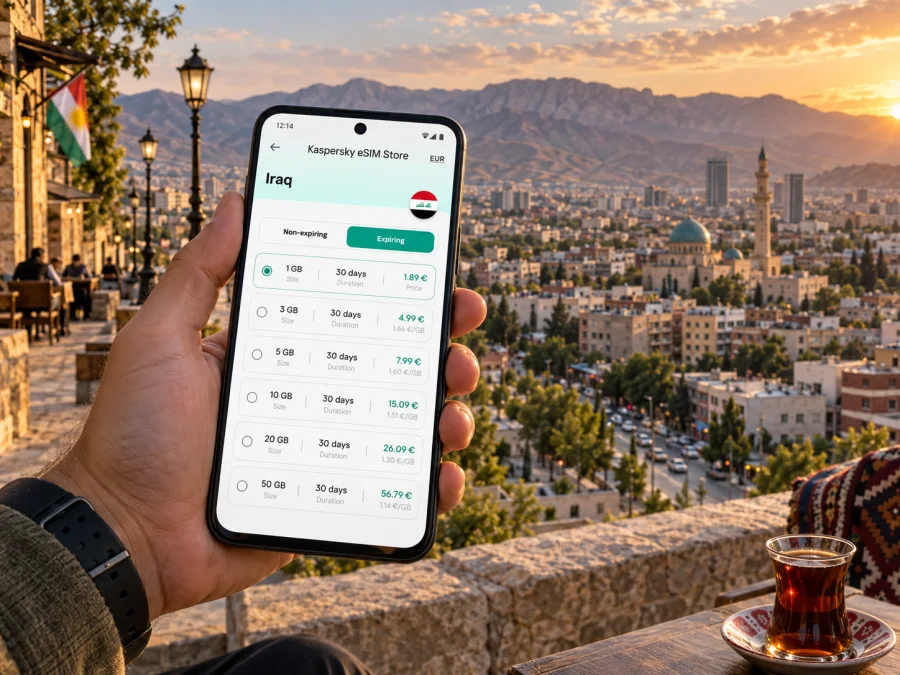
Sulaymaniyah eSIM: mobile connection and internet for your city trip
Sulaymaniyah, also widely called Slemani, is a city of lively central streets, cafés, bookshops, markets and mountain views. A reliable way to check a map, message your hotel or arrange your next ride can make the first hours in an unfamiliar place easier. An eSIM can provide mobile data without swapping out your physical SIM, provided your device supports eSIM and the selected plan is available for Iraq.
This guide focuses on using mobile internet around Sulaymaniyah: getting from the airport into town, finding your hotel, moving between neighbourhoods, planning a workday and making a short excursion beyond the city. It also explains what to prepare before you travel so that connectivity is useful without becoming another thing to manage.
Before you arrive: make a simple connectivity plan
Start with the tasks you expect to handle online: maps, messages, email, bookings and possibly calls through internet apps. Your data needs depend on your habits and length of stay, so compare the plan terms against your itinerary rather than choosing by allowance alone.
- Destination: confirm the plan covers Iraq and your travel dates.
- Data and validity: estimate map, messaging and work use; check when the plan starts and how long it lasts.
- Device: confirm eSIM support and that your phone is not carrier-locked. Check whether your device supports eSIM.
- Setup: complete steps that need a stable connection before departure, or save instructions offline.
- Primary SIM: decide whether to keep your regular number available and review roaming settings with your home carrier.
A travel eSIM is generally intended for data. Do not assume it includes a local number, ordinary calls or SMS unless the selected plan says so. Internet messaging may work over data, depending on your apps and account settings.
Landing in Sulaymaniyah and getting oriented
Jalal Talabani International Airport, formerly known as Sulaymaniyah International Airport, serves the city. Check the name on your ticket and current airport information. Before leaving, confirm your ride: arrange a pickup, ask your hotel for a recommendation or agree a taxi locally. Keep the hotel name, address, booking details and contact number saved offline.
Mobile data can help check the route and share your arrival time, but it does not replace confirming the destination with the driver. If a street name is unfamiliar or a map pin seems imprecise, show the saved address and a nearby landmark. Reception and speed can vary by location; offline map details are useful if the route does not load.
Moving around Sulaymaniyah
Think of Sulaymaniyah as a set of destinations rather than one compact sightseeing loop. The centre is a useful base for many visits, while hotels, meeting venues and viewpoints may be farther apart. Check a route before setting out and leave time for traffic, finding the entrance and confirming the final streets locally.
Walking works for short central trips when weather, distance and traffic make it comfortable. For longer journeys, arrange a taxi through your accommodation or use a locally familiar option. App availability and payment methods can change, so keep a backup and do not assume a particular ride-hailing service operates everywhere.
| Trip | How data helps | Backup |
|---|---|---|
| Airport to hotel | Map pin, arrival message | Saved address and pickup contact |
| Hotel to meeting | Route and updated ETA | Written address and time buffer |
| Central walk | Find a venue or entrance | Screenshot and street name |
| Evening return | Share pickup point | Hotel contact and agreed meeting spot |
| Excursion | Coordinate where service exists | Offline map and return plan |
A suggested route does not confirm that a road is open or comfortable to walk. Check before leaving, follow local traffic and stop somewhere safe before consulting your phone.
Central Sulaymaniyah: streets, market and meeting points
The central market and older streets reward an unhurried visit. Choose a clear meeting point—a recognisable corner, entrance or nearby café—instead of trying to follow a moving pin through crowded lanes. Save the point and the route back to a main street.
Salim Street is a useful orientation point, with cafés and bookshops among the everyday stops. Amna Suraka, the Sulaymaniyah Museum and central market visits each deserve time; check current opening arrangements locally before planning a tightly timed day around a venue.
Use your phone to save a location, translate a phrase or send a message, but keep it secure in busy places. If data is slow, use a screenshot and ask your accommodation or a nearby shop for help with the next turn. For a first visit, start from the hotel, explore one central area, take a break and decide whether to continue on foot or arrange a ride.
Choosing an eSIM plan for a city stay
Your needs depend on the length of stay, use of maps and video, work requirements and whether the trip continues beyond Sulaymaniyah. Compare the actual data allowance, validity, destination coverage and activation conditions. A short break with light messaging differs from a week of navigation, photo sharing and remote work.
Kaspersky eSIM Store is an app and website where you can choose, complete and activate an eSIM with a suitable data plan for an international trip. The plan’s stated terms and local network determine where and how service is available. To review options for this destination, choose a data plan for your trip to Iraq.
Before choosing, consider whether you will use data mainly for maps and messages or also for video calls and uploads; how many days you need; whether your route includes other Iraqi destinations; and whether your unlocked, compatible phone is ready for digital SIM setup. Review the terms before checkout and keep a copy accessible. A larger allowance is not automatically a better fit if it expires too soon or does not match your route.
A practical day of mobile internet in Sulaymaniyah
Morning: hotel to first stop
Check the day’s venue details with your host, save the address and map pin, and message your driver or companion with the agreed destination. Review a walking route in advance and carry a power bank if you expect to navigate frequently.
Midday: market and lunch
Stop somewhere safe before checking a map in crowded streets. Save the restaurant or meeting point in writing and share the location only after confirming the entrance. Send a changed plan to anyone expecting you.
Afternoon and evening
Check a museum’s current opening arrangements and location before travelling. Agree on a clear evening pickup point, keep your accommodation address saved and allow time for the return journey. Mobile internet should support the day, not dictate its pace.
Hotels, meetings and business travel
For work travel, save hotel, office and conference locations separately. Put the venue name and full address in calendar entries; a map link is useful, but a written address helps if an app opens in the wrong language or a pin lands at a neighbouring entrance.
Check the hotel’s Wi-Fi and your plan’s data terms before relying on either for video meetings. Mobile reception indoors varies. Keep large downloads and updates for a reliable Wi-Fi connection, and use mobile data for essential messages, route changes and short calls where appropriate.
For a day with several appointments, add each venue address and contact to your calendar, save its location, leave a traffic buffer and tell the next host if your arrival time changes. Carry a charging cable or power bank: navigation, hotspot use and video can drain a battery quickly. A travel eSIM is generally a data option, not a replacement for your business number; check roaming costs with your home carrier if you need ordinary calls or verification texts.
Short stopovers and trips from Sulaymaniyah
A brief stopover calls for fewer moving parts. Keep onward travel details, accommodation and one or two priority stops together on your phone. Before leaving the centre, consider the return journey and allow a comfortable margin; do not assume that traffic or transport will match a map estimate.
With more time, visitors may consider destinations such as Dukan Lake or Halabja, depending on current conditions, transport and itinerary. These are separate journeys, not neighbourhood extensions. Confirm route and return arrangements with a trusted local contact, save destination details offline and check whether your plan’s coverage description suits the route. Data can help coordinate, but cannot guarantee service on every road.
Before an excursion, save the destination in text and on the map, agree transport and return plans, charge your phone, download offline map details and tell someone your itinerary.
Installation and activation: prepare before the travel day
Set aside a few minutes before travel rather than starting setup in a taxi or at check-in. Use a stable internet connection for any steps that require one. Follow the guide for your device: eSIM installation steps for Android or eSIM installation steps for iOS.
Menus vary by model and operating system. Add the profile using the method provided, label the line clearly and follow the plan’s activation instructions. Do not delete a profile simply because it is not connecting; check plan terms, the selected data line and the device settings first.
Confirm that the phone supports eSIM and is unlocked; you know which line handles data, calls and texts; you understand when the plan begins; and you can access instructions securely. Activation timing differs, so do not assume that adding the profile starts validity—or that it does not.
Keep data use predictable
Download offline maps and tickets in advance, turn off automatic photo backup over mobile data and leave large updates for trusted Wi-Fi. Messaging and text directions usually use less data than video, though usage varies by app and settings.
Check the remaining allowance periodically, limit background downloads and reserve video calls or large uploads for Wi-Fi where practical. Save destinations before you head out, and confirm that your plan still fits if the itinerary changes. Keep essential phone functions available while adjusting only automatic downloads and background use.
If the connection is slow or unavailable
A problem does not always mean the eSIM profile failed. Confirm the eSIM is enabled, selected for mobile data if required, and configured according to the plan’s instructions. Move to a clearer signal area and allow the phone to reconnect.
If the issue continues, check that the plan covers Iraq and is within its validity period, review the device settings in the installation guide, and restart only if the guide recommends it. Use hotel Wi-Fi or an offline map for immediate needs, then contact support through the service if the plan and settings appear correct.
Reception can vary between buildings, neighbourhoods and roads outside the city. Keep a written destination and hotel contact available in case an app or weak-signal area interrupts navigation.
Frequently asked questions
Is an eSIM useful if I am staying mostly in central Sulaymaniyah?
It can be useful if you want mobile data for maps, messages, bookings and changing plans without swapping your physical SIM. Whether it suits you depends on your phone, the available Iraq plan and its terms.
Can I use the eSIM for calls and text messages?
Treat it as a data plan unless the specific plan explicitly includes voice or SMS. You may be able to use internet calling and messaging apps over data. Your regular SIM may still be needed for ordinary calls or verification texts; check roaming conditions with your home carrier.
Will it work throughout Sulaymaniyah and on every road outside it?
No plan should be assumed to work in every building or at every point along a route. Check the coverage description for your plan and keep offline directions for travel beyond the central city.
Should I install the eSIM before departure?
Preparing in advance can reduce tasks after arrival, but the correct timing depends on the plan’s installation and activation instructions. Read those terms carefully and use a stable connection for any required setup.
What if I only have a few hours in the city?
Prioritize one or two central stops, save the return address and confirm the airport transfer before you leave. Keep a time buffer for traffic and the journey back; use a map as a guide and confirm transport locally.
Do I need mobile data to use a map?
Map apps differ, but many allow you to download an area before travelling. Save the route or map while online, then keep the hotel address in text as a backup. Live traffic and updated search results may still require a connection.
A calmer way to stay oriented
For Sulaymaniyah, a useful connectivity plan fits the day: a saved airport address, clear central meeting points, enough data for navigation and messages, and offline details for trips beyond town. Review destination, data and validity terms, prepare the phone before departure and keep a backup route when service is limited.
When ready, use Kaspersky eSIM Store to compare available plan details, complete your selection and follow device activation steps. Choose an eSIM data plan for Iraq and keep its information accessible during your stay.


