
Travel connectivity guide
Suva eSIM for Mobile Internet in Fiji
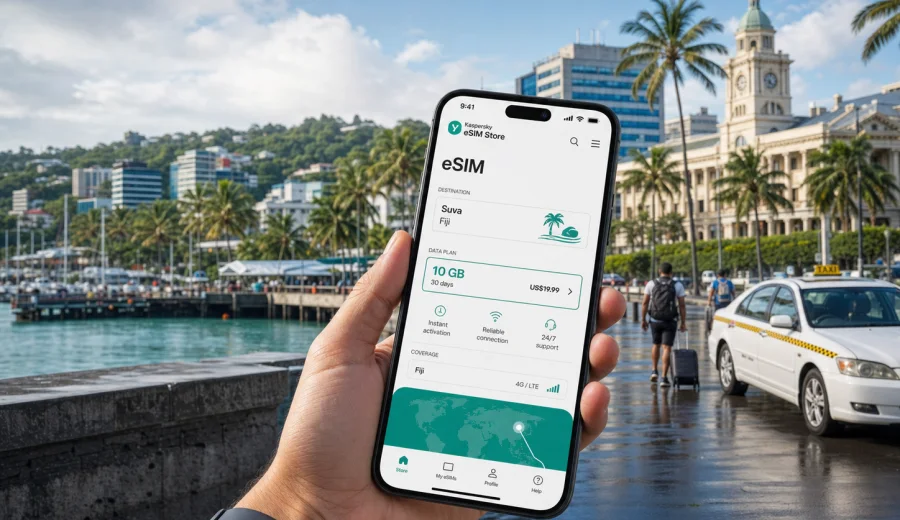
Suva eSIM: mobile connection and internet for a Fiji trip
Suva is the capital of Fiji, a working Pacific city where government offices, embassies, universities, markets, hotels, ferry links and waterfront streets sit close together. For a traveler, that makes mobile internet more than a convenience. You may need maps from Nausori International Airport, a ride to a hotel near Victoria Parade, a message to a host in Laucala Bay, or a quick check of ferry and bus plans before leaving the city.
An eSIM can help you prepare mobile connection for Suva without buying a physical SIM card after arrival. You choose a prepaid data plan for Fiji, install the eSIM on a compatible device, and use mobile data for navigation, messengers, bookings, banking apps and work tools during the trip. Conditions depend on the selected plan and local network availability, so the right approach is to check the destination, data allowance and validity period before you travel.
This guide focuses on Suva city scenarios: arrival, local movement, taxis, hotels, meetings, short stopovers, walking routes, wet-weather plans and trips from the capital to other parts of Viti Levu.
Why mobile internet matters in Suva
Suva is compact on a map, but the practical travel rhythm changes quickly. A meeting can be in central Suva in the morning, lunch near the waterfront, an afternoon appointment around Laucala Bay, and an evening return through traffic toward Tamavua, Samabula or a hotel outside the center. If your mobile connection is not ready, small tasks become slower:
- confirming an airport pickup;
- showing a hotel address to a taxi driver;
- checking whether a restaurant or office is open;
- following map directions in streets that may not be familiar;
- receiving changes to a meeting time;
- using a banking app or payment confirmation;
- contacting family after arrival;
- managing onward travel to Nadi, Pacific Harbour or another island connection.
Public Wi-Fi can help in a hotel or cafe, but it is not always available at the moment you need it. An eSIM is useful because the setup can be prepared before the trip, and the same phone can keep your primary SIM for calls or messages while the eSIM handles mobile data.
Suva arrival: what to prepare before landing
Many visitors reach Suva through Nausori International Airport, while others arrive in Fiji through Nadi and continue to Suva by road or domestic flight. In both cases, the first hour often includes practical tasks: opening maps, checking the hotel address, messaging a driver, and confirming the route.
Before you travel, make a short connectivity checklist:
- check that your phone supports eSIM;
- check that the device is not locked to one mobile carrier;
- choose a Fiji data plan that matches your trip length;
- install the eSIM while you still have reliable Wi-Fi;
- keep the QR code or installation details available offline;
- decide which SIM will be used for mobile data after arrival;
- save your hotel address, booking reference and key contacts.
If you prefer to install the eSIM after landing, make sure you will have a stable internet connection for the setup process. Airport Wi-Fi, hotel Wi-Fi or another mobile connection may be needed to download and install the eSIM profile.
Where eSIM helps during a Suva stay
The strongest reason to prepare mobile internet for Suva is not one dramatic moment. It is the number of small decisions that depend on being online. A reliable data setup can make the city easier to manage from the first ride to the last transfer.
| Suva situation | Why mobile data helps | Practical tip |
|---|---|---|
| Arrival at Nausori | Maps, pickup messages and hotel confirmation | Save the address in advance and keep mobile data ready for the transfer |
| Central business meetings | Calendar changes, email and document access | Choose a plan with enough data for cloud files and calls |
| Walking near the waterfront | Navigation, weather checks and restaurant searches | Download an offline map as a backup |
| Hotel check-in | Booking apps, ID confirmations and messages | Keep your reservation details available offline too |
| Trips to Pacific Harbour or Nadi | Route planning and contact with drivers | Check plan validity for the full route inside Fiji |
| Wet-weather days | Transport updates and taxi coordination | Keep a power bank if you rely heavily on maps |
Suva is also a city where weather can change quickly. When rain affects walking plans, mobile internet helps you switch to a taxi, message a guide, change a dinner booking or choose a closer stop.
Choosing data for Suva: light, standard or work-heavy use
The best eSIM data allowance depends on what you actually do in the city. A traveler who uses maps and messengers needs much less than someone who takes video calls from a hotel room or uploads large files after a business event.
Use this simple model:
- Light use: maps, text messages, occasional searches, ride coordination and email checks.
- Standard travel use: maps, messenger calls, booking apps, social media, photos, restaurant searches and regular browsing.
- Work-heavy use: video meetings, cloud documents, laptop tethering, large uploads and frequent online collaboration.
For a short stopover or two-day business visit, a smaller data package may be enough if you use hotel Wi-Fi for large updates. For a week in Suva with day trips and regular navigation, choose more data and a validity period that covers the full stay. If you plan to use your phone as a hotspot for a laptop, check whether tethering is allowed in the plan conditions and expect data use to rise quickly.
Districts and routes where connection is useful
Suva travel is often organized around a few practical zones rather than one tourist strip. The city center, the waterfront, Laucala Bay, Samabula, Tamavua and nearby residential areas can all be part of the same trip. Mobile internet helps because addresses may be described by landmarks, building names or road sections rather than by a format you know from home.
In the central area, you may need data for walking directions between offices, cafes, banks and shops. Around Laucala Bay, mobile data can help with campus visits, events and longer taxi routes. In Samabula and Tamavua, it is useful for sharing a live location with a driver or checking the best route back to the hotel. Near the waterfront, it helps with restaurant bookings, weather checks and photo backups.
If you are in Suva for work, set up your eSIM before the first meeting. It is easier to solve connectivity questions in advance than while standing outside an office, looking for a Wi-Fi password.
How Kaspersky eSIM Store fits into the trip
Kaspersky eSIM Store is an app and website where you can choose, arrange and activate an eSIM with a suitable data plan for mobile internet during an international trip. For Suva, the destination to select is Fiji, because a city article uses the country plan page for the country the city belongs to.
Before you confirm a plan, review the data volume, validity period, destination and any plan conditions. If your trip includes only Suva, a Fiji plan may be the relevant option. If your route includes several countries, compare whether a country, regional or global option fits the itinerary better.
When you are ready to prepare the connection, you can review the available mobile internet options for Fiji and choose a plan that matches your Suva schedule. This is especially useful if you want the eSIM arranged before the flight, so arrival tasks do not depend entirely on airport or hotel Wi-Fi.
Step-by-step: setting up an eSIM for Suva
The setup flow is simple, but it is worth doing carefully. A few minutes of preparation can prevent confusion after a long flight or during a tight transfer.
1. Check your device. Confirm that your phone or tablet supports eSIM and is not locked to a single carrier.
2. Choose Fiji as the destination. For a Suva article, the correct destination is the country where Suva is located.
3. Select a plan. Compare data allowance, validity period and conditions.
4. Install the eSIM. Follow the instructions on your device, using a stable internet connection.
5. Set mobile data. Choose the eSIM profile for mobile data when you want to use it in Fiji.
6. Keep your main SIM if needed. You can often keep your regular SIM active for calls or SMS, depending on your device and home operator settings.
7. Monitor data use. Use phone settings and the app or profile information to track consumption.
For installation details, use the Android eSIM installation guide or the iOS eSIM installation guide. The exact screens can differ by device model and operating system version, so follow the instructions shown on your phone.
Device compatibility before you buy
Not every phone supports eSIM. Some phones also have regional versions with different eSIM support, and some devices can be locked by a mobile carrier. Check this before you buy a plan, not after you arrive in Suva.
Check your device if you are not sure whether your smartphone or tablet can use eSIM. Also confirm that the device can connect to mobile networks in Fiji and that you know where to change the mobile data line in settings.
Useful checks:
- your exact device model supports eSIM;
- the device is not carrier-locked;
- the operating system is updated enough for eSIM setup;
- you know whether your device supports dual SIM with eSIM and physical SIM together;
- you have enough battery and a stable internet connection during installation.
Suva travel scenarios and data planning
Different Suva trips create different mobile internet needs. Use the city plan below to estimate what matters most.
| Trip type | Likely data use | What to prioritize |
|---|---|---|
| One-day stopover | Low to moderate | Maps, taxi messages, hotel or ferry confirmations |
| Weekend in Suva | Moderate | Navigation, restaurants, photos, messenger calls |
| Business trip | Moderate to high | Email, documents, video calls, hotspot use if allowed |
| University or event visit | Moderate | Campus maps, event updates, messaging groups |
| Suva plus Viti Levu route | Moderate to high | Longer navigation, transfer coordination, weather checks |
For light travel, mobile internet is mostly about orientation and communication. For business travel, it is about continuity. You may need to join a call from a hotel lobby, send documents before a meeting, or receive a new address while already on the road. In that case, choose more data than you would for a sightseeing-only trip.
Transport, taxis and navigation
Suva is easier when your phone is ready for practical movement. You may use taxis, buses, hotel transfers or private drivers. Online maps help estimate routes, but local traffic, weather and road works can affect travel time.
Mobile internet is helpful for:
- sending your exact location to a driver;
- checking the route from Nausori Airport to the hotel;
- finding a nearby ATM, pharmacy or supermarket;
- saving the address of an office or embassy;
- translating a short message if needed;
- checking whether a meeting point is walkable in rain;
- planning a return route after dinner.
Do not rely on one app or one connection method. Save key addresses offline, keep screenshots of confirmations, and carry a charger or power bank if you will be out all day.
Hotels, meetings and remote work in Suva
Hotel Wi-Fi is useful, but it does not cover every moment of the day. You may need mobile data in the taxi before check-in, in a lobby while waiting for a room, or outside a meeting venue when plans change. If your trip includes remote work, build a small data buffer into your plan.
For work-heavy days, check:
- whether video calls are necessary or can be audio-only;
- whether you need to upload presentations or large files;
- whether your laptop will use your phone as a hotspot;
- whether the plan conditions allow tethering;
- whether your meeting locations have reliable Wi-Fi as a backup;
- whether your phone can keep the eSIM active while your primary SIM receives authentication codes.
If you expect two-factor authentication by SMS, keep your home SIM settings under control. International roaming charges can depend on your home operator, so check those conditions before the trip.
Short stopovers in Suva
A short stay can still require a good connection. If you have only a few hours between airport arrival, a meeting and a return transfer, losing time to Wi-Fi login pages or SIM-card counters can be frustrating. With an eSIM installed in advance, you can focus on the route.
For a Suva stopover, prepare:
- hotel or meeting address saved offline;
- driver contact details;
- map of central Suva;
- eSIM installed and ready for mobile data;
- screenshots of flight, ferry or transfer confirmations;
- battery above 50 percent before leaving the airport or hotel.
Keep the plan simple. You probably do not need a large data allowance for one day unless you will take video calls, stream media or use a laptop hotspot.
Trips from Suva: staying online beyond the capital
Many travelers use Suva as a base for another part of Fiji. You might continue to Pacific Harbour, return across Viti Levu toward Nadi, visit a coastal area, or connect to a ferry. For these routes, check that your data plan covers Fiji as a destination and remains valid for the whole trip.
Mobile internet can help with:
- driver coordination for longer transfers;
- weather checks before road or sea travel;
- hotel messages outside Suva;
- route changes if rain slows movement;
- staying in touch with family during a day trip;
- confirming departure times and pickup points.
Coverage and speed can vary by location, local network conditions, terrain, building structure and congestion. Keep important documents available offline and avoid leaving critical uploads until you are moving between areas.
Practical data-saving tips for Suva
You can make a moderate data allowance last longer with a few settings:
- download offline maps before arrival;
- disable automatic cloud backup on mobile data;
- restrict app updates to Wi-Fi;
- send compressed images in messengers when possible;
- use audio calls instead of video calls when mobile data is limited;
- close navigation after the route is finished;
- check phone data usage every day;
- use hotel Wi-Fi for large downloads if it is reliable.
This is especially useful in Suva because travelers often switch between business tasks, city movement and day trips. A data plan that looks generous can drain quickly if cloud sync, video calls and hotspot use run in the background.
Quick checklist before your Suva flight
Use this checklist the day before departure:
- My phone supports eSIM and is not carrier-locked.
- I selected Fiji as the destination for the Suva trip.
- The data allowance matches my expected maps, messages, calls and work use.
- The validity period covers arrival, the full stay and departure day.
- I know how to set the eSIM as the mobile data line.
- I saved hotel, meeting and transfer details offline.
- I downloaded an offline map of Suva.
- I kept installation instructions available in case I need them.
- I checked whether my primary SIM should stay on or be limited abroad.
If any item is unclear, solve it before travel. It is easier to read instructions and compare plan details at home than while searching for a connection after landing.
Common questions about eSIM in Suva
Is an eSIM useful if my hotel has Wi-Fi?
Yes, because hotel Wi-Fi only helps when you are at the property and logged in. Mobile data is useful for airport transfers, taxis, walking routes, restaurant bookings, meeting changes and day trips around Suva.
Does an eSIM give me a local phone number in Fiji?
Usually, travel eSIM plans for mobile internet are data-focused. Voice calls and SMS are not included unless the selected plan conditions say otherwise. You can use internet-based calling and messaging apps over mobile data.
Should I install the eSIM before arriving in Suva?
Installing before travel is often more convenient because you can use stable Wi-Fi and take your time. Activation timing and data validity depend on the selected plan conditions, so read them before setup.
Can I keep my usual SIM active?
Many modern phones allow a primary SIM and an eSIM profile to be used together. You can often keep your usual SIM for calls or authentication messages while using the eSIM for mobile data. Check your device settings and home operator roaming costs.
What if I run out of data?
Check whether your selected plan can be topped up or whether you need another plan. Reduce background data use, switch large uploads to Wi-Fi and monitor data consumption in your phone settings.
Is eSIM only for tourists?
No. It can also help business travelers, conference visitors, students, family visitors and anyone who needs mobile internet in Suva without handling a physical SIM card on arrival.
Choose an eSIM plan for your Suva trip
Suva is a practical city: your connection supports airport arrival, local transport, meetings, hotel logistics, waterfront walks and onward travel around Fiji. Prepare the eSIM before you fly, check device compatibility, choose a data allowance that fits your plans, and keep offline backups for essential details.
To get ready for the trip, choose a suitable eSIM plan for Fiji in Kaspersky eSIM Store, install it on a compatible device, and use it for mobile internet while you move through Suva and beyond.