
Travel connectivity guide
Swaziland eSIM for mobile internet
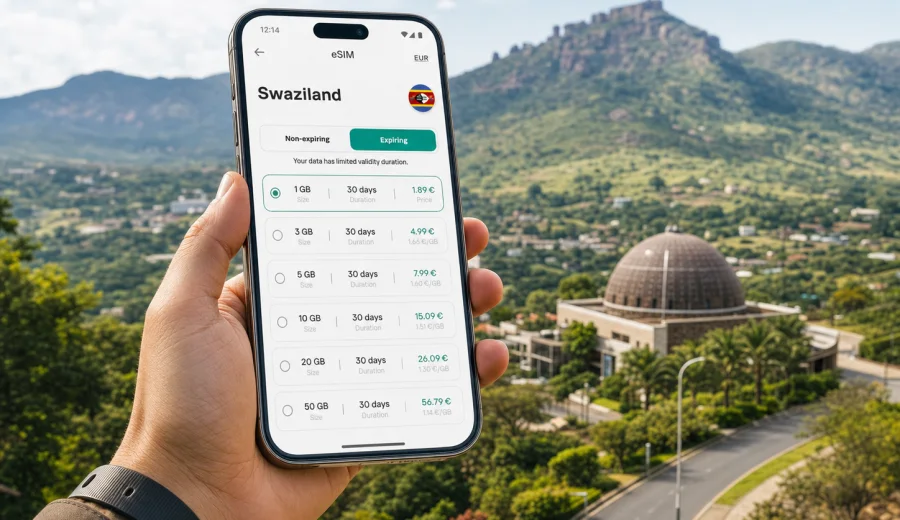
Swaziland eSIM: mobile connection and internet for your trip
Swaziland, also widely known as Eswatini, is a compact country where travel days can move quickly: a morning in Mbabane, an afternoon in the Ezulwini Valley, a stop in Manzini, and then a drive toward nature reserves, craft markets, border posts, or mountain viewpoints. For this kind of route, mobile connection is not just a convenience. It helps you use maps, call a ride, message a host, check opening hours, translate details, and keep travel documents close at hand.
An eSIM can make that preparation simpler. Instead of looking for a physical SIM card after arrival, you can choose a data plan before the trip, install it on a suitable device, and use mobile internet when the plan is active and network conditions allow. Kaspersky eSIM Store is an app and website where you can quickly choose, arrange, and activate an eSIM with a suitable data plan for mobile internet during an international trip.
This guide explains how to plan mobile internet for Swaziland, when an eSIM is useful, what to check before purchase, how much data different travelers may need, and how to avoid common mistakes with roaming, public Wi-Fi, and device settings.
Why mobile internet planning matters in Swaziland
Swaziland is small on the map, but your online needs can change from one hour to the next. In towns you may want reliable access to navigation, banking apps, hotel messages, and restaurant information. On rural roads you may want offline maps, saved booking confirmations, and the ability to message if plans change. At border crossings, airports, or long-distance bus stops, a working data connection can save time when you need to check addresses, confirm transfers, or contact a driver.
Mobile internet is especially useful in these travel situations:
- arriving at King Mswati III International Airport and checking onward transport;
- moving between Mbabane, Manzini, Ezulwini, and Lobamba;
- using maps for self-drive routes through valleys and mountain areas;
- keeping in touch with accommodation hosts or tour organizers;
- paying online, checking bank notifications, or receiving security codes;
- sharing your location with family or colleagues;
- translating signs, menus, or short messages;
- checking weather before outdoor plans.
The practical issue is not only whether you can get online. It is whether you can do it without spending your first hour in the country solving a connectivity problem. An eSIM helps because most of the preparation can happen before departure: you choose the destination, review the available plan conditions, install the eSIM profile, and know which line should be used for mobile data.
eSIM, roaming, local SIM, and Wi-Fi: what changes for the traveler
There are several ways to get internet in Swaziland. None of them is perfect for every trip. The right option depends on your device, budget, trip length, route, and how much you rely on mobile data.
| Option | When it can work well | What to check before relying on it |
|---|---|---|
| Standard roaming | Short trips where your home operator has clear roaming terms | Daily fees, data limits, speed restrictions, and billing rules |
| Local physical SIM | Longer stays where you want a local number or local retail support | Store location, registration rules, opening hours, and phone SIM lock status |
| Public Wi-Fi | Hotels, offices, cafés, or planned stops | Availability, quality, privacy, and whether you need internet while moving |
| eSIM data plan | Travelers who want mobile internet without changing a physical SIM card | Device support, plan conditions, data amount, validity period, and activation timing |
For many visitors, eSIM is most useful as a practical travel data tool. It does not need to replace every other option. You may still use hotel Wi-Fi for large downloads, keep your primary SIM active for calls or banking messages, and use the eSIM line for maps, chat, email, and travel apps. The benefit is that you can separate your travel data plan from your regular SIM and manage it without visiting a physical store.
Typical data needs for a trip to Swaziland
Your data use depends less on the country and more on behavior. Navigation, messaging, email, and booking apps use relatively modest amounts of data. Video, cloud photo backup, video calls, and hotspot sharing can use much more. Before choosing a plan, estimate your realistic daily pattern rather than choosing only by price.
| Traveler profile | Common online activity | Practical data planning note |
|---|---|---|
| Light user | Maps, messengers, email, occasional browser searches | A smaller package may be enough if video and backups stay on Wi-Fi |
| Active traveler | Navigation, ride coordination, social media, frequent photo sharing | Choose more data if you will be moving between towns every day |
| Remote worker | Email, documents, calls, hotspot for laptop | Check whether tethering is allowed in the plan terms and keep a reserve |
| Family or group organizer | Messaging, bookings, maps, shared itinerary, location sharing | One person may use more data than the rest because they coordinate logistics |
| Content-heavy user | Reels, video uploads, cloud sync, long video calls | Use hotel Wi-Fi for heavy media or choose a larger package |
A simple rule helps: use mobile data for tasks that matter while you are moving, and save heavy downloads for stable Wi-Fi. Download offline maps, travel documents, and entertainment before the trip. Turn off automatic photo backup on mobile data. Update apps over Wi-Fi before departure. These small steps can make a moderate eSIM data plan last much longer.
What to check before choosing an eSIM plan
Before you buy any travel data plan, check the conditions carefully. eSIM is convenient, but it still depends on your device and the selected tariff terms.
Use this checklist:
- Confirm that your smartphone or tablet supports eSIM.
- Make sure the device is not locked to one mobile operator.
- Review the country or region covered by the plan.
- Check the amount of data and the validity period.
- Read when the validity period starts: after installation, after activation, or after first network connection, depending on the plan conditions.
- Check whether hotspot or tethering is allowed if you plan to share data with a laptop.
- Keep your primary SIM active only for the services you need, such as calls or SMS, and turn off data roaming on the wrong line.
- Save the eSIM installation details before departure in case airport Wi-Fi is busy or unstable.
If you are not sure whether your phone can use eSIM, check your device before choosing a plan. This is especially important for older phones, devices bought through operator contracts, and some regional device versions. A phone model name alone is not always enough; the exact version and operator lock status matter.
How to choose a Swaziland eSIM data plan
Start with the route, not with the number of gigabytes. A traveler spending two days in Mbabane with hotel Wi-Fi may need less data than a traveler driving between towns, using maps all day, and sharing a hotspot. The best plan is the one that fits your actual use pattern and trip length.
Ask yourself five questions:
1. How many days will I need mobile internet in Swaziland?
2. Will I use video calls, streaming, or cloud backup on mobile data?
3. Will I share the connection with a laptop or another traveler?
4. Do I need data only in Swaziland, or also in nearby countries on the same trip?
5. Do I want to install the eSIM before departure or after arrival?
For a short stay, a smaller data package can work if you use mobile internet mainly for maps, messages, email, and basic searches. For a longer route or work trip, choose a larger package so you do not have to reduce essential use halfway through the journey. For multi-country travel in Southern Africa, compare country and regional options where available, because a route that crosses borders may require different coverage than a Swaziland-only stay.
When you are ready to compare available options, you can choose an eSIM data plan for Swaziland through Kaspersky eSIM Store and review the plan conditions before activation.
How installation and activation usually work
The exact steps depend on your device and the selected plan, but the general sequence is straightforward. You choose the destination and plan, arrange the eSIM, install the eSIM profile on your device, and then activate mobile data according to the instructions. Some travelers install the eSIM at home before departure and activate it when they arrive. Others install it after landing, if they have stable Wi-Fi.
For installation details, follow the official device-specific guidance: use the Android installation instructions or the iOS installation instructions when setting up the eSIM on your phone.
A careful setup routine looks like this:
1. Connect to stable Wi-Fi before installation.
2. Install the eSIM profile and give it a clear label, such as “Swaziland data”.
3. Keep your primary SIM as the default line for calls if needed.
4. Set the eSIM line as the mobile data line when you want to use the travel plan.
5. Check whether data roaming should be enabled for the eSIM line, as some plans require it.
6. Turn off mobile data on the wrong SIM line to avoid accidental roaming charges.
7. Test basic internet access with a low-data page or messaging app.
Do not delete an installed eSIM profile unless you are sure it is no longer needed. In many cases an eSIM profile cannot simply be moved to another device after activation. If you change phones during the trip, the original eSIM conditions may not allow transfer.
Settings that prevent common mistakes
Many travel connectivity problems come from settings rather than from the eSIM itself. Before you leave or as soon as you arrive, check how your phone routes mobile data.
On most smartphones, you can have more than one mobile line. Your home SIM may remain active for calls or security messages, while the eSIM is used for data. This is useful, but it also means you must choose the right default line for mobile internet.
Check these settings:
- Mobile data line: set it to the eSIM when using the travel data plan.
- Data roaming: enable it only where the eSIM plan instructions require it, and avoid enabling it on your home SIM unless you intend to use roaming.
- Automatic app updates and cloud backup: set them to Wi-Fi only.
- Hotspot: use it carefully, because laptops can consume data quickly through updates and background sync.
If your phone shows no connection after setup, restart the device, confirm the eSIM line is active, check that the correct data line is selected, and verify the plan activation instructions. If needed, contact support through the channel provided by the service.
Practical travel scenarios
Different trips require different data habits. The following examples show how to think about eSIM use in Swaziland without overbuying or underestimating your needs.
Weekend visit. You arrive, go to your hotel, spend time around Mbabane or Ezulwini, and use Wi-Fi at accommodation. Mobile data is mainly for maps, messages, and quick searches.
Self-drive itinerary. You move between towns, scenic areas, and accommodation outside the city center. Download offline maps first, then use the eSIM for live updates, messaging, and route changes.
Business trip. You need email, calendar updates, authentication prompts, document access, and messaging with local contacts. If you use a laptop hotspot, check the plan terms first.
Regional route. If Swaziland is one stop between South Africa, Mozambique, or another country, look carefully at coverage. A country plan may suit a stay focused on Swaziland, while a regional option may be more practical for cross-border travel if it matches your route.
Quick data-saving checklist
- Download offline maps for Swaziland and nearby border areas.
- Save hotel addresses, booking confirmations, and tickets offline.
- Update apps over Wi-Fi.
- Download entertainment before the flight or drive.
- Turn off mobile-data cloud backup for photos and videos.
- Make sure important messaging apps are already logged in.
- Use mobile data for maps, messaging, banking checks, and urgent searches.
- Use Wi-Fi for system updates, large files, and long video calls.
- Avoid autoplay video in social apps.
- Watch hotspot use carefully.
- Check data balance regularly if the app or plan interface shows it.
- Keep a small data reserve for the final travel day.
The last point matters more than many travelers expect. The final day often includes transport changes, payment checks, boarding information, and messages with drivers or hosts. Running out of data right before departure is more inconvenient than using less social media earlier in the trip.
Common mistakes to avoid
The most common eSIM mistakes are easy to prevent:
- Buying a plan before checking whether the device supports eSIM.
- Installing the eSIM on the wrong phone.
- Deleting the eSIM profile after installation.
- Leaving the home SIM selected for mobile data.
- Forgetting that an eSIM data plan may not include a normal phone number, voice calls, or SMS.
- Starting the validity period too early because activation rules were not reviewed.
- Assuming public Wi-Fi will be available at every important moment.
- Using hotspot for a laptop without realizing how quickly background updates consume data.
Also remember that mobile coverage and speed can vary by location, network conditions, terrain, and device. An eSIM data plan helps you prepare mobile internet for the trip, but it should still be used with realistic expectations. For routes outside larger towns, keep offline maps and saved contact details as a backup.
Swaziland eSIM FAQ
Is eSIM useful for a trip to Swaziland?
Yes. It can help with maps, messaging, bookings, email, and travel apps without changing a physical SIM card.
Does an eSIM include calls and SMS?
Travel eSIM plans are usually focused on mobile data. A standard phone number, voice calls, and SMS are not included unless the selected plan explicitly says so. For calls and messages, many travelers use internet-based apps over mobile data.
Can I keep my regular SIM active?
Yes, many phones allow a physical SIM and an eSIM to be active at the same time. Check your settings so data uses the intended line.
Should I install the eSIM before departure?
Installing before departure can be convenient because you can use stable Wi-Fi. Review the plan conditions first so you understand when validity starts.
What if I travel from Swaziland to South Africa or Mozambique?
Check the destination coverage in the plan terms. A Swaziland plan is suitable for Swaziland-focused travel. If your route crosses borders, compare options that match the full itinerary where available.
Final pre-trip checklist
Before you leave for Swaziland, make sure you have:
- confirmed that your device can use eSIM and is not operator-locked;
- selected a data amount that matches your trip length and online habits;
- reviewed the validity period and activation rules;
- saved installation instructions and booking details offline;
- downloaded maps and important documents;
- set your phone to use the correct line for mobile data;
- planned how you will handle calls and SMS if your eSIM plan is data-only.
Good mobile internet planning is not about staying online every second. It is about having data available when it matters: arrival, navigation, payments, messages, changes in schedule, and the final trip day. With a prepared eSIM, you can reduce uncertainty and spend less time solving connectivity details after you arrive.
To prepare mobile internet for your trip, choose an eSIM data plan for Swaziland in Kaspersky eSIM Store, review the available conditions, install the eSIM on a suitable device, and activate it according to the plan instructions.