
Travel connectivity guide
Sweden eSIM: mobile internet for your trip
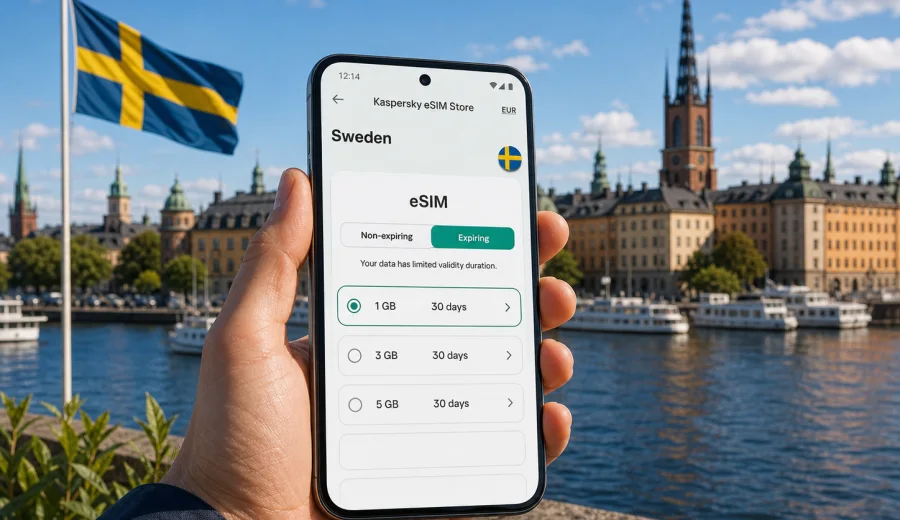
eSIM in Sweden: mobile connection and internet for your trip
Sweden is an easy country to travel through when your phone is ready before you land. You may need maps at Stockholm Arlanda Airport, train tickets in Gothenburg, ferry updates in the archipelago, hotel messages in Malmo, or weather alerts before a long drive north. An eSIM can help you prepare mobile internet for these moments without looking for a physical SIM card after arrival.
An eSIM is a digital SIM profile installed on a compatible smartphone or tablet. For a trip to Sweden, it is useful when you want mobile data for navigation, rides, banking confirmations, messengers, booking apps, and work tools. The important point is to choose a data plan that matches your route, trip length, and expected traffic use.
Kaspersky eSIM Store is an app and website where you can choose, order, and activate an eSIM with a suitable data plan for international travel. It helps you review the destination, amount of data, validity period, and price before you install the eSIM on a compatible device. It does not replace your regular mobile operator and does not usually include a local phone number, calls, or SMS unless the selected plan states otherwise.
Why eSIM is useful for mobile internet in Sweden
Sweden is highly digital in daily travel. Tickets, check-ins, payments, restaurant reservations, route planning, and support chats often work more smoothly when you have reliable mobile data. Public Wi-Fi may be available in hotels, airports, and cafes, but it is not always convenient when you are moving between transport, streets, museums, ferries, and rural stops.
With an eSIM prepared in advance, you can:
- open maps and transport apps when you leave the airport;
- message your hotel, host, colleagues, or family without waiting for Wi-Fi;
- check train platforms, ferry times, and road conditions during the day;
- use translation and payment apps where mobile data is helpful;
- keep your regular physical SIM in the phone if your device supports dual SIM use;
- avoid spending the first hour of the trip comparing physical SIM options in a shop.
The main benefit is not a promise of perfect service in every location. It is control: you can select a prepaid data plan, install it before departure, and understand the validity period before you start using mobile internet in Sweden.
Where mobile data matters most during a Sweden trip
Different travel styles create different data needs. A short city break in Stockholm is not the same as a rail trip across several regions or a winter route toward Swedish Lapland.
| Travel scenario | Typical mobile internet needs | Practical note |
|---|---|---|
| Weekend in Stockholm | Maps, transport, restaurant bookings, messaging | A modest data package may be enough if you also use hotel Wi-Fi. |
| Business trip | Email, video calls, calendar updates, hotspot use | Choose more data if you share internet with a laptop. |
| Family vacation | Navigation, tickets, photos, chat apps, children’s devices | Consider how many people will depend on one phone. |
| Road trip | Maps, weather, charging stops, ferry routes, hotel changes | Offline maps help reduce traffic use. |
| Northern Sweden route | Weather, transport alerts, messaging, translation | Plan with extra margin because travel days can be long. |
In large cities such as Stockholm, Gothenburg, Malmo, Uppsala, and Lund, mobile internet is most often needed for everyday logistics. In smaller towns and nature-focused routes, it becomes more important for planning, safety, and last-minute changes. Before you rely on any connection, download essential documents, tickets, maps, and hotel details for offline access.
eSIM, roaming, public Wi-Fi, and physical SIM cards
There is no single best option for every traveler. The right choice depends on your operator, your device, and how you use data.
| Option | When it can be convenient | What to check |
|---|---|---|
| eSIM data plan | You want mobile internet without changing a physical SIM card | Device compatibility, validity period, data volume, activation rules |
| Home operator roaming | You prefer one bill and your current number | Daily roaming fees, data caps, fair-use limits, speed conditions |
| Public Wi-Fi | You mostly stay in hotels or offices | Availability, login steps, security, coverage while moving |
| Local physical SIM | You need local telecom services beyond travel data | Store availability, registration requirements, device SIM slot |
An eSIM is especially useful when your priority is data for a trip, not a new phone number. You can usually keep your primary SIM active for calls or banking messages and use the eSIM profile for mobile data, if your device supports that setup. Check your phone’s SIM settings before departure so you know which line will handle mobile data and which one will remain the default for calls.
How to choose an eSIM data plan for Sweden
Start with the number of days in Sweden and the apps you expect to use. Data use varies widely, but a simple planning framework helps avoid underestimating your needs.
1. Count travel days, including arrival and departure days.
2. Decide whether you will use mobile data only on your phone or also as a hotspot.
3. Identify heavy apps: video, cloud backup, navigation, streaming, video meetings, and social media uploads.
4. Check whether your accommodation, office, or train has Wi-Fi you actually plan to use.
5. Choose a validity period that covers the full trip, not just the busiest days.
6. Leave a buffer for delays, route changes, and unexpected work tasks.
For light use, mobile data usually covers maps, messages, email, and occasional browsing. For moderate use, add photo uploads, ride apps, museum tickets, and regular social media. For heavy use, include video calls, laptop tethering, cloud files, and streaming. If you are unsure, it is usually better to choose a plan with a little more data than to run out in the middle of a transfer.
What to check before buying
Before you order an eSIM for Sweden, make sure the technical basics are clear. This step is small, but it prevents most installation problems.
- Your smartphone or tablet must support eSIM.
- The device should not be locked to one mobile operator.
- You need an internet connection to install the eSIM profile.
- You should know whether the plan starts at installation or at first network use.
- You should check whether data roaming must be enabled for the eSIM profile.
- You should confirm whether the plan supports hotspot use if you need it.
- You should keep the QR code or installation details available until setup is complete.
If you are not sure whether your phone supports eSIM, use the compatibility check before purchase: check your device. Device model names can be confusing, and the same phone series may have regional differences, so it is worth checking the exact model.
How to install and activate an eSIM for Sweden
The basic flow is straightforward: choose the destination, select a suitable data plan, install the eSIM profile, and set it as the line for mobile data. The exact screens depend on the phone model and operating system.
Typical setup steps:
1. Connect your phone to Wi-Fi or stable mobile data.
2. Open the eSIM details after ordering.
3. Install the eSIM by following the on-screen steps or scanning the QR code.
4. Give the eSIM a clear label, such as Sweden data.
5. Keep your primary SIM as the default line for calls if needed.
6. Set the eSIM as the line for mobile data.
7. Enable data roaming for the eSIM profile if the plan instructions require it.
8. Test the connection after arrival or when the plan becomes active.
For detailed setup, follow the Android installation guide or the iOS installation guide. Install the eSIM before your trip if possible, but activate mobile data only according to the plan instructions so you do not start the validity period earlier than intended.
When to prepare your eSIM before the trip
For most travelers, the best time to prepare an eSIM is one or two days before departure. That gives you enough time to check compatibility, install the profile, and read the activation details without rushing at the airport. If your trip is business-critical, do it earlier and keep screenshots of the setup details in a secure place.
This is also the right moment to compare the data allowance and validity period with your actual itinerary. A five-day Stockholm conference, a two-week rail route through Sweden, and a mixed Sweden-Denmark trip may need different choices. If Sweden is your main destination, you can choose an eSIM data plan for Sweden and review available options before you travel.
Practical data planning for Sweden
Sweden’s travel rhythm often encourages steady data use rather than one large burst. You may open transport apps several times per day, check weather before leaving the hotel, use maps in compact city centers, and message people across time zones. A simple daily budget helps you choose a plan more calmly.
Use this rough planning table as a practical guide, not as a guarantee:
| Usage pattern | Examples | Planning approach |
|---|---|---|
| Light | Maps, messaging, email, tickets | Choose a smaller package with enough validity for the full trip. |
| Standard | Daily navigation, browsing, photos, transport apps | Choose a medium package and disable automatic cloud backups. |
| Heavy | Video calls, hotspot, large uploads, streaming | Choose more data and monitor usage every day. |
| Uncertain | Mixed work and leisure, flexible route | Add a buffer and check whether top-up is available for the plan. |
To reduce traffic use, download offline maps for Stockholm, Gothenburg, Malmo, and any regions you plan to visit. Turn off automatic photo backup on mobile data. Update apps before departure. Save hotel addresses, ferry bookings, train tickets, and emergency contacts offline. These small steps make your eSIM data last longer.
City and region scenarios
Sweden is not only one city trip. Your data needs can change by region and season.
In Stockholm, mobile internet is useful for metro and commuter rail routes, museum bookings, ferry schedules, restaurant reservations, and navigation between islands. In Gothenburg, you may use maps, tram routes, event tickets, and harbor-area transport. In Malmo, mobile data is useful for city travel and cross-border planning if you continue toward Copenhagen, although you should check whether your selected plan covers only Sweden or a wider region.
For Swedish Lapland, plan more carefully. Winter routes may involve weather checks, transfers, activity confirmations, and longer distances between stops. In the archipelago, ferries and weather updates can shape the day. In smaller towns, you may rely on mobile data for opening hours, route changes, and accommodation messages.
If your route includes neighboring countries, check whether a Sweden-only plan is enough or whether a regional Europe option is more practical. Do not assume that every plan works across borders. The destination and coverage area are part of the tariff conditions and should be reviewed before purchase.
Common mistakes to avoid
Many eSIM problems come from small setup errors. You can avoid most of them with a short checklist.
- Do not buy before checking device compatibility.
- Do not delete an installed eSIM profile unless you are sure it can be reinstalled.
- Do not assume calls and SMS are included in a data plan.
- Do not leave mobile data assigned to your home SIM if you want the eSIM to carry data.
- Do not forget to enable data roaming for the eSIM profile when the instructions require it.
- Do not start heavy cloud backup on mobile data.
- Do not choose a validity period that ends before your departure day.
- Do not rely only on public Wi-Fi for airport transfer, maps, or urgent messages.
If something does not work after installation, check the basics first: the eSIM profile is enabled, mobile data is assigned to it, airplane mode is off, data roaming is set according to the instructions, and the device has been restarted if needed. If the issue remains, contact support with your device model, destination, and a clear description of what you see on screen.
Quick checklist before departure
Use this checklist when your Sweden trip is close:
- Confirm your phone supports eSIM and is not operator-locked.
- Choose a data volume and validity period that match the whole itinerary.
- Install the eSIM while you still have stable internet.
- Save setup details and order information.
- Label the eSIM profile clearly in phone settings.
- Keep your primary SIM for calls and SMS if you need it.
- Set the eSIM as the mobile data line when appropriate.
- Download offline maps, tickets, booking confirmations, and addresses.
- Turn off automatic app updates and cloud backups on mobile data.
- Review whether hotspot use is allowed if you plan to connect a laptop.
This checklist is especially useful if you travel with family or colleagues. One person may become the navigator, ticket holder, translator, and emergency contact, so their phone should be ready before the group leaves the airport.
FAQ about eSIM and internet in Sweden
Does an eSIM for Sweden include calls and SMS?
Usually, travel eSIM plans are focused on mobile data. They do not normally include a local phone number, voice calls, or SMS unless the selected plan clearly says so. You can use internet-based calling and messaging apps over mobile data.
Can I keep my usual SIM card active?
On many compatible phones, yes. You can keep your regular SIM for calls or messages and use the eSIM for mobile data. Check your device settings because dual SIM behavior differs between models.
Should I install the eSIM before arriving in Sweden?
Installing it before departure is often convenient because you can use home Wi-Fi and avoid airport pressure. Read the plan rules carefully so you know when the validity period starts.
Do I need data roaming for an eSIM?
Some eSIM data plans require data roaming to be enabled on the eSIM profile. Follow the instructions for your selected plan. Keep roaming disabled on your home SIM if you want to avoid unintended roaming charges there.
What if I travel from Sweden to another country?
Check the destination list of your selected plan. A Sweden-only plan may not cover Denmark, Norway, Finland, or other countries. If your itinerary crosses borders, a regional plan may be more suitable.
Can I use a hotspot with my eSIM?
Hotspot availability depends on the selected plan and device settings. If laptop tethering or sharing data with family is important, check this condition before ordering.
What happens if I use all the data?
The answer depends on the plan conditions. You may need to top up, order another plan, or switch to Wi-Fi. Monitor usage in your phone settings during the trip.
Choose an eSIM plan for your Sweden trip
An eSIM is a practical way to prepare mobile internet for Sweden when you want data for maps, transport, bookings, payments, messengers, and work tools without searching for a physical SIM card after arrival. The best result comes from careful preparation: check your device, choose the right validity period, install the eSIM with stable internet, and understand how activation works.
Kaspersky eSIM Store helps you compare destination, data amount, validity, and price before you set up your travel connection. If Sweden is your next destination, you can prepare an eSIM data plan for Sweden before departure and arrive with a clearer mobile internet plan for the trip.