
Travel connectivity guide
Switzerland eSIM: mobile internet guide
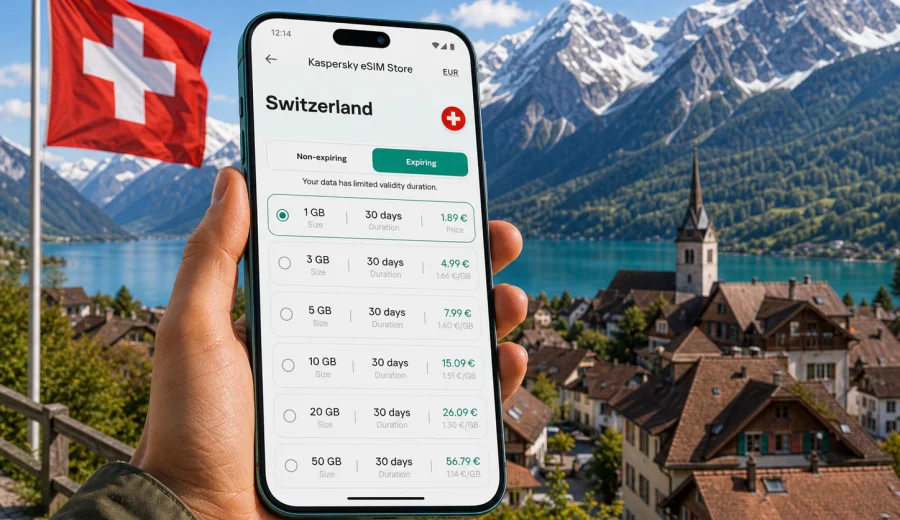
Switzerland eSIM: mobile connection and internet for your trip
Switzerland is a country where mobile internet quickly becomes part of the travel plan. You may need maps at Zurich Airport, train updates on the way to Interlaken, hotel messages in Geneva, weather checks before a mountain route, or payments and tickets in Bern. If your itinerary includes mobile internet for a trip to Switzerland, you can prepare mobile data before you travel and avoid looking for a physical SIM card after arrival.
An eSIM is a digital SIM profile installed on a compatible smartphone or tablet. For a trip to Switzerland, it can help you connect to mobile data for navigation, messaging, transport apps, bookings, and everyday online tasks. Kaspersky eSIM Store is an app and website where you can choose, arrange, and activate an eSIM with a suitable data plan for international travel. The key is to check the plan conditions, your device compatibility, and your expected data use before you go.
Why use an eSIM for Switzerland
Switzerland is compact, but travel inside the country is often mobile-first. Train platforms, mountain cable cars, lake boats, museum tickets, ski passes, parking apps, restaurant bookings, and messaging all work more smoothly when your phone has mobile data. Public Wi-Fi can be useful, but it is not always available exactly when you need a route, a QR ticket, or a taxi confirmation.
An eSIM can be useful if you want to:
- prepare mobile internet before departure;
- keep your primary physical SIM in the phone;
- avoid searching for an offline SIM shop after landing;
- use maps, messengers, email, and booking apps while moving between cities;
- see the data allowance and validity period before choosing a plan;
- reduce dependence on airport, hotel, and cafe Wi-Fi.
This does not mean you should ignore all other options. Standard roaming from your home operator may be convenient for short business trips, and a local SIM can suit longer stays if you need a local phone number. For many visitors, however, an eSIM is a practical way to keep mobile data ready for the first day and the rest of the route.
What an eSIM gives you in Switzerland
An eSIM plan for travel is mainly about mobile data. It usually does not include a regular Swiss phone number, voice calls, or SMS unless those features are stated in the selected plan conditions. For calls and messages, most travelers use internet-based apps over mobile data.
| Travel task | Why mobile data helps | Practical example |
|---|---|---|
| Arrival | You can open maps, train apps, and hotel messages without waiting for Wi-Fi. | Check the train from Zurich Airport to the city center. |
| Rail travel | Timetables and platform changes are easier to follow online. | Confirm a connection from Lucerne to Interlaken. |
| Mountain routes | Weather and transport updates can change plans quickly. | Check conditions before going to Zermatt, Grindelwald, or Titlis. |
| Work trips | Email, calendars, messengers, and documents stay available. | Join a meeting from Basel or Geneva between appointments. |
| Family travel | Group chats and shared maps are easier to manage. | Coordinate plans near Lake Geneva or in the old town of Bern. |
The exact experience depends on the chosen plan, local network conditions, device settings, and your route. Mountain valleys, tunnels, remote viewpoints, and indoor locations can affect signal quality for any mobile service. Treat mobile data as part of your travel preparation, not as a guarantee that every corner of the country will behave the same way.
How to choose a data plan for Switzerland
Start with your trip length and the way you normally use your phone. Switzerland rewards planning: a two-day city break in Zurich has different data needs from a ten-day itinerary through Geneva, Lausanne, Lucerne, Interlaken, and mountain resorts.
Use this simple estimate:
- Light use: maps, messengers, transport apps, email, restaurant searches. A smaller data package may be enough for a short trip.
- Standard use: maps, social media, photo sharing, browsing, occasional video calls. Choose more data, especially for trips longer than a weekend.
- Heavy use: remote work, frequent video calls, cloud documents, hotspot use, streaming, large photo backups. Look for a larger allowance and check whether tethering is allowed by the plan.
The safest choice is not always the largest plan. Match the plan to the number of days, your route, and your online habits. If your trip crosses borders, for example Switzerland plus France, Italy, Germany, or Austria, compare a Switzerland-only plan with a regional Europe plan if it is available for your itinerary. A country plan is often clearer for a single-destination trip; a regional option can be more convenient for multi-country travel.
Before choosing, check four details:
1. Destination: the plan should cover Switzerland or the region you will use.
2. Data allowance: choose enough GB for maps, messages, browsing, and any work tasks.
3. Validity period: make sure the plan lasts for your full stay.
4. Activation rules: review when the validity period starts and whether any extra setup is required.
A practical data guide for common Swiss trips
The following guide is not a promise of exact consumption. Apps, video quality, cloud sync, background updates, and hotspot use can change data use significantly. It is a practical way to think about the plan size before you choose.
| Trip type | Typical route | Data behavior to expect |
|---|---|---|
| Weekend city break | Zurich, Geneva, Basel, Bern, or Lausanne | Maps, messaging, tickets, restaurant searches, photos. |
| Scenic rail trip | Lucerne, Interlaken, Zermatt, St. Moritz | Navigation, transport updates, weather, photos, travel apps. |
| Ski or mountain stay | Zermatt, Davos, Verbier, Grindelwald | Weather, lift information, maps, messengers, shared photos. |
| Business visit | Zurich, Geneva, Basel, Zug | Email, calendars, video calls, documents, taxi and hotel apps. |
| Multi-country route | Switzerland with France, Italy, Germany, or Austria | Consider whether a regional plan fits better than separate country plans. |
If you often stream video or upload many high-resolution photos, connect to trusted Wi-Fi where appropriate and keep mobile data for movement, maps, and communication. If you work remotely, disable automatic cloud backup on mobile data unless you intentionally planned for it.
Before you buy: compatibility and settings
Not every phone or tablet supports eSIM, and some devices can be locked by the original mobile operator. Before choosing a plan, check your device and confirm that it supports eSIM profiles. Some models also differ by region of sale, so it is worth checking the exact device variant, not only the model name.
Run through this checklist:
- Your phone or tablet supports eSIM.
- The device is not locked to one mobile operator.
- The operating system is up to date enough for eSIM setup.
- You have internet access for installation, such as home Wi-Fi before departure.
- You understand whether the selected plan includes data only or any other services.
- You know when the plan validity period begins.
- You can keep your primary SIM active if you need your usual number for banking or messages.
It is usually best to install the eSIM before departure while you have stable Wi-Fi, then activate mobile data for that eSIM when the plan conditions say it is appropriate. If the plan starts counting only after connecting to a supported network, you can prepare the profile in advance and use it after arrival. Always follow the conditions shown for the selected plan.
How to install and activate an eSIM
The installation flow can vary by device, but the logic is simple: choose a plan, add the eSIM profile, select it for mobile data, and confirm the settings. Kaspersky eSIM Store gives you a practical way to arrange the eSIM and follow the setup flow from the app, website, profile, or QR code, depending on the selected option.
For detailed setup, use the Android installation guide or the iOS installation guide. Keep a stable internet connection during installation and avoid deleting the eSIM profile unless you are sure you no longer need it.
Basic steps:
1. Check that your device supports eSIM and is not operator-locked.
2. Choose Switzerland or the relevant travel region.
3. Review the data allowance, validity period, price, and activation details.
4. Arrange the selected plan through Kaspersky eSIM Store.
5. Add the eSIM profile using the instructions shown on your device.
6. Select the eSIM for mobile data when you are ready to use it.
7. If required by the plan or device, enable data roaming for that eSIM profile.
8. Wait a few minutes for the connection to register on the local network.
If the connection does not appear immediately, check the active mobile data line, airplane mode, roaming data for the eSIM profile, and whether you are in an area with signal. Restarting the device can also help after a new profile is added.
Choose a plan before the busy part of the trip
The best moment to arrange travel mobile data is before you need it urgently. After you have booked flights, hotels, or rail passes, open the destination page and compare available options for your dates and data needs. You can choose an eSIM plan for Switzerland through Kaspersky eSIM Store and keep the setup ready for the trip.
This is especially useful if you land late, travel with children, arrive with tight train connections, or need to message a host as soon as you leave the airport. It also helps on business trips, where the first hour after arrival is often filled with calendar changes, taxi apps, and messages from colleagues.
Switzerland travel scenarios where eSIM helps
Zurich arrival and onward trains
Zurich Airport is well connected, but the first minutes after arrival can still be busy. You may need to check a platform, find a ticket, open a hotel booking, or message someone waiting in the city. With mobile data prepared, you can leave the arrivals area without making a SIM shop your first stop.
Geneva, Lausanne, and Lake Geneva
The Lake Geneva region often combines business, leisure, and cross-border movement. You may use maps for short tram routes, translation, restaurant reservations, and day trips. If your plan continues into France, check whether your selected eSIM is only for Switzerland or covers the wider route.
Interlaken, Lucerne, and mountain excursions
Mountain travel can involve changing trains, boats, buses, and cable cars. Mobile data helps with timetables, weather, and route changes. It is also useful for sending location updates to companions when groups split up for different activities.
Zermatt, St. Moritz, and ski resorts
Ski and alpine trips often use apps for lift status, maps, weather, restaurant bookings, and messaging. If you take many photos and videos, remember that uploading them over mobile data can consume your allowance quickly. Save large backups for Wi-Fi unless you have chosen a plan that fits that usage.
eSIM, roaming, local SIM, or Wi-Fi: what fits your trip
Each option has a place. The right choice depends on how long you stay, how much data you need, and how much setup you want after arrival.
| Option | Works well when | Check before relying on it |
|---|---|---|
| Travel eSIM | You want mobile data ready without a physical SIM card. | Device compatibility, plan coverage, validity, data allowance. |
| Standard roaming | Your home operator has a suitable travel package. | Daily fees, data limits, speed rules, fair use terms. |
| Local SIM | You stay longer and may need local calling options. | Store hours, registration process, device SIM slot, plan terms. |
| Public Wi-Fi | You are mostly in hotels, offices, or cafes. | Availability, stability, security, and whether you need internet while moving. |
For many visitors, eSIM is the balanced option: it keeps setup digital, leaves the physical SIM slot free, and supports the practical online tasks that make travel easier. You still need to read the plan terms carefully and keep expectations realistic.
Tips to control mobile data in Switzerland
Small settings can make a data plan last longer:
- Download offline map areas before departure.
- Turn off automatic video playback in social apps.
- Pause cloud photo backup on mobile data.
- Use lower video quality for calls when possible.
- Keep system updates for Wi-Fi.
- Disable background data for apps you do not need during the trip.
- Track data use in your phone settings and in the relevant app or profile.
If you travel as a group, avoid using one phone as a constant hotspot for everyone unless the plan allows it and has enough data. Tethering a laptop or several phones can use data much faster than normal smartphone browsing.
Common mistakes to avoid
- Buying a plan before checking whether the device supports eSIM.
- Choosing a plan that expires before the final travel day.
- Installing the eSIM, then deleting the profile by accident.
- Forgetting to select the eSIM for mobile data after arrival.
- Leaving cloud backup or app updates active on mobile data.
- Assuming that a data-only eSIM includes a local phone number.
- Choosing a Switzerland-only plan for a route that also needs neighboring countries.
A little preparation prevents most issues. Check compatibility first, choose the right destination, review the validity period, and keep installation instructions available before you travel.
FAQ
Can I use an eSIM for mobile internet in Switzerland?
Yes. If your device supports eSIM and the selected plan covers Switzerland, an eSIM can be used for mobile data during your trip. Check the plan conditions before purchase and follow the activation instructions.
Does an eSIM replace my regular phone number?
Usually no. Travel eSIM plans are commonly focused on mobile data. Unless the selected plan states otherwise, you should not expect a regular phone number, voice calls, or SMS. You can keep your primary SIM active for your usual number and use the eSIM for data.
Should I install the eSIM before leaving home?
In many cases, yes. Installing the eSIM profile before departure gives you time to complete setup over stable Wi-Fi. Review the plan rules so you understand when validity begins and when to turn on mobile data for the eSIM.
Do I need data roaming enabled?
Some eSIM profiles require data roaming to be enabled on the eSIM line. This does not mean you should enable roaming on your primary SIM. Check the instructions for your device and make sure the eSIM is selected for mobile data.
What if I travel from Switzerland to another country?
Check the destination coverage before choosing. A Switzerland plan is designed for Switzerland, while a regional plan may be more suitable for a route that includes neighboring countries. Compare the plan details with your actual itinerary.
Can I top up or choose another plan?
Availability depends on the plan and product flow shown in Kaspersky eSIM Store. Review the available options in your profile or app before your data runs low, especially if you are traveling through remote areas or working during the trip.
Final checklist for your Switzerland eSIM
Before departure, confirm:
- Your phone supports eSIM and is not operator-locked.
- The selected plan covers Switzerland and matches your route.
- The data allowance fits your expected usage.
- The validity period covers all travel days.
- You know how to install the eSIM on your device.
- You understand whether data roaming should be enabled for the eSIM line.
- You have saved any QR code, instructions, or account access you may need.
Choose an eSIM plan for Switzerland
If you want mobile internet prepared before your trip, use Kaspersky eSIM Store to choose a suitable eSIM plan for Switzerland, review the data allowance and validity period, and install the eSIM on a compatible device. Start with the destination page, compare the available options, and select the plan that matches your travel dates and expected data use: choose an eSIM plan for Switzerland.