Travel connectivity guide
Tabuk eSIM: Mobile Internet in Saudi Arabia
Tabuk eSIM: mobile connection and internet for your trip
A visit to Tabuk can begin at the airport, continue through the city’s historic sites and parks, and extend into the wider northwest of Saudi Arabia. A mobile connection helps you check directions, coordinate a pickup, confirm a hotel booking and keep travel details at hand. An eSIM can make mobile internet easier to prepare because it is installed digitally, without replacing a physical SIM in the usual way.
Tabuk is a city in northwestern Saudi Arabia and the administrative centre of Tabuk Region. A city guide and a regional road itinerary are different planning tasks: a plan intended for Saudi Arabia should be checked for its stated territory, while signal availability can still vary by neighbourhood, building and route. This guide focuses on practical connectivity for arriving in Tabuk, getting around the city and deciding whether your journey continues beyond it.
When mobile internet is useful in Tabuk
The first few hours often involve small tasks that are easier online: finding the correct airport exit, messaging a driver, checking a reservation, translating a short phrase or locating a shop. Later, maps and messaging can help you navigate between your accommodation and places such as Tabuk Archaeological Castle, Tabuk Station on the Hejaz Railway, Al-Tawbah Mosque, Al Murooj Park or Prince Fahad Bin Sultan Park. Visit Saudi lists these among the city’s cultural and public-space attractions.
Connectivity is useful in practical moments, not only while sightseeing:
- On arrival: open your hotel details, confirm the pickup point and share your estimated arrival time.
- On the move: check a route before boarding a bus or booking a car, then follow changes if your plans shift.
- At a historic site: keep digital tickets, opening information or saved notes accessible; check current visitor arrangements before setting out.
- During a work trip: use email, calendars, maps and messaging when away from hotel Wi-Fi. For a video call, test the connection first and keep a backup option available.
- Between stops: share your location or itinerary with someone travelling with you, especially when leaving the central city for a longer drive.
A mobile data eSIM is not automatically a local phone line. Unless the selected tariff explicitly says otherwise, it provides data rather than a new number for ordinary calls and SMS. You can use internet-based messaging and calling apps where available, while keeping your usual SIM active for calls or verification messages if your device and home plan allow it. Check roaming charges with your home operator before departure.
Arriving at Prince Sultan bin Abdulaziz International Airport
Tabuk is served by Prince Sultan bin Abdulaziz International Airport (TUU), formerly referred to as Tabuk Regional Airport. The airport is close to the city, so a map, a confirmed pickup location and your accommodation address can make the transfer easier to organise. Your exact route and travel time depend on the destination, traffic and transport arrangement; check the trip in a navigation app on the day.
Before landing, save the hotel name and address in English and, if available, Arabic. Keep a screenshot of the booking and the driver’s details in case the airport connection or your eSIM activation takes longer than expected. When you have data, compare the pickup point shown in your message with the one indicated by airport staff or your transport provider rather than assuming that every car service uses the same meeting area.
Getting around: buses, taxis and walking
Tabuk has a public bus service. The operator SAPTCO describes a network serving different routes within the city; its current service information and route map are the best places to confirm stops, hours and any changes before travelling. A city bus can suit a planned trip between recognised stops, while a taxi or pre-arranged car can be more practical when carrying luggage, travelling outside the service area or going somewhere unfamiliar. Check the service available for your specific journey.
To navigate, search the full destination name and confirm the pin is in Tabuk. Save a screenshot of the route and nearest stop or pickup point, and keep the address offline in case your battery or data runs low. For a familiar short route, walking may be practical; use a car or bus for longer distances instead of judging by the map alone.
Choose an eSIM tariff for the trip you are actually taking
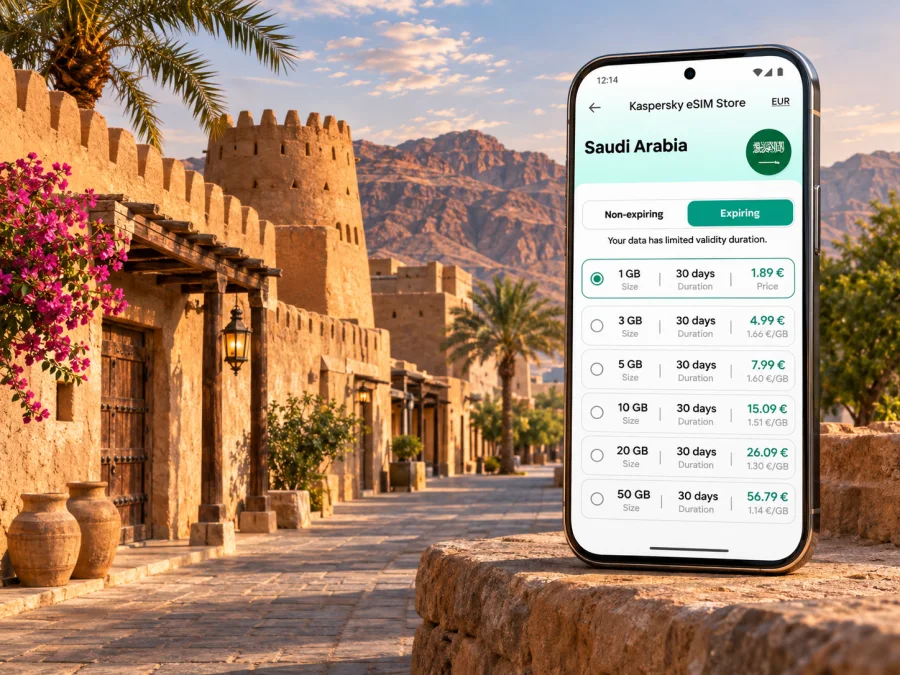
A city-specific search does not necessarily mean that a city-only tariff exists. Check whether the offer is for Saudi Arabia as a whole, a broader region or a multi-country itinerary. The tariff details, not the search phrase, define where it is intended to work. For a visit contained within Tabuk, start by reviewing the destination and conditions shown for eSIM options for Saudi Arabia; this is the country landing page, not a claim that a particular tariff covers every location or route.
Choose based on your dates, likely data use and itinerary. A few days of messaging, maps and email can need less data than regular video calls, hotspot use or uploading large files. Consider what you can do over hotel Wi-Fi and what you expect to do while moving around. If the journey continues to the Red Sea coast, mountain areas or another part of the country, verify that the tariff’s stated coverage includes each destination before paying. Do not infer remote-area service from a city listing or a national coverage statistic.
| Travel pattern | What to check before choosing |
|---|---|
| One or two days in central Tabuk | Validity period, data allowance, activation timing and whether light map and messaging use fits the allowance |
| Several days with frequent navigation | Total trip length, whether the validity starts on installation or first network connection, and how top-ups work if offered |
| Remote work from a hotel | Hotspot permission, data allowance for calls, and a backup such as hotel Wi-Fi |
| A road trip outside the city | The named countries or territory included, route-specific coverage information and the possibility of weak or unavailable signal between populated places |
| A stopover with uncertain plans | Whether the tariff can remain unused until arrival and exactly when its validity begins |
Check the tariff’s data volume, duration, price, network access conditions, supported destination and any fair-use or hotspot restrictions. These terms can differ between offers and may change, so use the current checkout details as the source for the tariff you select. If your phone supports dual SIM, you may be able to keep your regular line for calls while selecting the eSIM for mobile data; the available options depend on the device and its configuration.
Kaspersky eSIM Store is an app and website where you can choose, arrange and activate an eSIM with a suitable tariff for mobile internet on an international trip. It is not the mobile network operator. Network access depends on the underlying local operator, the tariff conditions, your device and the area you are visiting. Before purchasing, check your precise model variant, because eSIM capability can differ between regional versions of the same phone.
What coverage can you expect?
A national or regional coverage figure cannot predict the signal inside a particular hotel, airport building, underground space or stretch of road. Saudi Arabia’s Communications, Space and Technology Commission (CST) provides interactive coverage maps where users can check network coverage by selecting a location. That is a useful starting point for comparing a city address or planned route, but it is not a guarantee of service at every moment.
In Tabuk, plan for the possibility that your experience changes as you move between the city centre, the airport, indoor locations and open countryside. Buildings, terrain, congestion, handset bands and the network used by a particular tariff can all matter. A 5G-capable phone does not guarantee a 5G connection: both the network and the location must support it, and the device must be compatible with the local configuration. A 4G connection may be sufficient for maps, messaging and ordinary browsing.
For journeys beyond the city, use a conservative approach. Download maps and any essential reservations in advance, start with a charged phone, and tell a companion your route when appropriate. If coverage is important for work or safety, ask your accommodation or transport provider about connectivity along the specific route and retain a second way to access important information. Do not treat an online map or general coverage claim as a substitute for trip planning.
Check your phone before you buy
An eSIM requires a compatible device that is not restricted by a carrier lock. Support can vary by exact model and regional variant, even when two phones share the same product name. Confirm the manufacturer’s specifications for your precise model and check whether the phone can add an eSIM profile. If in doubt, check whether your device supports eSIM before choosing a tariff.
Before purchase, confirm the exact model code, that the device is carrier-unlocked and eSIM capable, and when tariff validity begins. Keep Wi-Fi available for setup and decide which SIM should handle data after arrival.
Do not delete an eSIM profile simply because it is temporarily offline. Some profiles cannot be reinstalled after removal. If setup fails, follow the provider’s troubleshooting steps and contact support before removing the profile or resetting network settings.
Install and activate your eSIM
If your device is compatible, installing before departure can leave you more time to troubleshoot while you still have access to Wi-Fi. Follow the instructions for your operating system: eSIM setup for Android or eSIM setup for iOS. Menu names vary by device and software version, so use the on-screen steps for your model.
A typical setup is to complete the order, open the supplied installation details, and add the eSIM through mobile-network settings using the provided QR code or manual details where supported. Keep the QR code private. Label the line clearly, then follow the tariff instructions about when to switch it on. On arrival, select it for mobile data and enable data roaming only if required by that eSIM. Test a web page or messaging app; if it does not connect, check the selected data line and local-network instructions.
The point at which a tariff starts varies. Installing a profile and beginning the validity period are not always the same event. Read the specific activation conditions before scanning or enabling the profile, especially if you arrive late at night or have a short stay.
City visit or a regional itinerary?
Tabuk city can be a base for exploring the wider northwest, whose landscapes include desert, mountains and Red Sea coastal areas. These are regional journeys, not neighbourhood trips. Distances, transport arrangements and network conditions can differ substantially from what you experience in town. Confirm road access, opening arrangements and travel requirements before setting out, and check your tariff against the full itinerary.
For a day trip, download maps and reservations, share your route when appropriate, and check likely network availability along the way. For a multi-stop itinerary, confirm that the tariff includes every destination and remains valid for the whole trip. When crossing sparsely populated areas, service may be intermittent even if it was available in the city. Plan stops before departure and never use a phone while driving.
Troubleshooting if the eSIM does not connect
Confirm that the eSIM is enabled and selected for data, airplane mode is off, and any required roaming setting is enabled. Check the order’s destination, activation date and network instructions, then wait in an open location for registration. Restart only if appropriate for the plan. If the issue continues, use Wi-Fi to contact support with your order details. Avoid deleting the profile or resetting the phone unless instructed.
Frequently asked questions
Will one eSIM work throughout Saudi Arabia?
Only the tariff’s stated destination and terms can answer that. Even a country-level tariff does not guarantee reception in every location. Review the listed coverage and check the route, particularly for remote destinations.
Can I use my usual number as well?
Possibly, if your phone supports dual SIM and your home operator allows the line to remain active. Choose which line handles data and check roaming charges on your regular plan. A data eSIM does not automatically include a local phone number, ordinary calls or SMS.
Should I install the eSIM before flying?
You can install it before departure if the instructions and your device allow it. Check when the tariff validity begins; installation may not be the same as activation. Keep Wi-Fi available for setup and follow the plan’s instructions for switching the line on.
What if my phone has no eSIM support?
Use another compatible, unlocked device or ask your home operator about roaming options. Do not assume that a phone model supports eSIM based on its name alone: regional variants can differ.
Prepare before you set out
For Tabuk, a useful connectivity plan is simple: confirm the exact destination, save the airport and accommodation details, check bus or pickup information, and review the tariff’s conditions against your full itinerary. Verify that your particular phone variant is unlocked and supports eSIM, then install and activate the profile according to its instructions. Keep maps and key travel details available offline for the moments when a signal is weak or unavailable.
When you are ready, use Kaspersky eSIM Store on the app or website to choose, arrange and activate a suitable eSIM tariff for your trip. Review eSIM options for Saudi Arabia and compare the current destination, data allowance, validity and activation terms before you travel.


