Travel connectivity guide
Tagbilaran eSIM: Mobile Data for Bohol Travel
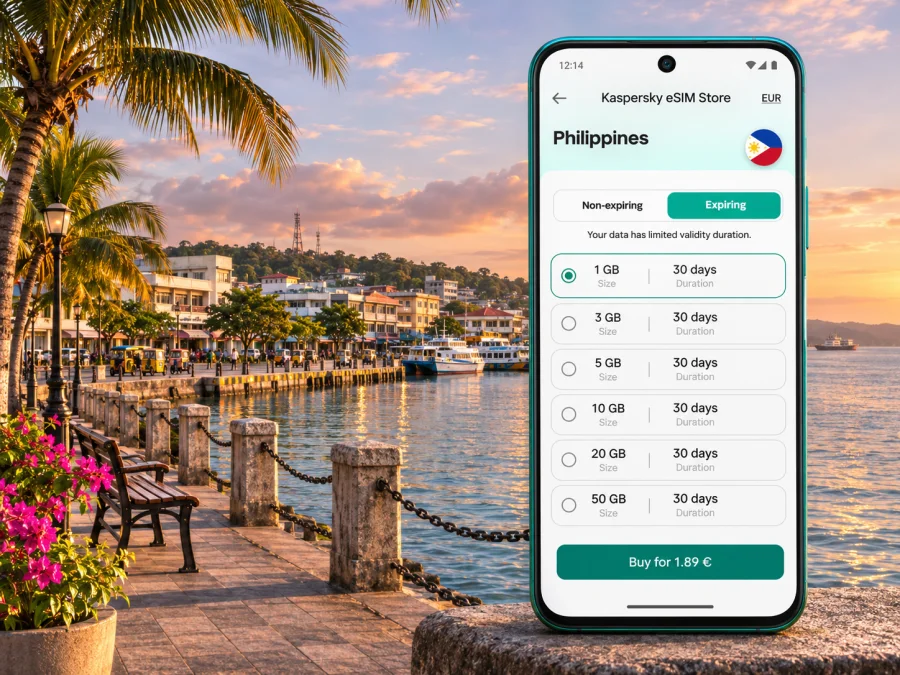
Tagbilaran eSIM: Mobile Connection and Internet for Your Bohol Trip
Tagbilaran is a useful base for arriving in Bohol, arranging onward travel and handling everyday tasks in the provincial capital. A travel eSIM can keep mobile data available for maps, ride bookings, messages and reservations without swapping out your home SIM. Before you travel, check that your phone supports eSIM, that the selected plan covers the Philippines, and that its terms fit the full route you have in mind.
There is one important airport detail to plan around: Bohol–Panglao International Airport is on Panglao Island, not in Tagbilaran. It replaced the former Tagbilaran Airport in 2018. The airport authority’s project information describes Tagbilaran as roughly a 30-minute drive away, though actual transfer time depends on traffic, pickup arrangements and road conditions. Tagbilaran also has a seaport, so your arrival route may be by ferry rather than air.
This distinction matters when you open a map, arrange a pickup or tell someone where to meet you. Use the exact destination name in your booking and share your live location only after your data connection is working. An eSIM can help with those digital tasks, but service depends on the plan, the local network it uses, the handset and conditions at your location.
When mobile data helps in Tagbilaran
The first few hours after arrival are often when a reliable way to get online is most useful. You may need to confirm a hotel address, message a driver, check a ferry connection, find a cash machine or let family know you have arrived. Downloading a city map before leaving home is still sensible; mobile data then helps you search nearby places and adjust the route as plans change.
In the city centre, navigation can help connect places that may appear close together on a map but require a ride in the heat or rain. The provincial tourism office identifies St. Joseph the Worker Cathedral near the city plaza, the National Museum Bohol in the former Provincial Capitol building, and the Blood Compact Shrine in Bool among Tagbilaran’s visitor stops. You can use a map to check opening information, plan an order for visits and find your way back to your accommodation. Confirm hours directly before setting out, especially on holidays.
Mobile data can also help with practical details that are easy to overlook:
- checking a hotel’s message or revised check-in instructions;
- booking or coordinating a car for a city journey;
- translating a short message or reading a digital ticket;
- sending a pin when a pickup point is difficult to describe;
- checking weather updates before a coastal walk or longer road trip;
- keeping boarding details and reservation confirmations accessible.
The Bohol tourism office lists app-based car services in Tagbilaran and nearby areas, alongside other ways of getting around the island. Availability, wait times and pickup locations can vary. Keep your accommodation address written down or saved offline in case an app cannot locate you or you temporarily lose signal. For a street-side ride, confirm the vehicle and destination before starting the trip.
Choosing a plan for a city stay and island route
A plan should match where you are going, how long you will be away and what you expect to do online. A short Tagbilaran visit may involve mostly messaging, maps and booking details. A longer Bohol itinerary can add frequent map searches, photo uploads, video calls and streaming. Those activities use very different amounts of data, so estimate from your own habits rather than assuming every traveler needs the same allowance.
Check the plan’s coverage description for the Philippines and read any regional limits. A country-level plan is not a promise of equally strong reception in every neighborhood, inside every building or along every road. If your itinerary includes Panglao, Loboc, the Chocolate Hills area or another island destination, verify the plan’s stated coverage for the whole journey and remember that terrain, distance from populated areas and indoor conditions can affect reception.
| Your travel pattern | What to consider |
|---|---|
| A few days in Tagbilaran | Estimate map, messaging, ride-booking and reservation use; avoid paying for capacity you do not expect to need. |
| Tagbilaran plus day trips | Include navigation and messaging outside the city; save key maps and addresses before leaving. |
| Several stops around Bohol | Check country coverage and the validity period against all travel dates, not only the first city. |
| Work calls or frequent uploads | Look closely at data limits and fair-use conditions; have Wi-Fi as a backup for large files. |
| Keeping a home SIM active | Confirm how the phone handles two lines and disable data roaming on the home line if you want to avoid roaming charges. |
A useful estimate starts with your routine. Messaging and occasional map checks are usually lighter tasks than video meetings, high-resolution uploads or streaming. Hotel and café Wi-Fi may reduce mobile usage, but do not rely on every connection being available or suitable for sensitive work. If the eSIM is data-only, it does not replace a local number for ordinary calls or SMS unless the specific offer expressly says otherwise. Internet calling and messaging apps can work over data when the other person can be reached through the same service.
For a route that continues outside the city, make a quick stop-by-stop list before you choose: Tagbilaran, any overnight location, and the final departure point. This keeps a short city visit from being mistaken for an island-wide itinerary and gives you a practical way to compare validity dates and expected data use. Save the list with your travel documents so you can check the same route again if plans change.
Before selecting anything, compare the plan’s destination, data amount, validity, activation rules and any recharge options shown at checkout. Note whether validity begins on purchase, installation or first connection; the wording can differ by offer. If a detail is not clear, check the current offer terms before you proceed. The Philippines eSIM options page is a starting point for reviewing the currently displayed choices; it is not a guarantee of coverage at a particular street address in Tagbilaran.
Arrival: Panglao airport or Tagbilaran port
If you land at Bohol–Panglao International Airport, plan a transfer to Tagbilaran as a separate leg. Airport signage, pickup rules and traffic can change, so follow current instructions at the terminal and confirm the exact pickup point with your driver or accommodation. Keep the hotel name and address available offline. If your eSIM is already installed, wait until the phone has found a supported local network before relying on a map or booking app.
If you arrive by sea, the Port of Tagbilaran is a different arrival point from the airport. The Philippine Ports Authority lists Tagbilaran under its Port Management Office of Bohol. Ferry schedules and terminal procedures are set by the carriers and may change; check your ticket and the operator’s latest notice rather than depending on an old timetable in a travel post. After disembarking, a data connection can help you coordinate the next ride, but have a written backup for your accommodation and destination.
Do not assume that the signal you see on a phone in the terminal will be identical on the road or at your lodging. Buildings, congestion, weather, network selection and the eSIM’s underlying local service can all affect the experience. If data does not start immediately, first check that the travel eSIM is enabled for mobile data, that the correct line is selected and that any required settings in the plan instructions are applied. Avoid deleting the eSIM profile while troubleshooting unless support specifically instructs you to do so; a reinstallation may not be possible with a one-time activation code.
Getting around the city and planning a day out
Tagbilaran works both as a city destination and as a staging point for other parts of Bohol. In town, a map and messaging connection can make short trips easier to coordinate, especially when a meeting point is busy or a place has several possible entrances. For an official ride-booking option, Bohol’s tourism information currently lists GrabCar for Tagbilaran and nearby areas. Check the app’s live availability and fare before confirming; a listed service does not mean every vehicle is available at every hour.
For walks around the centre, save the names of places you want to visit before heading out. The cathedral and city plaza area, National Museum Bohol and the coastal Blood Compact Shrine offer different stops, so live directions can help you decide whether to walk, take a local ride or leave one for another day. The shrine is in Bool; make sure the map is routing you to the correct place rather than a similarly named point elsewhere.
If Tagbilaran is your base for a Bohol excursion, plan the return as carefully as the outbound leg. Longer drives can pass through areas where mobile reception changes, and a route may take longer than a simple distance estimate suggests. Download offline maps, carry your accommodation details and agree on a pickup time or meeting point before leaving. Treat online maps as a navigation aid, not as a substitute for local instructions or current road advice.
For a ferry connection, keep the ticket, sailing time and terminal details saved on the phone and, if possible, as a screenshot. Port schedules can change with weather, operational needs or carrier decisions. Check the latest information before leaving your accommodation, and leave enough time to reach the terminal. If the phone battery is low, prioritize the ticket and the route home rather than continuous location sharing or background video.
Install and prepare your eSIM
If the phone and plan support eSIM, installing before departure gives you time to resolve setup questions while you still have dependable Wi-Fi. Some plans allow installation before travel but connect only after arrival; follow the activation instructions for the offer you selected. Keep your home line available for calls if desired, while carefully choosing which line will use mobile data.
A general preparation sequence is:
- Check the device’s eSIM support and confirm that it is not locked in a way that prevents use with another provider. Regional variants can differ even when model names look similar. Check whether your device supports eSIM before choosing a plan.
- Review the destination, coverage notes, data allowance, validity and activation conditions shown for the offer.
- Connect to stable Wi-Fi and install the eSIM using the current instructions. Keep the QR code or activation details available on another screen if your phone cannot scan its own display.
- Label the travel line clearly so you can distinguish it from your home SIM. Do not remove the profile after installation unless the instructions or support team tell you to.
- On arrival, select the travel eSIM for mobile data. Enable data roaming for that eSIM only if the plan’s instructions require it, and check that the home SIM is not using roaming data unintentionally.
- Open a simple webpage or messaging app to confirm data works before relying on it for navigation. If it fails, check the plan instructions, line selection and local network availability.
For device-specific steps, use the Android eSIM installation instructions or the iPhone eSIM installation instructions. Menu labels vary by phone brand, operating-system version and regional variant, so follow the screens on your own device rather than assuming every handset uses the same path.
Kaspersky eSIM Store is an app and website where travelers can choose, arrange and activate an eSIM with a suitable plan for mobile data abroad. The service does not make every phone compatible or guarantee reception at every destination. Your device, the selected plan and the local network determine whether and how a connection is available.
Practical scenarios
A late arrival and a hotel transfer
Before boarding, save your hotel’s name, street address and check-in message. Once you land at Panglao airport, follow terminal pickup instructions and message the driver if the meeting point needs clarification. If mobile data is not ready, use the airport’s available information and contact your accommodation through a backup method. Avoid leaving the terminal based only on an unconfirmed map pin.
A meeting in the city centre
Save the address, contact name and meeting time offline. Use live directions to check the route shortly before departure, then send an update if traffic or a pickup delay affects your arrival. For calls, keep your regular number available if it is important to colleagues; use the travel eSIM for data only if that is what the selected offer includes.
A day trip from Tagbilaran
Check the route and return plan before leaving. Download a map area, keep enough battery for directions and messages, and confirm transport arrangements with the provider. If you expect to upload many photos or make video calls, estimate that separately when choosing a data amount. Mobile reception may vary beyond the city and cannot be inferred from how the connection behaved downtown.
A short stop before a ferry
Save the boarding pass or ticket to the phone and note the terminal and departure time. Use data for last-minute updates, but check the carrier’s current instructions directly. If the eSIM is not connecting, a screenshot of the ticket and a written destination address can still help you complete the immediate task.
What to check before departure
Use this checklist the day before your trip:
- Device: eSIM is supported by the exact phone variant, and the device is not restricted by a carrier lock.
- Destination: the plan explicitly lists the Philippines and fits any other countries on your route.
- Timing: the plan’s activation trigger and validity cover your travel dates.
- Data use: the allowance is realistic for your maps, calls, uploads and streaming habits.
- Settings: you know which line will use data and whether the travel eSIM requires data roaming.
- Offline backup: hotel address, tickets, maps and essential instructions are saved locally.
- Power: you have a charging cable or power bank for arrival and navigation.
- Route: you know whether you are arriving at Bohol–Panglao International Airport or the Port of Tagbilaran.
Frequently asked questions
Is Tagbilaran Airport still the airport for Bohol?
No. Bohol–Panglao International Airport opened in November 2018 and replaced Tagbilaran Airport. It is on Panglao Island; Tagbilaran is reached by road from there. Confirm the airport named on your current ticket before travelling.
Can I use one eSIM across Tagbilaran and the rest of Bohol?
That depends on the plan’s country coverage and the local network conditions along your route. Check that the Philippines is included, then treat reception outside populated areas and inside buildings as variable. No city guide can promise a signal at each stop.
Will an eSIM provide a Filipino phone number?
Do not assume so. Many travel eSIM offers are data-only. Read the selected offer’s terms for calls and SMS. If no regular number is included, internet-based calling and messaging apps may work over mobile data, subject to the app and your contacts having access.
Should I install the eSIM before I arrive?
Usually it is practical to install while you have stable Wi-Fi, provided the plan’s instructions allow early installation. Installation and activation are not always the same event. Follow the offer’s timing details, and avoid deleting an installed profile during troubleshooting.
What should I do if mobile data does not connect?
Check that the travel line is switched on and selected for mobile data, review the plan’s APN or roaming instructions, and restart the connection if advised. Allow the phone time to register on an available local network. If the issue persists, contact the service’s support team using Wi-Fi and keep your activation details at hand.
Can I rely on the same connection at the airport, port and hotel?
Not necessarily. They are separate places, and network availability can vary by provider, indoor conditions, congestion and distance. Prepare offline maps and booking details, and confirm that the selected plan covers your intended destination.
Get ready for Tagbilaran
A little preparation makes arrival in Tagbilaran easier: identify whether your trip begins at the Panglao airport or the city port, save your hotel and ticket information offline, and check the route beyond the city if you plan to explore Bohol. Then compare the plan’s country coverage, validity and data allowance with your real itinerary, and confirm your phone’s eSIM support before installation.
Use Kaspersky eSIM Store’s app or website to review the current Philippines options for your trip, choose a suitable eSIM plan and follow the instructions for your device. Install it when you have a stable connection, keep your home line settings in mind and test mobile data before you depend on it for a ride or ferry transfer.


